
T-Rex Runner Game DS: Difference between revisions
From GameBrew
More actions
m Text replacement - "Category:Action Games on DS" to "" |
m Text replacement - "|download=https://dlhb.gamebrew.org/dshomebrew/" to "|download=https://dlhb.gamebrew.org/dshomebrew2/" |
||
| (2 intermediate revisions by the same user not shown) | |||
| Line 8: | Line 8: | ||
|version=2020 | |version=2020 | ||
|license=Mixed | |license=Mixed | ||
|download=https://dlhb.gamebrew.org/ | |download=https://dlhb.gamebrew.org/dshomebrew2/trexrunnergameds.7z | ||
|website=https://fewnity.itch.io/t-rex-game-ds | |website=https://fewnity.itch.io/t-rex-game-ds | ||
|source=https://github.com/Fewnity/T-Rex-Runner-Game-Nintendo-DS | |source=https://github.com/Fewnity/T-Rex-Runner-Game-Nintendo-DS | ||
| Line 34: | Line 34: | ||
https://dlhb.gamebrew.org/dshomebrew/trexrunnergameds2.png | https://dlhb.gamebrew.org/dshomebrew/trexrunnergameds2.png | ||
https://dlhb.gamebrew.org/dshomebrew/trexrunnergameds3.png | https://dlhb.gamebrew.org/dshomebrew/trexrunnergameds3.png | ||
==Media== | |||
'''T-Rex Runner Game on Nintendo DS''' ([https://www.youtube.com/watch?v=KXw6DIv5Y4c Fewnity]) <br> | |||
<youtube width="515">KXw6DIv5Y4c</youtube> | |||
<!--BEGIN Online Emulator Section--> | <!--BEGIN Online Emulator Section--> | ||
==Online | ==Online emulator== | ||
{{ | {{EmulatorJS Main | ||
|width=515px | |||
|height=384px | |||
|EJS_backgroundImage=https://www.gamebrew.org/images/2/21/Trexrunnergameds.png | |||
EJS_core = | |EJS_core=desmume2015 | ||
EJS_gameName = | |EJS_gameName=T-Rex game DS | ||
EJS_gameUrl = | |EJS_gameUrl=https://dlhb.gamebrew.org/onlineemulators/nds/trexrunnergameds.7z | ||
}} | }} | ||
{{DS Control Settings}} | {{DS Control Settings}} | ||
<!--END Online Emulator Section--> | <!--END Online Emulator Section--> | ||
==Compatibility== | ==Compatibility== | ||
Can run on emulator such as melonDS. | Can run on emulator such as melonDS. | ||
Latest revision as of 11:11, 16 August 2024
| T-Rex game DS | |
|---|---|
| Error creating thumbnail: Unable to save thumbnail to destination | |
| General | |
| Author | Fewnity |
| Type | Action |
| Version | 2020 |
| License | Mixed |
| Last Updated | 2020/08/29 |
| Links | |
| Download | |
| Website | |
| Source | |

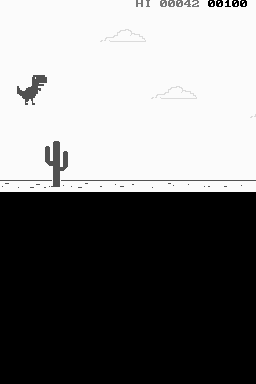
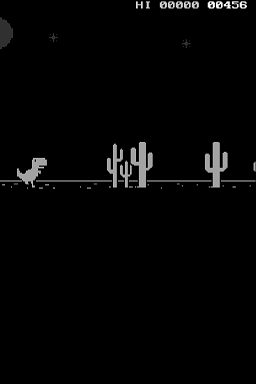
T-Rex game DS is a remake of the T-Rex Runner game from Google Chrome for the Nintendo DS. It is a runner game that can be accessed when Chrome browser is offline, also known as Dinosaur Game or Chrome Dino.
Features
- High score stored in flashcard.
- Day night cycle.
- Official sprites and sounds.
- 60 FPS in game frame rate.
- Up and down arrows to play.
User guide
Play as the Lonely T-Rex running across a desert landscape.
Avoid oncoming obstacles including cacti and pterodactyls by jumping or ducking.
Controls
Up - Jump
Down - Duck
Screenshots
Media
T-Rex Runner Game on Nintendo DS (Fewnity)
Online emulator
| Nintendo DS | Keyboard |
|---|---|

|

|

|

|

|

|

|

|

|

|

|

|

|

|

|

|

|

|
Compatibility
Can run on emulator such as melonDS.
For a real Nintendo DS, you will need a R4 linker, may not work on other linker like M3DS REAL.