
NTR Viewer HR 3DS: Difference between revisions
More actions
No edit summary |
0.3.7.0 |
||
| (22 intermediate revisions by 2 users not shown) | |||
| Line 3: | Line 3: | ||
|image=ntrviewerhr3ds.png | |image=ntrviewerhr3ds.png | ||
|description=A bare bone NTR viewer. | |description=A bare bone NTR viewer. | ||
|author= | |author=xzn | ||
|lastupdated= | |lastupdated=2026/01/30 | ||
|type=3DS Streaming | |type=3DS Streaming | ||
|version=0. | |version=0.3.7.0 | ||
|license=Mixed | |license=Mixed | ||
|download=https://github.com/xzn/ntrviewer-hr/releases | |download=https://github.com/xzn/ntrviewer-hr/releases | ||
| Line 12: | Line 12: | ||
|source=https://github.com/xzn/ntrviewer-hr/ | |source=https://github.com/xzn/ntrviewer-hr/ | ||
}} | }} | ||
<!--ntrviewerhr3ds.7z--> | |||
An NTR streaming client developed by zbash92 for use with [[NTR-HR 3DS|NTR-HR]]. | An NTR streaming client developed by zbash92 for use with [[NTR-HR 3DS|NTR-HR]]. | ||
== User guide == | == User guide == | ||
Start NTR-HR on the 3DS, choose the | ===How to use=== | ||
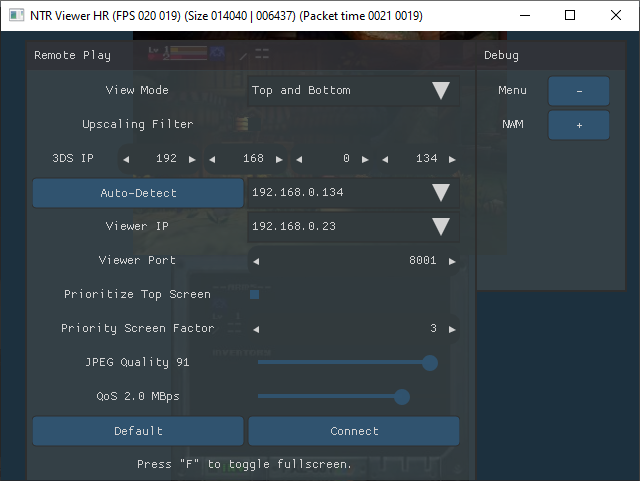
Start NTR-HR on the 3DS, choose the option 3.6HR. | |||
On the PC, run NTR Viewer HR, enter the 3DS IP address. You can find the IP address from FBI > Remote install > Receive URLs... | On the PC, run NTR Viewer HR, enter the 3DS IP address. You can find the IP address from FBI > Remote install > Receive URLs... | ||
| Line 23: | Line 23: | ||
Change quality, priority factor, etc and click Connect. | Change quality, priority factor, etc and click Connect. | ||
=== Tips === | ===Interface usage=== | ||
Right-click anywhere in the top screen window to hide/unhide settings window. | |||
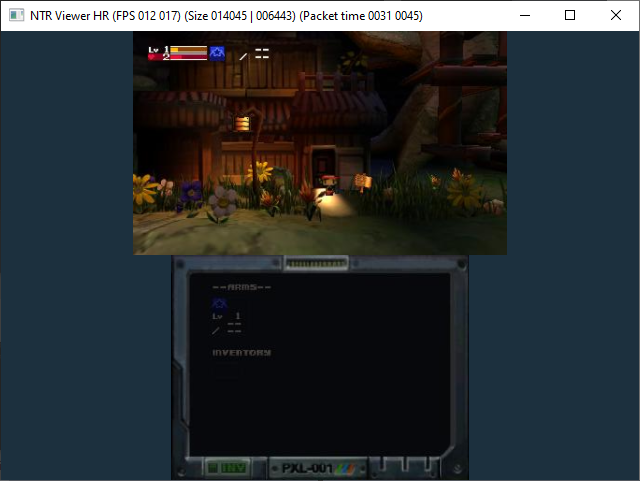
Left-click/drag on bottom screen display for input redirection of bottom touch screen. | |||
Keyboard (tab) navigation is supported for Remote Play settings window. Esc to hide/unhide window. | |||
===Settings=== | |||
* <code>View Mode</code> - Choose the screens to display, and whether to display them in separate windows. | |||
* <code>Upscaling Filter</code> - Not available on lite version. Apply post-processing pixel filter. | |||
* <code>3DS IP</code> - IP address of the 3DS console you intend to stream from. Can try Auto-Detect or select from drop down menu. | |||
* <code>Viewer IP</code> - IP address of the network interface the viewer should listen from. Auto-Select should work most of the time. | |||
* <code>Viewer Port</code> - For use with multiple 3DS devices streaming at once to the same PC. Each should have a different port. Otherwise leave at default. | |||
* <code>Prioritize Top Screen</code> - See Priority Screen Factor | |||
* <code>Priority Screen Factor</code> - Prioritized screen will have frame rate multiple of the other screen at specified factor. If factor is 0, only the prioritized screen is streamed. | |||
* <code>JPEG Quality</code> - Picture quality for the stream. Should be 95 or lower for decent frame rate. Below 55 the picture quality notably suffers. | |||
* <code>Bandwidth Limit</code> - Caps streaming bandwidth to specified number. Lower value can help with congestion and lag but will result in lower frame rate. | |||
* <code>Reliable Stream</code> - Only effective with latest NTR-HR. | |||
** "Off" for the original protocol, minimum latency. | |||
** "On" for the alternative protocol that attempts to reduce dropped frames. | |||
** "On + Delta" for alternative encoding that in most cases improves picture quality for the same bandwidth. | |||
* <code>Default</code> - Reset viewer settings. | |||
* <code>Connect</code> - Attempts to start remote play and/or apply any changed settings. | |||
* <code>Input Redirection</code> - Choose a connected gamepad for input redirection. | |||
** Enable it in Luma3DS/Rosalina's menu, See https://wiki.hacks.guide/wiki/3DS:Input_redirection | |||
* <code>Swap A/B X/Y</code> - Enabled by default. Buttons glyphs will be mismatched but positions will be correct. | |||
* <code>Bottom Screen Cursor</code> - Size of mouse cursor for bottom screen input redirection. | |||
* <code>Press F to toggle fullscreen</code> - Toggle viewer's fullscreen display. Works with multiple monitors as well. | |||
===Reliable Stream=== | |||
* The title bar text changes depending on the current streaming method. | |||
* Compatibility Mode will be displayed if Reliable Stream is not enabled or not supported. | |||
* Reliable Stream will be displayed if Reliable Stream is On. | |||
* Reliable Stream + Delta will be displayed if On + Delta is enabled and supported. | |||
===macOS quarantine bypass=== | |||
Run <code>xattr -r -d com.apple.quarantine NTRViewer-HR-macOS-Universal.zip</code> on the file downloaded. | |||
=== Asahi Linux port publish === | |||
This applies to other arm64 based Linux distro as well. When using muvm/fex to run the application, you will need to publish the viewer's port, e.g.: <code>muvm -p 8001/udp FEXInterpreter $(realpath ./ntrviewer)</code> | |||
===Additional filters options=== | |||
* Selected shaders were downloaded from https://github.com/libretro/slang-shaders, where you can find more. | |||
* Manually edit the <code>rashader.json</code> file to make options appear within the application. Similarly for placebo shaders with <code>placebo.json</code>. | |||
===Tips=== | |||
Set your WiFi device used for hot spot to be 2.4 GHz only to maximize 3DS WiFi connection speed. There should be similar options in routers where you can disable 5 GHz radio or similar. | Set your WiFi device used for hot spot to be 2.4 GHz only to maximize 3DS WiFi connection speed. There should be similar options in routers where you can disable 5 GHz radio or similar. | ||
If you don't want to change your router setting, it's recommended to get a WiFi dongle that support AP mode and set it to 2.4 GHz only in device manager, then connect your 3DS to the hot spot from that WiFi dongle. | If you don't want to change your router setting, it's recommended to get a WiFi dongle that support AP mode and set it to 2.4 GHz only in device manager, then connect your 3DS to the hot spot from that WiFi dongle. | ||
How to fix Pokemon games hanging when loading a save when Remote Play is enabled: | |||
* Enabling Input Redirection or Debugger in Luma3DS/Rosalina on your 3DS is the recommended method. | |||
* Alternatively use NFC patch in NTR-HR menu if you are using that. The caveat is that this will disable Reliable Stream. | |||
=== Notes=== | |||
Audio capture is not supported. A workaround is use a 3.5 mm audio aux cable to connect from your 3DS's audio jack to your PC's line-in for capture. | |||
DS games, DSiWare, and GBA games streaming are not supported, as 3DS' CPU run in a compatibility mode that loses all the normal 3DS computing power. | |||
== Screenshots == | == Screenshots == | ||
| Line 33: | Line 87: | ||
https://dlhb.gamebrew.org/3dshomebrews/ntrviewerhr3ds3.png | https://dlhb.gamebrew.org/3dshomebrews/ntrviewerhr3ds3.png | ||
== | ==Compatibility== | ||
Only New 3DS/New 2DS is supported. | |||
== Changelog == | |||
'''v0.3.7.0 2026/01/30''' | |||
Added optional lossless mode (need latest NTR-HR). | |||
Re-organized UI. | |||
'''v0.3.6.0 2026/01/15''' | |||
* Fix bottom screen cursor having wrong location when top and bottom windows are on different displays with differing display scales. | |||
* Add ambient background blur. | |||
* Add arm64 (aarch64) version for Linux. | |||
* Remote play parameters are now updated without having to click Connect. | |||
* Controllers input are now read while in background. | |||
* Other misc fixes. | |||
'''v0.3.5.7 2025/09/12''' | |||
* Fix bottom screen cursors in SDL hardware renderer. | |||
* Fix quarter downsample for Windows and Lite versions. | |||
'''v0.3.5.6 2025/09/03''' | |||
* Updated to support downsample methods in NTR-HR [https://github.com/xzn/ntr-hr/releases/tag/v0.3.5.4 v0.3.5.4]. | |||
'''v0.3.5.5 2025/08/18''' | |||
* Fix Vulkan backend descriptor set count. (For radv on Linux and maybe others.) | |||
* Lite versions unchanged still. Previous lite version [https://github.com/xzn/ntrviewer-hr/releases/tag/v0.3.5.2 here]. | |||
'''v0.3.5.4 2025/08/14''' | |||
*Color on Asahi Linux on Vulkan backend. | |||
*Try not to tear on fullscreen on macOS. | |||
*Lite versions again unchanged, feel free to use [https://github.com/xzn/ntrviewer-hr/releases/tag/v0.3.5.2 previous] version. | |||
'''v0.3.5.3 2025/08/14''' | |||
*Fix macOS placebo shaders colors components | |||
*Fix Super-XBR filter option not available. | |||
*Lite versions again unchanged, feel free to use [https://github.com/xzn/ntrviewer-hr/releases/tag/v0.3.5.2 previous] version. | |||
'''v0.3.5.2 2025/08/13''' | |||
*Adjusted bottom screen cursor size for HiDPI display on Windows. | |||
*GitHub workflow build, otherwise the same thing. | |||
*Note: | |||
**For macOS version, the release is unsigned. After downloading the file, remove quarantine by running | |||
**<code>xattr -r -d com.apple.quarantine NTRViewer-HR-macOS-Universal.zip</code> | |||
**or | |||
**<code>xattr -r -d com.apple.quarantine NTRViewer-HR-macOS-Universal</code> | |||
**If you already extracted the files. | |||
'''v0.3.5.1 2025/07/01''' | |||
*Adjusted IP Auto-Detect and IP selection behavior. | |||
*Fix static compilation issue (Windows and Linux). | |||
'''v0.3.5.0 2025/06/24''' | |||
* Changes: | |||
** Fix regression on Windows HiDPI screen bottom screen cursor misaligned. | |||
** Some misc changes. | |||
* Update: | |||
** Linux version has been re-uploaded with following changes: | |||
** Fix readlink usage. | |||
** Fix static library compilation issue. | |||
* Update 2: | |||
** Re-uploaded Windows version with similar fix. | |||
'''v0.3.4.1 2025/04/09''' | |||
* Added Vulkan debug runtime command line option. | |||
* Adjusted macOS MoltenVK loading. | |||
'''v0.3.4.0 2025/04/07''' | |||
* Fixed OpenGL librashader initialization for separate windows view mode. | |||
* Updated SDL dependency to SDL3. | |||
* Added optional Vulkan shader renderer. | |||
* New macOS version. | |||
* Update: | |||
** Re-uploaded macOS version. Packaged shaders weren't being loaded. | |||
** Re-uploaded Windows versions as well. (wrong malloc usage ..) | |||
** Re-uploaded Linux versions to match. | |||
* Update 2: | |||
** macOS version, local network access permission request adjustment. | |||
'''v0.3.3.0 025/03/30''' | |||
* Fix decoding images would fail under certain options combinations. | |||
* Lower glibc version requirement to 2.36 (Linux). | |||
* Fix OpenGL init under certain circumstances. | |||
* Fix params settings for librashader. | |||
'''v0.3.2.1 2025/03/25''' | |||
* Use presentation manager to schedule present time for very slightly smoother frame time. (Windows only; regular version only) | |||
* Lite version and Linux builds are unchanged (v0.3.2.0) | |||
'''v0.3.2.0 2025/03/23''' | |||
* Support for Luma3DS/Rosalina's input redirection. Support game controllers via SDL2. Mouse for bottom screen. | |||
'''v0.3.1.0 2025/03/12''' | |||
* Removed Magpie and Real-CUGAN support. | |||
* Added librashader support. | |||
* Updated Nuklear dependency. | |||
* Fix high CPU usage with D3D11 backend on some systems. | |||
* Fix D3D11 backend displaying incorrectly initially when launched on HiDPI monitors. | |||
'''v0.3.0.0 2025/03/09''' | |||
* Added Magpie shaders support (Windows only) and libplacebo (a.k.a. mpv) shaders support (Linux and OpenGL on Windows). | |||
* Improved keyboard navigation of the UI. | |||
* Fixed regression where high idle CPU usage. | |||
* Fixed regression where reconnecting may cause the video feed to hang for a while. | |||
* New delta encoding method. Requires reliable stream. Works with latest NTR-HR. | |||
* Fixed program crashing on start when running on old CPUs without avx2 support. (Need confirmation). | |||
'''v0.2.2.1 2024/09/16''' | |||
* Use triple buffering for screen decode/upscale/render, should no longer skip rendering frames when combined top and bottom frame rate exceeds display refresh rate. | |||
* Added Lite versions, which are smaller in size and do not have the upscaling filter option. (Use SDL renderer for display instead of OpenGL directly.) | |||
'''v0.2.2.0 2024/09/15''' | |||
* Fix hang during shut down if view mode is Separate on Windows (Regression). | |||
* Fix crash if Vulkan/OpenGL interop is not available (Regression). | |||
* Fix laggy/slowed down decode if GPU cannot render/upscale fast enough (Regression). | |||
* Fix (another) sync bug leading to corrupt image when upscaling filter is enabled. | |||
* Update Nuklear dependency: better property field handling. | |||
* Hopefully this release fixed all the remaining synchronization issue with my usage of multithreaded OpenGL/Vulkan rendering. | |||
'''v0.2.1.0 2024/09/12''' | |||
*Added keyboard navigation (tab navigation). | |||
'''v0.2.0.4 2024/09/11''' | |||
* Changed nack packets to be rate limited in reliable stream mode. | |||
* Fixed wrong index used in sync when using upscaling filters, which may have led to flickering images. | |||
'''v0.2.0.3 2024/09/09''' | |||
*Minor optimization for Upscaling Filter (later GPU->CPU fences); also actually used Vulkan Configurator's validation this time. | |||
'''v0.2.0.2 2024/09/08''' | |||
* Fixed a memory leak introduced in v0.2.0.0 | |||
* Use cached uploaded/upscaled texture when possible to reduce GPU usage (applicable when screen mode is Top and Bottom and there's a difference in frame rate for top and bottom screen.) | |||
* Upscaling filter changed to run on GPU only and only with around 1.3 GB or more vram. (Will adjust this later maybe) | |||
'''v0.2.0.1 2024/09/06''' | |||
*Make upscaling filter work on AMD GPUs. | |||
'''v0.2.0.0 2024/09/06''' | |||
* Some bug fixes. | |||
* Support for Reliable Stream mode for the latest NTR-HR (v0.3.0.0). | |||
* Currently lacking congestion control, will be added in next version. | |||
'''v0.1.4.2 2024/02/21''' | |||
* Fix Linux build not working on MESA. | |||
* Updated Window build as well in case it's not working on AMD/Intel. | |||
'''v0.1.4.1 2024/02/21''' | |||
* Added Linux build. | |||
* Upscaling changes: | |||
** Now share Vulkan handle with OpenGL when possible to avoid copying to/from CPU. | |||
** Moved upscaling code to per frame render instead of per frame decode. Should hopefully avoid accumulating lag. | |||
'''v0.1.4 2024/02/17''' | '''v0.1.4 2024/02/17''' | ||
* Use FSR on top of Real-CUGAN when Upscaling Filter is enabled. (Note: may lag badly when frame rate is high, unless you have a 3090 or something) | * Use FSR on top of Real-CUGAN when Upscaling Filter is enabled. (Note: may lag badly when frame rate is high, unless you have a 3090 or something) | ||
Latest revision as of 02:26, 21 March 2026
| NTR viewer HR | |
|---|---|
 | |
| General | |
| Author | xzn |
| Type | 3DS Streaming |
| Version | 0.3.7.0 |
| License | Mixed |
| Last Updated | 2026/01/30 |
| Links | |
| Download | |
| Website | |
| Source | |
An NTR streaming client developed by zbash92 for use with NTR-HR.
User guide
How to use
Start NTR-HR on the 3DS, choose the option 3.6HR.
On the PC, run NTR Viewer HR, enter the 3DS IP address. You can find the IP address from FBI > Remote install > Receive URLs...
Change quality, priority factor, etc and click Connect.
Interface usage
Right-click anywhere in the top screen window to hide/unhide settings window.
Left-click/drag on bottom screen display for input redirection of bottom touch screen.
Keyboard (tab) navigation is supported for Remote Play settings window. Esc to hide/unhide window.
Settings
View Mode- Choose the screens to display, and whether to display them in separate windows.Upscaling Filter- Not available on lite version. Apply post-processing pixel filter.3DS IP- IP address of the 3DS console you intend to stream from. Can try Auto-Detect or select from drop down menu.Viewer IP- IP address of the network interface the viewer should listen from. Auto-Select should work most of the time.Viewer Port- For use with multiple 3DS devices streaming at once to the same PC. Each should have a different port. Otherwise leave at default.Prioritize Top Screen- See Priority Screen FactorPriority Screen Factor- Prioritized screen will have frame rate multiple of the other screen at specified factor. If factor is 0, only the prioritized screen is streamed.JPEG Quality- Picture quality for the stream. Should be 95 or lower for decent frame rate. Below 55 the picture quality notably suffers.Bandwidth Limit- Caps streaming bandwidth to specified number. Lower value can help with congestion and lag but will result in lower frame rate.Reliable Stream- Only effective with latest NTR-HR.- "Off" for the original protocol, minimum latency.
- "On" for the alternative protocol that attempts to reduce dropped frames.
- "On + Delta" for alternative encoding that in most cases improves picture quality for the same bandwidth.
Default- Reset viewer settings.Connect- Attempts to start remote play and/or apply any changed settings.Input Redirection- Choose a connected gamepad for input redirection.- Enable it in Luma3DS/Rosalina's menu, See https://wiki.hacks.guide/wiki/3DS:Input_redirection
Swap A/B X/Y- Enabled by default. Buttons glyphs will be mismatched but positions will be correct.Bottom Screen Cursor- Size of mouse cursor for bottom screen input redirection.Press F to toggle fullscreen- Toggle viewer's fullscreen display. Works with multiple monitors as well.
Reliable Stream
- The title bar text changes depending on the current streaming method.
- Compatibility Mode will be displayed if Reliable Stream is not enabled or not supported.
- Reliable Stream will be displayed if Reliable Stream is On.
- Reliable Stream + Delta will be displayed if On + Delta is enabled and supported.
macOS quarantine bypass
Run xattr -r -d com.apple.quarantine NTRViewer-HR-macOS-Universal.zip on the file downloaded.
Asahi Linux port publish
This applies to other arm64 based Linux distro as well. When using muvm/fex to run the application, you will need to publish the viewer's port, e.g.: muvm -p 8001/udp FEXInterpreter $(realpath ./ntrviewer)
Additional filters options
- Selected shaders were downloaded from https://github.com/libretro/slang-shaders, where you can find more.
- Manually edit the
rashader.jsonfile to make options appear within the application. Similarly for placebo shaders withplacebo.json.
Tips
Set your WiFi device used for hot spot to be 2.4 GHz only to maximize 3DS WiFi connection speed. There should be similar options in routers where you can disable 5 GHz radio or similar.
If you don't want to change your router setting, it's recommended to get a WiFi dongle that support AP mode and set it to 2.4 GHz only in device manager, then connect your 3DS to the hot spot from that WiFi dongle.
How to fix Pokemon games hanging when loading a save when Remote Play is enabled:
- Enabling Input Redirection or Debugger in Luma3DS/Rosalina on your 3DS is the recommended method.
- Alternatively use NFC patch in NTR-HR menu if you are using that. The caveat is that this will disable Reliable Stream.
Notes
Audio capture is not supported. A workaround is use a 3.5 mm audio aux cable to connect from your 3DS's audio jack to your PC's line-in for capture.
DS games, DSiWare, and GBA games streaming are not supported, as 3DS' CPU run in a compatibility mode that loses all the normal 3DS computing power.
Screenshots
Compatibility
Only New 3DS/New 2DS is supported.
Changelog
v0.3.7.0 2026/01/30 Added optional lossless mode (need latest NTR-HR). Re-organized UI.
v0.3.6.0 2026/01/15
- Fix bottom screen cursor having wrong location when top and bottom windows are on different displays with differing display scales.
- Add ambient background blur.
- Add arm64 (aarch64) version for Linux.
- Remote play parameters are now updated without having to click Connect.
- Controllers input are now read while in background.
- Other misc fixes.
v0.3.5.7 2025/09/12
- Fix bottom screen cursors in SDL hardware renderer.
- Fix quarter downsample for Windows and Lite versions.
v0.3.5.6 2025/09/03
- Updated to support downsample methods in NTR-HR v0.3.5.4.
v0.3.5.5 2025/08/18
- Fix Vulkan backend descriptor set count. (For radv on Linux and maybe others.)
- Lite versions unchanged still. Previous lite version here.
v0.3.5.4 2025/08/14
- Color on Asahi Linux on Vulkan backend.
- Try not to tear on fullscreen on macOS.
- Lite versions again unchanged, feel free to use previous version.
v0.3.5.3 2025/08/14
- Fix macOS placebo shaders colors components
- Fix Super-XBR filter option not available.
- Lite versions again unchanged, feel free to use previous version.
v0.3.5.2 2025/08/13
- Adjusted bottom screen cursor size for HiDPI display on Windows.
- GitHub workflow build, otherwise the same thing.
- Note:
- For macOS version, the release is unsigned. After downloading the file, remove quarantine by running
xattr -r -d com.apple.quarantine NTRViewer-HR-macOS-Universal.zip- or
xattr -r -d com.apple.quarantine NTRViewer-HR-macOS-Universal- If you already extracted the files.
v0.3.5.1 2025/07/01
- Adjusted IP Auto-Detect and IP selection behavior.
- Fix static compilation issue (Windows and Linux).
v0.3.5.0 2025/06/24
- Changes:
- Fix regression on Windows HiDPI screen bottom screen cursor misaligned.
- Some misc changes.
- Update:
- Linux version has been re-uploaded with following changes:
- Fix readlink usage.
- Fix static library compilation issue.
- Update 2:
- Re-uploaded Windows version with similar fix.
v0.3.4.1 2025/04/09
- Added Vulkan debug runtime command line option.
- Adjusted macOS MoltenVK loading.
v0.3.4.0 2025/04/07
- Fixed OpenGL librashader initialization for separate windows view mode.
- Updated SDL dependency to SDL3.
- Added optional Vulkan shader renderer.
- New macOS version.
- Update:
- Re-uploaded macOS version. Packaged shaders weren't being loaded.
- Re-uploaded Windows versions as well. (wrong malloc usage ..)
- Re-uploaded Linux versions to match.
- Update 2:
- macOS version, local network access permission request adjustment.
v0.3.3.0 025/03/30
- Fix decoding images would fail under certain options combinations.
- Lower glibc version requirement to 2.36 (Linux).
- Fix OpenGL init under certain circumstances.
- Fix params settings for librashader.
v0.3.2.1 2025/03/25
- Use presentation manager to schedule present time for very slightly smoother frame time. (Windows only; regular version only)
- Lite version and Linux builds are unchanged (v0.3.2.0)
v0.3.2.0 2025/03/23
- Support for Luma3DS/Rosalina's input redirection. Support game controllers via SDL2. Mouse for bottom screen.
v0.3.1.0 2025/03/12
- Removed Magpie and Real-CUGAN support.
- Added librashader support.
- Updated Nuklear dependency.
- Fix high CPU usage with D3D11 backend on some systems.
- Fix D3D11 backend displaying incorrectly initially when launched on HiDPI monitors.
v0.3.0.0 2025/03/09
- Added Magpie shaders support (Windows only) and libplacebo (a.k.a. mpv) shaders support (Linux and OpenGL on Windows).
- Improved keyboard navigation of the UI.
- Fixed regression where high idle CPU usage.
- Fixed regression where reconnecting may cause the video feed to hang for a while.
- New delta encoding method. Requires reliable stream. Works with latest NTR-HR.
- Fixed program crashing on start when running on old CPUs without avx2 support. (Need confirmation).
v0.2.2.1 2024/09/16
- Use triple buffering for screen decode/upscale/render, should no longer skip rendering frames when combined top and bottom frame rate exceeds display refresh rate.
- Added Lite versions, which are smaller in size and do not have the upscaling filter option. (Use SDL renderer for display instead of OpenGL directly.)
v0.2.2.0 2024/09/15
- Fix hang during shut down if view mode is Separate on Windows (Regression).
- Fix crash if Vulkan/OpenGL interop is not available (Regression).
- Fix laggy/slowed down decode if GPU cannot render/upscale fast enough (Regression).
- Fix (another) sync bug leading to corrupt image when upscaling filter is enabled.
- Update Nuklear dependency: better property field handling.
- Hopefully this release fixed all the remaining synchronization issue with my usage of multithreaded OpenGL/Vulkan rendering.
v0.2.1.0 2024/09/12
- Added keyboard navigation (tab navigation).
v0.2.0.4 2024/09/11
- Changed nack packets to be rate limited in reliable stream mode.
- Fixed wrong index used in sync when using upscaling filters, which may have led to flickering images.
v0.2.0.3 2024/09/09
- Minor optimization for Upscaling Filter (later GPU->CPU fences); also actually used Vulkan Configurator's validation this time.
v0.2.0.2 2024/09/08
- Fixed a memory leak introduced in v0.2.0.0
- Use cached uploaded/upscaled texture when possible to reduce GPU usage (applicable when screen mode is Top and Bottom and there's a difference in frame rate for top and bottom screen.)
- Upscaling filter changed to run on GPU only and only with around 1.3 GB or more vram. (Will adjust this later maybe)
v0.2.0.1 2024/09/06
- Make upscaling filter work on AMD GPUs.
v0.2.0.0 2024/09/06
- Some bug fixes.
- Support for Reliable Stream mode for the latest NTR-HR (v0.3.0.0).
- Currently lacking congestion control, will be added in next version.
v0.1.4.2 2024/02/21
- Fix Linux build not working on MESA.
- Updated Window build as well in case it's not working on AMD/Intel.
v0.1.4.1 2024/02/21
- Added Linux build.
- Upscaling changes:
- Now share Vulkan handle with OpenGL when possible to avoid copying to/from CPU.
- Moved upscaling code to per frame render instead of per frame decode. Should hopefully avoid accumulating lag.
v0.1.4 2024/02/17
- Use FSR on top of Real-CUGAN when Upscaling Filter is enabled. (Note: may lag badly when frame rate is high, unless you have a 3090 or something)
- No longer uses ANGLE in order to enable FSR, now uses OpenGL ES 3.1 directly. If you are having issues try the previous version. (Also if you don't care about the filters there's no need to update.)
v0.1.3.2 2024/02/16
- Fix memory leak introduced in previous version, sorry.
0.1.3.1 2024/02/15
- Actually tested Hi-DPI this time.. sorry.
- Update: Do not use this version, has memory leak..
v0.1.3 2024/02/15
- Updated SDL2 for multi-monitor Hi-DPI support.
- Update: Hi-DPI is actually broken in this version, try the latest version instead.
v1.2.1 2024/02/03
- Less spam in console log output.
- Fix window title.
v0.1.2 2024/01/26
- Added fullscreen toggle (press f).
v0.1.1 2024/01/22
- Add separate windows view support.
v0.1.0 2024/01/20
- Can now detect 3DS' IP address automatically. Method taken from Boop.
- Can change viewer's port, for streaming multiple 3DSs simultaneously.
v0.0.3 2024/01/19
- Better error handling. Should crash even less now.
v0.0.2 2024/01/18
- Hopefully crash less.
v0.0.1 2024/01/15
- Known to crash sometimes, (usually when receiving funny packets).
- Note: The "Upscaling Filter" option is very GPU intensive, around 40% GPU usage at 60 FPS on a 3080...
- Edit: Re-uploaded (2024-01-17), should now contain all the necessary libraries to launch.