
VidInjector9000: Difference between revisions
More actions
FoofooTheGuy (talk | contribs) mNo edit summary |
No edit summary |
||
| (20 intermediate revisions by 3 users not shown) | |||
| Line 1: | Line 1: | ||
{{Infobox 3DS Homebrews | |||
== VidInjector9000 == | |title=VidInjector9000 | ||
A cross platform injector for 3DS video CIAs | |image=VidInjector90003ds.png | ||
|description=A cross platform CLI and GUI based injector for 3DS video CIAs. (Linux, MacOS, and Windows) | |||
|author=FoofooTheGuy | |||
|lastupdated=2025/02/05 | |||
|type=Forwarders and Virtual Console Injectors | |||
|version=3.5.0 | |||
|license=Mixed | |||
|download=https://github.com/FoofooTheGuy/VidInjector9000/releases/latest | |||
|website=https://github.com/FoofooTheGuy/VidInjector9000 | |||
|source=https://github.com/FoofooTheGuy/VidInjector9000 | |||
}}<!--https://dlhb.gamebrew.org/3dshomebrews/vidInjector90003ds.7z--> | |||
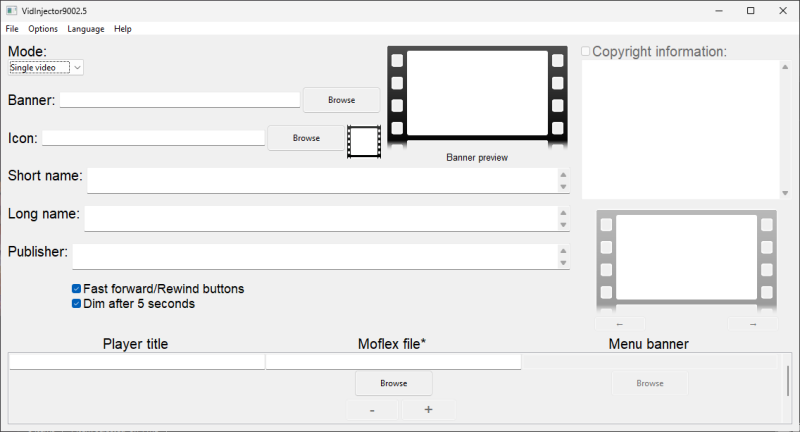
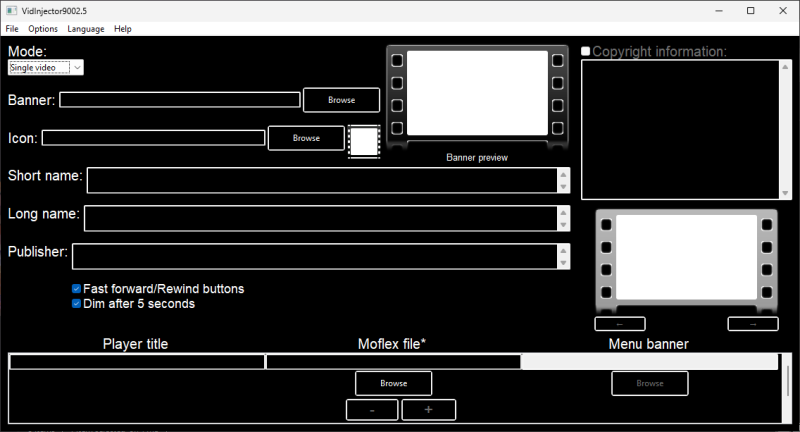
A cross platform injector for 3DS video CIAs. Currently known support is Linux, MacOS, and Windows. <ref>FoofooTheGuy. [https://github.com/FoofooTheGuy/VidInjector9000/tree/main/VidInjector9002.5#screenshots VidInjector9000: A Cross Platform Injector for 3DS Video CIAs.] GitHub, 2025-2-5.</ref> As of version 3.5.0, it consists of two programs. VidInjector9002-CLI does the functional work and VidInjector9002.5 works as the GUI frontend. <ref>FoofooTheGuy.[https://github.com/FoofooTheGuy/VidInjector9000/blob/main/README.md#editions VidInjector9000: A Cross Platform Injector for 3DS Video CIAs.] GitHub, 2025-2-5.</ref> Although the CLI can be used alone, the GUI depends of the CLI to work properly. | |||
== | == Features == | ||
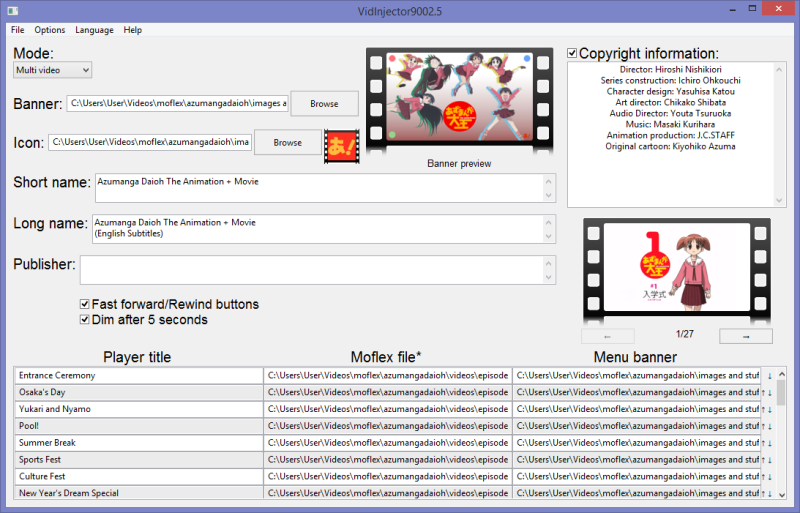
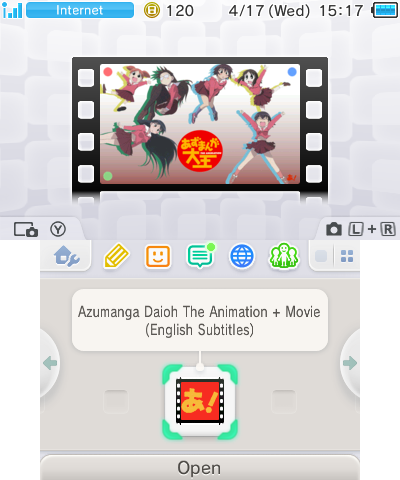
* '''Create video injects | * '''Create video injects''' - Input .moflex videos, images, and text, and the program will build a .cia file for you. | ||
* '''Create multi-video injects | * '''Create multi-video injects''' - Similar to the above, but there can be multiple videos in one .cia file. | ||
* '''Unpack a video CIA | * '''Unpack a video CIA''' - Load parameters from a .cia file to edit and rebuild. | ||
* '''Save and load parameters | * '''Save and load parameters''' - Save your place and come back later. | ||
* ''' | * '''Configure the GUI interface for any language''' - If you can translate it, you can add it. | ||
== User guide == | |||
Translation files: | |||
*To use the provided translations, extract the Vidinjector9000Resources directory from the zip you want to the directory with the binary. | |||
Tips: | Tips: | ||
* Click the icon preview to change border modes | * Click the icon preview to change border modes. | ||
* Open a project file (.vi9p) with the program to load in those parameters | * Open a project file (.vi9p) with the program to load in those parameters. | ||
* Click the multi video banner preview to choose file | * Click the multi video banner preview to choose file. | ||
* | * If an image doesn't fit in, it will be resized and cropped. | ||
* If | |||
== Screenshots == | |||
[[File:vidInjector90003ds2.png|800px|Windows 11 system color mode|link=]] | |||
[[File:vidInjector90003ds3.png|800px|Windows 11 light color mode|link=]] | |||
[[File:VidInjector90003ds4.png|800px|Windows 8.1 light mode with populated parameters|link=]] | |||
{| style="margin-left: 0em;" | |||
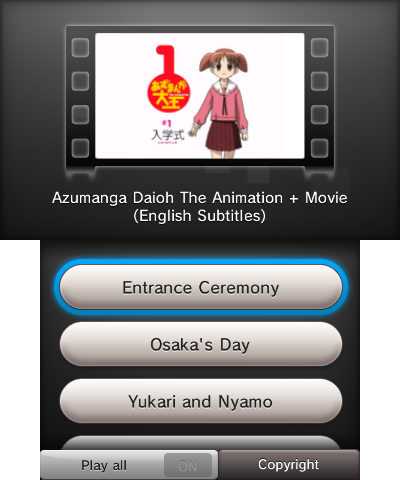
|[[File:VidInjector90003ds5.png|400px|Video inject on the home menu|link=]] | |||
|[[File:MultiVideoInject1.png|400px|Multi video inject main menu|link=]] | |||
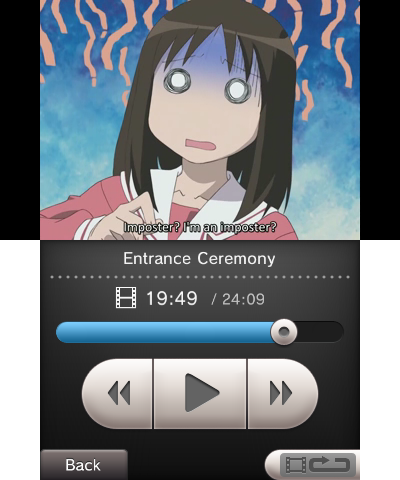
|[[File:MultiVideoInject2.png|400px|Multi video inject player menu|link=]] | |||
|} | |||
== Known issues == | |||
https://github.com/FoofooTheGuy/VidInjector9000/tree/main/VidInjector9002-CLI#known-issues | |||
== Changelog == | |||
'''v3.5.0 2025/02/05''' | |||
VidInjector9002.5: (New) | |||
* VidInjector9002.5: A GUI frontend for VidInjector9002-CLI made with the help of wxWidgets. | |||
VidInjector9002-CLI: | |||
New: | |||
* -set_smdh | -ss | |||
* -generate_preview | -gp | |||
* -return_rows | -rr | |||
Changes: | |||
* VI9P version 1.0.1: Removed the `INT:PREINDEX` parameter and replaces surrounding double quotes (") with surrounding unit separators (�) This fixes strings containing double quotes. | |||
'''v3.0.5 2024/04/11''' | |||
Notable changes: | |||
* Introducing VidInjector9002-CLI. | |||
* Allow line breaks in short name, long name, and publisher. | |||
* Added the ability to use a seed or seeddb to decrypt input .CIAs. | |||
* Added more exception handling (So the program doesn't crash as much). | |||
* Added Wide window mode (Useful for screens with low height). | |||
* Added the ability to split parameters into a Luma LayeredFS game patch. | |||
* More overall stability (So many small improvements). | |||
'''v3.0 2023/10/31''' | |||
Notable changes: | |||
*Graphical user interface using xtd forms. | |||
*Unicode text is easier to use because the text boxes use UTF-8. | |||
*The interface text can be changed to pretty much whatever you want (useful for translation). | |||
*Save and load parameters to a file so that you can return to your project later. | |||
*Load parameters from CIA file (or at least attempt to). | |||
*No separate binary dependencies. | |||
*1 and 2 channel images are now supported. | |||
*Light and dark mode exist. | |||
*It has a logo now. | |||
*Probably other stuff I forgot about. | |||
'''v2.6.9 2022/12/31''' | |||
Notable changes: | |||
*Add checks for Apple Mac OS makerom (If you build it for Mac). | |||
*Remove template files (It's faster now). | |||
*Protect against using '#' as the first character in csv files since that is the comment character. | |||
*Fix memory problems when processing text. | |||
'''v2.6.5 2022/11/12''' | |||
Notable changes: | |||
*Better icon template. | |||
*Remove the need for 3dstool. | |||
*Remove the need for bannertool. | |||
*Extended characters can be used in icon texts (E.g. é, ö, ñ). | |||
*Remove the need for 3dstex. | |||
*Comma detection so as to not break the csv files. | |||
*Fixed CP437 encoded extended character conversion (the Windows cmd input). | |||
*Broke ASCII encoded extended character (sorry, not sorry. Use UTF-8/16 instead). | |||
'''v2.5.9 2022/10/10''' | |||
Notable changes: | |||
*You are able to quit a job if it fails. | |||
*If the output rom is too big it will yell at you, but it wont restrict you from creating it. | |||
*You can drag a .txt file to it and it will read the contents and use those as input (useful for unicode names). | |||
*Modified multi video layout file to make 1+ hour long time progress not covered by that icon. | |||
'''v2.5.7 2022/09/21''' | |||
Note-worthy Changes: | |||
*Better title ID pseudo-Randomness (less generation of stuff like "CXXXX"). | |||
*Increased speed on functions. | |||
*No more ImageMagick (the zip is smaller now). | |||
'''v2.5.2 2022/08/09''' | |||
Note-worthy Changes: | |||
*Fix maximum bytes check when building. | |||
*Add checks on everything to make sure it's working. | |||
*Better way to set video amount in Multi video mode (you can't break everything anymore). | |||
'''v2.2.2 2022/07/11''' | |||
Notable Changes: | |||
*If the input of <code>copyfile()</code> fails, it wont crash the entire program. | |||
*It wont check the icon box if it failed to create it. | |||
*Trim invalid characters from the output Filename. (The cia contents stay the same but it is more stable now). | |||
'''v2.1.2 2022/07/11''' | |||
*Now you can enable debug information. | |||
*Additional notes: | |||
**Option to display what calls to the resource tools it makes. | |||
**Version indicator. | |||
'''v2.1.1 2022/06/29''' | |||
*Error 0xe0c046f8 (file of size 0) when creating extdata has been fixed (icon.icn was important after all, sorry!). | |||
*Removed the unused ctrtool.exe from resources. | |||
'''v2.1.0 2022/06/16''' | |||
Note-worthy changes: | |||
*Turn on or off the fast forward and rewind buttons. | |||
*Turn on or off the screen fading after a while. | |||
*An option to use a custom banner file instead of having it generate it from an image. | |||
*A file size check has been added (no .cia's over 4GB because of fat32). | |||
*CIA building title ID check fixed (again). | |||
== Credits and Stuff== | == Credits and Stuff== | ||
[https://github.com/ | [https://github.com/FoofooTheGuy/nnc nnc]: Converting banner and icon images, packing and unpacking CIA files.<ref>The original [https://github.com/MyPasswordIsWeak/nnc nnc] is gone because the creator deleted his GitHub account.</ref> | ||
[https://github.com/nothings/stb stb image]: Manipulating images. | |||
[https://github.com/tfussell/miniz-cpp miniz cpp]: Zip extraction. | |||
[https:// | [https://www.3dbrew.org/ 3DBrew]: Emotional support. | ||
[https://github.com/ | [https://github.com/wxWidgets/wxWidgets wxWidgets]: The GUI library used in VidInjector9002.5 | ||
==References== | |||
<references /> | |||
== External links == | |||
* GitHub - https://github.com/FoofooTheGuy/VidInjector9000 | |||
Latest revision as of 04:44, 6 February 2025
| VidInjector9000 | |
|---|---|
 | |
| General | |
| Author | FoofooTheGuy |
| Type | Forwarders and Virtual Console Injectors |
| Version | 3.5.0 |
| License | Mixed |
| Last Updated | 2025/02/05 |
| Links | |
| Download | |
| Website | |
| Source | |
A cross platform injector for 3DS video CIAs. Currently known support is Linux, MacOS, and Windows. [1] As of version 3.5.0, it consists of two programs. VidInjector9002-CLI does the functional work and VidInjector9002.5 works as the GUI frontend. [2] Although the CLI can be used alone, the GUI depends of the CLI to work properly.
Features
- Create video injects - Input .moflex videos, images, and text, and the program will build a .cia file for you.
- Create multi-video injects - Similar to the above, but there can be multiple videos in one .cia file.
- Unpack a video CIA - Load parameters from a .cia file to edit and rebuild.
- Save and load parameters - Save your place and come back later.
- Configure the GUI interface for any language - If you can translate it, you can add it.
User guide
Translation files:
- To use the provided translations, extract the Vidinjector9000Resources directory from the zip you want to the directory with the binary.
Tips:
- Click the icon preview to change border modes.
- Open a project file (.vi9p) with the program to load in those parameters.
- Click the multi video banner preview to choose file.
- If an image doesn't fit in, it will be resized and cropped.
Screenshots
|
|
|
Known issues
https://github.com/FoofooTheGuy/VidInjector9000/tree/main/VidInjector9002-CLI#known-issues
Changelog
v3.5.0 2025/02/05
VidInjector9002.5: (New)
- VidInjector9002.5: A GUI frontend for VidInjector9002-CLI made with the help of wxWidgets.
VidInjector9002-CLI:
New:
- -set_smdh | -ss
- -generate_preview | -gp
- -return_rows | -rr
Changes:
- VI9P version 1.0.1: Removed the `INT:PREINDEX` parameter and replaces surrounding double quotes (") with surrounding unit separators (�) This fixes strings containing double quotes.
v3.0.5 2024/04/11
Notable changes:
- Introducing VidInjector9002-CLI.
- Allow line breaks in short name, long name, and publisher.
- Added the ability to use a seed or seeddb to decrypt input .CIAs.
- Added more exception handling (So the program doesn't crash as much).
- Added Wide window mode (Useful for screens with low height).
- Added the ability to split parameters into a Luma LayeredFS game patch.
- More overall stability (So many small improvements).
v3.0 2023/10/31
Notable changes:
- Graphical user interface using xtd forms.
- Unicode text is easier to use because the text boxes use UTF-8.
- The interface text can be changed to pretty much whatever you want (useful for translation).
- Save and load parameters to a file so that you can return to your project later.
- Load parameters from CIA file (or at least attempt to).
- No separate binary dependencies.
- 1 and 2 channel images are now supported.
- Light and dark mode exist.
- It has a logo now.
- Probably other stuff I forgot about.
v2.6.9 2022/12/31
Notable changes:
- Add checks for Apple Mac OS makerom (If you build it for Mac).
- Remove template files (It's faster now).
- Protect against using '#' as the first character in csv files since that is the comment character.
- Fix memory problems when processing text.
v2.6.5 2022/11/12
Notable changes:
- Better icon template.
- Remove the need for 3dstool.
- Remove the need for bannertool.
- Extended characters can be used in icon texts (E.g. é, ö, ñ).
- Remove the need for 3dstex.
- Comma detection so as to not break the csv files.
- Fixed CP437 encoded extended character conversion (the Windows cmd input).
- Broke ASCII encoded extended character (sorry, not sorry. Use UTF-8/16 instead).
v2.5.9 2022/10/10
Notable changes:
- You are able to quit a job if it fails.
- If the output rom is too big it will yell at you, but it wont restrict you from creating it.
- You can drag a .txt file to it and it will read the contents and use those as input (useful for unicode names).
- Modified multi video layout file to make 1+ hour long time progress not covered by that icon.
v2.5.7 2022/09/21
Note-worthy Changes:
- Better title ID pseudo-Randomness (less generation of stuff like "CXXXX").
- Increased speed on functions.
- No more ImageMagick (the zip is smaller now).
v2.5.2 2022/08/09
Note-worthy Changes:
- Fix maximum bytes check when building.
- Add checks on everything to make sure it's working.
- Better way to set video amount in Multi video mode (you can't break everything anymore).
v2.2.2 2022/07/11
Notable Changes:
- If the input of
copyfile()fails, it wont crash the entire program. - It wont check the icon box if it failed to create it.
- Trim invalid characters from the output Filename. (The cia contents stay the same but it is more stable now).
v2.1.2 2022/07/11
- Now you can enable debug information.
- Additional notes:
- Option to display what calls to the resource tools it makes.
- Version indicator.
v2.1.1 2022/06/29
- Error 0xe0c046f8 (file of size 0) when creating extdata has been fixed (icon.icn was important after all, sorry!).
- Removed the unused ctrtool.exe from resources.
v2.1.0 2022/06/16
Note-worthy changes:
- Turn on or off the fast forward and rewind buttons.
- Turn on or off the screen fading after a while.
- An option to use a custom banner file instead of having it generate it from an image.
- A file size check has been added (no .cia's over 4GB because of fat32).
- CIA building title ID check fixed (again).
Credits and Stuff
nnc: Converting banner and icon images, packing and unpacking CIA files.[3]
stb image: Manipulating images.
miniz cpp: Zip extraction.
3DBrew: Emotional support.
wxWidgets: The GUI library used in VidInjector9002.5
References
- ↑ FoofooTheGuy. VidInjector9000: A Cross Platform Injector for 3DS Video CIAs. GitHub, 2025-2-5.
- ↑ FoofooTheGuy.VidInjector9000: A Cross Platform Injector for 3DS Video CIAs. GitHub, 2025-2-5.
- ↑ The original nnc is gone because the creator deleted his GitHub account.