
Minecraft: Enhanced Mod Vita: Difference between revisions
More actions
Created page with "{{Infobox Vita Homebrews |title=Minecraft: Enhanced Mod |image=minecraftenhancedvita.png |description=Minecraft: Enhanced Mod switched to the 1.83 version of the game (Update Aquatic). |author=PG Team |lastupdated=2023/09/20 |type=Game Hacks |version=1.0 |license=Mixed |downloadraw=[https://mega.nz/folder/eR0DlDiB#TOeKW_YrHnMvxGeqXUcryg Mega] - [https://drive.google.com/drive/folders/1b3MsOmRScpZGeD_dIF_O9DkBXPObnSNd G.Drive] |website=https://dev.pgteam.org/mods/other-ga..." |
No edit summary |
||
| (6 intermediate revisions by 2 users not shown) | |||
| Line 2: | Line 2: | ||
|title=Minecraft: Enhanced Mod | |title=Minecraft: Enhanced Mod | ||
|image=minecraftenhancedvita.png | |image=minecraftenhancedvita.png | ||
|description=Minecraft: Enhanced | |description=Minecraft: Enhanced is a Minecraft PS Vita mod of the version 1.83 (The Aquatic Update). | ||
|author=PG Team | |author=PG Team | ||
|lastupdated= | |lastupdated=2025/12/23 | ||
|type=Game Hacks | |type=Game Hacks | ||
|version= | |version=2.0 | ||
|license=Mixed | |license=Mixed | ||
| | |download=https://dev.pgteam.org/mods/en/minecraft/enhanced/install | ||
|website=https://dev.pgteam.org/mods/ | |website=https://dev.pgteam.org/mods/en/minecraft/enhanced | ||
|source= | |source= | ||
}} | }} | ||
| Line 18: | Line 18: | ||
|image_alt=Minecraft: Enhanced Mod | |image_alt=Minecraft: Enhanced Mod | ||
}} | }} | ||
Minecraft | <!--MinecraftEnhancedModVita.7z--> | ||
An unofficial enhanced mod for Minecraft developed by PG Team, designed to restore and improve both the visuals and technical aspects of the things missing in the official edition of Minecraft PS Vita compared to the Bedrock and Java Versions. | |||
==Installation== | ==Installation== | ||
Requires the [[RePatch_reLoaded_Vita|rePatch plugin]] to be installed. | |||
== | Download the archives according to the game region you need. | ||
Unpack *.zip-archives on your PC. | |||
Move the folder "<REGION_NAME>_<TITLEID>_1.83_spoof_1.84_decrypt" onto your console in the root of ux0: or in a selected directory of ux0:. | |||
* The contents of the rePatch folder are to be transfered to ux0:rePatch/. | |||
* As well as the contents of the reAddcont folder to ux0:reAddcont/. | |||
Go to [[VitaShell]], select the folder "<REGION_NAME>_<TITLEID>_1.83_spoof_1.84_decrypt" and install it (Triangle > More > Install folder). | |||
Wait for the installation process to complete. | |||
==User guide== | |||
===Save transfer=== | |||
Before installing the mod, navigate to the directory at ux0:user/00/savedata/ and locate the folder corresponding to your Minecraft save data (PCSB00560/PCSE00491/PCSG00302). Open it in decrypted mode (Triangle > Open decrypted) and copy the save folders (named like "<TITLEID>-<NUMBERS>") to any custom directory of your choice (e.g. ux0:Files). | |||
After installing the mod, launch the game and create a new world. Once the world loads, exit to the main menu using "Exit and Save" and close the game. | |||
Access the previously created folder (in our example, ux0:Files) and choose any save (folders with names like "<TITLEID>-<NUMBERS>"). Copy the "GAMEDATA.bin" file from the selected directory. | |||
Go to the directory ux0:user/00/savedata/, find the new save folder and open it in decrypted mode (Triangle > Open decrypted). | |||
Go to the save folder that was recently created by the game. Paste the previously copied GAMEDATA.bin file, overwrite if asked. | |||
Repeat steps 2-5 to transfer all the other saves you need. | |||
===FAQ=== | |||
'''Q. Does the modification affect performance?''' | |||
No, performance is the same as in the original game (version 1.83). | |||
Warning: The "Enhanced Animations" resource pack may negatively impact performance due to the large number of animations. | |||
'''Q. Does the modification support saves from the regular version of the game?''' | |||
Yes, but you need to carry out a special procedure for the save transfer. | |||
'''Q. Does the modification support all languages that were supported by the original?''' | |||
Yes, but our own edits are only in English and Russian locations. | |||
'''Q. Does the modification support VitaGrafix?''' | |||
Yes, native resolution and frame rate limit patches are fully functional. | |||
Warning: We HIGHLY do not recommend activating the native resolution patch as it breaks text and other UI items which affects the overall experience of using the mod. | |||
''' | '''Q. Does the modification support network features?''' | ||
Yes, all features, related to PSN, work correctly. The game will also not require any updates. | |||
Warning: You can only play with players who also have version 1.83 of the game. | |||
''' | '''Q. Why do i have a trial versions of DLCs?''' | ||
' | Because you have a different version of rePatch or you've followed the rePatch transfer instructions wrong. Please install latest version of [[RePatch_reLoaded_Vita|rePatch reLoaded]] instead of your current one or redo the rePatch transfer instructions correctly. | ||
''' | '''Q. Can you offer some sort of recommended settings?''' | ||
Yes! here are some settings: | |||
* VitaGrafix: | * [[VitaGrafix]]: | ||
** Resolution: 720x408 | ** Resolution: 720x408 | ||
** FPS Cap: 30 | ** FPS Cap: 30 | ||
* PSVShell: | * [[PSVshell Vita|PSVShell]]: | ||
** 500MHz CPU overclock | ** 500MHz CPU overclock | ||
* Game: | * Game: | ||
** Gamma: 30-40% | ** Gamma: 30-40% | ||
** Texture pack: | ** Texture pack: Enhanced Additions | ||
==Screenshots== | |||
{| style="width: 50%; margin-left:0em;" | |||
https://dlhb.gamebrew.org/vitahomebrews/minecraftenhancedvita-01.png | |||
https://dlhb.gamebrew.org/vitahomebrews/minecraftenhancedvita-02.png | |||
https://dlhb.gamebrew.org/vitahomebrews/minecraftenhancedvita-03.png | |||
https://dlhb.gamebrew.org/vitahomebrews/minecraftenhancedvita-04.png | |||
https://dlhb.gamebrew.org/vitahomebrews/minecraftenhancedvita-05.png | |||
https://dlhb.gamebrew.org/vitahomebrews/minecraftenhancedvita-06.png | |||
https://dlhb.gamebrew.org/vitahomebrews/minecraftenhancedvita-07.png | |||
https://dlhb.gamebrew.org/vitahomebrews/minecraftenhancedvita-08.png | |||
|} | |||
==Media== | |||
'''Minecraft Enhanced Launch Trailer''' ([https://www.youtube.com/watch?v=R0yrTHxzHTo PG Team]) <br> | |||
<youtube width="640">R0yrTHxzHTo</youtube> | |||
==Changelog== | ==Changelog== | ||
'''v2.0''' | |||
*World Generation | |||
** Added extended world size (1024x1024 blocks vs. 864x864 blocks in the regular world); | |||
** Added amplified world type (Like in Java Edition) with the following features: | |||
*** Mountains are generated higher than in the regular world; | |||
*** Caves and valleys are generated deeper than in the regular world. | |||
** New ore types in the Nether: Nether Gold Ore and Ancient Debris; | |||
** Huge mushrooms now generate in the swamps like in the Bedrock Edition. | |||
*Items & Blocks | |||
** Added Nether Gold Ore, Ancient Debris & Netherite blocks from the Nether Update; | |||
*** Nether Gold Ore & Ancient Debris spawn naturally in the Nether; | |||
*** Ancient Debris can be smelted in Furnace into Netherite Scrap; | |||
*** Netherite Scrap can be combined with Gold Ingots to make a Netherite Ingot; | |||
*** Netherite Ingots can be combined with Diamond items to create Netherite items (Enchanted items will lose their enchantments in the process). | |||
** Added Netherite Scrap & Ingot items from the Nether Update; | |||
** Added Netherite items (Sword, Pickaxe, Axe, Shovel, Hoe, Helmet, Chestplate, Leggings and Boots) from the Nether Update; | |||
*** Netherite items are more durable and more powerful than Diamond ones; | |||
*** Netherite items are immune to lava and fire. | |||
** Beacon recognizes Netherite blocks as a base block; | |||
** Beacon accepts Netherite Ingot as a payment item; | |||
** Added Raw Iron & Gold items; | |||
*** They can be obtained by mining Iron & Gold Ore respectively. Can be smelted in a furnace to make their respective ingots. | |||
** New blocks added to the Creative menu (Farmland, Barked Wood, Command Blocks, Dragon Egg, Barrier); | |||
** Added Spawn eggs for the Illusioner, Snow Golem and Wither (Also for the Ender Dragon and Iron Golem); | |||
*** Added in-game notifier for the Ender Dragon and Iron Golem spawn eggs that they will not work without a spawner. | |||
** Increased stack amounts for the Potions (16) and Snowballs (64) from the Java Combat Tests; | |||
** Added cooldown timer for Snowball throwing (Four ticks) from the Java Combat Tests; | |||
** New recipes for some blocks: Barked Wood and the Planks from it, Packed Ice; | |||
** Added a duplication recipe for the Totem of Undying; | |||
** Added crafting recipe for the Saddle. | |||
*Mobs & Spawning | |||
** Added Villager & Zombie Villager biome variants from "Village & Pillage" update; | |||
*** Child's variant is selected randomly from the parents' variants or from the biome variant. | |||
** Added Cold, Warm and Temperate variants for the Cows, Pigs and Chickens from the "Spring to Life" game update; | |||
*** Child's variant is selected randomly from the parents' variants. | |||
** Added new Wolf variants from the "Armored Paws" game update; | |||
*** Child's variant is selected randomly from the parents' variants. | |||
** Tamed Wolves now have 30HP instead of 20HP; | |||
** Zombie Horses can spawn naturally in the world; | |||
*** Spawn with Zombie Horsemen riding them which are equipped with Iron Swords; | |||
*** They're already tamed by Zombie Horsemen and can be saddled after the Horseman is killed. | |||
*** Zombie Horses now have 25HP instead of 15HP; | |||
*** Zombie Horses get random speed value like regular horses; | |||
** New spawn rules (According to the "Spring to Life" game update): | |||
*** Cows, Pigs and Wolves now spawn in the Jungle; | |||
*** Chickens, Sheep, Cows, Pigs and Wolves now spawn in the Badlands; | |||
*** Wolves now spawn in the Savanna. | |||
** Ported new sheep color distribution from the "Spring to Life" game update; | |||
** Iron Golem now has visible cracked states and can be repaired with the Iron Ingots; | |||
** The Saddle now can be removed from a pig by using a Shears; | |||
** Fixed the Illusioner naming bug that caused the game not to display its name; | |||
** Changed the Illusioner's spawn rules and loot table; | |||
** Removed Herobrine. | |||
*Graphics & Performance | |||
** Added new graphics settings: | |||
*** Render distance (Up to 8 chunks) & Fog distance sliders; | |||
*** FOV slider; | |||
*** Particles level slider; | |||
*** Cloud rendering control slider; | |||
*** Ability to enable fast rendering of leaves; | |||
*** Ability to disable smooth lighting. | |||
*Technical | |||
** Added an ability to enable camera zooming. You can use it by touch or by button combination; | |||
*** Zooming method can be changed in the game settings; | |||
*** The sensitivity of the zooming can also be changed in the game settings. | |||
** Integrated free DLCs patch; | |||
** Enabled the ability to use non-English symbols while using Books with Quill and Signs; | |||
** Added an ability to enable debug hitboxes rendering (Disabled in Mini games); | |||
** Fixed the crash by using a Door and Piston + Button; | |||
** Fixed the crash caused by the macOS specific files (Like .DS_Store) in the game DLC directories. | |||
*Menus & Interface | |||
** Unlocked a hidden Biome Preview menu (Moving map borders works with some bugs and limitations); | |||
** Added Seed Templates - a feature that allows you to select a seed template (One of 17 choices) for the world generation; | |||
*** Generating a new seed via Biome Preview or editing the seed manually will reset the selected template. | |||
** Added the ability to send messages to the in-game chat by using the keyboard. You can summon it by touch or button combination; | |||
*** Activation method can be changed in the game settings; | |||
*** You can disable the chat entirely in the game settings. | |||
** Added the ability to enable the display of item debug information in the game (Like durability, NBTs, IDs, etc.); | |||
*** Added repair cost information for the items; | |||
*** Added Entity ID information for the items. | |||
** Added the ability to enable advanced armor UI from the Battle Mini game for use in regular gameplay; | |||
** Added the ability to enable the directional damage indicator from the Battle Mini game and Glide Mini game for use in regular gameplay; | |||
** Added additional HUD elements (Optional); | |||
*** Added coordinates display (Chunk coordinates included); | |||
*** Added FPS counter. | |||
** Added changelog showcase after the first launch of the game (Like official 4J Studios' changelog); | |||
** Removed duplicated Skin Packs from the Skin Select menu; | |||
** Changed the End Poem's look according to the recent Java Edition updates; | |||
** End Poem scrolling speed is increased; | |||
** New look for the panoramas and some other UI elements (For example: crosshair); | |||
** Added some new splashes; | |||
** Localization tweaks. | |||
*Visuals | |||
** Updated models and textures for the following mobs: | |||
*** Pig; | |||
*** Chicken; | |||
*** Cow and Mooshroom; | |||
*** Bat. | |||
** New cloud pattern; | |||
** New Wolf textures; | |||
** Updated look of the Wolf's collar; | |||
** Villager's and Zombie Villager's textures were tweaked; | |||
** Fixed Sheep fur texture issue; | |||
** Mushroom block textures were updated; | |||
** Changed Map background; | |||
** Updated grass color in the Savanna biomes; | |||
** New Command Block textures with animations; | |||
** Some other small tweaks to match modern Java Edition look. | |||
*Cosmetics | |||
** Added Christmas chests event from Java Edition; | |||
** Added a feature to display the player's cape on the elytra (It won't work with most of the 4J Studios' capes, but it will work with the official Mojang capes and with the custom capes); | |||
** Added ambient fog effects; | |||
*** Fog during the rain is closer to the player; | |||
*** Fog in the Swamps is closer to the player. | |||
** Added an ability to enable darker nights; | |||
*** Its effects depend on the game's gamma setting. | |||
** Added an ability to enable colorful stars rendering (Also adds more stars to the night sky); | |||
** Added an ability to enable Minecraft Beta clouds height; | |||
** Added an ability to enable better lighting (Warmer Lighting). | |||
*DLCs | |||
** Added Bare Bones Texture Pack; | |||
** Added Halloween Charity Skin Pack; | |||
** Added the following maps for the Battle Mini-Game: | |||
*** "Pipe Field" by Alexis. | |||
** Added the following maps for the Glide Mini-Game: | |||
*** "Lighthouse" by the LCE Glide Community (Obvzyes, Commander, UMFD-0); | |||
*** "Challenge" by LoreOfCrafters; | |||
*** "Fortress" by Alexis; | |||
*** "Baby Park" by Alexis. | |||
** Added world templates for the Halo and Mario Mash-Ups; | |||
** Some missing DLCs were added back into the game; | |||
** Added Elytra layer support for some of the capes. | |||
'''v1.0''' | '''v1.0''' | ||
*LiveArea screen | *LiveArea screen | ||
| Line 147: | Line 300: | ||
==Credits== | ==Credits== | ||
* | * Original Game Developers: Mojang Studios, 4J Studios, Double Eleven (Minecraft Dungeons). | ||
* | * Inspired by: Nebbix. | ||
* | * PG Team: SkyForces - Lead Developer and Maintainer; Once13One - General design Advisor, LiveArea design Developer; Dimon353 - Tester, Tech Developer, DLC's and dump Builder; H0meFox - Tester, Tech Developer. | ||
Other Authors and Contributors: | |||
* | * Technical support and assistance: MayNL/MattNL, PhoenixARC, Miku-666, RealYoti. | ||
* | * Music: C418, Lena Raine, Kumi Tanioka, Samuel Åberg, liltommyj, MayNL/MattNL, Shauny Jang, Peter Hont, Johan Johnson, Solunary, Karam Bharj, DeWolfe, Aaron F. Bianchi Jupiter, Średni Tonek, Yekonaip, Taioo2, Antimo & Welles. | ||
* | * Textures: BarandMCS, VanillaTweaks, StormDragon77, Reijvi, Tovarich_bavalucked, Sully, DarkStormPT, Firch, Cubeoidal, LordKif br, The Daikuu, ZeykeHas, TheFrey_, XeKr, Rustillery, Foony the Foxacoon, zozo-zrob, Entium, robonate135, Rozarke, fisher521, Joosh, GogoMines, SunischitM, moro2610, Mickey Joe, Etomic Studios, Dark Gato, JQBlockMaster, imjustpabloiguess and others. | ||
* | * Skins: Nobledez, xMWx, MayNL/MattNL. | ||
* | * Testing and Feedback: DarthBellic, efimandreev0, v.subboty. | ||
* | * Localisation assistance: DarthBellic. | ||
* | * Special Thanks: MayNL/MattNL, PhoenixARC, Miku-666 and other members of the Minecraft LCE community who continue to create such breathtaking things for an amazing game. | ||
== External links == | == External links == | ||
* | * [https://dev.pgteam.org/mods/other-games/minecraft-enhanced Official Website] | ||
* | * [https://www.reddit.com/r/vitahacks/comments/16n56a7/release_minecraft_enhanced_by_pg_team_mod/ Reddit Post] | ||
Latest revision as of 03:34, 11 January 2026
| Minecraft: Enhanced Mod | |
|---|---|
 | |
| General | |
| Author | PG Team |
| Type | Game Hacks |
| Version | 2.0 |
| License | Mixed |
| Last Updated | 2025/12/23 |
| Links | |
| Download | |
| Website | |
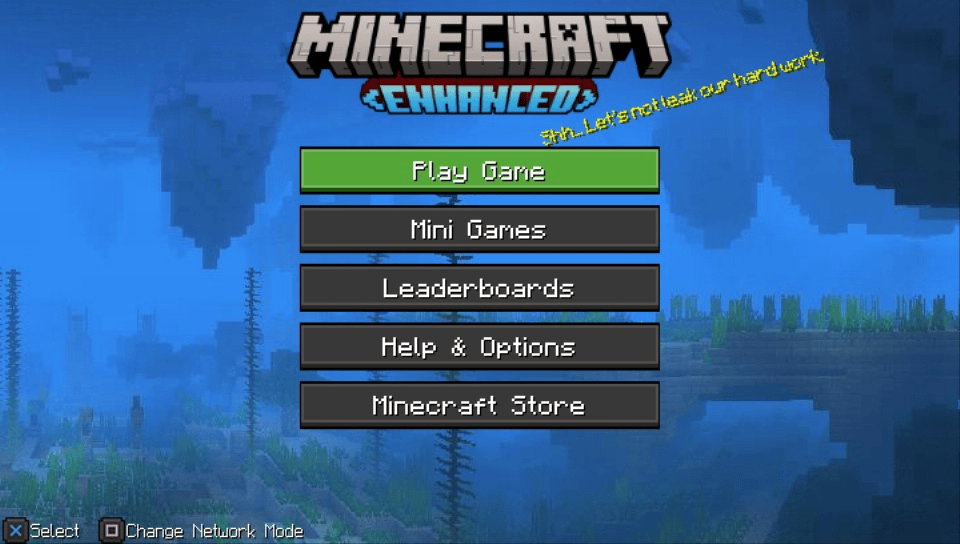
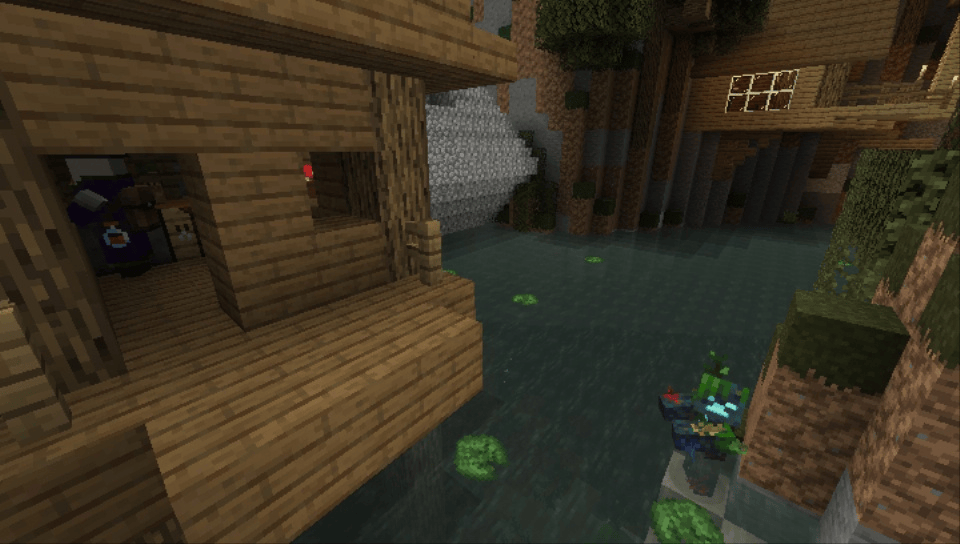
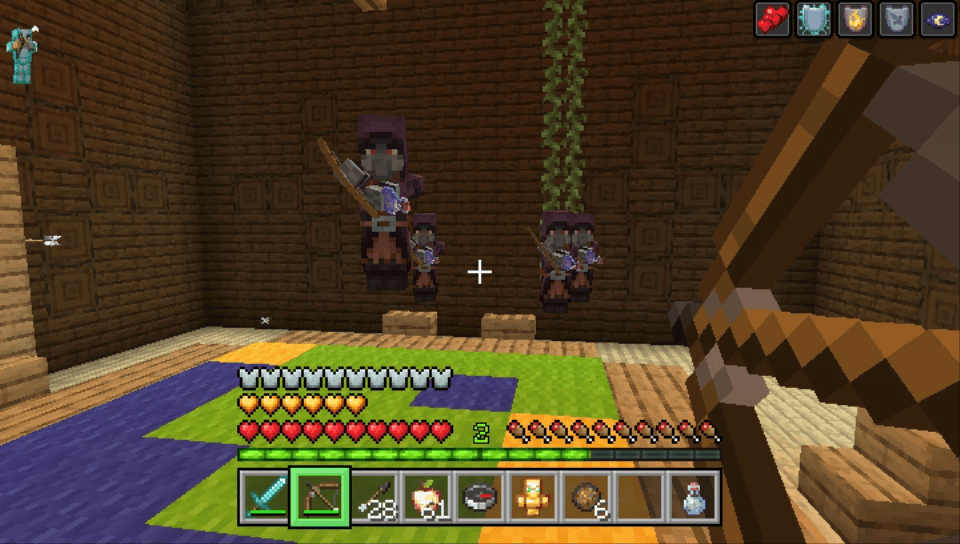
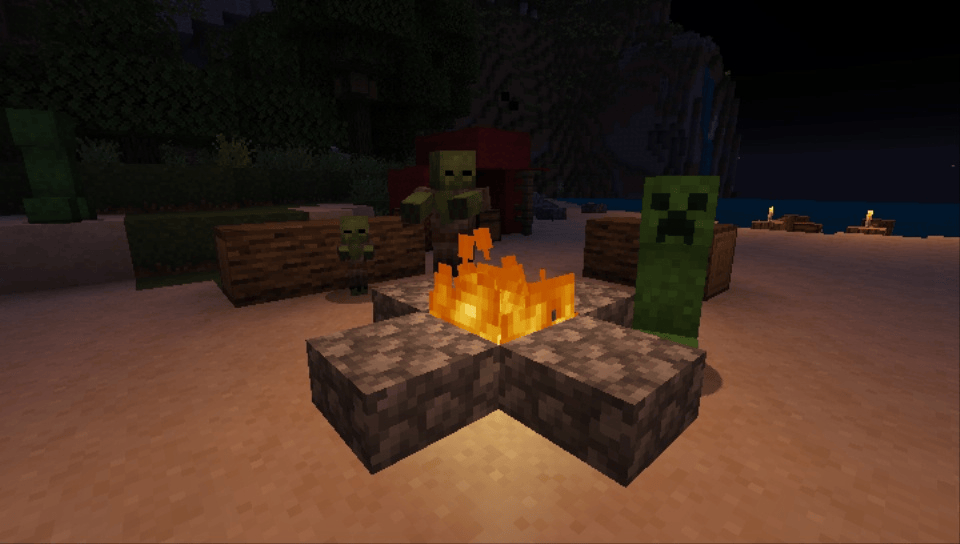
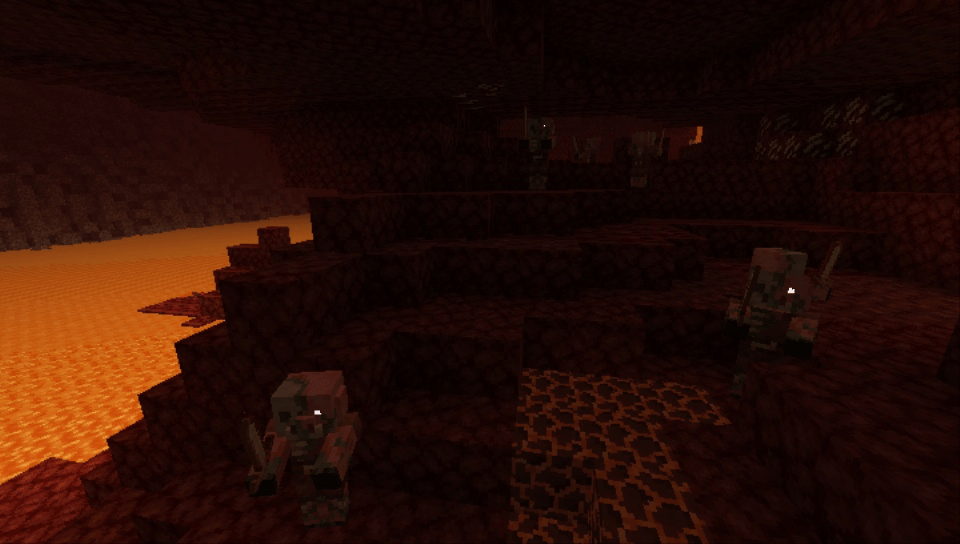
An unofficial enhanced mod for Minecraft developed by PG Team, designed to restore and improve both the visuals and technical aspects of the things missing in the official edition of Minecraft PS Vita compared to the Bedrock and Java Versions.
Installation
Requires the rePatch plugin to be installed.
Download the archives according to the game region you need.
Unpack *.zip-archives on your PC.
Move the folder "<REGION_NAME>_<TITLEID>_1.83_spoof_1.84_decrypt" onto your console in the root of ux0: or in a selected directory of ux0:.
- The contents of the rePatch folder are to be transfered to ux0:rePatch/.
- As well as the contents of the reAddcont folder to ux0:reAddcont/.
Go to VitaShell, select the folder "<REGION_NAME>_<TITLEID>_1.83_spoof_1.84_decrypt" and install it (Triangle > More > Install folder).
Wait for the installation process to complete.
User guide
Save transfer
Before installing the mod, navigate to the directory at ux0:user/00/savedata/ and locate the folder corresponding to your Minecraft save data (PCSB00560/PCSE00491/PCSG00302). Open it in decrypted mode (Triangle > Open decrypted) and copy the save folders (named like "<TITLEID>-<NUMBERS>") to any custom directory of your choice (e.g. ux0:Files).
After installing the mod, launch the game and create a new world. Once the world loads, exit to the main menu using "Exit and Save" and close the game.
Access the previously created folder (in our example, ux0:Files) and choose any save (folders with names like "<TITLEID>-<NUMBERS>"). Copy the "GAMEDATA.bin" file from the selected directory.
Go to the directory ux0:user/00/savedata/, find the new save folder and open it in decrypted mode (Triangle > Open decrypted).
Go to the save folder that was recently created by the game. Paste the previously copied GAMEDATA.bin file, overwrite if asked.
Repeat steps 2-5 to transfer all the other saves you need.
FAQ
Q. Does the modification affect performance?
No, performance is the same as in the original game (version 1.83).
Warning: The "Enhanced Animations" resource pack may negatively impact performance due to the large number of animations.
Q. Does the modification support saves from the regular version of the game?
Yes, but you need to carry out a special procedure for the save transfer.
Q. Does the modification support all languages that were supported by the original?
Yes, but our own edits are only in English and Russian locations.
Q. Does the modification support VitaGrafix?
Yes, native resolution and frame rate limit patches are fully functional.
Warning: We HIGHLY do not recommend activating the native resolution patch as it breaks text and other UI items which affects the overall experience of using the mod.
Q. Does the modification support network features?
Yes, all features, related to PSN, work correctly. The game will also not require any updates.
Warning: You can only play with players who also have version 1.83 of the game.
Q. Why do i have a trial versions of DLCs?
Because you have a different version of rePatch or you've followed the rePatch transfer instructions wrong. Please install latest version of rePatch reLoaded instead of your current one or redo the rePatch transfer instructions correctly.
Q. Can you offer some sort of recommended settings?
Yes! here are some settings:
- VitaGrafix:
- Resolution: 720x408
- FPS Cap: 30
- PSVShell:
- 500MHz CPU overclock
- Game:
- Gamma: 30-40%
- Texture pack: Enhanced Additions
Screenshots
Media
Minecraft Enhanced Launch Trailer (PG Team)
Changelog
v2.0
- World Generation
- Added extended world size (1024x1024 blocks vs. 864x864 blocks in the regular world);
- Added amplified world type (Like in Java Edition) with the following features:
- Mountains are generated higher than in the regular world;
- Caves and valleys are generated deeper than in the regular world.
- New ore types in the Nether: Nether Gold Ore and Ancient Debris;
- Huge mushrooms now generate in the swamps like in the Bedrock Edition.
- Items & Blocks
- Added Nether Gold Ore, Ancient Debris & Netherite blocks from the Nether Update;
- Nether Gold Ore & Ancient Debris spawn naturally in the Nether;
- Ancient Debris can be smelted in Furnace into Netherite Scrap;
- Netherite Scrap can be combined with Gold Ingots to make a Netherite Ingot;
- Netherite Ingots can be combined with Diamond items to create Netherite items (Enchanted items will lose their enchantments in the process).
- Added Netherite Scrap & Ingot items from the Nether Update;
- Added Netherite items (Sword, Pickaxe, Axe, Shovel, Hoe, Helmet, Chestplate, Leggings and Boots) from the Nether Update;
- Netherite items are more durable and more powerful than Diamond ones;
- Netherite items are immune to lava and fire.
- Beacon recognizes Netherite blocks as a base block;
- Beacon accepts Netherite Ingot as a payment item;
- Added Raw Iron & Gold items;
- They can be obtained by mining Iron & Gold Ore respectively. Can be smelted in a furnace to make their respective ingots.
- New blocks added to the Creative menu (Farmland, Barked Wood, Command Blocks, Dragon Egg, Barrier);
- Added Spawn eggs for the Illusioner, Snow Golem and Wither (Also for the Ender Dragon and Iron Golem);
- Added in-game notifier for the Ender Dragon and Iron Golem spawn eggs that they will not work without a spawner.
- Increased stack amounts for the Potions (16) and Snowballs (64) from the Java Combat Tests;
- Added cooldown timer for Snowball throwing (Four ticks) from the Java Combat Tests;
- New recipes for some blocks: Barked Wood and the Planks from it, Packed Ice;
- Added a duplication recipe for the Totem of Undying;
- Added crafting recipe for the Saddle.
- Added Nether Gold Ore, Ancient Debris & Netherite blocks from the Nether Update;
- Mobs & Spawning
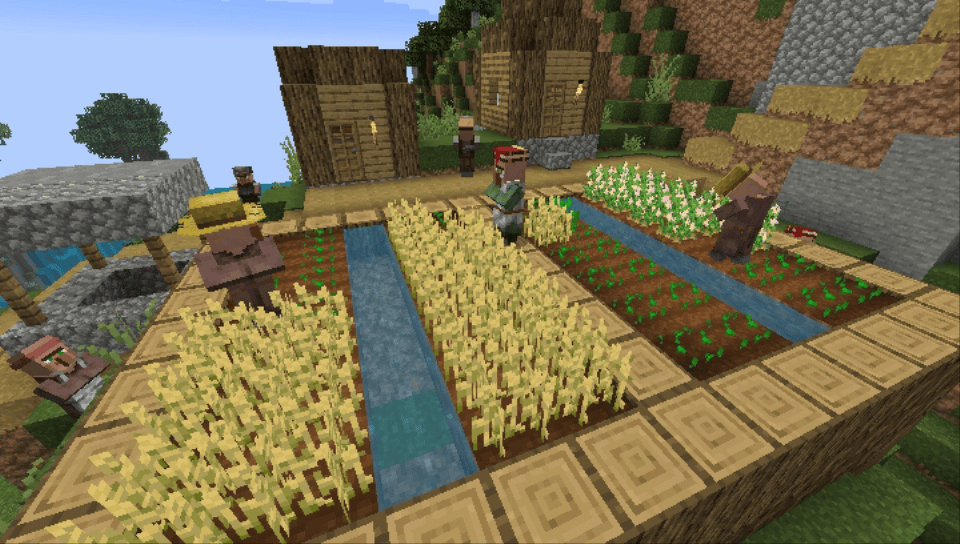
- Added Villager & Zombie Villager biome variants from "Village & Pillage" update;
- Child's variant is selected randomly from the parents' variants or from the biome variant.
- Added Cold, Warm and Temperate variants for the Cows, Pigs and Chickens from the "Spring to Life" game update;
- Child's variant is selected randomly from the parents' variants.
- Added new Wolf variants from the "Armored Paws" game update;
- Child's variant is selected randomly from the parents' variants.
- Tamed Wolves now have 30HP instead of 20HP;
- Zombie Horses can spawn naturally in the world;
- Spawn with Zombie Horsemen riding them which are equipped with Iron Swords;
- They're already tamed by Zombie Horsemen and can be saddled after the Horseman is killed.
- Zombie Horses now have 25HP instead of 15HP;
- Zombie Horses get random speed value like regular horses;
- New spawn rules (According to the "Spring to Life" game update):
- Cows, Pigs and Wolves now spawn in the Jungle;
- Chickens, Sheep, Cows, Pigs and Wolves now spawn in the Badlands;
- Wolves now spawn in the Savanna.
- Ported new sheep color distribution from the "Spring to Life" game update;
- Iron Golem now has visible cracked states and can be repaired with the Iron Ingots;
- The Saddle now can be removed from a pig by using a Shears;
- Fixed the Illusioner naming bug that caused the game not to display its name;
- Changed the Illusioner's spawn rules and loot table;
- Removed Herobrine.
- Added Villager & Zombie Villager biome variants from "Village & Pillage" update;
- Graphics & Performance
- Added new graphics settings:
- Render distance (Up to 8 chunks) & Fog distance sliders;
- FOV slider;
- Particles level slider;
- Cloud rendering control slider;
- Ability to enable fast rendering of leaves;
- Ability to disable smooth lighting.
- Added new graphics settings:
- Technical
- Added an ability to enable camera zooming. You can use it by touch or by button combination;
- Zooming method can be changed in the game settings;
- The sensitivity of the zooming can also be changed in the game settings.
- Integrated free DLCs patch;
- Enabled the ability to use non-English symbols while using Books with Quill and Signs;
- Added an ability to enable debug hitboxes rendering (Disabled in Mini games);
- Fixed the crash by using a Door and Piston + Button;
- Fixed the crash caused by the macOS specific files (Like .DS_Store) in the game DLC directories.
- Added an ability to enable camera zooming. You can use it by touch or by button combination;
- Menus & Interface
- Unlocked a hidden Biome Preview menu (Moving map borders works with some bugs and limitations);
- Added Seed Templates - a feature that allows you to select a seed template (One of 17 choices) for the world generation;
- Generating a new seed via Biome Preview or editing the seed manually will reset the selected template.
- Added the ability to send messages to the in-game chat by using the keyboard. You can summon it by touch or button combination;
- Activation method can be changed in the game settings;
- You can disable the chat entirely in the game settings.
- Added the ability to enable the display of item debug information in the game (Like durability, NBTs, IDs, etc.);
- Added repair cost information for the items;
- Added Entity ID information for the items.
- Added the ability to enable advanced armor UI from the Battle Mini game for use in regular gameplay;
- Added the ability to enable the directional damage indicator from the Battle Mini game and Glide Mini game for use in regular gameplay;
- Added additional HUD elements (Optional);
- Added coordinates display (Chunk coordinates included);
- Added FPS counter.
- Added changelog showcase after the first launch of the game (Like official 4J Studios' changelog);
- Removed duplicated Skin Packs from the Skin Select menu;
- Changed the End Poem's look according to the recent Java Edition updates;
- End Poem scrolling speed is increased;
- New look for the panoramas and some other UI elements (For example: crosshair);
- Added some new splashes;
- Localization tweaks.
- Visuals
- Updated models and textures for the following mobs:
- Pig;
- Chicken;
- Cow and Mooshroom;
- Bat.
- New cloud pattern;
- New Wolf textures;
- Updated look of the Wolf's collar;
- Villager's and Zombie Villager's textures were tweaked;
- Fixed Sheep fur texture issue;
- Mushroom block textures were updated;
- Changed Map background;
- Updated grass color in the Savanna biomes;
- New Command Block textures with animations;
- Some other small tweaks to match modern Java Edition look.
- Updated models and textures for the following mobs:
- Cosmetics
- Added Christmas chests event from Java Edition;
- Added a feature to display the player's cape on the elytra (It won't work with most of the 4J Studios' capes, but it will work with the official Mojang capes and with the custom capes);
- Added ambient fog effects;
- Fog during the rain is closer to the player;
- Fog in the Swamps is closer to the player.
- Added an ability to enable darker nights;
- Its effects depend on the game's gamma setting.
- Added an ability to enable colorful stars rendering (Also adds more stars to the night sky);
- Added an ability to enable Minecraft Beta clouds height;
- Added an ability to enable better lighting (Warmer Lighting).
- DLCs
- Added Bare Bones Texture Pack;
- Added Halloween Charity Skin Pack;
- Added the following maps for the Battle Mini-Game:
- "Pipe Field" by Alexis.
- Added the following maps for the Glide Mini-Game:
- "Lighthouse" by the LCE Glide Community (Obvzyes, Commander, UMFD-0);
- "Challenge" by LoreOfCrafters;
- "Fortress" by Alexis;
- "Baby Park" by Alexis.
- Added world templates for the Halo and Mario Mash-Ups;
- Some missing DLCs were added back into the game;
- Added Elytra layer support for some of the capes.
v1.0
- LiveArea screen
- LiveArea screen has been remade from scratch.
- Intro-animation
- Design of the Intro-animation is updated using the various materials from Mojang Studios and 4J Studios.
- Menus
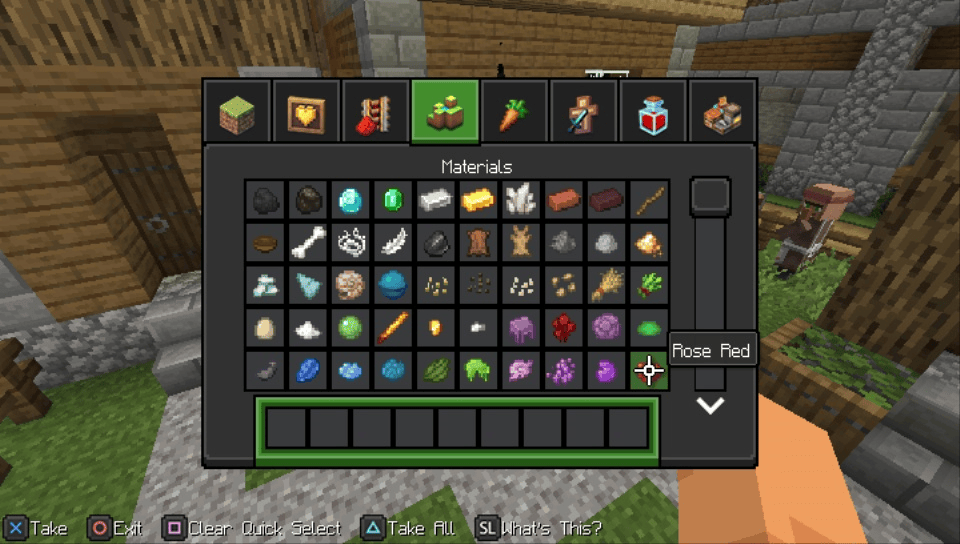
- Completely redesigned HUD and UI - the base of the new UI uses resources from the experimental design for Minecraft: Bedrock Edition from Mojang Studios.
- Panoramas were updated with PG Team materials, and effects from Minecraft: Java Edition.
- Some elements of new UI use Minecraft Dungeons and Minecraft Earth design samples, as well as samples from PG Team's different works.
- Added brand new text icons in some places of the menus.
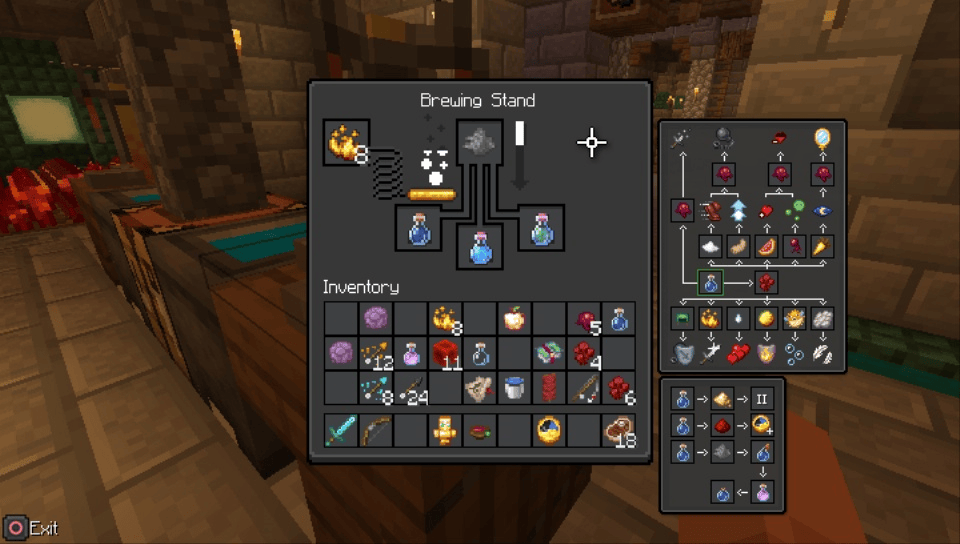
- Added Brewing Guide to the Brewing Stand UI.
- Most of the in-game animations were improved.
- Network features
- Despite the fact that the modification requires the 1.83 version of the game, all network features work as should.
- DLC and other in-game content
- All DLC packs were unlocked.
- Ported some Mash-Up packs and skin packs from the following platforms: Xbox 360, Wii U and PS4 (For example, Super Mario and Halo Mash-Ups).
- DLC packs that weren't available to the public have been re-added to the game. DLC's from PG Team and other authors are also included.
- Added "Programmer Art" resource pack those whom may perfer to play with Classic textures and music.
- Added "Vanilla Feel" resource pack those whom may perfer to play with Vanilla textures and music from actually on the current versions of Minecraft - 1.20+.
- Added "Enhanced Additions" resource pack which presents brand new mob models, some block animations and styled music. We reccomend this pack for the best game experience.
- Added "Enhanced Animations" resource pack which expands "Enhanced Additions" experience with completely new animations for the various items and blocks.
- In-game textures
- All the textures were updated to those of the most recent versions of Minecraft: Java Edition 1.20+.
- Textures of some items were taken from the Minecraft: Bedrock Edition.
- To improve the quality and detail of some textures materials from VanillaTweaks and other authors were used.
- Some of the enviroment colours were improved.
- Global lighting was updated in all dimensions.
- In-game models
- Fixed some original models in the "Vanilla Feel" and "Programmer Art" resource packs.
- Updated models (and textures) of the following mobs:
- Available in the "Vanilla Feel", "Enhanced Additions" and "Enhanced Animations" resource packs
- Zombified Piglin,
- Illusioner (Design from Minecraft),
- Vex,
- Ghast,
- Villager,
- Zombie Villager.
- Available in the "Enhanced Additions" and "Enhanced Animations" resource packs
- Vindicator,
- Evoker,
- Illusioner (Design from Minecraft Dungeons),
- Polar Bear,
- Witch,
- Zombie, Husk and Drowned,
- Skeleton and Stray,
- Spider and Cave Spider,
- Silverfish and Endermite.
- Gameplay
- Illusioner now can spawn in Woodland Mansion.
- Removed Herobrine.
- Text
- Updated splashes according to the Java and Bedrock editions of the Minecraft.
- Added more information about the game around the various menus.
- Edits were made to the Russian and English localisations.
Credits
- Original Game Developers: Mojang Studios, 4J Studios, Double Eleven (Minecraft Dungeons).
- Inspired by: Nebbix.
- PG Team: SkyForces - Lead Developer and Maintainer; Once13One - General design Advisor, LiveArea design Developer; Dimon353 - Tester, Tech Developer, DLC's and dump Builder; H0meFox - Tester, Tech Developer.
Other Authors and Contributors:
- Technical support and assistance: MayNL/MattNL, PhoenixARC, Miku-666, RealYoti.
- Music: C418, Lena Raine, Kumi Tanioka, Samuel Åberg, liltommyj, MayNL/MattNL, Shauny Jang, Peter Hont, Johan Johnson, Solunary, Karam Bharj, DeWolfe, Aaron F. Bianchi Jupiter, Średni Tonek, Yekonaip, Taioo2, Antimo & Welles.
- Textures: BarandMCS, VanillaTweaks, StormDragon77, Reijvi, Tovarich_bavalucked, Sully, DarkStormPT, Firch, Cubeoidal, LordKif br, The Daikuu, ZeykeHas, TheFrey_, XeKr, Rustillery, Foony the Foxacoon, zozo-zrob, Entium, robonate135, Rozarke, fisher521, Joosh, GogoMines, SunischitM, moro2610, Mickey Joe, Etomic Studios, Dark Gato, JQBlockMaster, imjustpabloiguess and others.
- Skins: Nobledez, xMWx, MayNL/MattNL.
- Testing and Feedback: DarthBellic, efimandreev0, v.subboty.
- Localisation assistance: DarthBellic.
- Special Thanks: MayNL/MattNL, PhoenixARC, Miku-666 and other members of the Minecraft LCE community who continue to create such breathtaking things for an amazing game.