
Ftpd Switch: Difference between revisions
More actions
Created page with "{{Infobox Switch Homebrews |title=Ftpd Pro |image=ftpdproswitch.png |description=FTP Server for 3DS/Switch. |author=mtheall |lastupdated=2021/06/13 |type=Utilities |version=3.1.0 |license=GPL-3.0 |download=https://dlhb.gamebrew.org/switchhomebrews/ftpdproswitch.7z |website=https://github.com/mtheall/ftpd |source=https://github.com/mtheall/ftpd |donation= }} {{#seo: |title=Switch Homebrew Apps (Utilities) - GameBrew |title_mode=append |image=ftpdproswitch.png |image_alt=..." |
No edit summary |
||
| (15 intermediate revisions by 3 users not shown) | |||
| Line 1: | Line 1: | ||
{{Infobox Switch Homebrews | {{Infobox Switch Homebrews | ||
|title= | |title=ftpd | ||
|image= | |image=ftpdnx.png | ||
|description=FTP Server for 3DS/Switch. | |description=FTP Server for 3DS/Switch. | ||
|author=mtheall | |author=mtheall | ||
|lastupdated= | |lastupdated=2024/11/17 | ||
|type= | |type=File Browsers | ||
|version=3.1 | |version=3.2.1 | ||
|license=GPL-3.0 | |license=GPL-3.0 | ||
|download=https://dlhb.gamebrew.org/switchhomebrews/ | |download=https://dlhb.gamebrew.org/switchhomebrews/ftpdnx.7z | ||
|website=https://github.com/mtheall/ftpd | |website=https://github.com/mtheall/ftpd | ||
|source=https://github.com/mtheall/ftpd | |source=https://github.com/mtheall/ftpd | ||
}} | }} | ||
FTP Server for [[Ftpd 3DS|3DS]]/Switch/Linux. | |||
==Features== | ==Features== | ||
* Appears to work well with a variety of clients. | * Appears to work well with a variety of clients. | ||
* Supports multiple simultaneous clients. The 3DS itself only appears to support enough sockets to perform 4-5 simultaneous data transfers, so it will help if you limit your FTP client to this many parallel requests. | * Supports multiple simultaneous clients. The 3DS itself only appears to support enough sockets to perform 4-5 simultaneous data transfers, so it will help if you limit your FTP client to this many parallel requests. | ||
* Cutting-edge graphics. | * Cutting-edge [https://github.com/mtheall/ftpd#dear-imgui graphics]. | ||
* Exit on NDS/3DS with START button | * Exit on NDS/3DS with START button . | ||
* Exit on Switch with PLUS button | * Exit on Switch with PLUS button. | ||
* Toggle backlight on NDS/3DS with SELECT button | * Toggle backlight on NDS/3DS with SELECT button. | ||
* Toggle backlight on Switch with MINUS button | * Toggle backlight on Switch with MINUS button. | ||
* Emulation of a /dev/zero (/devZero) device for network performance testing | * Emulation of a /dev/zero (/devZero) device for network performance testing. | ||
** Example retrieve curl ftp://192.168.1.115:5000/devZero -o /dev/zero | ** Example retrieve <code><nowiki>curl ftp://192.168.1.115:5000/devZero -o /dev/zero</nowiki></code> | ||
** Example send curl -T /dev/zero ftp://192.168.1.115:5000/devZero | ** Example send <code><nowiki>curl -T /dev/zero ftp://192.168.1.115:5000/devZero</nowiki></code> | ||
== | ==Installation== | ||
Choose either one version to install: | |||
*Standard build - sdmc:/switch/ftpd/ftpd.nro | |||
*Classic build - sdmc:/switch/ftpd-classic/ftpd-classic.nro | |||
== | ==User guide== | ||
To use it, run the application and then connect to your Switch's IP with an ftp program on port 5000. | |||
==Supported Commands== | ===Supported Commands=== | ||
{| style="margin-left:0em;" | |||
| | |||
* ABOR | * ABOR | ||
* ALLO (no-op) | * ALLO (no-op) | ||
| Line 81: | Line 57: | ||
* PASV | * PASV | ||
* PORT | * PORT | ||
|width="30px"| <!--spacer-column--> | |||
| | |||
* PWD | * PWD | ||
* QUIT | * QUIT | ||
| Line 101: | Line 79: | ||
* XPWD | * XPWD | ||
* XRMD | * XRMD | ||
|} | |||
==SITE commands== | ===SITE commands=== | ||
* Show help: SITE HELP | * Show help: SITE HELP | ||
* Set username: SITE USER | * Set username: SITE USER | ||
* Set password: SITE PASS | * Set password: SITE PASS | ||
* Set port: SITE PORT | * Set port: SITE PORT | ||
* Set | * Set hostname1: SITE HOST | ||
* Set getMTime2: SITE MTIME [0|1] (for 3DS only, enabling will give timestamps at the expense of slow listings.) | |||
* Save config: SITE SAVE | * Save config: SITE SAVE | ||
==Controls== | |||
A - Activate/Open/Toggle, Tweak value with D-Pad (+ L/R to tweak slower/faster) | |||
B - Cancel/Close/Exit | |||
X - Edit text / on-screen keyboard | |||
Y - Toggle menu | |||
Hold Y+L/R - Focus windows | |||
Left Stick - Scroll | |||
Y+Left Stick - Move window | |||
D-Pad - Move, Tweak values (when activated with A), Resize window (when holding Y) | |||
==Screenshots== | |||
'''Classic'''<br> | |||
https://dlhb.gamebrew.org/switchhomebrews/ftpdnx2.png | |||
'''Standard'''<br> | |||
https://dlhb.gamebrew.org/switchhomebrews/ftpdnx3.png | |||
==Media== | |||
'''Setting Up FTPD (Wireless File Transfers) - Nintendo Switch Edition - Full Guide! ([https://www.youtube.com/watch?v=aqzjvVdfTXo KlutchxGaming])'''<br> | |||
<youtube>aqzjvVdfTXo</youtube> | |||
==Changelog== | ==Changelog== | ||
''' | '''v3.2.1 2024/11/17''' | ||
* | * Center 3DS window selector on top screen | ||
* | * Update to [https://github.com/ocornut/imgui/releases/tag/v1.91.5 Dear ImGui v1.91.5] | ||
* Update | * General system stability improvements to enhance the user’s experience | ||
'''v3.2.0 2024/11/11''' | |||
* DSi wifi support with update to libnds-2.0.0 | |||
* mDNS support | |||
* glob support | |||
* ImGui stereoscopic effect on 3DS | |||
* Removed CIA build for 3DS | |||
** DO NOT ASK ME TO SUPPORT CIA | |||
* Build with CMake | |||
* Update to [https://github.com/ocornut/imgui/releases/tag/v1.91.4 Dear ImGui v1.91.4] | |||
* General system stability improvements to enhance the user’s experience | * General system stability improvements to enhance the user’s experience | ||
''' | '''v3.1.0 2021/06/13''' | ||
* Even better graphics than ever (Dear ImGui backend) | * Access Point mode on Switch. | ||
* NDS support | * Reset button for configuration. | ||
* Exit button changed from B to PLUS/START | * Update to Dear ImGui 1.83. | ||
* Backlight toggle changed from PLUS/START to MINUS/SELECT | * General system stability improvements to enhance the user’s experience. | ||
* User/Password support | '''v3.0.0 2020/05/27''' | ||
* Scrollable log | * Even better graphics than ever (Dear ImGui backend). | ||
* Status icons/text (battery/wifi/time) | * NDS support. | ||
* "Classic" builds retain console interface | * Exit button changed from B to PLUS/START. | ||
* Further improvements to overall system stability and other minor adjustments have been made to enhance the user experience | * Backlight toggle changed from PLUS/START to MINUS/SELECT. | ||
''' | * User/Password support. | ||
* Rebuild against latest toolchains | * Scrollable log. | ||
* Further improvements to overall system stability and other minor adjustments have been made to enhance the user experience | * Status icons/text (battery/wifi/time). | ||
''' | * "Classic" builds retain console interface. | ||
* New Supported Commands | * Further improvements to overall system stability and other minor adjustments have been made to enhance the user experience. | ||
** MLSD | '''v2.3.1 2019/09/16''' | ||
** MLST | * Rebuild against latest toolchains. | ||
** SIZE | * Further improvements to overall system stability and other minor adjustments have been made to enhance the user experience. | ||
* Other Features | '''v2.3 2018/09/24''' | ||
** Switch support | * New Supported Commands: | ||
** Backlight toggle (Start button) | ** MLSD. | ||
** More compatibility with non-compliant clients | ** MLST. | ||
** Further improvements to overall system stability and other minor adjustments have been made to enhance the user experience | ** SIZE. | ||
''' | * Other Features: | ||
* Now with more stuff | ** Switch support. | ||
''' | ** Backlight toggle (Start button). | ||
* Turbo Edition | ** More compatibility with non-compliant clients. | ||
''' | ** Further improvements to overall system stability and other minor adjustments have been made to enhance the user experience. | ||
* Turbo Edition | '''v2.2 2016/06/16''' | ||
''' | * Now with more stuff. | ||
'''v2.1 2016/01/17''' | |||
* Turbo Edition. | |||
'''v2.0 2016/01/16''' | |||
* Turbo Edition. | |||
'''v1.1 2015/08/20''' | |||
* First Release. | * First Release. | ||
== External links == | == External links == | ||
* Github - https://github.com/mtheall/ftpd | * Github - https://github.com/mtheall/ftpd | ||
Latest revision as of 23:26, 17 November 2024
| ftpd | |
|---|---|
 | |
| General | |
| Author | mtheall |
| Type | File Browsers |
| Version | 3.2.1 |
| License | GPL-3.0 |
| Last Updated | 2024/11/17 |
| Links | |
| Download | |
| Website | |
| Source | |
FTP Server for 3DS/Switch/Linux.
Features
- Appears to work well with a variety of clients.
- Supports multiple simultaneous clients. The 3DS itself only appears to support enough sockets to perform 4-5 simultaneous data transfers, so it will help if you limit your FTP client to this many parallel requests.
- Cutting-edge graphics.
- Exit on NDS/3DS with START button .
- Exit on Switch with PLUS button.
- Toggle backlight on NDS/3DS with SELECT button.
- Toggle backlight on Switch with MINUS button.
- Emulation of a /dev/zero (/devZero) device for network performance testing.
- Example retrieve
curl ftp://192.168.1.115:5000/devZero -o /dev/zero - Example send
curl -T /dev/zero ftp://192.168.1.115:5000/devZero
- Example retrieve
Installation
Choose either one version to install:
- Standard build - sdmc:/switch/ftpd/ftpd.nro
- Classic build - sdmc:/switch/ftpd-classic/ftpd-classic.nro
User guide
To use it, run the application and then connect to your Switch's IP with an ftp program on port 5000.
Supported Commands
|
|
SITE commands
- Show help: SITE HELP
- Set username: SITE USER
- Set password: SITE PASS
- Set port: SITE PORT
- Set hostname1: SITE HOST
- Set getMTime2: SITE MTIME [0|1] (for 3DS only, enabling will give timestamps at the expense of slow listings.)
- Save config: SITE SAVE
Controls
A - Activate/Open/Toggle, Tweak value with D-Pad (+ L/R to tweak slower/faster)
B - Cancel/Close/Exit
X - Edit text / on-screen keyboard
Y - Toggle menu
Hold Y+L/R - Focus windows
Left Stick - Scroll
Y+Left Stick - Move window
D-Pad - Move, Tweak values (when activated with A), Resize window (when holding Y)
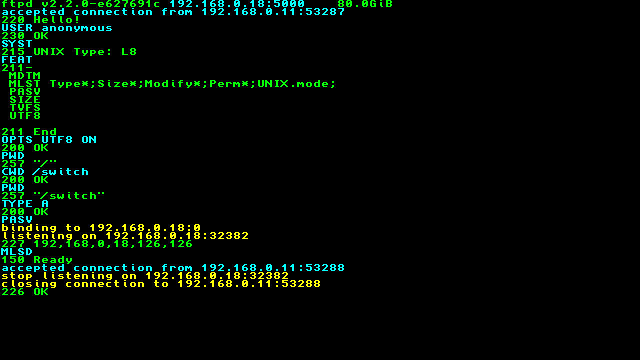
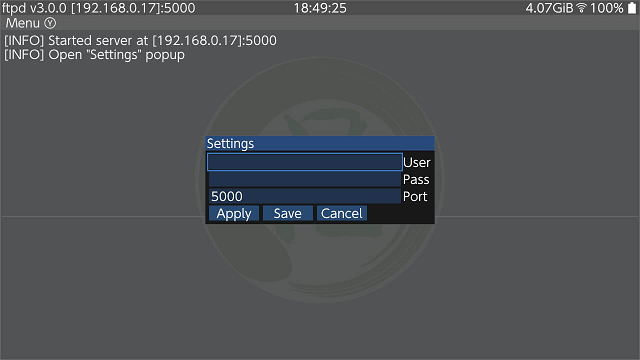
Screenshots
Classic
Standard
Media
Setting Up FTPD (Wireless File Transfers) - Nintendo Switch Edition - Full Guide! (KlutchxGaming)
Changelog
v3.2.1 2024/11/17
- Center 3DS window selector on top screen
- Update to Dear ImGui v1.91.5
- General system stability improvements to enhance the user’s experience
v3.2.0 2024/11/11
- DSi wifi support with update to libnds-2.0.0
- mDNS support
- glob support
- ImGui stereoscopic effect on 3DS
- Removed CIA build for 3DS
- DO NOT ASK ME TO SUPPORT CIA
- Build with CMake
- Update to Dear ImGui v1.91.4
- General system stability improvements to enhance the user’s experience
v3.1.0 2021/06/13
- Access Point mode on Switch.
- Reset button for configuration.
- Update to Dear ImGui 1.83.
- General system stability improvements to enhance the user’s experience.
v3.0.0 2020/05/27
- Even better graphics than ever (Dear ImGui backend).
- NDS support.
- Exit button changed from B to PLUS/START.
- Backlight toggle changed from PLUS/START to MINUS/SELECT.
- User/Password support.
- Scrollable log.
- Status icons/text (battery/wifi/time).
- "Classic" builds retain console interface.
- Further improvements to overall system stability and other minor adjustments have been made to enhance the user experience.
v2.3.1 2019/09/16
- Rebuild against latest toolchains.
- Further improvements to overall system stability and other minor adjustments have been made to enhance the user experience.
v2.3 2018/09/24
- New Supported Commands:
- MLSD.
- MLST.
- SIZE.
- Other Features:
- Switch support.
- Backlight toggle (Start button).
- More compatibility with non-compliant clients.
- Further improvements to overall system stability and other minor adjustments have been made to enhance the user experience.
v2.2 2016/06/16
- Now with more stuff.
v2.1 2016/01/17
- Turbo Edition.
v2.0 2016/01/16
- Turbo Edition.
v1.1 2015/08/20
- First Release.
External links
- Github - https://github.com/mtheall/ftpd