
Donkey Kong Jr. Wii: Difference between revisions
From GameBrew
More actions
No edit summary |
No edit summary |
||
| (4 intermediate revisions by the same user not shown) | |||
| Line 1: | Line 1: | ||
{{Infobox Wii Homebrews | {{Infobox Wii Homebrews | ||
|title=Donkey Kong Jr | |title=Donkey Kong Jr | ||
|image= | |image=donkeykongjrwii2.png | ||
|description=Donkey Kong Jr Game | |description=Donkey Kong Jr Game and Watch clone. | ||
|author=PaulGoes | |author=PaulGoes | ||
|lastupdated=2017/07/06 | |lastupdated=2017/07/06 | ||
| Line 18: | Line 12: | ||
|source=https://github.com/PaulGoes/Wii-Donkey-Kong-Jr | |source=https://github.com/PaulGoes/Wii-Donkey-Kong-Jr | ||
}} | }} | ||
This is a recreation of Game and Watch Donkey Kong Jr for the Wii. For those that are interested a [[#Media|making of video]] is also available, which shows the different stages that the game has gone through during development. | |||
== | ==Features== | ||
*Gameplay identical to the Game & Watch Donkey Kong Jr. | |||
*Each level becomes gradually more difficult: more birds and crocs are added. | |||
*Controlled using the Wiimote controller in horizontal position. | |||
*Wiimote rumble feedback. | |||
*Background graphic borrowed from Game and Watch Gallery 3. | |||
*All other graphics created from a picture taken from my G&W Donkey Kong Jr. | |||
*All sounds recorded from a playing session with G&W Donkey Kong Jr. | |||
==Installation== | |||
For use with [[Homebrew Channel Wii|Homebrew Channel]]: | |||
* Create the folder SD:\apps\dkjunior on your SD card. | |||
* Put the following files in this folder: dkjunior.dol, dkjunior.elf, icon.png, and meta.xml. | |||
* Rename dkjunior.dol to boot.dol and dkjunior.elf to boot.elf. | |||
* Insert the SD card into the Wii's SD card slot. | |||
* Start the Homebrew Channel and select the SD card. | |||
* Start the Donkey Kong Jr homebrew application. | |||
To add the channel forwarder in the system menu: | |||
* Create the folder SD:\wad\ on your SD card. | |||
* Put the file Donkey Kong Jr - DKJR.wad in this folder. | |||
* Insert the SD card into the Wii's SD card slot. | |||
* Install the wad file using a WAD manager like YAWMM. | |||
* The game can now be started from the Wii System Menu. | |||
'''Note:''' The channel forwarder wad was created using [[CustomizeMii Wii|CustomizeMii]]. | |||
== | ==Controls== | ||
Control with the Wiimote holding it sideway. | |||
D-Pad - Move | |||
2 - Jump | |||
==Screenshots== | ==Screenshots== | ||
https://dlhb.gamebrew.org/wiihomebrews/ | https://dlhb.gamebrew.org/wiihomebrews/donkeykongjrwii3.png | ||
https://dlhb.gamebrew.org/wiihomebrews/ | |||
https://dlhb.gamebrew.org/wiihomebrews/donkeykongjrwii4.png | |||
https://dlhb.gamebrew.org/wiihomebrews/ | |||
https://dlhb.gamebrew.org/wiihomebrews/donkeykongjrwii5.png | |||
==Media== | ==Media== | ||
'''Creating the Wii Homebrew Game and Watch Donkey Kong Jr. | '''Creating the Wii Homebrew Game and Watch Donkey Kong Jr. ([https://www.youtube.com/watch?v=u77aPG7SFoY Paul Goes])'''<br> | ||
<youtube>u77aPG7SFoY</youtube> | <youtube>u77aPG7SFoY</youtube> | ||
'''Wii Homebrew Game and Watch Donkey Kong Jr. | '''Wii Homebrew Game and Watch Donkey Kong Jr. ([https://www.youtube.com/watch?v=PbqBAagenMI Paul Goes])'''<br> | ||
<youtube>PbqBAagenMI</youtube> | <youtube>PbqBAagenMI</youtube> | ||
== | ==Credits== | ||
The game is created using [https://devkitpro.org/ devkitpro]. | |||
Good [http://www.codemii.com/category/wii-programming-tutorials/ introduction tutorials] to using devkitpro and Wii programming. | |||
[https://www.elotrolado.net/wiki/Curso_de_programacion Additional information] about Wii programming. | |||
==External links== | ==External links== | ||
* | * GitHub - https://github.com/PaulGoes/Wii-Donkey-Kong-Jr | ||
* | * WiiBrew - https://wiibrew.org/wiki/Donkey_Kong_Jr | ||
Latest revision as of 15:21, 3 August 2023
| Donkey Kong Jr | |
|---|---|
 | |
| General | |
| Author | PaulGoes |
| Type | Platform |
| Version | 1.0 |
| License | GPL-3.0 |
| Last Updated | 2017/07/06 |
| Links | |
| Download | |
| Website | |
| Source | |
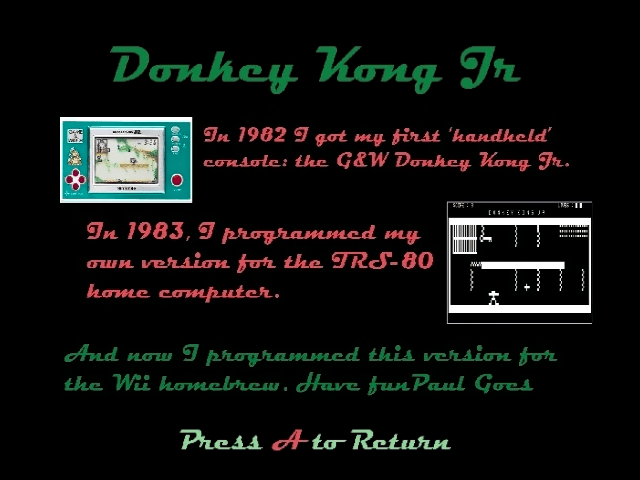
This is a recreation of Game and Watch Donkey Kong Jr for the Wii. For those that are interested a making of video is also available, which shows the different stages that the game has gone through during development.
Features
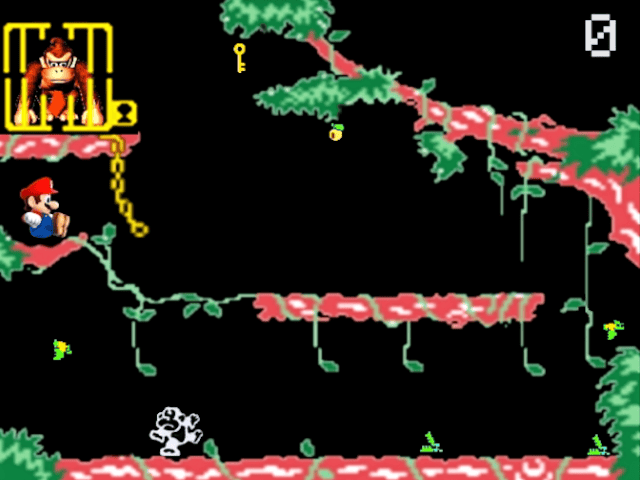
- Gameplay identical to the Game & Watch Donkey Kong Jr.
- Each level becomes gradually more difficult: more birds and crocs are added.
- Controlled using the Wiimote controller in horizontal position.
- Wiimote rumble feedback.
- Background graphic borrowed from Game and Watch Gallery 3.
- All other graphics created from a picture taken from my G&W Donkey Kong Jr.
- All sounds recorded from a playing session with G&W Donkey Kong Jr.
Installation
For use with Homebrew Channel:
- Create the folder SD:\apps\dkjunior on your SD card.
- Put the following files in this folder: dkjunior.dol, dkjunior.elf, icon.png, and meta.xml.
- Rename dkjunior.dol to boot.dol and dkjunior.elf to boot.elf.
- Insert the SD card into the Wii's SD card slot.
- Start the Homebrew Channel and select the SD card.
- Start the Donkey Kong Jr homebrew application.
To add the channel forwarder in the system menu:
- Create the folder SD:\wad\ on your SD card.
- Put the file Donkey Kong Jr - DKJR.wad in this folder.
- Insert the SD card into the Wii's SD card slot.
- Install the wad file using a WAD manager like YAWMM.
- The game can now be started from the Wii System Menu.
Note: The channel forwarder wad was created using CustomizeMii.
Controls
Control with the Wiimote holding it sideway.
D-Pad - Move
2 - Jump
Screenshots

Media
Creating the Wii Homebrew Game and Watch Donkey Kong Jr. (Paul Goes)
Wii Homebrew Game and Watch Donkey Kong Jr. (Paul Goes)
Credits
The game is created using devkitpro.
Good introduction tutorials to using devkitpro and Wii programming.
Additional information about Wii programming.