
Unit13 Trainer Vita: Difference between revisions
From GameBrew
More actions
m Text replacement - "https://vitadb.rinnegatamante.it/" to "https://www.rinnegatamante.eu/vitadb/" |
|||
| (One intermediate revision by the same user not shown) | |||
| Line 29: | Line 29: | ||
Copy the .suprx file to ux0:tai/ or ur0:tai/. | Copy the .suprx file to ux0:tai/ or ur0:tai/. | ||
Add the following lines to tai/config.txt (change to ur0 if you | Add the following lines to tai/config.txt (change to ur0 if you store the plugin there) | ||
*PCSD00021 | *PCSD00021 | ||
ux0:tai/UNIT13.suprx | ux0:tai/UNIT13.suprx | ||
| Line 52: | Line 52: | ||
* Wololo - https://wololo.net/talk/viewtopic.php?t=47512 | * Wololo - https://wololo.net/talk/viewtopic.php?t=47512 | ||
* GitHub - https://github.com/r0ah/vitacheat/tree/master/plg | * GitHub - https://github.com/r0ah/vitacheat/tree/master/plg | ||
* VitaDB - https:// | * VitaDB - https://www.rinnegatamante.eu/vitadb/#/info/85 | ||
* Vita Troubleshooting Guide - [https://cimmerian.gitbook.io/vita-troubleshooting-guide/plugins-related-problem/error-when-using-autoplugin#what-is-a-plugin https://cimmerian.gitbook.io/vita-troubleshooting-guide/plugins-related-problem/] | * Vita Troubleshooting Guide - [https://cimmerian.gitbook.io/vita-troubleshooting-guide/plugins-related-problem/error-when-using-autoplugin#what-is-a-plugin https://cimmerian.gitbook.io/vita-troubleshooting-guide/plugins-related-problem/] | ||
Latest revision as of 04:38, 5 January 2025
| Unit13 Trainer | |
|---|---|
 | |
| General | |
| Author | vosman |
| Type | Plugins |
| Version | 1.01 |
| License | Mixed |
| Last Updated | 2016/10/11 |
| Links | |
| Download | |
| Website | |
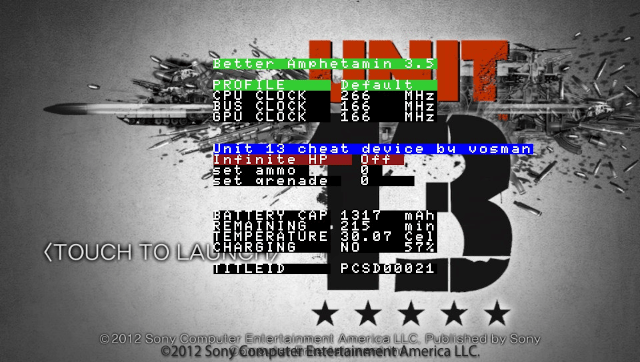
Unit13 Trainer is a cheat plugin for Unit13.
Features
- Unlimited HP.
- Unlimited weapons bullets.
- Unlimited grenades, missiles.
- Level select.
Installation
Copy the .suprx file to ux0:tai/ or ur0:tai/.
Add the following lines to tai/config.txt (change to ur0 if you store the plugin there)
*PCSD00021
ux0:tai/UNIT13.suprx

*PCSF00034
ux0:tai/UNIT13.suprx
Go to Settings > HENkaku Settings > Reload taiHEN config.txt.
Launch the game, then open the menu with hotkeys.
Controls
Down+Select - Open menu
Cross - Close menu
Screenshots
External links
- Douwan - http://bbs.duowan.com/space-uid-1135841.html (archived)
- Wololo - https://wololo.net/talk/viewtopic.php?t=47512
- GitHub - https://github.com/r0ah/vitacheat/tree/master/plg
- VitaDB - https://www.rinnegatamante.eu/vitadb/#/info/85
- Vita Troubleshooting Guide - https://cimmerian.gitbook.io/vita-troubleshooting-guide/plugins-related-problem/