
NetStream Vita: Difference between revisions
More actions
No edit summary |
3.35 |
||
| (14 intermediate revisions by the same user not shown) | |||
| Line 2: | Line 2: | ||
|title=Vita Homebrew Apps (Media players) - GameBrew | |title=Vita Homebrew Apps (Media players) - GameBrew | ||
|title_mode=append | |title_mode=append | ||
|image= | |image=netstreamvita2.png | ||
|image_alt=NetStream | |image_alt=NetStream | ||
}} | }} | ||
{{Infobox Vita Homebrews | {{Infobox Vita Homebrews | ||
|title=NetStream | |title=NetStream | ||
|image= | |image=netstreamvita2.png | ||
|description=Online video streaming application: YouTube and more | |description=Online video streaming application: YouTube and more. | ||
|author=GrapheneCt | |author=GrapheneCt | ||
|lastupdated= | |lastupdated=2026/04/24 | ||
|type=Media | |type=Media Players | ||
|version= | |version=3.35 | ||
|license=Mixed | |license=Mixed | ||
|download=https://dlhb.gamebrew.org/vitahomebrews/netstreamvita.7z | |download=https://dlhb.gamebrew.org/vitahomebrews/netstreamvita.7z | ||
| Line 18: | Line 18: | ||
|source=https://github.com/GrapheneCt/NetStream | |source=https://github.com/GrapheneCt/NetStream | ||
}} | }} | ||
NetStream is a universal video streaming client for the PS Vita, which allows users to stream videos from various platforms and sources on their PS Vita device. | |||
Supports: | |||
* YouTube videos and livestreams. | |||
* HTTP server. | |||
* FTP server. | |||
* Local storage. | |||
==Features== | ==Features== | ||
* | *YouTube and livestreams: | ||
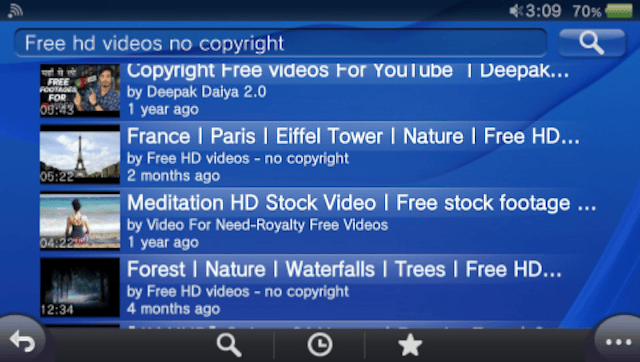
**NetStream can be used to play YouTube videos on PlayStation Vita and PlayStation TV. It supports regular normal video and Live Streaming. You can also read comments and livestream chats, add videos to favorites and download them to your system. YouTube NetStream search engine is powered by Invidious and supports various search filters. | **NetStream can be used to play YouTube videos on PlayStation Vita and PlayStation TV. | ||
* | **It supports regular normal video and Live Streaming. | ||
**NetStream can be used to play video directly from HTTP or HTTPS server. To use this feature you will need to enter the server URL and authentication information if required. | **You can also read comments and livestream chats, add videos to favorites and download them to your system. | ||
**YouTube NetStream search engine is powered by Invidious and supports various search filters. | |||
*HTTP Server: | |||
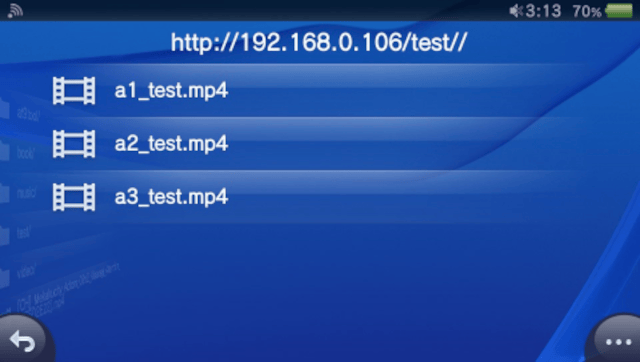
**NetStream can be used to play video directly from HTTP or HTTPS server. | |||
**To use this feature you will need to enter the server URL and authentication information if required. | |||
*Accumulative rewind and fast forward: | |||
**You can use the directional DPAD buttons, shoulder buttons L and R button or touchscreen to accumulate time jump values similar to the YouTube application on Android. | |||
**When the accumulation is complete, the accumulated value will be time jumped and displayed on the screen. | |||
*Energy saving mode: | |||
**You can force the system to enter energy saving mode by pressing the START button during video playback. | |||
**In this mode the screen will be off and only audio will play, you can still control the audio volume while in power saving mode. | |||
**To exit Low Power Mode, press the Power button or the PS button. | |||
*Downloader: | |||
**You can download videos to your system from the Settings menu if the current playback source supports it. | |||
==Controls== | |||
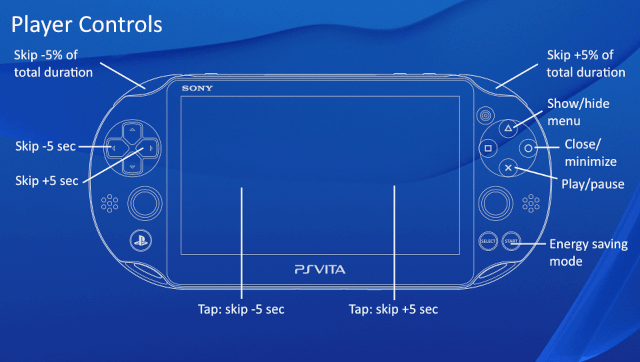
L - Skip -5% of total duration | |||
R - Jump +5% total duration | |||
D-Pad Left - Skip -5 seconds (or tap on the left side of the touchscreen) | |||
D-Pad Right - Skip +5 seconds (or tap on the right side of the touchscreen) | |||
Triangle - Show/Hide menus | |||
Circle - Close/Minimize | |||
Cross - Play pause | |||
Start - Energy saving mode | |||
Please read included PS Vita user manual for more information and controls. | |||
==Screenshots== | |||
https://dlhb.gamebrew.org/vitahomebrews/netstreamvita3.png | |||
https://dlhb.gamebrew.org/vitahomebrews/netstreamvita4.png | |||
https://dlhb.gamebrew.org/vitahomebrews/netstreamvita5.png | |||
https://dlhb.gamebrew.org/vitahomebrews/netstreamvita6.png | |||
==Media== | ==Media== | ||
'''NetStream | New Ps Vita Homebrew Streaming Client ([https://www.youtube.com/watch?v=qZX6f1rq1ZQ Zealous Chuck]) | '''NetStream | New Ps Vita Homebrew Streaming Client''' ([https://www.youtube.com/watch?v=qZX6f1rq1ZQ Zealous Chuck])<br> | ||
<youtube>qZX6f1rq1ZQ</youtube> | <youtube width='640'>qZX6f1rq1ZQ</youtube> | ||
==Changelog== | |||
'''v3.35''' | |||
* Added temporary workaround for YouTube PO token requirement. | |||
'''v3.34''' | |||
* Fixed an issue introduced in v3.30 that resulted in playback skipping for remote audio-only files. | |||
* Added some YouTube video details display back. | |||
'''v3.33''' | |||
* Added offline mode. | |||
* Native language (original) audio track is now used by default for YouTube videos. | |||
* Fixed YouTube History tab. | |||
'''v3.32''' | |||
* Added proxy server support for YouTube. HTTP and SOCKS proxy servers are supported. | |||
* Fixed an issue with 720p resolution for some YouTube videos that resulted audio-only playback. | |||
'''v3.30''' | |||
This version is experimental and may not operate correctly for some videos. | |||
* NetStream no longer relies on Invidious for YouTube support. | |||
* NetStream now uses modern YouTube DASH-like API for VOD videos, with extended audio and video quality list. | |||
* Added cloud storage support for YouTube history and favourites. Cloud storage uses Playstation Network servers, so you must be logged in Playstation Network in order to use it. | |||
* It is now possible to select YouTube livestream in real time directly from the player page. | |||
* Added more YouTube search filters. | |||
* Drastically improved battery efficiency for video playback. | |||
* Added SRT subtitle support. Subtitle file must have the same name as the video file. Subtitles share settings with system Settings (Settings->Accessibility->Closed Captions). | |||
Known bugs: | |||
* YouTube VOD video (non-livestream) comments are barely operational and may crash the application. | |||
* Seeking on some YouTube videos may not be available. | |||
'''v3.13''' | |||
*Fixed an issue with YouTube favourites system. | |||
'''v3.12''' | |||
* Added memory for the last opened path for the local storage. | |||
* Fixed YouTube playback for livestreams. | |||
* Fixed crash when attempting to add YouTube video to favourites or expand video player after video playback error. | |||
'''v3.10''' | |||
* Aspect ratio of the source video will now be retained. | |||
* Added support for the following formats (local storage and HTTP server only): FLAC, MP3, Ogg Vorbis, OPUS, WAV, ATRAC3, ATRAC3plus, ATRAC9, IT, MOD, S3M, XM. | |||
* Added French translation. | |||
* Updated Spanish translation. | |||
* Updated default Invidious instance. | |||
'''v2.0.4''' | |||
* | * Updated default Invidious instance. | ||
* | |||
* | '''v2.0.2''' | ||
* | * Added parser for locally stored .m3u8 playlists. | ||
* | * YouTube player in minimized state now doesn't obstruct screen when starting playback. | ||
* | * Fixed bug where performing new YouTube search from nonzero page didn't reset paging. | ||
* | * Added European Portuguese translation. | ||
* | * Added Brazilian Portuguese translation. | ||
* Added Italian translation. | |||
* Corrections in Polish translation. | |||
''' | '''v2.0.1''' | ||
* Added Polish translation. | |||
* Fixed Spanish translation. | |||
* Fixed string cutoffs in UI on some locales. | |||
'''v2.0.0''' | |||
* | * Added FTP server support. | ||
* | * Added local storage support. | ||
* | * Added Options popup. | ||
* Fixed manual typos. | |||
* Added Russian translation. | |||
* Added Spanish translation. | |||
* Added Japanese translation. | |||
* Added Simplified Chinese translation. | |||
* Added Traditional Chinese translation. | |||
'''v1.0.1''' | |||
''' | * Fixed YouTube page navigation. | ||
* Fixed YouTube page navigation | |||
''' | '''v1.0''' | ||
* First Release. | * First Release. | ||
== External links == | == External links == | ||
* Reddit - https://www.reddit.com/r/vitahacks/comments/zunt06/release_netstream_online_video_streaming/ | * Reddit - https://www.reddit.com/r/vitahacks/comments/zunt06/release_netstream_online_video_streaming/ | ||
* | * GitHub - https://github.com/GrapheneCt/NetStream | ||
* | * GBAtemp - https://gbatemp.net/threads/release-netstream-online-video-streaming-application-by-altctrlgraphene.623718/ | ||
Latest revision as of 04:51, 24 April 2026
| NetStream | |
|---|---|
 | |
| General | |
| Author | GrapheneCt |
| Type | Media Players |
| Version | 3.35 |
| License | Mixed |
| Last Updated | 2026/04/24 |
| Links | |
| Download | |
| Website | |
| Source | |
NetStream is a universal video streaming client for the PS Vita, which allows users to stream videos from various platforms and sources on their PS Vita device.
Supports:
- YouTube videos and livestreams.
- HTTP server.
- FTP server.
- Local storage.
Features
- YouTube and livestreams:
- NetStream can be used to play YouTube videos on PlayStation Vita and PlayStation TV.
- It supports regular normal video and Live Streaming.
- You can also read comments and livestream chats, add videos to favorites and download them to your system.
- YouTube NetStream search engine is powered by Invidious and supports various search filters.
- HTTP Server:
- NetStream can be used to play video directly from HTTP or HTTPS server.
- To use this feature you will need to enter the server URL and authentication information if required.
- Accumulative rewind and fast forward:
- You can use the directional DPAD buttons, shoulder buttons L and R button or touchscreen to accumulate time jump values similar to the YouTube application on Android.
- When the accumulation is complete, the accumulated value will be time jumped and displayed on the screen.
- Energy saving mode:
- You can force the system to enter energy saving mode by pressing the START button during video playback.
- In this mode the screen will be off and only audio will play, you can still control the audio volume while in power saving mode.
- To exit Low Power Mode, press the Power button or the PS button.
- Downloader:
- You can download videos to your system from the Settings menu if the current playback source supports it.
Controls
L - Skip -5% of total duration
R - Jump +5% total duration
D-Pad Left - Skip -5 seconds (or tap on the left side of the touchscreen)
D-Pad Right - Skip +5 seconds (or tap on the right side of the touchscreen)
Triangle - Show/Hide menus
Circle - Close/Minimize
Cross - Play pause
Start - Energy saving mode
Please read included PS Vita user manual for more information and controls.
Screenshots

Media
NetStream | New Ps Vita Homebrew Streaming Client (Zealous Chuck)
Changelog
v3.35
- Added temporary workaround for YouTube PO token requirement.
v3.34
- Fixed an issue introduced in v3.30 that resulted in playback skipping for remote audio-only files.
- Added some YouTube video details display back.
v3.33
- Added offline mode.
- Native language (original) audio track is now used by default for YouTube videos.
- Fixed YouTube History tab.
v3.32
- Added proxy server support for YouTube. HTTP and SOCKS proxy servers are supported.
- Fixed an issue with 720p resolution for some YouTube videos that resulted audio-only playback.
v3.30 This version is experimental and may not operate correctly for some videos.
- NetStream no longer relies on Invidious for YouTube support.
- NetStream now uses modern YouTube DASH-like API for VOD videos, with extended audio and video quality list.
- Added cloud storage support for YouTube history and favourites. Cloud storage uses Playstation Network servers, so you must be logged in Playstation Network in order to use it.
- It is now possible to select YouTube livestream in real time directly from the player page.
- Added more YouTube search filters.
- Drastically improved battery efficiency for video playback.
- Added SRT subtitle support. Subtitle file must have the same name as the video file. Subtitles share settings with system Settings (Settings->Accessibility->Closed Captions).
Known bugs:
- YouTube VOD video (non-livestream) comments are barely operational and may crash the application.
- Seeking on some YouTube videos may not be available.
v3.13
- Fixed an issue with YouTube favourites system.
v3.12
- Added memory for the last opened path for the local storage.
- Fixed YouTube playback for livestreams.
- Fixed crash when attempting to add YouTube video to favourites or expand video player after video playback error.
v3.10
- Aspect ratio of the source video will now be retained.
- Added support for the following formats (local storage and HTTP server only): FLAC, MP3, Ogg Vorbis, OPUS, WAV, ATRAC3, ATRAC3plus, ATRAC9, IT, MOD, S3M, XM.
- Added French translation.
- Updated Spanish translation.
- Updated default Invidious instance.
v2.0.4
- Updated default Invidious instance.
v2.0.2
- Added parser for locally stored .m3u8 playlists.
- YouTube player in minimized state now doesn't obstruct screen when starting playback.
- Fixed bug where performing new YouTube search from nonzero page didn't reset paging.
- Added European Portuguese translation.
- Added Brazilian Portuguese translation.
- Added Italian translation.
- Corrections in Polish translation.
v2.0.1
- Added Polish translation.
- Fixed Spanish translation.
- Fixed string cutoffs in UI on some locales.
v2.0.0
- Added FTP server support.
- Added local storage support.
- Added Options popup.
- Fixed manual typos.
- Added Russian translation.
- Added Spanish translation.
- Added Japanese translation.
- Added Simplified Chinese translation.
- Added Traditional Chinese translation.
v1.0.1
- Fixed YouTube page navigation.
v1.0
- First Release.