
ONEtranslate Vita: Difference between revisions
From GameBrew
More actions
m HydeWing moved page Onetranslate Vita to ONEtranslate Vita without leaving a redirect |
No edit summary |
||
| (5 intermediate revisions by the same user not shown) | |||
| Line 1: | Line 1: | ||
{{#seo: | {{#seo: | ||
|title=Vita Homebrew Apps (Other Apps) - GameBrew | |title=Vita Homebrew Apps (Other Apps) - GameBrew | ||
|title_mode=append | |title_mode=append | ||
|image= | |image=onetranslatevita2.png | ||
|image_alt=ONEtranslate | |image_alt=ONEtranslate | ||
}} | }} | ||
{{Infobox Vita Homebrews | {{Infobox Vita Homebrews | ||
|title=ONEtranslate | |title=ONEtranslate | ||
|image= | |image=onetranslatevita2.png | ||
|description= | |description=Text translator for Play Station Vita. | ||
|author= | |author=ONElua Team (gdljjrod, DevdadisNunez) | ||
|lastupdated=2017/ | |lastupdated=2017/03/10 | ||
|type=Other Apps | |type=Other Apps | ||
|version=1.0 | |version=1.0 | ||
|license=MPL-2.0 | |license=MPL-2.0 | ||
|download=https://dlhb.gamebrew.org/vitahomebrews/onetranslatevita.7z | |download=https://dlhb.gamebrew.org/vitahomebrews/onetranslatevita.7z | ||
|website= | |website=https://gekihen.customprotocol.com/en/project/ONEtranslate | ||
|source=https://github.com/DavisDev/ONEtranslate | |source=https://github.com/DavisDev/ONEtranslate | ||
}} | }} | ||
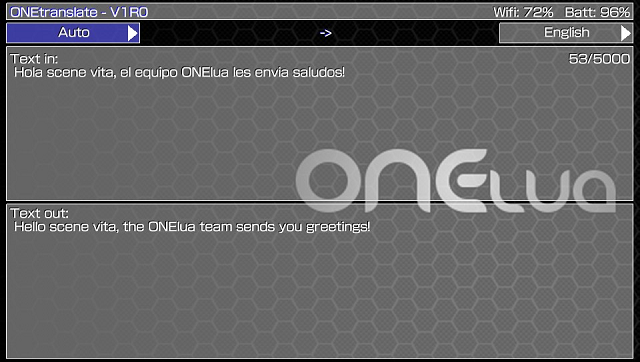
ONEtranslate, is an application written in [http://onelua.x10.mx/ ONElua] and supported by the well-known Google translate service to translate texts directly into the console, through a simple and friendly interface. | |||
It was participated in the GekiHEN Homebrew Contest. | |||
==User guide== | |||
Allows the translation of 11 languages in total: | |||
*English. | |||
*Spanish. | |||
*Japanese. | |||
*German. | |||
*French. | |||
*Italian. | |||
*Dutch. | |||
*Portuguese. | |||
*Russian. | |||
*Korean. | |||
*Chinese. | |||
It also allows automatic mode for the entrance, and thus detect the language that you are entering. | |||
==Controls== | |||
L/R - Switch between the output and input language selector | |||
D-Pad Left/Right - Switch between the available languages in the selectors | |||
Cross - Enter the keyboard and translate the entered text | |||
==Screenshots== | ==Screenshots== | ||
https://dlhb.gamebrew.org/vitahomebrews/ | https://dlhb.gamebrew.org/vitahomebrews/onetranslatevita3.png | ||
https://dlhb.gamebrew.org/vitahomebrews/onetranslatevita4.png | |||
https://dlhb.gamebrew.org/vitahomebrews/ | |||
== | ==External links== | ||
* GitHub - https://github.com/DavisDev/ONEtranslate | |||
* | * GekiHEN Contest - https://gekihen.customprotocol.com/en/project/ONEtranslate | ||
[[Category:GekiHEN Homebrew Contest]] | |||
Latest revision as of 02:51, 2 July 2024
| ONEtranslate | |
|---|---|
 | |
| General | |
| Author | ONElua Team (gdljjrod, DevdadisNunez) |
| Type | Other Apps |
| Version | 1.0 |
| License | MPL-2.0 |
| Last Updated | 2017/03/10 |
| Links | |
| Download | |
| Website | |
| Source | |
ONEtranslate, is an application written in ONElua and supported by the well-known Google translate service to translate texts directly into the console, through a simple and friendly interface.
It was participated in the GekiHEN Homebrew Contest.
User guide
Allows the translation of 11 languages in total:
- English.
- Spanish.
- Japanese.
- German.
- French.
- Italian.
- Dutch.
- Portuguese.
- Russian.
- Korean.
- Chinese.
It also allows automatic mode for the entrance, and thus detect the language that you are entering.
Controls
L/R - Switch between the output and input language selector
D-Pad Left/Right - Switch between the available languages in the selectors
Cross - Enter the keyboard and translate the entered text
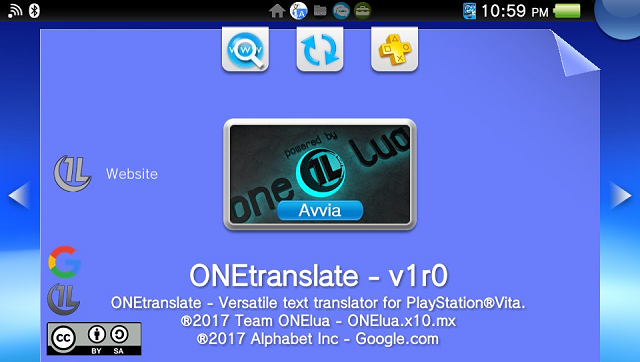
Screenshots
External links
- GitHub - https://github.com/DavisDev/ONEtranslate
- GekiHEN Contest - https://gekihen.customprotocol.com/en/project/ONEtranslate