
SDCafiine Plugin Wii U
More actions
| SDCafiine WUPS | |
|---|---|
 | |
| General | |
| Author | Maschell |
| Type | Plugins |
| Version | 0.1.6 |
| License | Mixed |
| Last Updated | 2026/04/19 |
| Links | |
| Download | |
| Website | |
| Source | |
With SDCaffine you can load custom content from an external source (SD) and thus use game mod on the Wii U.
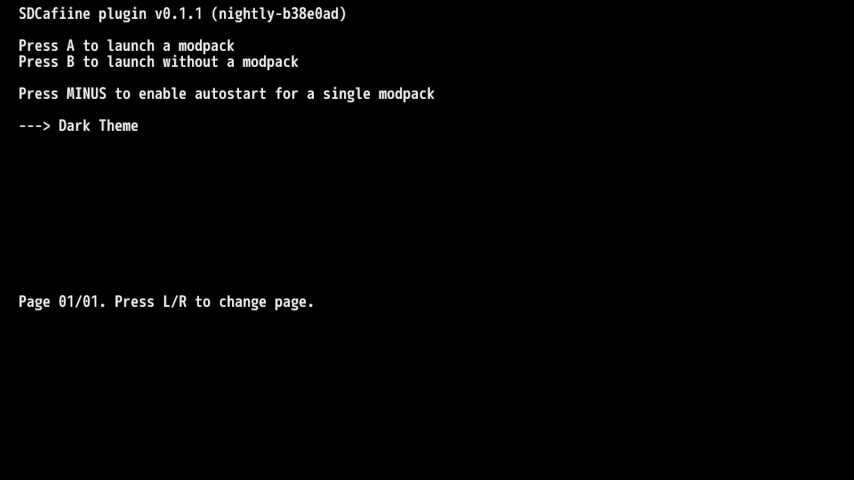
In action, every time a file is accessed on the Wii U, SDCafiine examines whether a modified version of that file is available on the SD card. If it finds a modified counterpart, it redirects the file operations to utilize this version.
Features
- On the fly file replacing of game files.
- Support for replacing files from downloadable content.
- Supports loading files from SD.
- Support for multiple modpacks for as single game.
Installation
Download the latest release.
Copy sdcafiine.wps into sd:/wiiu/environments/aroma/plugins.
User guide
Configuration
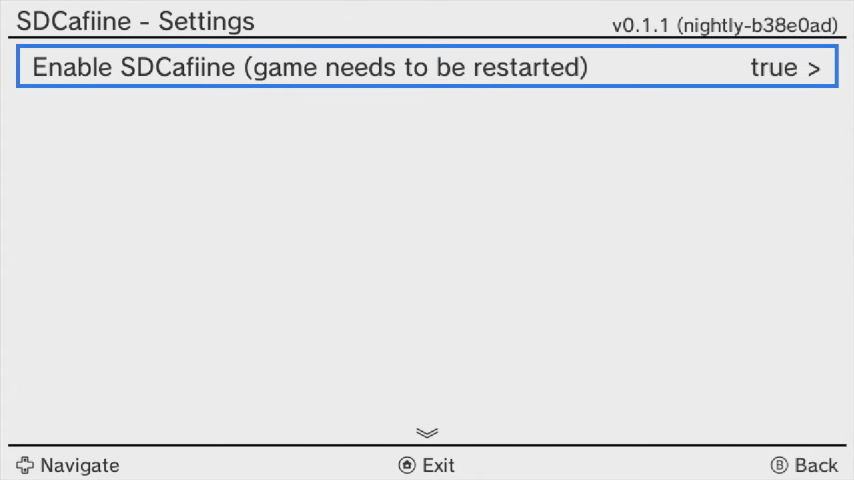
Configure the plugin through the menu (L+D-Pad Down+Minus). Available options include:
- Settings:
- Enable SDCafiine:
- Globally enables or disables SDCafiine. Restart the game to apply changes.
- Enable SDCafiine:
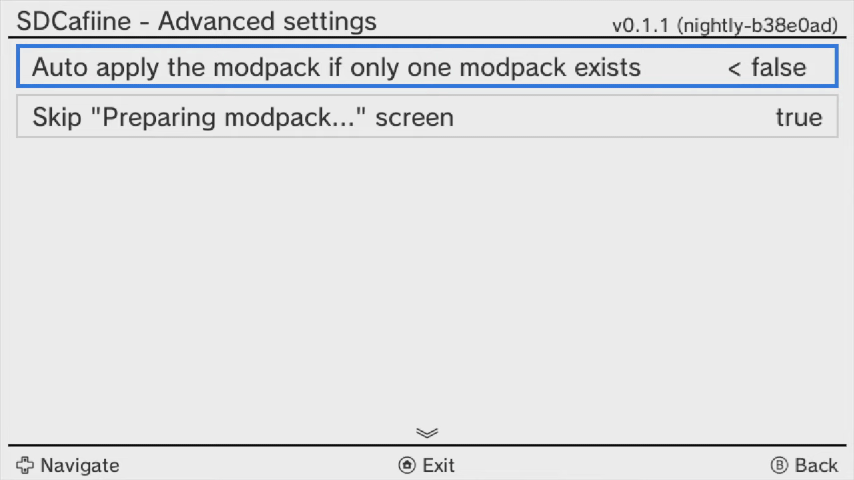
- Advanced Settings:
- Auto apply the modpack if only one exists:
- Skips modpack selection if only one is available. Press X during "Preparing modpack" to launch the game without mods.
- Skip "Preparing modpack..." screen:
- Skips the "Preparing modpack..." screen during auto boot into a single modpack. Disable to run the game without mods.
- Auto apply the modpack if only one exists:
Installing mods
Copy the files to the SD card, the structure is as follows (with "root:/" corresponding to the SD card root):
root:/wiiu/sdcafiine/[TITLEID]/[MODPACK]/content/ <-- for game files, maps to /vol/content/
root:/wiiu/sdcafiine/[TITLEID]/[MODPACK]/aoc/ <-- for DLC files, maps to /vol/aoc/
Replace:
- [TITLEID] with the game's TitleID (e.g., SSBU: "0005000010145000").
- [MODPACK] with the modpack's name.
Example path for the EUR version of Super Smash Bros for Wii U:
root:/wiiu/sdcafiine/0005000010145000/SpecialChars/content/
root:/wiiu/sdcafiine/0005000010145000/SpecialChars/aoc/
To replace the file /vol/content/movie/intro.mp4:
root:/wiiu/sdcafiine/0005000010145000/SpecialChars/content/movie/intro.mp4
Managing multiple mod packs
SDCafiine supports multiple mods for a single game on the same SD card. Each modpack has its own subdirectory:
sd:/wiiu/sdcafiine/0005000010145000/ModPack1/content/
sd:/wiiu/sdcafiine/0005000010145000/ModPack2/content/
Hiding files via SDCafiine
If you want a game to stop using a certain file without getting rid of it permanently, you can hide it using SDCafiine. Instead of removing the file, you create an empty file with with the prefix .deleted_. This tells SDCafiine to keep the file hidden from the game. For example, to "delete" /vol/content/assets/tree.bin:
root:/wiiu/sdcafiine/[TITLEID]/[MODPACK]/content/assets/.deleted_tree.bin
Screenshots
Changelog
v0.1.6 2026/04/19
- Bump version, update logging, update Dockerfile by @Maschell in #47.
v0.1.5 2024/05/09
- Fix changing the auto apply setting directly in the splash screen by @Maschell in #33
- Full Changelog: v0.1.4...v0.1.5
v0.1.4 2024/05/06
- Support for WUPS 0.8.1.
v0.1.3 2023/07/22
- Compile with latest wut, devkitPPC and wups version.
- Full Changelog: v0.1.2...v0.1.3.
v0.1.2 2022/10/11
- Fix /vol/aoc support #10 (requires ContentRedirectionModule v0.2.3 or higher).
- Full Changelog: v0.1.1...v0.1.2.
External links
- GitHub (Plugin) - https://github.com/wiiu-env/sdcafiine_plugin
- GitHub (HBL version) - https://github.com/Maschell/SDCafiine
- Homebrew App Store - https://hb-app.store/wiiu/SDCafiine_WUPS