
PSP Cheat Hacker
More actions
| PSP Cheat Hacker | |
|---|---|
 | |
| General | |
| Author | Nekokabu |
| Type | Hack Utilities |
| Version | 0.12 |
| License | Mixed |
| Last Updated | 2006/05/09 |
| Links | |
| Download | |
| Website | |
| Source | |
PSP Cheat Hacker is a homebrew works similar to Pro Action Replay.
User guide
Menu
Insert the disc of the game you want to modify and launch Cheat Hacker. The main menu will be displayed.
Menu:
- Start Game - Launch the game
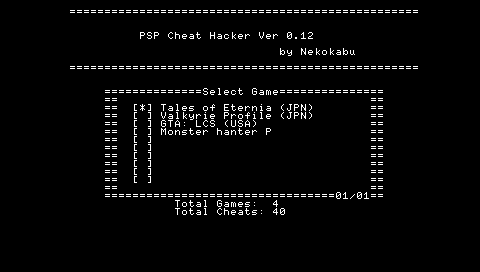
- Select Cheat Codes - Select the cheat codes to use
- Options - Settings
- Exit - Exit Cheat Hacker
- Total Games, Total Cheats - Displays the number of registered game titles and cheat codes.
Start Game
In the Start Game menu, you can change whether to use cheat codes, memory dump functionality, etc.
- Start UMD Game - Start the UMD game
- Boot XMB - Display the PSP system menu (XMB)
- Cheat Code - Toggle cheat codes (on/off)
- Memory Dump - Toggle memory dump functionality (on/off)
- Cancel - Return to the main menu
Select Cheat Codes
From this menu, you can select which cheat codes to use.
Options
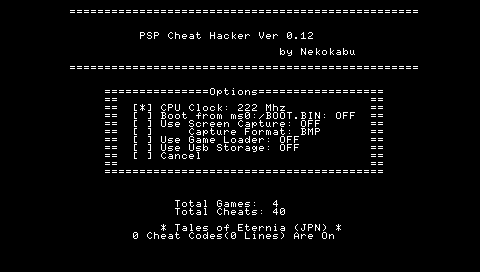
You can change the settings for Cheat Hacker here.
- CPU Clock - Change the PSP's CPU clock speed
- Boot from ms0:/BOOT.BIN - Instead of using the BOOT.BIN inside the UMD, launch the BOOT.BIN placed in the root of the Memory Stick. (See Note 1)
- Use Screen Capture - Toggle the use of the screen capture feature
- Capture Format - Select the save format for screenshots. Supports BMP, PNG, and JPEG.
- Use Game Loader - Toggle whether to use Game Loader or RunUMD for game startup.
- Use Usb Storage - Enable using the PSP as a USB mass storage device during gameplay.
- Cancel - Return to the main menu
- Exit - Exit Cheat Hacker
(Note 1: This feature is full of bugs and does not work correctly)
Memory Dump
The memory dump feature saves the game's memory to the Memory Stick while the game is running. It can be enabled by turning on the Memory Dump option in the Game Start menu.
When the memory dump feature is enabled, the following actions are available during gameplay:
- R+Vol Up - Save 24MB of memory starting from 0x08800000 to a file.
- L+R+Select - Return to the PSP menu.
The files are saved to the root of the Memory Stick as mem00.bin, mem01.bin, mem02.bin, and so on. These saved files can be compared using a binary editor like SFX or disassembled using PS2DIS to create cheat codes.
When creating cheat codes, make sure to add 0x08800000 to the address.
Note:
- Each saved file is 24MB, so make sure there is enough free space on your Memory Stick before using this feature.
- Do not turn off the power while writing to the Memory Stick.
Screenshots
While the software is running, press Note to capture a screenshot. Press Vol Down and Note simultaneously to capture at 1/4 size. Press L+R+Note (+Vol Down) to start continuous capture mode, where screenshots are captured continuously. To stop continuous capture mode, hold the Note button.
- Note - Capture the screen to a file, End continuous capture mode
- Note+Vol Down - Capture the screen at 1/4 size (only when saving as BMP)
- L+Note (+Vol Down) - Start continuous capture mode
- L+R+Select - Return to the PSP menu
Captured images are saved in the capture folder on the Memory Stick.
Note:
- Do not turn off the power while writing to the Memory Stick.
- Capturing at 1/4 size is only available when saving in BMP format. If set to PNG or JPG, the screenshot will be saved at the original size.
- Some games may cause the system to freeze when taking screenshots in JPG or PNG formats.
Screenshots
Compatibility
Developed for 1.00 and 1.50.
Support Game Loader (MPH or RunUMD) to launch games that require firmware version 2.00 or later.
Changelog
Ver0.12 2006/05/09
- Fixed the issue where pressing L + R + Select during XMB launch would not terminate the program.
- Moved
cheat.prxto the installation directory (PSP/GAME/~), such asms0:/PSP/GAME/cheat/. - Changed key assignments:
- R + Vol+ → Memory dump
- L + R + Music (+ Vol-) → Start continuous capture mode
- Fixed a bug where the game would freeze when saving memory or taking screenshots.
- Added support for saving screenshots in PNG and JPG formats.
- Changed screenshot save location to
ms0:/PSP/PHOTO/capture. - Changed screenshot filename format to “Game ID_Number.png” (e.g.,
ULJM-05037_004.png).
External links
- Author's website - http://nekokabu.s7.xrea.com/