
Luma3DSWeather
More actions
| Luma3DSWeather | |
|---|---|
 | |
| General | |
| Author | Dzhmelyk135 |
| Type | Other Apps |
| Version | 1.2 |
| License | MIT License |
| Last Updated | 2026/02/27 |
| Links | |
| Download | |
| Website | |
| Source | |
A working weather app for all consoles of the Nintendo 3DS family with custom firmware installed.
Weather data provided by Open-Meteo.com.
Features
- Works with any city in the world - including small and less known ones (like Pegognaga, MN, Italy!)
- Real-time weather data via Open-Meteo - free, no API key required
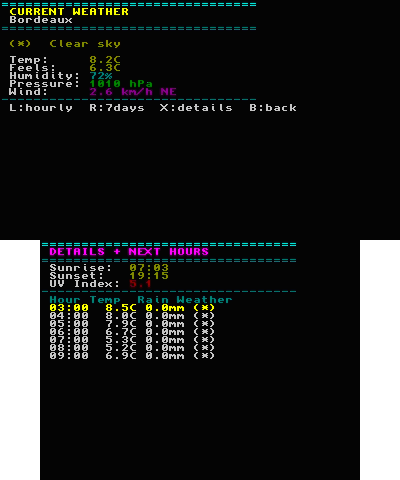
- Hourly forecast - temperature, precipitation, humidity and weather condition for each hour of today
- 7-day forecast - max/min temperature, precipitation, wind speed and weather condition
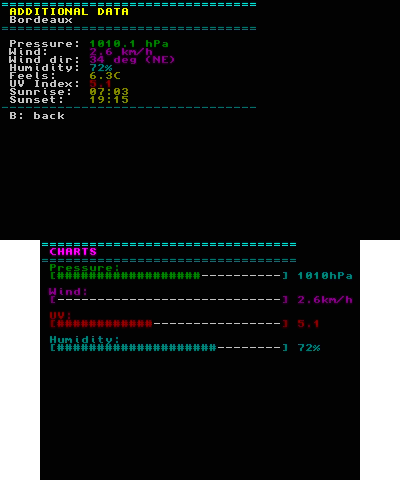
- Additional data - atmospheric pressure, wind speed & direction, UV index, feels-like temperature, sunrise & sunset times, with visual bar indicators
- Multiple cities - save up to 20 cities and switch between them instantly
- City reordering - reorder your saved cities with an intuitive drag interface
- 7 languages supported:
- Italiano
- English
- Français
- Español
- Deutsch
- Ukrainska (romanized)
- Nihongo (romanized)
- Persistent settings - language and cities are saved to the SD card and remembered on next launch
- Symbol legend - built-in legend screen explaining all weather icons.
(*)Clear sky(^)Partly cloudy(n)Cloudy / Overcast~~~Fog._.Drizzle***Snow/!/Thunderstorm???Unknown
- Lightweight - console-based UI, no heavy graphics, fast and responsive
Installation
Copy 3ds-weather.3dsx to your SD card (sdmc:/3ds/3ds-weather/3ds-weather.3dsx).
Launch the Homebrew Launcher on your 3DS and select 3DS Weather.
User guide
Make sure your 3DS is connected to WiFi.
Press X to add your first city.
Note: The app will automatically create the folder /3ds/3ds-weather/ on first launch and save your cities and language preference there.
Controls
City List
Up/Down - Navigate cities
A - Download & show weather
X - Add a new city
Y - Delete selected city
Select - Reorder cities
L - Open language selection
R - Open symbol legend
Start - Exit app
Current Weather
L - Hourly forecast
R - 7-day forecast
X - Additional details
B - Back to city list
Start - Exit app
Hourly Forecast
Up/Down - Scroll hours
R - 7-day forecast
B - Back
7-Day Forecast
L - Hourly forecast
X - Additional details
B - Back
City Reorder
A - Pick up/Put down city
Up/Down - Move selected city
B - Save and go back
Screenshots
Compatibility
Works with 3DS(XL), 2DS, N2DS(XL). N3DS(XL).
Changelog
v1.2
- Dual screen support All screens now use both the top and bottom display to show more information at once - current weather, hourly forecast, daily forecast, details, and city comparison all take advantage of both screens.
- City comparison: Press R from the city list to compare two cities side by side. Top screen shows city 1, bottom screen shows city 2, with a temperature delta indicator.
- Reorder cities with L: Press L from the city list to quickly reorder your saved cities.
- SELECT menu Press SELECT to open a quick-access menu with: Language, Symbol Legend, Compare Cities, and Credits.
- WiFi error screen If the internet connection fails, a clear error screen is shown on both displays with tips on how to fix the connection, instead of a generic error message.
- Credits screen Added a credits screen accessible from the SELECT menu, showing the developer, repository, and libraries used.
- Default language: English The app now defaults to English on first launch, instead of italian.
v1.1
- Fixed error in displaying the "hour per hour" data
v1.0
- First public version
Credits
- Open-Meteo- free weather & geocoding API
- devkitPro - 3DS homebrew toolchain
- libctru - Nintendo 3DS userland library
- jsmn- lightweight JSON parser by Serge Zaitsev (MIT)
- Luma3DS - custom firmware