
ItemzFlow PS4
More actions
| ItemzFlow | |
|---|---|
 | |
| General | |
| Author | LightningMods, Masterzorag |
| Type | Utilities |
| Version | 1.06 |
| License | GPL-3.0 |
| Last Updated | 2024/06/27 |
| Links | |
| Download | |
| Website | |
| Source | |
| Support Author | |
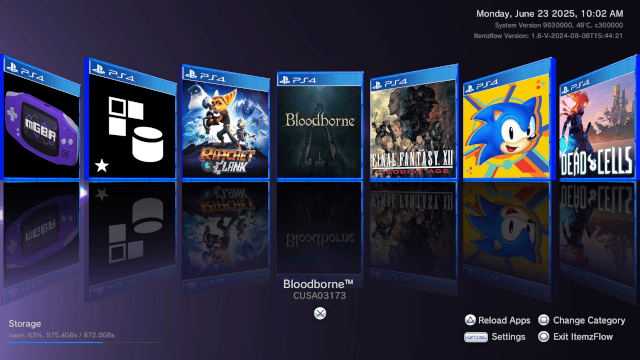
ItemzFlow Game Manager is an open-source Home Menu alternate for the PS4 that expands the beyond limits of Sony's ShellUI.
Features
- App manager.
- Game dumper.
- PKG installer.
- Cover download.
- MP3 playback.
- Custom themes.
User guide
Menus
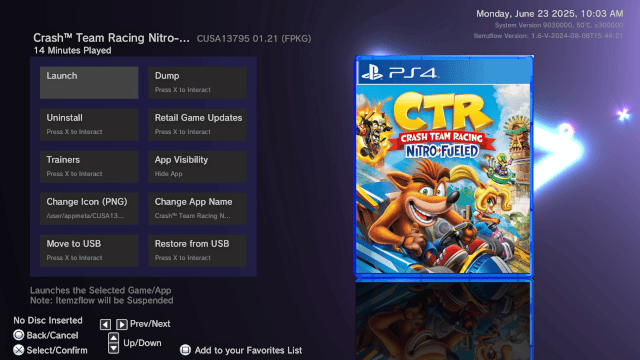
Apps menu:
- Launch
- Dump
- Uninstall
- Retail Game Update
- Trainers
- App Visibility (Show/Hide app from Home Menu)
- Change Icon (PNG, 512x512)
- Change App Name
- Move to USB
- Restore from USB
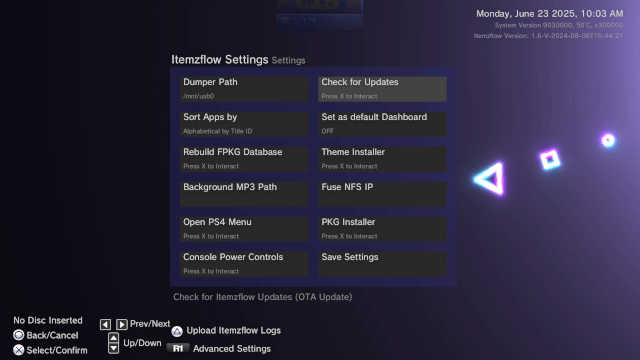
Settings menu:
- Set Dumper Path
- Check for Updates
- Sort Apps (Alphabetical by title id)
- Set as default default Dashboard (ON/OFF)
- Rebuilt FPKG Database
- Background MP3 Path
- Fuse NFS IP
- Open PS4 Menu
- PKG Installer
- Console Power Controls
- Save Settings
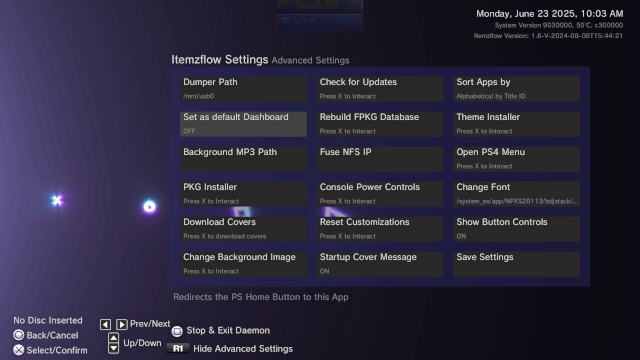
Advanced settings menu:
- Set Dumper Path
- Check for Updates
- Sort Apps (Alphabetical by title id)
- Set as default default Dashboard (ON/OFF)
- Rebuilt FPKG Database
- Theme Installer
- Background MP3 Path
- Fuse NFS IP
- Open PS4 Menu
- PKG Installer
- Console Power Controls
- Change Font
- Download Covers
- Reset Customizations
- Show Button Controls
- Change Background Image
- Startup Cover Message
- Save Settings
Settings
the ini file is either loaded by the app dir or from USB0 when the app is booted
Settings Layout
| INI Key | Description |
|---|---|
Dumper_option
|
0 = ALL 1 = BASE Game only 2 = Patch only |
Sort_By
|
-1 is NA 0 = Alpha order by TID 1 = Alpha order by App Name |
Sort_Cat
|
Sort category |
cover_message
|
Shows cover message on app startup |
MP3_Path
|
FS Path to a folder of MP3s or a single MP3 to play on loop |
Dumper_Path
|
Dump path |
TTF_Font
|
TTF Font the store will try to use (embedded font on fail) |
Show_Buttons
|
Shows IF buttons on the screen |
Enable_Theme
|
ONLY Active if you have a theme enabled |
Image_path
|
background PNG image |
Reflections
|
Enables cover reflections in IF |
Home_Redirection
|
Enables the Home Menu Redirect |
Daemon_on_start
|
Disables the Daemon from auto connecting with the app |
Image_path
|
Background Image |
Show_install_prog
|
Enables the Store PKG/APP install Progress |
Fuse_IP
|
PC NFS Share in format nfs://IP/share_name
|
setting.ini example
[Settings]
Dumper_option=0
Sort_By=-1
Sort_Cat=0
cover_message=1
MP3_Path=/mnt/usb0/music
Dumper_Path=/mnt/usb0
TTF_Font=/mnt/usb0/myfont.ttf
Show_Buttons=1
Enable_Theme=1
Image_path=/mnt/usb0/pic.png
Reflections=1
Home_Redirection=1
Daemon_on_start=0
Show_install_prog=1
Fuse_IP=nfs://192.1.2.3/nfs_share
The NFS formatted string can be entered in the app using the in-app keyboard or set in the settings.ini file
nfs://PC_IP/share_name
or if your share name is /
PC_IP
Daemon
The itemz daemon is installed when you open the app for the first time at /system/vsh/app/ITEM00002 it gets updated ONLY by Itemzflow
The daemon folder is ONLY for internal use by the Itemzflow devs it is hash checked by the loader to ensure the daemon is always up to date with the PKG
Dumper details
- Dumper log is at
/user/app/ITEM00001/logs/if_dumper.log - Dumper WILL ONLY dump to the first USB it finds (most likely USB0)
- Dumper will try to use the same Language as Itemzflow
- If the dumper gets stuck on a file make SURE both discs and ALL Languages are installed if available BEFORE Dumping
- If your dump has failed then provide us the log
/user/app/ITEM00001/logs/if_dumper.login our discord below
Languages
- The Itemzflow's Langs. repo is HERE
- The Itemzflow uses the PS4's System software Lang setting
Themes
- You can download custom themes released in the Itemzflow Themes Repo
- You can also make your own custom themes by following these instructions.
Important: The Theme files must HAVE the exact filename as listed below.
| Filename | Description |
|---|---|
btn_o.png
|
O Button (67x68) |
btn_x.png
|
X Button (67x68) |
btn_tri.png
|
Triangle Button (67x68) |
btn_sq.png
|
square Button (67x68) |
btn_r1.png
|
R1 Button (309x152) |
btn_l1.png
|
L1 Button (120x59) |
btn_l2.png
|
L2 Button (120x105) |
btn_options.png
|
Options Button (145x84) |
btn_up.png
|
D-Pad Up Button (32x32) |
btn_down.png
|
D-Pad Down Button (32x32) |
btn_left.png
|
D-Pad Left Button (32x32) |
btn_right.png
|
D-Pad Right Button (32x32) |
font.ttf
|
Theme Font |
background.png
|
Background Image |
shader.bin
|
PS4 GLES Compiled Shader |
theme.ini
|
Theme Info |
Theme INI Config
| INI Key | Description |
|---|---|
| Name | Theme Name |
| Author | Who Made it |
| Date | Date it was made on |
| Version | Theme Version Number |
| Image | 1 if your Theme has a background image, 0 if not |
| Font | 1 = Theme has font.ttf 0 = It doesnt |
| Shader | 1 = Has Shader bin 0 = It doesnt |
Example Theme config
[THEME]
Name=Example Theme
Author=Example Author
Date=10/16/2022
Version=1.00
Image=1
Font=1
Shader=0
App logs and their paths
| Service | PS4 Path |
|---|---|
| Itemzflow main app | /user/app/ITEM00001/logs/itemzflow_app.log
|
| Dumper | /user/app/ITEM00001/logs/if_dumper.log
|
| Itemz Loader | /user/app/ITEM00001/logs/loader.log
|
| Itemz Daemon | /data/itemzflow_daemon/daemon.log
|
| libfuse | /data/itemzflow_daemon/libfuse.log
|
On USB (only on failure or crash)
| Service | USB Path |
|---|---|
| Itemzflow main app | /mnt/usb<USB_NUMBER>/itemzflow/crash.log
|
| Dumper | /mnt/usb<USB_NUMBER>/itemzflow/dumper.log
|
| Itemz Loader | /mnt/usb<USB_NUMBER>/itemzflow/loader.log
|
| Itemz Daemon | /mnt/usb<USB_NUMBER>/itemzflow/daemon.log
|
Game Patches
- Downloads from online database via the app or manual install via zip file
- Supported formats:
yamlfilename must be(TITLE_ID).yml, i.e CUSA00547.yml - Startup patches only supports
eboot.binfor now. PRs are very welcome to support games that use multple elf. - YML per game filepath:
/data/GoldHEN/patches/yml/(TITLE_ID).yml
Patch Syntax
Syntax:
{ "type": "", "addr": "", "value": "" }
Types:
byte: 1 bytebytes16: 2 bytesbytes32: 4 bytesbytes64: 8 bytesbytes: array of bytes (no spaces)utf8: utf8 stringutf16: utf16 string
Examples:
{ "type": "byte", "addr": "0x01271464", "value": "0x01" },
{ "type": "bytes", "addr": "0x00402d90", "value": "31c0c3" }
Controls
Cross - Apps menu
Triangle - Reload apps
Square - Change category
Options - Settings
Circle - Exit ItemzFlow
Screenshots
Media
New PS4 Itemzflow Game Manager Preview (MODDED WARFARE)
Changelog
v1.06
- Added (experimental) Fake Game support (load dumps from USB or local storage, supports NFS, requires external fake signing).
- Added Firmware info and Compatibility details to the retail game updates feature.
- Added the option to have PKGs installed in the background through Itemzflow's PKG installer (File Browser Option).
- Itemzflow will now keep the last 3 logs (last 3 itemzflow launches).
- Added more info for certain error codes (i.e patch installer will tell you if you are blocking Sonys CDN etc).
- Improved stock itemzflow performance.
- Fixed a memory leak that would cause issues if a lot of games were on the console.
- Added a progress bar for downloading covers.
- Fixed an issue causing Itemzflow to crash if you tried to download game covers with the API blocked (i.e DNS).
- Improved the itemz-daemon Fuse startup (wont stall trying to auto-connect to the last NFS share if unavail.).
- 1.05 HOTFIXs.
- Fixed an issue that would cause the app to crash when using/selecting trainers.
- Fixed an issue causing the "Upload itemzflow logs" not to appear in the settings.
- Added a prompt to explain the issue when uploading the logs manually via settings (not from crashing).
- Disabled all C++ exceptions (allows my custom crash handler to work on FW 5.50+).
v1.05
- Fuse (NFS) support for 11.00.
- Replaced the Game Saves option with the option to download retail game updates.
- Fixed dumping patches from external storage.
- The Dumper will ask if you want to generate the GP4 at the end of the dump.
- The Dump All option will now try to dump any loaded DLCs (to dump DLCs not yet loaded use the Dump DLC option).
- The Dumper should now cancel dumping if the app is resumed twice (resumed again while dumping) instead of restarting.
- The Dumper will now display the time it took to dump a game in the last message.
- Added the ability to upload Itemzflows logs via triangle in the settings menu (internet required).
- Upon crash you will now have to option to Itemzflows logs for review (internet required).
- Itemzflow will now pre-load app icons after launching.
- Game playtime has been moved to its own itemzflow thread (should increase perf).
- the Itemz-daemon will now record playtime for both mini (homebrew) and big apps (games) open.
- Added more files to the GP4 blacklist to improve compatibility with Sonys PKG tools.
- Fixed the favorites category.
- Improved media app detection.
- Improved code quality.
v1.04
- Fixed dumping DLCs and AC w/o data.
- Added an Install all PKGs option for folders with more than 1 PKG.
- Installing a PKG will no longer boot you back to settings.
- Carried over some improvements from the PS5 version of IF.
- Replaced reg. vectors for ThreadSafeVectors.
- Added the Chinese lang files.
- Fixed a bug that would cause the Utility thread to deadlock.
- Fixed a Bug that caused the daemon not to give a backtrace on 9.00.
v1.03
- Added a screen saver (with alternating text every 5 mins) when idling for 15 mins or if the controller is turned off.
- Itemzflow now accepts and backups game saves in Apollo's Decrypted save format for portability.
- Added 3 dpad speeds (to all directions) depending on how long you have held the button.
- Screen saver shows IP address, FW, temp, itemzflow version and current theme info.
- Install a PKG or dump a game directly to your PC using /hostapp when connected to an NFS share.
- Added the Remote app virtual app to itemzflow's app menu when connected to an NFS Share.
- Added specific vapp menus instead of showing the traditional game menu.
- Added an option to stop music, hovering over background music in settings press square to stop and remove the music.
- Added Fuse NFS PC IP to the settings menu.
- NFS setting accepts other share names using the following format nfs://PC_IP/share_name.
- Added libfuse (with patches) and a modified version of fuse-nfs by @sahlberg to the itemz-daemon (big thanks to @SocraticBliss).
- Added Fuse related RPC commands.
- [HOT FIX] fixed the Store API by including the prx in the pkg.
- Improved game dumper progress.
- Removed the Reflections setting (can still be enabled manually and will continue to work if previously enabled).
- Daemon now saves every NFS IP after successful connection for auto connection.
- Fixed move to and restore from USB in the game menus.
- Improved the PS button redirect.
- @illusion0001 moved game patches from using tinyjson to pugixml.
- Improved Itemz-daemons RPC functions and Itemzflow's IPC functions.
- Added vapp launch events.
- Fuse currently only supports 9.00 and 5.05 goldhen or unreleased mira update, all fws.
- Fixed a few bugs.
v1.02
- First Release.
Credits
Lead Developer:
Third-Party Libraries:
- fuse-nfs
- libNFS
- libfuse
- FTPS4
- dr_mp3
- liborbisAudio
- Orbis SQLite
- OrbisDev SDK
- OOSDK for PRXs
- JSMN (MIT)
- INI Parser (Apache License 2.0)
- RSA Verify (ARMmbed) (Apache License 2.0)
- OpenSSL/MD5 (Apache License 2.0)
- BusyBox (GPLv2)
- LibPNG
- log.c
- Game Dumper
- libjbc
- pugixml
- taglib
- Libz
Refs:
Credits:
- Flatz
- SocraticBliss
- TheoryWrong
- Znullptr
- Xerpi
- TOXXIC407
- Masterzorag
- Psxdev/BigBoss
- Specter
- SocraticBliss
- Sleirsgoevy
- AlAzif
- BigBoss
- bucanero (Game Saves)
- illusion (Game Patches/Trainers)
- Pharaoh2k (Apps/Games/DLCs Databases Recovery)