
Argon-NX-SX-Mod Switch
More actions
| Argon-NX-SX-Mod | |
|---|---|
 | |
| General | |
| Author | mrdude |
| Type | Payload (Binaries) |
| Version | 2019 |
| License | Mixed |
| Last Updated | 2019/04/24 |
| Links | |
| Download | |
| Website | |
| Source | |
A mod for Argon-NX that lets you run alternative payloads and write/read from the micro SD card.
This Argon-NX mod allows for the automatic creation of your SXOS license.dat, it also has a SXOS payload generator contained within the payload. This payload can be installed on any dongle that supports payload updates, or can be flashed onto a samd21 based modchip.
It also include some ability to turn off/reboot/boot OFW to the menu's in Argon-NX. Those options were added so if you boot into RCM without a micro SD card you can boot to OFW/Shutdown easily from the menu.
Installation
Payload creation:
- Replace your license.dat with the one in the payload creation folder.
- If you want to add your own serial, open b.hex with a hex editor (HXD), edit the highlighted MYSX-LICENCE serial (see the included picture) with your own sx license code. Save b.hex (don't change the byte size or edit anything apart from MYSX-LICENCE).
- Click Join.bat to create your own custom argon-nx.bin.
A new payload file will be created and will be unique to your device, and always have your own license embedded. You can flash this to a modchip (trinket mo/samd21 based chip) using binConverter.py and then using arduino ide to upload. If you have a dongle based on samd21 chips - you can flash in the same way you normally flash that.
Reboot to argon:
- Put generated argon-nx.bin into argon folder
/argon/argon-nx.bin - Put reboot_to_argon-nx.nro into your
switchfolder. - Launch argon-nx like any other homebrew (press v+ during loading if you have autoboot.bin in your root directory).
Note on icons:
- Included is a photoshop file so you can make your own, the layout is 1 line with 4 icons (290x290 pixels).
- If you need more, place extra payloads in a folder called payloads2.
User guide
One the first run, the Argon-NX menu will appear - you can generate your autoboot.bin (SXOS payload) + license.dat from this menu. Also, if you installed the included SD files, you can load any of those payloads from that menu.
On the second run - if you created autoboot.bin, the Switch will boot that automatically when you enter RCM mode. If you keep your finger on Volume Up - the Argon-NX menu will load instead.
The ability to boot into OFW and Shutdown the Switch has also been added to the menu. If the Switch boots without a micro SD card - and you boot into RCM, you can choose to boot OFW/Shutdown or reload RCM mode.
Interface
Top arrow - next page if payloads2 dir exists.
Icons (from left to right):
- Battery - shows battery percentage, changes colours depending on charge level. Shows warning at 5%.
- Screenshot.
- Fuse - shows amount of fuses blown.
- Gen SX payload as autoboot.bin if autoboot.bin doesn't exist.
- Gen SX licence (if you add this yourself).
- About.
- Launch autoboot.bin (icon doesn't show if not present).
- Launch ordinary firmware.
- Power off.
Screenshots
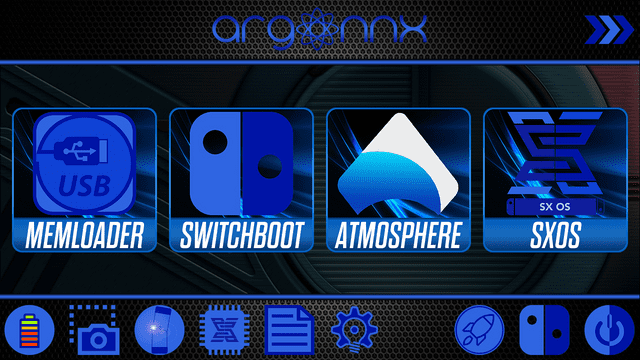
Changelog
2019/04/24
- Icons added instead of text, minor icon fixes - new background.
- Also many fixes applied, and error checks added, auto centering of payload icons (if less than 4 - no longer goes to left of screen but centres properly), speed increase due to uneeded loop (thanks - JustBrandonT for fix). Auto timer shows text on screen for 5 seconds then text is removed. Updated graphics - and other stuff I probably forgot.
2019/04/08
- If a user had more than 4 payloads in the Argon payloads directory, icons would draw over each other - fixed.
- Some other minor bug fixes/changes.
- Extra menu added - if the user has more than 4 payloads, place extra payloads in Argon/payloads2 directory.
- If you previously downloaded - download sd files again as these new graphics are included - you need default.bmp in the argon/logos folder as the payload reads the size from this file to generate icons.
- NOTE: Boot to OFW does not work if you have AutoRCM enabled, it works without that enabled though - I've no idea why or how to fix it.