
Animal Crossing - New Horizons - Design Pattern Editor Switch
More actions
| Animal Crossing: New Horizons - Design Pattern Editor | |
|---|---|
 | |
| General | |
| Author | PotatoePet |
| Type | Hack Utilities |
| Version | 1.0.1a |
| License | GPL-3.0 |
| Last Updated | 2026/05/01 |
| Links | |
| Download | |
| Website | |
| Source | |
| Support Author | |
An editor for Animal Crossing: New Horizons design patterns.
This software only works with hacked Switch and in combination with JKSV to export your device saves, edit them with this tool and reimport them after that.
The editor was tested and verified with 1.0.0 - 2.0.8.
Features
- Loading the savegame and showing all of your design patterns.
- Cloning of design patterns.
- Swapping of design patterns.
- Deleting design patterns.
- Importing a picture (png, gif, jpg, bmp, webp) as design pattern with different color quantization algorithms etc.
- Importing ACNL, ACNH and QR codes.
- Edit patterns with a lot of tools. Editing is happening in 32-bit and can be quantized to your liking.
- Edit pattern supports layering and importing smart objects (images).
- Support for full 24-bit colors (of course you are still limited to a palette of 15 colors).
- Supports transparency.
- Save your designs as project files (keeping all layers).
- Exporting a picture (as png, gif, jpg, bmp) to share it with others.
- Exporting a design as QR code (only legacy designs work).
- Full support for pro designs (including legacy 3DS designs like the horned cap).
- Preview of patterns in 3D.
- Of course saving your savegame.
- Windows and Mac support.
Screenshots
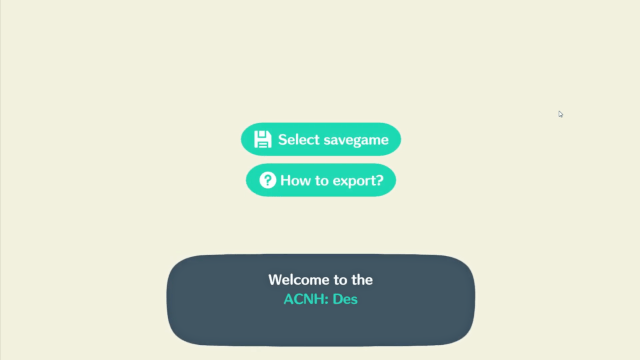
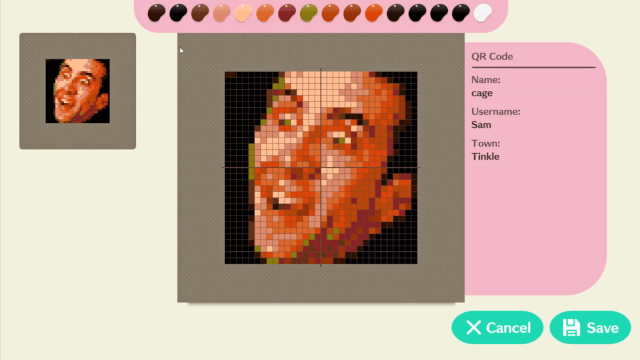
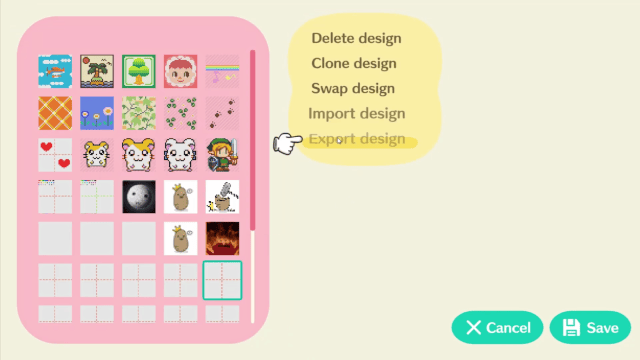
Media
Animal Crossing: New Horizons - Design Pattern Editor (Potatoe Pet)
How to use Animal Crossing: New Horizons - Design Pattern Editor (Green Greenieee)
Changelog
1.0.1a 2026/05/01
- Updated offset detection code.
1.0.1 2026/02/27
- Fixed an error which corrupted the names due to a wrong offset in patterns.
- An error which lead to freezing UI was fixed involving exchange import actions.
- The tool now adds file extensions on export if they are missing.
- The tool shows which file types are supported in file dialogue now.
- Mac can select any file for .anch and .acnl imports as there is a weird bug with tinyfiledialogs and 4 letter extensions on Mac.
- Changed the way BinaryData reads strings. Its now finding the end of string (0x0000) and uses it accordingly for text parsing.
1.0.0 2026/02/27
- Added offsets for 3.0.1
- The editor is now able to find hash regions in save files based on the latest one. This means that if Nintendo decides to update ACNH again, the tool probably won't break.
- The editor is now also able to find offsets for pro designs and simple designs.
- The editor is now also able to find offsets for the pattern-set flags.
- The pattern-set flags are now correctly set.
- The usage parameter in designs is now correctly set (e.g. transparent patterns).
- Removed the pattern exchange from import menu.
- Added the pattern exchange as a menu button at pattern selection.
- The new pattern exchange is freely browsable. You can click a pattern, import it to a slot and continue right where you left off. This makes importing a lot of patterns much easier.
- Fixed a pagination bug when searching. It now correctly resets to page 1
- Added the ability to delete multiple patterns with a new "IMultipleSelectCommand". Click on a pattern, choose "Delete multiple" and select all patterns you want to remove.
- Deleted patterns will now have the standard english names.
- Added settings menu.
- Removed credits from the settings button at top and put it into the new settings menu.
- Added Close button to credits.
- Added refresh rate options.
- Added animation speed options (I recommend not using fastest, but it's of course an option).
- Removed SkiaSharp.
- Added SixLabors.ImageSharp as the new imaging library.
- Cleaned up some unused files.
- Removed native code for texture manipulation and instead use LoadRawTextureData (performance seems OK).
- Removed StandaloneFileBrowser.
- Added tinyfiledialogs.
- Fixed the brush overlay still showing when importing an image.
- Added import support for raw .nhd files (exported by NHSE).
- Added export support for raw .nhd files (imported in NHSE).
- Changed standard image import to use box scaling.
- Removed Patreon and added Ko-Fi.
- Fixed the scaling of the application. It keeps 16:9 ratio but is better useable in 4:3 environments now as it scales with width and height.
- Fixed an error which resulted in the background layer not showing an actual texture.
- Updated to Unity 2022.3.
- Mac and Linux builds are untested but should in theory work. I don't have anyone willing and able to test right now. So give it a try :)
0.9.7.2a 2026/01/21
- Critical hotfix for the 3.0.0 update.
0.9.7.2 2026/01/21
- Updated for 3.0.0.
0.9.7.1 2025/06/20
- Updated for 2.0.8.
0.9.6 2025/01/31
- Updated Unity version.
- As I moved servers I made the pattern exchange connect future proof by connecting to designs.potatoepet.de instead of an IP address.
0.9.5p16 2022/11/30
- Added support for 2.0.6.
0.9.5p15 2022/02/19
- Added support for 2.0.5.
0.9.5p14 2022/12/20
- Added support for 2.0.4.
0.9.5p13 2021/11/25
- Added support for 2.0.3.
0.9.5p12 2021/11/24
- Updated for 2.0.2.
0.9.5p11 2021/11/14
- Updated for 2.0.1.
0.9.5p10 2021/11/05
- Updated for 2.0.
- Fixed a bug which prevented the connection transition to not fade out when the connection to pattern exchange fails.
- A possible fix for ownership of patterns.
- Changed some dependencies to make the editor build with Unity 2019.4.32f1 (LTS).
- Improved design icons resolution to prevent blurriness. (by Jesús Miguel Cruz Cana).
0.9.5p6 2021/08/14
- Added support for 1.11.1.
0.9.5p5 2021/07/31
- Added support for 1.11.
- Changed pattern exchange IP to point to my new server.
0.9.5p4 2021/04/28
- Finally fixed 1.10 (hopefully).
Full changelog can be found here.
Credits
Special thanks to Cuyler36 for MyHorizons.