
3DS CodEdit
From GameBrew
More actions
| 3DS CodEdit | |
|---|---|
 | |
| General | |
| Author | dcuevasa |
| Type | Utilities |
| Version | 1.0.0 |
| License | N/A |
| Last Updated | 2026/03/30 |
| Links | |
| Download | |
| Website | |
| Source | |
3DS CodEdit is a code-first editor and project workspace for Nintendo 3DS.
It combines a lightweight multi-tab text editor, project Git workflow, file manager tools, and a monochrome draw mode for quick PBM assets.
Features
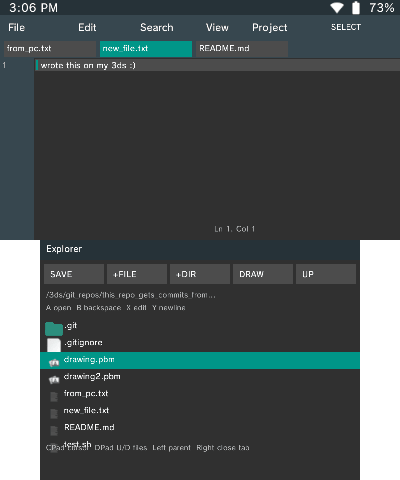
Code editing on-device
- Multi-tab text editor (up to 4 open documents).
- Create, open, edit, save, and save-as files directly on SD.
- Line-based editing with cursor movement, line numbers, and visible cursor position (Ln/Col).
- Fast editing actions from buttons and top menu:
- edit current line with OSK,
- insert newline,
- close/switch tabs,
- find next text match,
- undo/redo support.
- Sidebar workflow for project files: open files/folders, create new file/folder, go to parent directory.
Integrated Git + GitHub workflow
- Local Git actions:
- init repository,
- add all,
- commit staged changes,
- staged file counter and branch display.
- GitHub actions:
- probe remote,
- clone to current path,
- fetch,
- pull (fast-forward),
- push,
- personal access token storage.
- Example repository with commits made from 3DS CodEdit:
.gitignoresupport in add-all and push file scanning.- Multi-repository safety improvements:
- repository-local remote/branch state is preferred,
Root*warning when operating from a subfolder,- double-confirm guard for root-scope actions.
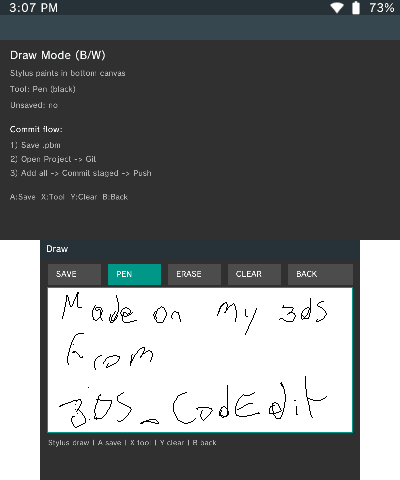
Draw mode for pixel assets (.pbm)
- Built-in black/white canvas editor (stylus pen + eraser).
- Create new drawings from editor sidebar (
DRAW). - Open existing
.pbmfiles from Explorer or editor sidebar. - Save as PBM (
P4) and return to Git workflow for commit/push.
File and system
- Explorer with storage usage bar, icons, and multi-select.
- File operations: create, rename, delete, copy, move, and batch operations.
- Archive extraction support (
.zip,.rar,.7z,.lzma). - Image viewer with zoom/pan and image properties.
- Search and quick jump to a path.
- Optional CTRNAND browsing/copying in developer options.
- Sorting modes: alphabetical (asc/desc) and size (largest/smallest).
- Dark theme, updater, and persistent config (
last_dir, sort mode, Git defaults, token).
- Home icon toggles between Explorer and editor.
- In Explorer,
SELECTalso returns to editor. - In editor,
SELECTopens/closes the top menu (File,Edit,Search,View,Project). Projectopens the Git panel.
Installation
Option A: Install 3DSX (Homebrew Launcher)
- Download 3DS_CodEdit.3dsx from Releases.
- Power off your 3DS and insert the SD card into your PC.
- Copy the file to the SD card in the path.
- Put the SD card back in the 3DS and launch it from Homebrew Launcher.
Option B: Install CIA (Home Menu)
Controls
Editor: Circle Pad - Cursor
D-Pad Up/Down - Navigate file browser
D-Pad Left - Parent folder
D-Pad Right - Close tab
A - Run
B - Backspace
X - Edit current line
Y - New line
L/R - Switch tab
Select - Menu
Screenshots
External links
- GitHub - https://github.com/dcuevasa/3DS_CodEdit
- Universal-DB - https://db.universal-team.net/3ds/3ds_codedit