
3dJelly 3DS
More actions
| 3dJelly | |
|---|---|
 | |
| General | |
| Author | 8-bitStudio |
| Type | Media Players |
| Version | 0.4.2 |
| License | GPL-2.0 |
| Last Updated | 2026/06/06 |
| Links | |
| Download | |
| Website | |
| Source | |
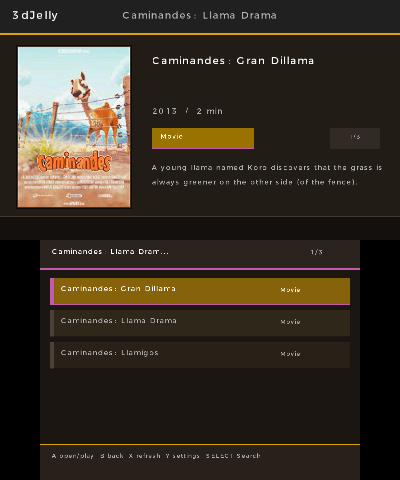
3dJelly is a 3rd party Nintendo 3DS homebrew client for Jellyfin. It is built for browsing and playing media from a Jellyfin server.
The project is early, there will be bugs. 3dJelly is being actively worked on. Browsing and login are the most stable parts right now. Playback is still experimental because the 3DS has limited CPU power, limited memory, and different video capabilities between Old 3DS, New 3DS, and emulators.
Current playback paths:
- New 3DS: tries Jellyfin transcoding to low resolution H.264 and uses the 3DS MVD hardware decoder.
- Old 3DS: defaults to 144p and uses a Jellyfin MJPEG fallback path.
- Azahar: can use the fallback path for testing when hardware video decode is not available.
Features
- Username and password login through Jellyfin
- Saved server, user, and token configuration on the SD card
- Library and item browsing
- 144p, 240p, and 240HQ available on old Nintendo 3ds systems. 360p and 480p are available on New Nintendo 3ds systems.
- Experimental New 3DS H.264 hardware decode path
User guide
Download the latest CIA from Releases.
Install 3dJelly.cia on a modded Nintendo 3DS via FBI, or use it with an emulator that supports CIA installation.
Server setup:
- Use the local network address of your Jellyfin server.
- For example:
http://YOUR_SERVER_IP:8096 - Do not use
localhostunless Jellyfin is running inside the same device or emulator environment. For a real 3DS, use the IP address of the computer or server running Jellyfin.
Controls
A - Open/Play selected item, Pause/Resume during playback
B - Back, Stop playback, Cancel autoplay countdown
X - Refresh current view
Y - Settings from browse screens, Mute/Unmute during playback
D-Pad Up/Down - Volume during playback
D-Pad Left/Right Change quality during playback
L/R - Scrub backward/forward during playback
Start - Exit
Screenshots
Compatibility
3dJelly works best on the 'New Nintendo 3DS' but works on the original Nintendo 3DS.
Known issues
- Playback may hitch when audio is loud.
- Some shows make you click B twice to get out of specials.
- Some shows dont show season 2.
Changelog
v0.4.2
- Added
- Added a search feature
- Added Polish language support.
- Added Indonesian language support.
- Added Turkish language support.
- Added Swedish language support.
- Added localized search, settings, browsing, playback status, error, and bottom-screen playback text for new languages.
- Changed
- Improved playback overlay handling for Latin diacritics so translated titles and status text avoid question marks where possible.
- Updated app-reported version to 0.4.2.
- Fixed
- Fixed browse artwork fitting so show and poster previews better cover their frame without small top or bottom bars.
- Fixed playback status badges for Polish, Indonesian, Turkish, and Swedish loading, error, and stopped messages.
- Notes
- The focus is now on plugins
- 3dJelly now supports a total of 17 languages
v0.4.1
- Added
- Added Afrikaans, French, German, Italian, Dutch, Portuguese, Russian, Korean, Simplified Chinese, and Traditional Chinese language support.
- Added native Korean/Hangul text rendering.
- Added Simplified and Traditional Chinese system-font support for normal UI text.
- Added compact playback-screen glyph support for Korean, Japanese, Simplified Chinese, and Traditional Chinese.
- Added configurable bottom-screen dimming during video playback, with timer options and a Never setting.
- Changed
- Reworked translations into separate JSON files with a generated C translation table.
- Improved the language selector with a larger modal, scroll window, current-language marker, and clearer controls.
- Improved Japanese playback UI text so bottom-screen controls and status labels use native Japanese.
- Fixed
- Fixed ampersands rendering as question marks in playback text.
- Fixed Japanese language label rendering after adding Chinese font support.
- Fixed Korean, Japanese, Simplified Chinese, and Traditional Chinese playback status labels showing missing or fallback characters.
- Notes
- 3dJelly now supports 13 languages.
- Some translations are new and may need community feedback, especially text that is too long for the 3DS screen.
- Playback is still experimental, especially at higher quality settings on Old 3DS. 3dJelly has not been tested on a new 3ds.
v0.4.0
- Added
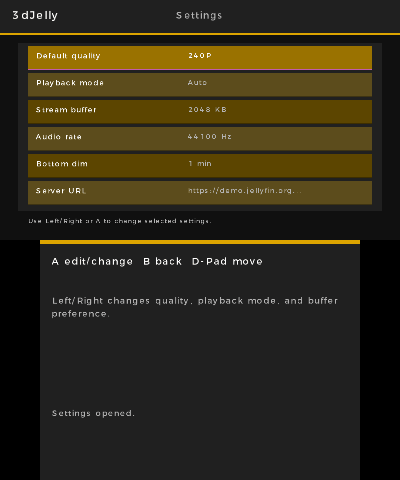
- Added a Settings screen opened with Y from browsing screens.
- Added settings for default quality, playback mode, stream buffer preference, server URL, and username.
- Added actions to clear saved login data, reset server/user data, and reset playback defaults.
- Added configurable audio sample rates for 240p and 240HQ playback.
- Added automatic next-episode playback when an episode ends.
- Added a top-screen next-episode countdown with A to play next immediately and B to cancel.
- Added a stacked language selector with native labels: English, Español, and 日本語.
- Changed
- Moved Setup access on the Libraries screen to B.
- Changed the Language setting from inline cycling to a selector menu.
- Removed the experimental 240M1 quality mode from user-selectable settings.
- Kept 144p audio at 22050 Hz while allowing higher audio rates for 240p and 240HQ.
- Fixed
- Fixed episodes replaying the last few seconds after reaching the end.
- Fixed near-end MJPEG/H.264 stream closes being treated as reconnects.
- Fix login redirects for public Jellyfin servers Issue #7, by @ClammyMantis488
- Fixed the language selector drawing behind Settings text.
- Fixed Japanese playback status badges not recognizing Japanese loading, error, and stopped states.
- Notes
- Japanese support is new and should be considered early. Please report any text that does not fit or any translation issues.
- Playback is still experimental, especially at higher quality settings on Old 3DS.
v0.3.0
- Added
- Added encrypted saved password and token storage.
- Added L/R video scrubbing with accelerated hold-to-skip behavior.
- Added top-screen seek progress overlay.
- Added experimental
240M1MPEG-1/MP2 playback mode for Old 3DS testing. This mode may be kept, changed, or removed depending on further testing. - Added deeper stream buffering with startup prebuffering.
- Changed
- Changed playback quality switching to D-pad left/right so L/R can be used for scrubbing.
- Improved bottom-screen playback controls for seek, quality, and volume.
- Improved Old 3DS MJPEG playback performance and catch-up behavior.
- Lowered normal Old 3DS
240pMJPEG bitrate from820 kbpsto720 kbpsfor stability. - Added threaded stream reading so network reads are less likely to block playback.
- Optimized MJPEG frame presentation by flushing only the top video framebuffer.
- Fixed
- Added stream-open retries and reconnect-from-current-position behavior after MJPEG stream interruptions.
- Improved handling of saved credential decrypt failures.
- Notes
240M1is experimental. It may work better than MJPEG on some Old 3DS setups, but it is still being tested.- Playback is still experimental on Old 3DS hardware.
v0.2.1
- Changes
- Added Old 3DS specific quality options, including
240HQ. - Improved
144pand240pbitrate targets for better image quality. - Improved audio stability during MJPEG playback.
- Added boosted-volume limiting and NDSP soft clipping to reduce harsh clipping on loud audio.
- Saved D-pad volume between videos and app restarts.
- Optimized MJPEG/AVI playback parsing, audio queue handling, JPEG color conversion, and fullscreen
400x240frame drawing. - Fixed large libraries, seasons, and folders being cut off by adding paged Jellyfin item loading.
- Increased browse capacity for large folders.
- Improved playback bottom-screen title wrapping for long titles.
- Added Old 3DS specific quality options, including
- Assets
3dJelly.ciafor installable 3DS title builds.3dJelly.3dsxfor Homebrew Launcher builds.3dJelly.smdhmetadata/icon file.- Source archives are generated automatically by GitHub.
v0.2.0
- Added
- Working in-playback quality switching with
L/R. - Fresh Jellyfin playback sessions when changing quality, so the server actually rebuilds the transcode.
- Current-position resume when changing quality.
- Higher-resolution quality popup showing requested and actual decoded stream size.
- Improved bottom-screen playback controls and UI.
- Better volume and mute controls during playback.
- Working in-playback quality switching with
- Fixed
Bduring video returns directly to the previous screen instead of the playback setup screen.- Library/item filtering now avoids showing media not actually in your server.
- Bottom-screen playback UI no longer flashes as aggressively during updates.
- Improved text rendering for punctuation and accented characters.
- Fixed HOME-button close behavior that left app stuck closing in a loop.
- Notes
144pand240pare still the best targets for Old 3DS.360pand480pmay be slow depending on hardware, emulator, server speed, and the media being transcoded.- For Homebrew Launcher use, download both
3dJelly.3dsxand3dJelly.smdh. - Source archives are attached automatically by GitHub.
v0.1.2
- First 3dJelly release!
Credits
Developed by 8-bit Studio and contributors.
Built with:
- C and Make
- devkitPro / devkitARM for Nintendo 3DS homebrew building
- libctru for 3DS system services, input, filesystem, networking, HTTP, audio, and app lifecycle
- citro2d and citro3d for native 3DS rendering
- Mbed TLS / mbedcrypto for AES and SHA-256 used by saved credential encryption
- picojpeg for JPEG/MJPEG frame decoding
- pl_mpeg for the experimental MPEG-1/MP2 playback code path
- Project_CTR makerom for CIA packaging
Jellyfin is a separate open source media server project. 3dJelly is an unofficial client and not affiliated with Jellyfin.