
FuseCheck Switch
More actions
| FuseCheck | |
|---|---|
 | |
| General | |
| Author | sthetix |
| Type | System Tools |
| Version | 1.0.4 |
| License | GPL-2.0 |
| Last Updated | 2026/06/16 |
| Links | |
| Download | |
| Website | |
| Source | |
FuseCheck is a Nintendo Switch payload that checks your console's burnt fuse count against the installed firmware version to determine if Official Firmware (OFW) will boot properly.
This is critical for users who have been using CFW and want to know if they can safely boot into stock firmware.
Based on Lockpick_RCM_Pro, with fuse checking logic inspired by the fuse-check project and UI design from TegraExplorer Switch and NCA Database checking from NxNandManager Switch.
Features
- Automatic Firmware Detection - Detects firmware version from SystemVersion NCA in SYSTEM partition
- Hardware Fuse Reading - Reads burnt fuse count directly from hardware registers
- Compatibility Analysis - Compares fuses against firmware requirements
- Horizontal UI Layout - Clean, TegraExplorer-inspired interface
- Fuse Database Viewer - Browse complete fuse requirements for all firmware versions
- Scrolling Support - Navigate through unlimited database entries
- Screenshot Support - Capture results with 3-finger touch gesture
- Silent Key Derivation - Keys derived in RAM only, no files written to SD
- External Database - Easy-to-update database file (no recompilation needed)
- Auto-Return to Hekate - Launches bootloader/update.bin after exit
User guide
Why Do Fuses Matter
Nintendo uses a hardware anti-downgrade mechanism called "fuse burning." Each major firmware update burns additional fuses, and the console checks this count during boot:
- Too few fuses burnt = Console will black screen on OFW boot
- Correct fuse count = OFW will boot normally
- Extra fuses burnt = Console will black screen on OFW boot
Installation
Download the latest zip from the Releases page.
Extract the zip to the SD card.
Boot into Hekate and launch FuseCheck.bin from the payloads menu.
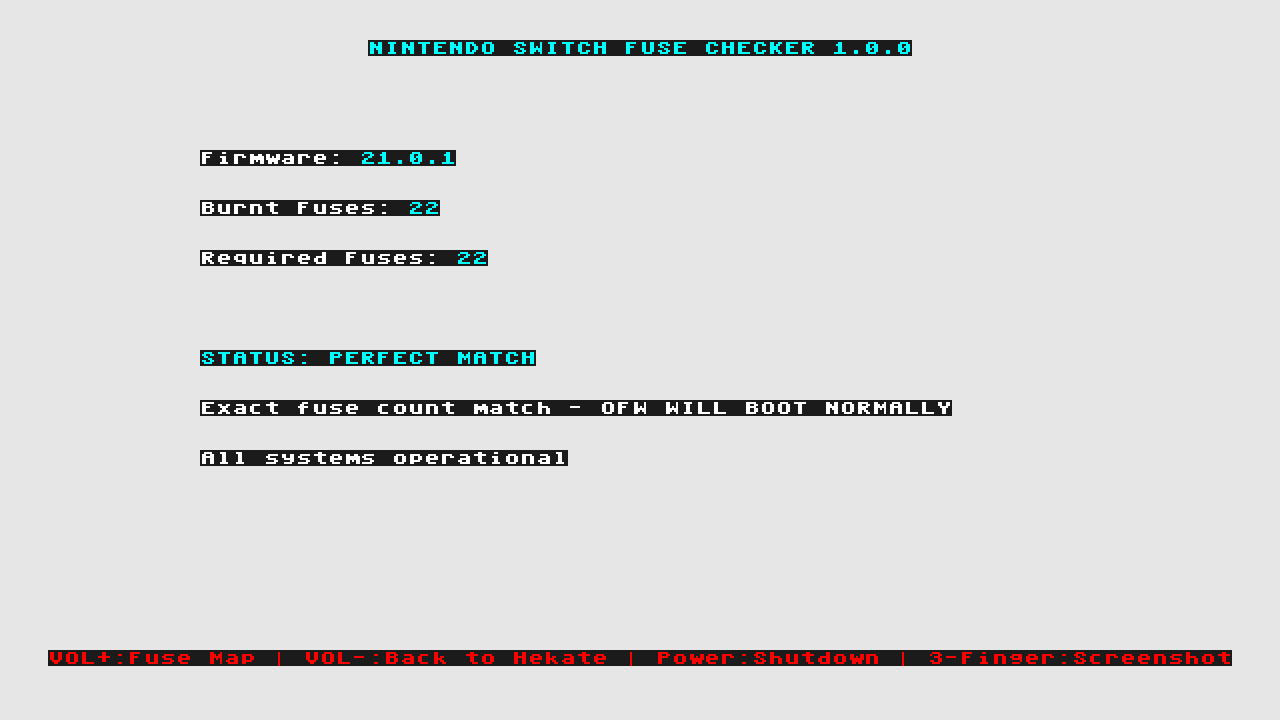
Main Page (Fuse Check Results)
The main page displays:
- Firmware Version - Auto-detected from SYSTEM partition
- Burnt Fuses - Hardware fuse count from ODM6+ODM7 registers (X fuses burnt)
- Required Fuses - Fuses needed for detected firmware
- Status - Color-coded compatibility result
- Detailed Info - What will/won't work based on fuse status
Controls:
- VOL+ - View Fuse Database (all firmware versions)
- Power - Return to Hekate
- 3-Finger Touch - Take screenshot
Fuse Database Page
View complete fuse requirements for all Nintendo Switch firmware versions:
- System version ranges
- Production unit fuse counts
- Development unit fuse counts
- Scroll indicator showing position [start-end/total]
Controls:
- VOL+ - Scroll down (stops at bottom)
- VOL- - Scroll up (stops at top)
- Power - Return to main page
- 3-Finger Touch - Take screenshot
Status Indicators
FUSE MISMATCH
- Condition: Burnt fuses < Required fuses
- Result: OFW WILL NOT BOOT (black screen)
- What will work: CFW (Atmosphère), Semi-stock (Hekate nogc)
- What won't work: Stock OFW
FUSE MISMATCH (OVERBURNT)
- Condition: Burnt fuses > Required fuses
- Result: OFW WILL NOT BOOT (black screen)
- What will work: CFW (Atmosphère), Semi-stock (Hekate nogc)
- What won't work: Stock OFW
- Note: This is very rare but can happen on some consoles
PERFECT MATCH
- Condition: Burnt fuses = Required fuses
- Result: OFW WILL BOOT NORMALLY
- Note: System is in ideal state for both CFW and OFW
Database Configuration
FuseCheck uses an external database file for easy updates without recompilation.
Database Location
sd:/config/fusecheck/fusecheck_db.txt
Database Format
The database file supports two entry types:
Fuse Count Entries:
[FUSE] <version_range> <prod_fuses> <dev_fuses>
Example:
[FUSE] 21.0.0-21.0.1 22 1
[FUSE] 20.0.0-20.5.0 21 1
[FUSE] 19.0.0-19.0.1 20 1
NCA Entries:
[NCA] <version> <nca_filename>
Example:
[NCA] 21.0.1 e7273dd5b560d0ba282fc64206fecb56.nca
[NCA] 21.0.0 4b0130c8b9d2174a6574f6247655acc0.nca
[NCA] 20.5.0 23ce01f1fc55e55a783162d456e5ca58.nca
Comments:
Lines starting with # are treated as comments.
Updating the Database
When new Switch firmware is released:
- Update the
[FUSE]section with new fuse count from switchbrew - Update the
[NCA]section with the new SystemVersion NCA filename - Copy the updated file to
sd:/config/fusecheck/fusecheck_db.txt - No recompilation needed
A sample database file is included in the repository at fusecheck_db.txt.
How It Works
- Hardware Initialization - Initializes display, storage, and DRAM
- Silent Key Derivation - Derives BIS keys in RAM using Lockpick_RCM engine
- Fuse Reading - Reads ODM6 and ODM7 fuse registers and counts all burnt fuses
- SYSTEM Partition Access - Mounts SYSTEM partition using BIS key 2
- Firmware Detection - Scans
/Contents/registered/for SystemVersion NCA - Database Matching - Matches NCA filename against external database
- Compatibility Check - Compares burnt fuses vs required fuses
- Status Display - Shows results in horizontal layout
Note: The Switch has two anti-downgrade fuse registers (ODM6 and ODM7). FuseCheck reads both registers to provide complete fuse coverage. As of firmware 21.0.0+, Nintendo has burned up to 22 fuses, with plenty of capacity remaining for future firmware versions.
Screenshots
|
|
Troubleshooting
Failed to derive keys
- Cause: Unable to derive BIS keys from TSEC/Mariko firmware
- What happens: The payload automatically reboots the console
- Solution: If this persists, your console may have eMMC corruption or hardware issues
WARNING: fusecheck_db.txt NOT FOUND
- Cause: The config folder with fusecheck_db.txt was not copied to the SD card
- What happens: Cannot detect firmware version or verify fuse compatibility
- Solution: Copy the
configfolder from the release archive to your SD card root (the path should be:sd:/config/fusecheck/fusecheck_db.txt)
Database file not found (in Fuse Database Viewer)
- Cause: Missing fusecheck_db.txt on SD card
- Solution: Copy the database file from the release zip to
sd:/config/fusecheck/fusecheck_db.txt
Changelog
v1.0.4
- Improvements
- Polished the landscape UI with cleaner top and bottom bars, improved spacing, and smoother action selection redraws.
- Improved Fuse Map scrolling so the header and footer stay stable while browsing entries.
- Database
- Added firmware 22.5.0 database support.
v1.0.3
- Added key dumping support aligned with Lockpick_RCM_Pro for firmware 21.x and 22.x.
- Updated firmware key generation support through 22.1.0.
- Bumped displayed/application version to 1.0.3.
- Moved the screenshot saved/failed notification below the footer controls so it no longer overlaps the “Return to Hekate” option.
v1.0.2
- Bug Fixes
- Fixed firmware version incorrectly displaying as 1.0.0 when NCA detection fails
- Firmware and Required Fuses now display N/A instead of a misleading version when detection fails
- Improvements
- Added new STATUS: FIRMWARE NOT DETECTED state when the database is loaded but the firmware NCA hash is not found
- When firmware is not detected, users are now directed to check for an updated build at github.com/sthetix/FuseCheck
- Added console Serial Number display (read from PRODINFO)
- Added Console Type display (Erista - Icosa (V1), Mariko - Iowa (V2), Mariko - Hoag (Lite), Mariko - Aula (OLED))
v1.0.1
- Added warning when fusecheck_db.txt is missing instead of showing misleading firmware version 1.0.0.
- Users are now properly informed when config folder is not copied to SD card.
- Improved user feedback for missing database file.
v1.0
- First Release.
Credits
This project combines work from multiple excellent Switch projects:
- CTCaer - Hekate bootloader, BDK libraries, hardware initialization
- shchmue - Original Lockpick_RCM, key derivation engine
- THZoria - Lockpick_RCMaster base
- TegraExplorer - Horizontal UI design inspiration
- switchbrew.org - Fuse documentation and mapping
- ReSwitched community - Research, documentation, and support
Special thanks to CTCaer for excellent documentation and reusable code architecture.