
OpenVitaLiero
From GameBrew
More actions
| OpenVitaLiero | |
|---|---|
 | |
| General | |
| Author | Ak1M1223 |
| Type | Arcade Games |
| Version | 0.3 |
| License | N/A |
| Last Updated | 2026/05/17 |
| Links | |
| Download | |
| Website | |
| Source | |
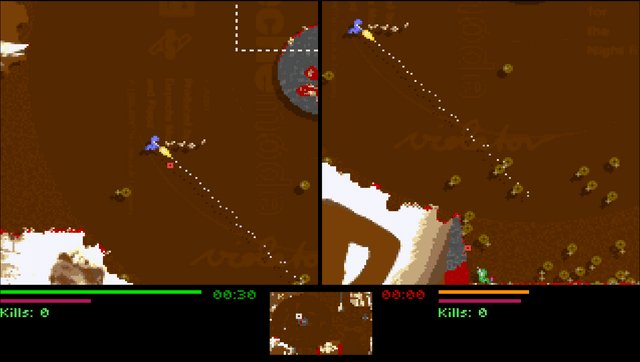
Earthworm simulation game based on a real physical model. Features: 2 worms, 40 weapons, great playability. Four game modes: Kill'em All, Game of Tag, Capture the Flag and Simple CtF!
Installation
- Copy
openlierovita.vpkto the folder of your choosing and install it through VitaShell or a similar program. - Create a folder on your Vita at
ux0:data/openlieroand copy theTCfolder to it. The directory should look like:ux0:data/openliero/TC/* - If you want to add levels, mods, or other content, place them in the
ux0:data/openlierodirectory. Folders for mappacks are also supported. Use the original project to generate data from legacy liero.
Controls
- Select — Escape Key
- Start — Enter Key
- Left and right player configs and keybinds can be set up individually.
Default Controls
| Action | Button |
|---|---|
| Aim Up / Down | D-pad Up / Down |
| Left / Right | D-pad Left / Right |
| Shoot | Cross |
| Jump | Circle |
| Change Weapon | Triangle + D-pad Left / Right |
| Dig | Square |
Screenshots
Changelog
v0.3
- Added joystick control.
- New default configuration sets the right player as a CPU and adds generic names (Player/Bot).
v0.2
- Added Vita bubble menu icons and splashscreen.
- Added Vita textbox/displaybox handling (for names, profile names, configs, etc.).
- Added default configuration generation compatible with Vita.
- Fixed laggy controls.
- Disabled replay functionality (double SDL windows on PSVita are considered pointless); recording is still an option and is off by default.
v0.1
- First release. Many things might not work.
- Included OpenLiero data files.