
Sys-tune Switch
From GameBrew
More actions
| sys-tune | |
|---|---|
 | |
| General | |
| Author | HookedBehemoth |
| Type | Overlays |
| Version | 2.1.0-beta.1 |
| License | Mixed |
| Last Updated | 2025/11/16 |
| Links | |
| Download | |
| Website | |
| Source | |
| Support Author | |
Background audio player for the Nintendo Switch + Tesla overlay.
Installation
- Download the release zip from here.
- Extract the zip to the root of your SD card.
- Put mp3/flac or wav files to your SD card.
Make sure you have Tesla Menu and nx-ovlloader installed.
You can manage playback via the Tesla overlay in the release.
User guide
How to play music only on the home menu[1]:
- Launch sys-tune overlay.
- Scroll down to "Play / Pause" section and click on "Tune (default)" once until it says "Pause".
- Whilst on the home menu and without a game launched in the background, scroll down to "Play / Pause" section and click on "Tune" twice until it says "Play".
- (it will say "Play" by default, but you need to click the option at least once for it to be saved to the config file).
Certain games crash when using sys-tune due to resource limits[2], you can manually create a blacklist by configuring the /config/sys-tune/blacklist.ini file:
[blacklist]
0100F2300D4BA000 = false
Controls
Y - Shuffle
X - Play/Pause
ZR/ZL - Seek
Screenshots
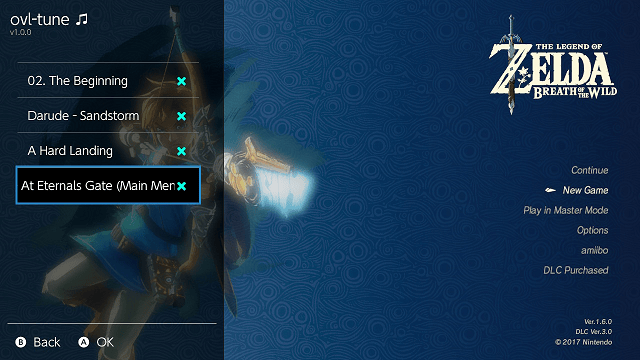
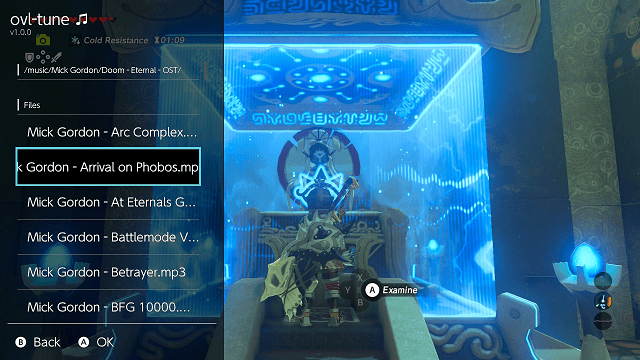
Media
Play Music On Switch Home Menu | sys-tune TUTORIAL (Manito)
Changelog
v2.1.0-beta.1
- In-Process resampler thanks to @ITotalJustice
- Recompiled with latest libnx (>=21.0.0 support)
v2.0.0
- What's Changed:
- Fixes:
- Playback will stop instead of crashing on certain games #10.
- The list of games can be configured in "/config/sys-tune/blacklist.ini".
- Playback will stop instead of crashing on certain games #10.
[blacklist]
0100F2300D4BA000 = false
v1.2.2
- Fix for 16.0.0.
v1.2.1
- Fix the music browser if the folder sdmc:/music/ isn't used.
v1.2.0
- Add option to shut down service.
- This is to work around an issue with some games that use up all audio renderer sessions.
- The next time you open the overlay it will start the service again.
- Playlist now shows everything.
- Drop Atmosphere-libs in favor of p-sam's IPC server used in sys-clk.
- Frees up some memory.
- Lowers compilation time by a lot.
- Recompiled overlay with latest libtesla.
- An bug in earlier versions could cause a crash if too many overlays were opened.
v1.1.2
- Implemented flac and wav support.
- Implement seeking in tracks.
- mp3's are now fully scanned.
- This fixed an issue where some songs with varying compression levels showed a wrong total length.
- Switched to audrv/audren.
- This fixed an issue where sleep worsened audio output quality.
- Now utilizes ams::fs.
- This reduced memory usage slightly.
At devs:
- API version bump.
- files are now mapped with sdmc:/.
- new call added for seeking.
- CurrentStats struct changed.
v1.0.0
- Initial release.
Credits
Special thanks to:
- mackron who made the awesome audio decoders used here.
- WerWolv for making libtesla, the UI library used for the control overlay.
References
- ↑ TotalJustice. sys-tune - background audio player with overlay. GBAtemp, 2023-09-27
- ↑ ITotalJustice. IAudioRendererManager resource exhaustion in several games · Issue #10 · HookedBehemoth/Sys-Tune. GitHub, 2023-09-07