
Blockamok Remix PSP
From GameBrew
More actions
| Blockamok Remix | |
|---|---|
 | |
| General | |
| Author | Mode8fx |
| Type | Action |
| Version | 1.2 |
| License | MIT License |
| Last Updated | 2025/11/10 |
| Links | |
| Download | |
| Website | |
| Source | |
Blockamok Remix is a CPU-only, from-scratch 3D game written in C, where you dodge blocks. Available for PC, Linux, Switch, Wii U, Wii, Gamecube, PSP, 3DS, Android and Vita.
Blockamok Remix is a significant update to Blockamok, a game originally made by Carl Riis to "challenge [himself] to create a 3D game without any pre-made 3D engine or utilities".
Features
- Widescreen.
- Customizable gameplay settings.
- Controller support + a new control scheme.
- New visual settings.
- Music and sound effects.
- A full menu, title screen, instructions, etc.
- Scoring system polish.
- High score saving.
- Console ports.
- Performance improvements for weaker hardware (see performance metrics comparing Remix v1.0 to v1.1 here).

User guide
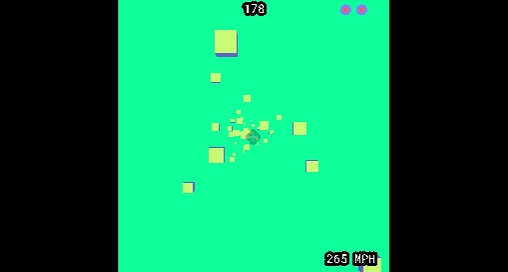
You accidentally fly your spaceship into a wormhole. To your shock, you find yourself in an alternate dimension filled with blocks.
The throttle on your spaceship is broken and keeps increasing the speed. How far can you make it?
Screenshots
Media
Blockamok Remix Gameplay (Wii, Gamecube, Vita, and more) (Mode8fx)
Changelog
v1.2
- Changes
- Added widescreen! (Or whatever your system's fullscreen is.) Overlay options are still present if you'd prefer to play with a square aspect ratio.
- Widescreen may result in slightly worse performance on some systems, but New 3DS is the only one where it's actually noticeable in my experience.
- Added three new background/overlay color options and one new block color option.
- Also reorganized background/overlay color options.
- Added Spawn Area setting that allows the player to change the size of the block spawn area.
- A larger area will be more visually appealing but have worse performance on weak devices. Conversely, a smaller area will look more cramped but improve framerate.
- Adjusted HUD element positions.
- Assorted minor polish.
- [Android] Increased block spawn boundaries from 10.0 to 12.0 (same as PC).
- [PC] Config file now stores WINDOW_WIDTH and WINDOW_HEIGHT instead of just WINDOW_SIZE (which previously set both width and height).
- [Switch] Very slightly increased block spawn boundaries from 8.7 to 8.8.
- [Vita] Slightly improved performance. Minimum no-overclock framerate increased from ~45 FPS to ~52 FPS.
- Added widescreen! (Or whatever your system's fullscreen is.) Overlay options are still present if you'd prefer to play with a square aspect ratio.
- Bug Fixes
- High score is no longer saved if debug mode is used during a game. No cheating!
- [Android] Fixed startup crash on some Android versions.
- [PC] Toggling fullscreen no longer resets visual settings.
v1.1
- Technical Improvements:
- Significantly optimized rendering and block logic. This means higher framerates on all systems (sometimes much higher)!
- The goal was usually to reach 60 FPS on the most intense settings while maintaining good block spawn boundaries, though some consoles only reach this target on less intense difficulties.
- If you're curious, here's a breakdown of how much performance has been improved on each system.
- Increased cube spawn boundaries on almost all consoles to take advantage of improved performance. The only exception is Wii U, where boundaries are reduced.
- Other minor optimizations and polish.
- [Linux] Changed save data location to point to current executable directory instead.
- [Linux] Enabled fullscreen by default.
- [Wii U] Reduced framerate to 540p for better performance (it basically looks the same as in 1080p anyway).
- Significantly optimized rendering and block logic. This means higher framerates on all systems (sometimes much higher)!
- Changes:
- Enhanced controller support! Input is now read from all connected controllers, and you can freely connect/disconnect controllers as desired.
- Added Block Transparency setting. Disabling this can slightly improve performance if needed.
- Added Frame Rate setting, intended for weak hardware.
- Made True Analog (formerly called Type B) the default control scheme.
- Made Pitch Black the default overlay color.
- Renamed and reorganized some menu options.
- Added version number to credits.
- [Vita] Restored Giant block setting.
- Bug Fixes:
- [Gamecube] Fixed save data reading/writing (mostly; see known bug below).
- [Vita] Fixed crash on high intensities.
- [Windows+Linux] Fixed save data not being read when you run the game from a directory other than the one containing the executable.
- Known Bugs:
- [Android] Performance is weaker than it could be (caps out at around 45 FPS on my Retroid Pocket 2+) but improves significantly when the system navigation bar is visible.
- [Gamecube] Saving/loading only works on an SD Gecko or SD2SP2; optical drive emulators such as FlippyDrive are not supported.
- [PSP] Edge lines are not drawn on blocks. I highly suspect that this is a limitation of the PSP's SDL2 library.
v1.0
- First Release.
External links
- GitHub - https://github.com/Mode8fx/blockamok
- itch.io - https://mode8fx.itch.io/blockamok-remix