
FrogGBA PSP
From GameBrew
More actions
| FrogGBA | |
|---|---|
 | |
| General | |
| Author | tzubertowski |
| Type | Handheld |
| Version | 0.3.3 |
| License | GPL-2.0 |
| Last Updated | 2025/09/03 |
| Links | |
| Download | |
| Website | |
| Source | |
FrogGBA is an modernised TempGBA (GBA emulator) with improved compatibility, based on:
- TempGBA by Nebuleon, Normmatt, and BassAceGold
- TempGBA4PSP-mod (TempGBA4PSP-26731020)
Features
- Overlay System:
- Custom Overlays/Borders - Render PNG overlays above the game window for bezels, borders, and custom frames.
- X/Y Offset Controls - Position the game window anywhere on screen.
- Online Overlay Generator - Convert PNG images to OVL format at https://froggba.onrender.com.
- Multiple Overlay Slots - Store up to 10 different overlays and switch between them.
- Dynamic Memory Management - Overlays only use memory when loaded.
- Display Options:
- Aspect Ratio Modes:
- Core Provided (3:2) - Original GBA aspect ratio with proper scaling.
- Zoom (Fill Screen) - Fills screen vertically, crops sides slightly.
- Stretch (Full PSP) - Stretches to fill entire 480×272 screen.
- Color Correction:
- GPSP mode with optimized lookup tables.
- Retro mode for authentic GBA colors.
- Off for raw output.
- FPS Display - SELECT + Square to toggle performance counter.
- Aspect Ratio Modes:
- Performance Optimizations:
- Volatile Memory Support - Uses additional 4MB of PSP RAM for 100% speed on demanding games.
- General gameplay - Consistent 60 FPS on most games with volatile memory enabled.
- Partial Flush for MIPS32 - Optimized cache invalidation for better performance.
- Color Correction via LUTs - 10x faster than real-time calculation.
- Memory Waitstate Optimization - ~50% reduced memory access delays.
- Sprite Rendering Pipeline - Unrolled loops and early culling for sprite-heavy games.
- Block Coalescing - Better instruction cache usage.
- Save State Improvements:
- Auto Menu Exit - Menu automatically closes after loading/saving states.
- Better Memory Management - Temporarily frees overlay memory during save/load operations.
- File Validation - Prevents crashes from corrupted or empty save states.
- Persistent Settings - All new options are saved in config.
- Save & Resume System:
- Auto Save/Load States - Automatic save state functionality using hidden slot 11.
- Resume Game on Boot - Automatically resume your last played game when starting the emulator.
- Recent Games Menu - Quick access to your last played titles (now works reliably on first try).
- Configurable Resume Options - Choose between resume last game, load last save state, or both.
- Quality of Life:
- Fast Forward - SELECT + R toggles 2x/3x speed modes.
- Turbo Buttons - Triangle and Square as dedicated turbo buttons.
- ROM Validation - Prevents crashes when loading invalid files.
- Improved Error Messages - Clear feedback for file and memory issues.
- Configurable X/O Button Mapping - Swap X and O button functions to match your preferences.
- Advanced Options:
- ME Engine Control - Menu option for PSP Media Engine features (Auto/Disabled/Enabled).
- Per-Game Configurations - Automatic ROM detection with customizable settings per game.
- Debug Logging - Optional froglog.txt for troubleshooting (can be enabled when needed).
- Original TempGBA Features:
- Added gpsp kai's cheats function.
- Added Chinese language support.
- Added restore function.
- New menu icon.
- Imported code from TempGBA-mod-dstwo-26750220.
- Modern PSP SDK compatibility.
- Docker-based build system.
Installation
You need to have a CFW installed on your PSP.
Download and extract the latest release, copy the unzipped PSP folder into root of your PSP SD card.
Acquire and copy GBA bios file into PSP/GAME/FrogGBA/gba_bios.bin file.
Launch the emulator on the console.
User guide
Overlays
Creating Overlays:
- Go to https://froggba.onrender.com/ and upload your PNG.
- Image must be exactly 480×272 pixels (PSP screen size).
- Transparent areas will show the game.
- Opaque areas will be the border/bezel.
- Click convert and download the generated .ovl file.
- Copy the .ovl file to
/PSP/GAME/FrogGBA/overlays/on your Memory Stick. - Files will appear in the Overlay menu in-game.
Using Overlays in FrogGBA:
- Press HOME during gameplay to open the menu.
- Navigate to "Overlay Settings".
- Select your overlay from the list.
- Adjust X/Y offset if needed to position the game window.
- Enable/disable overlays with the toggle option.
Tips for Best Results
- Design overlays with a transparent center area for the game (240×160 minimum).
- Use PNG transparency for see-through areas.
- Keep border designs simple to avoid hitting the 30,000 pixel limit.
- Test different aspect ratios with your overlays (Core/Zoom/Stretch).
Controls
Select+R - Fast forward toggle (2x/3x speed)
Select+Square - FPS counter toggle
Screenshots
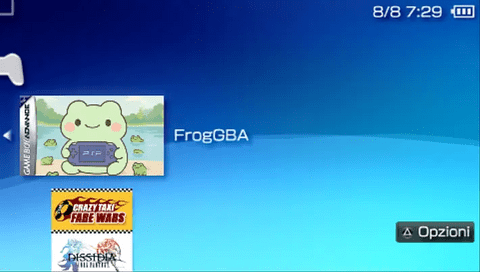
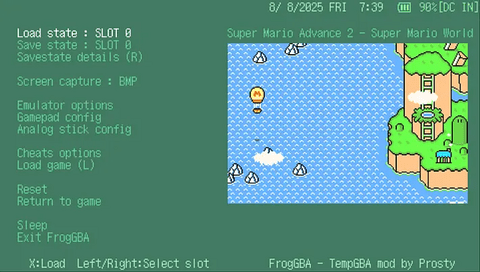
Compatibility
Works on all PSP models (1000/2000/3000/Go).
Changelog
V0.3.3
- Audio - Huge Gains
- 48kHz > 22kHz output (less load, decent).
- Fast audio mode now default (no extra interpolation overhead).
- Volume caching (math done ahead of time = faster).
- Optimised audio buffering (less thread fighting).
- CPU Emulation Optimisations
- Cut 75% of unnecessary cache flushes caused by self-modifying code checks.
- Faster battles with lots of sprites (no more “slow-mo” fights).
- Reduced dynarec overhead during heavy processing.
- Game Performance Highlights
- Pokemon Unbound
- Overworld = buttery 60fps.
- Audio = clean, stable, no skips.
- Battles = 40fps+ (up from ~20-30fps).
- All games
- Lower audio latency.
- Fewer dropouts in music-heavy areas.
- More consistent frame pacing.
- Pokemon Unbound
V0.3.1
- Pokemon Unbound Compatibility Note
- This game requires specific settings to run properly:
- In the game's audio menu, set to "Low Sound Quality" and "Mono" (results in 45-60 fps in game).
- Alternatively, disable background music entirely (results in 60 fps in game).
- Without these changes, expect severe performance issues.
- This game requires specific settings to run properly:
- Major Changes
- Performance Improvements
- The emulator now uses PSP's volatile memory partition (4MB extra RAM) for critical CPU caches. This approach, inspired by the DaedalusX64 N64 emulator, provides 2MB for ROM translation cache and 512KB for RAM translation cache with direct memory access.
- Note: This is NOT the extended memory layout.
- Performance Improvements
- CPU Optimization Restoration
- Previously disabled optimizations have been restored after fixing the underlying memory corruption issues:
- Dynamic recompilation with proper MIPS32 instruction scheduling.
- Branch prediction and optimization.
- Memory access pattern fixes.
- 32-byte aligned functions for cache efficiency.
- Previously disabled optimizations have been restored after fixing the underlying memory corruption issues:
- Bug Fixes
- Critical Issues:
- Stack overflow from infinite recursion in page loading.
- Other Fixes:
- File handle cleanup and restoration.
- CPU register preservation after state loads.
- Memory leak prevention when switching games.
- Instruction cache invalidation issues.
- Critical Issues:
- Technical Details
- The volatile memory implementation allocates performance-critical caches outside the main RAM partition, providing zero-copy access to translation caches. This technique was adapted from DaedalusX64's approach to utilizing the PSP's hardware capabilities.
- Save state loading has been moved from the initialization phase to the main game loop, executing after approximately one second of gameplay. This prevents corruption of the emulation context that occurred when states were loaded too early.
V0.3.0
- New in 0.3.0
- Recent Games Improvements
- Path Doubling Fix - Recent games now load correctly on first attempt (previously required two tries).
- Absolute Path Detection - Improved handling of PSP absolute paths vs relative paths.
- Instant Loading - Recent games launch immediately without file-not-found errors.
- Game Configuration System port from TempGBA mod
- Per-Game Settings - Automatic game detection via ROM header analysis.
- Customizable Configurations - Per-ROM settings for frame skip, audio, video optimizations, and controls.
- Game-Specific Optimizations - Better compatibility with ROM hacks and homebrew games.
- Persistent Per-Game Config - Settings automatically saved and restored for each game.
- Enhanced Auto-Resume System
- Fixed Resume Freezing - Completely resolved auto-resume freeze issues that occurred with games like Castlevania and Advance Wars.
- Improved State Loading - Auto-save states now load immediately after reset for seamless gameplay.
- Hidden Slot 11 - Uses invisible save slot 11 for auto-resume functionality without interfering with user saves.
- Timing Optimization - Fixed state loading timing to prevent emulation hangs.
- Recent Games Improvements
- Critical Fixes
- Auto-Resume Stability
- Fixed Auto-Resume Freeze - Games no longer freeze when loading save states on boot.
- Resolved White Screen Issue - Auto-resume now properly starts gameplay instead of showing blank screen.
- State Loading Timing - Fixed emulation context issues when loading states during startup.
- CPU State Restoration - Proper CPU register restoration after state loads.
- File System Improvements
- Recent Games Path Fix - Fixed path doubling bug that caused "file not found" errors on first load attempt.
- PSP Path Detection - Better handling of ms0:/ and host0:/ absolute paths vs relative paths.
- Load Path Resolution - Improved path construction for both recent games and manual file selection.
- Repository Cleanup
- Submodule Integration - Added psp-media-engine-custom-core as proper git submodule.
- Removed Duplicate Code - Cleaned up 81,000+ lines of redundant reference code from repository.
- Better Dependency Management - Streamlined build process with automatic ME library inclusion.
- Auto-Resume Stability
- Performance & Stability
- Enhanced Reliability - Fixed critical auto-resume and path handling bugs that caused crashes and hangs.
- Improved User Experience - Games now resume seamlessly without freeze or white screen issues.
- Cleaner Codebase - Repository cleanup reduces compilation time and improves maintainability.
- Better File Management - Resolved file loading issues that required multiple attempts to load games.
- Technical Details
- Auto-Resume Architecture
- Immediate State Loading - Auto-save states load immediately after reset instead of delayed loading.
- Skip Execution Path - Resume on boot bypasses normal loading flow to prevent conflicts.
- CPU Context Management - Proper PC status flags and register restoration after state loads.
- Hidden Slot Implementation - Uses slot 11 (invisible to users) for seamless auto-resume functionality.
- Path Resolution System
- Absolute Path Detection - Improved detection of PSP device paths (ms0:/, host0:/) vs relative paths.
- Path Construction Logic - Smart path building that avoids doubling directory paths.
- Recent Games Integration - Fixed path handling for games launched from recent games menu.
- Development Infrastructure
- Git Submodule Integration - PSP Media Engine library now properly managed as submodule.
- Repository Cleanup - Removed 81,000+ lines of redundant reference code.
- Build System Improvements - Streamlined compilation with automatic dependency inclusion.
- Enhanced Debug Framework - Comprehensive logging system for troubleshooting complex issues.
- Auto-Resume Architecture
V0.2.4
- New in v0.2.4
- Resume Game on Boot - Automatically resume your last played game when starting the emulator for seamless gaming sessions.
- Auto Save/Load States - New automatic save state functionality. Happens on menu open.
- Split Resume Options - Can resume last played game, also can load last save state upon game load.
- Dedicated Saving Submenu - Added organized submenu for all save-related settings and options.
- Critical Fixes
- Fixed Water Transparency Issues - Resolved major visual bugs causing water and transparent effects to show vertical stripes instead of smooth transparency.
- Fixed Kirby Startup Logo - Kirby's black startup logo now displays in proper colors thanks to corrected blending calculations.
- Eliminated Green Flickering - No more green blinking during black transition screens in Castlevania and other games.
- Restored Visual Accuracy - Disabled problematic optimizations that were causing widespread blending and alpha channel rendering issues.
- Performance Impact
- Prioritized Accuracy - Some optimizations were disabled to fix critical visual issues, resulting in slight performance reduction compared to v0.2.3.
- Visual Quality First - Games now render correctly with proper transparency and blending effects, even if slightly slower.
- Stable Experience - Rock-solid compatibility with correct sprite and background rendering across all tested games.
- Technical Details
- Disabled Tile Base Caching - Reverted to direct tile calculation to fix transparency issues.
- Removed VCOUNT Caching - All vertical counter reads now access register directly for accurate timing.
- Conservative Sprite Clearing - Restored simple memset() approach for reliable sprite rendering.
- Disabled Fast Path Optimizations - Prioritized accuracy over performance for consistent visual output.
- Enhanced Auto-Save System - Robust state management with configurable timing intervals.
V0.2.3
- Button Mapping Options - Choose between X/O or O/X as confirm/cancel buttons in emulator settings to match your PSP region or personal preference.
V0.2.2
- New in v0.2.2
- gpSP Kai Optimizations - Implemented some of the proven performance techniques from the legendary gpSP Kai, resulting in noticeable FPS gains.
- Fixed Multi-Layer Bottlenecks - Games like Castlevania (water sections) now run at better speed with 4-layer Mode 0 rendering.
- Eliminated Micro-Stutters - Smart cache management prevents stuttering during level transitions in games like Kirby Amazing Mirror.
- Optimized Memory Usage - Reduced translation cache sizes to optimal levels (2MB ROM, 256KB RAM) for better PSP memory utilization.
- Enhanced Audio Processing - Improved audio buffering reduces crackling and provides smoother sound output.
- Better Sprite Rendering - Optimized sprite handling for games with many on-screen objects.
- Performance Gains
- Golden Sun Series - Battle effects and world map rendering improved.
- Fire Emblem - Large battle animations no longer cause slowdown.
- Overall - up to 10% performance improvement in most demanding titles.
- About Pokemon Unbound
- TLDR: disable background music from in-game menu, keep the sound effects - they are fine. It'll give you 60 fps.
- Pokemon Unbound is one of the few hacks that struggles on low end devices like the PSP. This is due to it's implementation of high quality audio background music.
- Sadly we will never be able to run the game full speed using FrogGBA, or another emulator. That's at least my belief.
- Technical Details
- Static translation caches for reduced memory fragmentation.
- Cache invalidation reduction for smoother frame pacing.
- Simplified tile rendering pipeline matching gpSP Kai approach.
- Pre-warmed cache lines to reduce initial load stutters.
- Optimized memory access patterns for PSP's architecture.
- Bug Fixes
- Fixed BSOD on emulator exit.
- Eliminated micro-stutters during level transitions.
- Resolved glitchy tile rendering in certain games.
- Fixed recent games path handling.
- Improved save/load memory reliability.
V0.2.1
- New in v0.2.1
- Recent Games Menu - Your last played titles now appear right at the top when loading a game.
- Much Faster Overlays - Completely reworked overlay code; loads instantly, zero slowdown.
- Full-Screen Borders - Overlays can now stretch across the entire display for maximum style.
V0.2.0
- Full Speed Ahead - +110% Performance!
- Volatile Memory Magic - We’re tapping into that extra 4MB on your PSP for a massive speed boost.
- All PSP Models Welcome - 1000, 2000, 3000, Go… they all fly now.
- Clever Resource Handling - Saves and loads without choking your RAM.
- Partial Memory Flush - Massive benefits in memory heavy games like pokemon romhacks and late GBA releases
- Custom Overlay System
- Make it Yours - in your own PNG overlays for that perfect retro vibe.
- Instant Builder - Make overlays in seconds at [froggba.render.com](https://froggba.render.com/) - no Photoshop degree needed.
- Up to 10 Designs - Switch between them in-game, on the fly.
- Pixel-Perfect Control - Move the game window exactly where you want it.
- Smart Memory - Overlays only take up RAM when you’re actually using them.
- Display Upgrades
- Three Aspect Ratios:
- 3:2 Original - Pure GBA nostalgia.
- Zoom - Fill the screen (a teensy crop).
- Stretch - Full PSP screen takeover.
- Better Colours - 10× faster correction with lookup tables.
- Overlay-Friendly Scaling - Every mode works with your custom bezels.
- Three Aspect Ratios:
- Save State Quality of Life
- No Menu Fuss - Save/load and it kicks you back to the game instantly.
- Crash Guard - Checks saves before loading.
- Overlay-Friendly Saves - Temporarily frees overlay RAM while saving.
- ROM Checks - Stops bad files from nuking your session.
- Under the Hood Optimisations
- Partial Flush for MIPS32 - Faster cache work.
- Dynamic RAM Use - Freed up 550KB of static memory.
- 30K Pixel Overlay Cache - Even heavy overlays won’t slow you down.
- Double Buffer Sync - Bye-bye flicker.
- Real-World Gains
- Metroid Zero Mission - 45 -> 60 FPS (+33% speed).
- Sprite-Heavy Games - 20-30% boost.
- Overall - Locked 60 FPS with volatile memory on for many, many games
- Bug Squash List
- No more missing overlay pixels or weird glitches.
- Fixed save state RAM errors.
- Stops crashes from empty/bad ROMs.
- No more flicker in overlay’s top-right corner.
- Fixed menu text alignment.
- New Shortcuts
- HOME - Main menu + overlay settings.
- Aspect Ratio - Change in Emulator Settings.
- Overlay Menu - Enable/disable & tweak while playing.
V0.1.0
- New Features
- Color Correction: Authentic GBA screen colors with GPSP and Retro modes
- Fast Forward: + R to toggle 2x/3x speed modes
- Turbo Buttons: Triangle and Square as dedicated turbo buttons
- FPS Display: + Square to toggle performance counter
- Cute Loading Screen: ASCII frog animation during ROM loading
- Enhanced UI: Mint green color palette and mod attribution
- Performance Improvements
- 22% FPS boost in Metroid Zero Mission (45->55+ FPS)
- Sprite rendering optimizations for sprite-heavy games
- Memory waitstate optimization (~50% reduced access delays)
- PSP cycle batching reduces dynamic recompiler overhead
- Conservative cache management prevents performance drops
- Block coalescing for better instruction cache usage
- Technical Enhancements
- All optimizations are permanently enabled for the best experience:
- PSP MIPS32 instruction optimizations.
- Improved timer prescaling for better audio/video sync.
- Reduced cache invalidation overhead.
- Modern PSP SDK compatibility.
- Docker-based build system.