
Goldleaf Switch
More actions
| Goldleaf | |
|---|---|
 | |
| General | |
| Author | XorTroll |
| Type | Utilities |
| Version | 1.1.0 |
| License | GPL-3.0 |
| Last Updated | 2025/05/12 |
| Links | |
| Download | |
| Website | |
| Source | |
| Support Author | |
Goldleaf is multipurpose homebrew tool for Nintendo Switch, originated from NSPower.
It has a very similar concept to FBI, which is a similar tool for Nintendo 3DS homebrew.
The homebrew was entered into the GBAtemp Switch Homebrew Bounty 2018 (Switch application).
Features
- Explorer:
- Supported locations/devices:
- SD card
- Console memory (SAVE, SYSTEM, USER and PRODINFOF partitions)
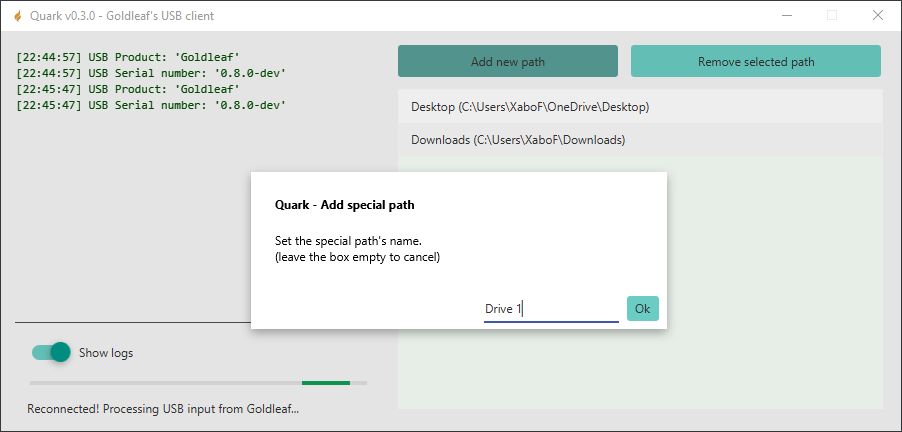
- Remote systems (via remote tools like Quark)
- USB drives (thanks to libusbhsfs)
- Game savedata (read-only, check below how to mount it)
- NRO homebrew RomFs (read-only)
- Note: all of them are automatically unmounted when Goldleaf is exited.
- Features:
- File operations: create, delete, copy, rename, view as hex/text, get size, etc.
- Directory operations: create, delete, copy, rename, (un)set archive bit, get full size, install all NSPs inside, etc.
- Install NSPs of games, updates, DLC, etc. (use with caution!)
- Launch other NRO homebrews and mount their RomFs (as mentioned above)
- Execute .bin files as RCM payloads (reboot with them)
- Set JPG/JPEG files as user icons (use with caution!)
- Preview of NACP files (the ones automatically exported by Goldleaf, and so on)
- Supported locations/devices:
- Game/update/DLC browser:
- Per title:
- View general information (occupied size, play stats, launch flags and so on)
- Mount savedata to navigate it (check the "Content explorer" above)
- Content operations (for each title content: base game, update or DLCs):
- View information (ID, contents, version, ticket...)
- Uninstall/completely remove the content (won't remove savedata)
- Export content to NSP
- Remove ticket, if present (use with caution!)
- Reset launch version (useful to be able to play a base game after an update has been removed)
- Note: some of these are only (obviously) available for games with contents.
- Per title:
- Ticket browser:
- Check tickets, and optionally remove unused ones (use with caution!)
- Web browser:
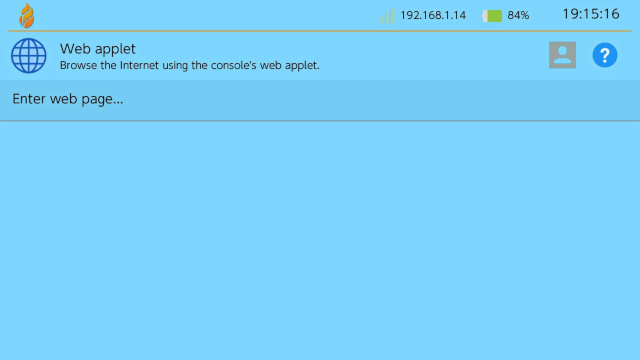
- Browse user-submitted URLs.
- Create and save bookmarks.
- Note: the web browser is only usable when launched as application (due to system memory limitations).
- Account manager:
- Select a user (or just use the pre-selected one if present)
- Change nickname
- View its icon
- Delete user (only if there is more than one in the system)
- Note: to change the user's icon, select the desired JPG/JPEG icon file by browsing in the "Content explorer".
- Amiibo dump:
- Create a virtual amiibo (for emuiibo) from a real amiibo figurine.
- Settings:
- Check both system and Goldleaf settings:
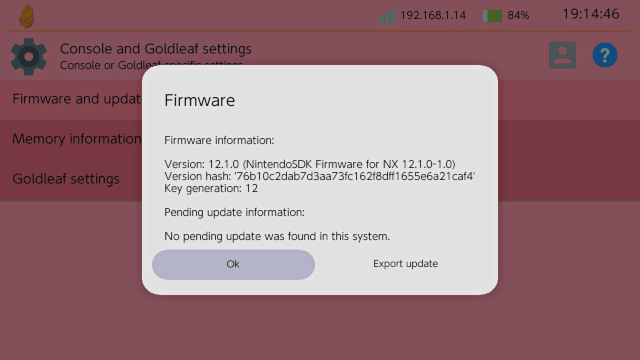
- Check current firmware information (version, hash, key generation)
- Check for pending updates, and (if desired) remove them if present
- Export current firmware or pending update data
- Memory: check free and total space on different locations
- Goldleaf settings: check settings present in
settings.json
- Check both system and Goldleaf settings:
- About:
- Check Goldleaf's version and how it was launched (as an applet or an application), and check for latest Goldleaf updates + update to a new release if it exists
- Goldleaf has been translated to 11 different languages so far: English, Spanish, German, French, Italian, Dutch, Japanese, Portuguese, Korean, traditional Chinese and simplified Chinese.
User guide
Disclaimer
Installing NSP Packages
Always keep in mind that installing NSP packages increase your risk of getting banned from online services. If you use airplane mode and special DNSs like 90DNS, there is a smaller chance to get banned.
Never install NSPs from untrusted sources, as Goldleaf doesn't perform any special verification, so please be very careful about installing untrusted packages.
Understanding Tickets
Tickets represent a game purchase - technically speaking, you can't launch a title if the ticket isn't present and the title requires it (official titles require them). NSPs which don't have/require a ticket are standard-crypto.
Goldleaf will display whether a ticket is present or not, and if so, it's title-key. Title-keys are required to decrypt and access a title's content. Otherwise, they are undecryptable, hence unlaunchable by the system.
Quark and remote browsing
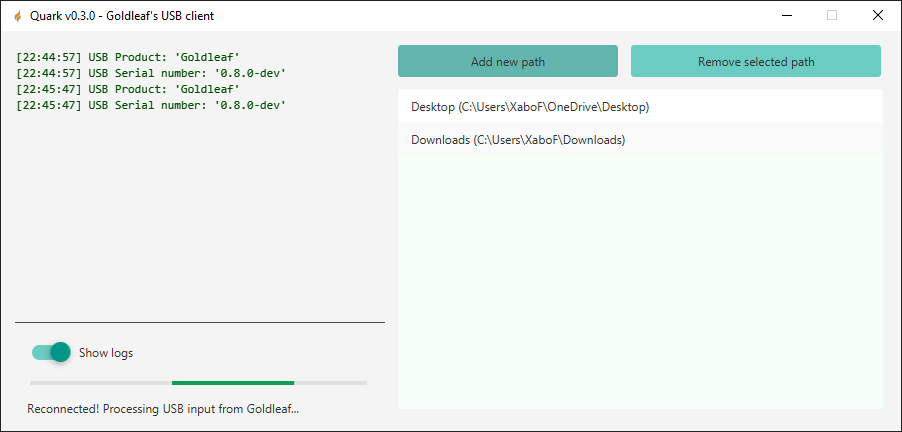
Quark is a PC tool, with a fancy UI and made in Java, in order to help Goldleaf with the remote PC option. It supports Windows, Linux and Mac.
Quark needs Java 9 or greater to run, check the guide on readme.
Settings & Theming
Goldleaf supports the customization of colors, assets and other options via a JSON file located at Goldleaf's folder: sd:/switch/Goldleaf/settings.json.
Sample
This is an example JSON for Goldleaf settings:
{
    "general": {
        "language": "es",
        "external_romfs_path": "sdmc:/switch/Goldleaf/custom-romfs",
        "use_12h_time": true,
        "ignore_hidden_files": true,
    },
    "ui": {
        "light_color_scheme": {
          "bg": "#aabbccdd",
          "menu_base": "#aabbccdd",
          "menu_base_focus": "#aabbccdd",
          "text": "#aabbccdd",
          "version_text": "#aabbccdd",
          "scroll_bar": "#aabbccdd",
          "progress_bar": "#aabbccdd",
          "progress_bar_bg": "#aabbccdd",
          "dialog_title": "#aabbccdd",
          "dialog_opt": "#aabbccdd",
          "dialog": "#aabbccdd",
          "dialog_over": "#aabbccdd"
        },
        "dark_color_scheme": {
          "bg": "#aabbccdd",
          "menu_base": "#aabbccdd",
          "menu_base_focus": "#aabbccdd",
          "text": "#aabbccdd",
          "version_text": "#aabbccdd",
          "scroll_bar": "#aabbccdd",
          "progress_bar": "#aabbccdd",
          "progress_bar_bg": "#aabbccdd",
          "dialog_title": "#aabbccdd",
          "dialog_opt": "#aabbccdd",
          "dialog": "#aabbccdd",
          "dialog_over": "#aabbccdd"
        },
        "menu_item_size": 80
    },
    "fs": {
        "compute_directory_sizes": false
    },
    "installs": {
        "ignore_required_fw_version": false,
        "show_deletion_prompt_after_install": false,
        "copy_buffer_max_size": 10485760
    },
    "export": {
        "decrypt_buffer_max_size": 10485760
    },
    "web": {
        "bookmarks": [
            {
                "name": "Google",
                "url": "https://www.google.com"
            },
            {
                "name": "GitHub",
                "url": "https://www.github.com"
            }
        ]
    }
}
If a certain attribute isn't present Goldleaf will use default values.
Colors follow #RRGGBBAA hex format. Not all color schemes/color scheme fields have to be implemented, otherwise default light/dark scheme ones will be used (for those not implemented).
Notes
Via RomFs replacement, when Goldleaf tries to locate, for instance, romfs:/FileSystem/FileDataFont.ttf resource font, if romfsReplace is true and romfsReplacePath is, for instance, /switch/Goldleaf/testromfs, Goldleaf will look if sd:/switch/Goldleaf/testromfs/FileSystem/FileDataFont.ttf exists and use it if so, otherwise will use RomFs's one.
So, via this configurations, UI's images, resources, element sizes and even translations (using custom JSON translations) can be used, plus some more assets which will be added in future updates.
Controls
Common:
LR Stick or R Stick or D-Pad - Move through the current menu
ZL/ZR - Show a dialog to shut down or reboot the console
Minus - Show a dialog with this control information
Plus - Exit the application in order to return to hbmenu
Content explorer:
X - Unmount the selected location (only when a savedata location is selected)
Y - Select folder (might take some time with folders with many sub-items)
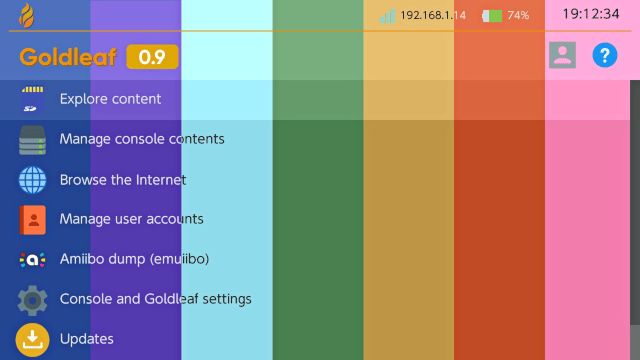
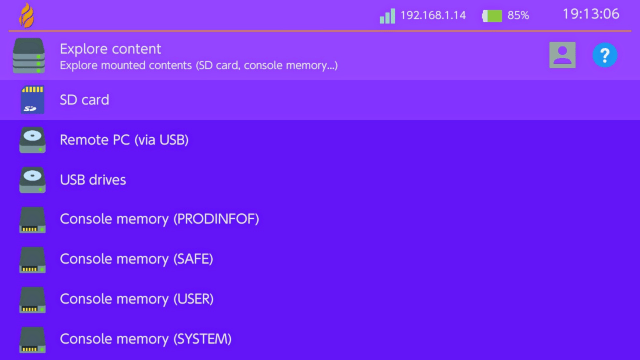
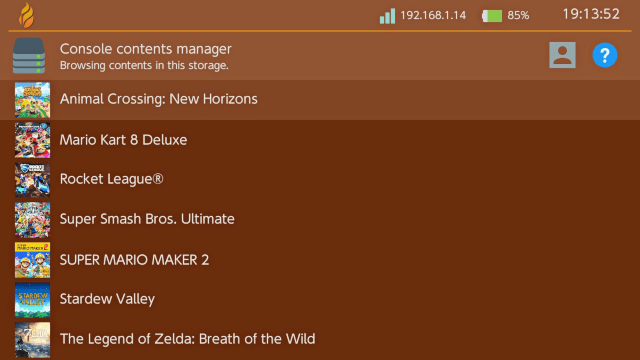
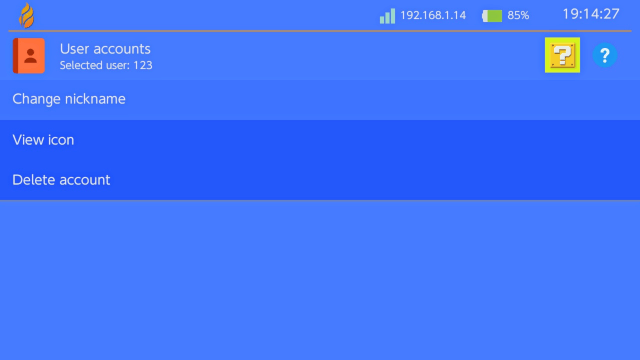
Screenshots
Known issues
- Exiting Goldleaf via HOME menu (as a NRO) seems to crash the system on 7.x firmwares due to a weird USB bug present on those specific versions. Any non-7.x firmware doesn't have this issue.
Changelog
v1.1.0 2025/05/12
- General
- Updated for latest Plutonium (UI library):
- When cancelling a dialog, the "cancel" option is focused before closing (to also indicate visually it was cancelled)
- Default resolution is always 1080p internally (see consequences below)
- Updated for latest Plutonium (UI library):
- Goldleaf
- Fixed an issue where custom background colors were not properly parsed by Goldleaf
- Goldleaf is 1080p now! Various relevant UI changes come in this release:
- The color scheme is no longer randomly generated at startup: there is now a default blue light/dark color scheme (although you can still customize it yourself) along with the project's gold color
- New icons are used everywhere (since I had to find new ones that had good resolutions)
- Goldleaf's settings have (slightly) changed: setting names are (slightly) different now, and the color customization is done in a more organized way (check the README for all details)
- The memory/space menu has been reorganized, taking up space in a more visually appealing way
- Too-long texts are clamped now, so that they don't protrude outside their expected bounds
- Now directory sizes are only computed if a setting (disabled by default) is enabled, since it lead to slowdowns when selecting large directories for other purposes.
- When exporting/dumping contents, names containing invalid FS characters (":", "/" or "") are now replaced to avoid issues when creating the exported NSP.
- Removed the old crash handling system, which worked half the time and made things annoying: crashes are handled like regular homebrew (with the usual system crash-screen), and detailed information about what caused the crash is logged in Goldleaf's log file
- Icons are now internally shared resources (previously, for each menu item/place it was used, a new icon copy was loaded in memory), which should reduce the memory footprint and somewhat improve performance
- Added confirmation dialogs to the power-off/reboot dialog, to avoid unwanted ZL/ZR presses causing unwanted shutdowns/reboots
- Using the web browser is no longer allowed unless Goldleaf is launched as an application (since otherwise it won't work and just cause a crash)
- Folders have now two different icons, visually distinguishing between empty and non-empty directories
- Fixed a bug where the message after exporting ticket/cert was not shown at all (an empty, long box was only displayed)
- The "image" menu icon is now shown also for PNG/WEBP images (even though they cannot be set as user icons)
- Updated key generation recognition up to the latest
20.0.0/20.0.1firmwares - For used tickets, the game title is displayed instead of the application ID on the ticket menu items (the ID can still be viewed by selecting a given ticket)
- Added special handling when removing an account that is also linked (removing requires it to be unlinked first, this is now done automatically)
- Added special result description messages for dedicated result codes (those with no previous description, or those where the base description was not really informative to users)
- Fixed ETA calculation when copying directories (which would display nonsense when copying multiple small files) so that it displays somewhat coherent values
- The user icon is exported again after changing it
- A bug was fixed where logging wouldn't happen correctly in certain menus
- Mounted filesystems are now properly disposed when exiting Goldleaf
- Pressing Y when a file is focused in the file browser will also display its options (like pressing A, so Y results in the same behaviour for files and directories)
- The previous content system has been completely replaced by a brand-new game list menu:
- This no longer considers/lists NAND-System contents, as that was a mostly useless (and slow) feature
- Slowness when loading contents has been reduced by using lazy-loading threaded code and caching many things
- Games and their contents are directly browsed now, instead of having to choose storages
- Useful information for debugging/dev purposes is displayed now as well (last record event and view flags)
- Size computing is more simple and straightforward now
- Save data mounting was fixed for games which use device savedata instead of per-user savedata (like Animal Crossing: New Horizons)
- If no user was yet selected, trying to mount the save data will directly prompt to select a user, and mount it if succeeded
- The tickets menu was moved to the main menu
- The update menu was merged with the about menu: you can now check updates by pressing A on the about page
- Fixed a dump replace-all bug where english strings would say "g_Clipboard" instead of "clipboard"
- Ticket information now also shows the key generation version range (not only on NSP installation info)
- Empty *.bin files can no longer be launched (or rather, Goldleaf attempting to launch them)
- Made transitions and movement in menus slightly faster (for convenience) and with more icons/dedicated messages for each menu
- The text viewer was slightly improved, allowing to also displace horizontally to read long lines, and only rendering the visible part of each line
v1.0.0 2023/08/20
- General
- Some minor rewrites (in a probably unnoticeable way) improved the internals of the project
- As always, all libraries were updated to their latest versions
- Goldleaf
- NSP installs have been (finally) made multithreaded - I've personally noticed up to 25% faster install times, but this speedups might be even greater ;)
- Proper support for multi-program titles was added (for installing, browsing and exporting them correctly)
- Switched to an alternative result system via arc, so that now more system results have proper names/descriptions for more readability
- Improved various internal parts via caching or general optimizations
- Added support to check titles with no data (archived content, gamecard titles without the gamecard inserted, actually corrupted content, etc.)
- Extended keyboard support, now supporting other kinds of characters (particularly fixed support for account renaming)
- Fixed an annoying ticket/cert exporting bug which caused invalid NSP exports being generated
- Now one can mount and explore homebrew NROs' RomFs
- Updated some language translations (thanks a lot to all the people who frequently help with that <3)
- Added support for 12h/24h time display and configuration
- Support for NXThemes was removed
- Added a setting to allow custom NSP installation copy buffer sizes
- Slightly improved random UI color generation
- Fixed menu scrollbars behaving incorrectly in menus with too many items
- Fixed a bug where one could exit Goldleaf in the middle of installing NSPs, copying files, etc.
- Improved the file/directory copy menu and content export menu UIs
- Added a setting to disable showing hidden files/directories (those starting by '.' in their name)
- Now showing a deletion dialog after a NSP install is disabled by default, and a setting was added to enable/disable it
- Quark
- Fixed a bug where, when successfully reconnecting to Goldleaf after a connection loss, Quark would regardless close
v.0.10.1 2023/04/09
- General:
- Updated with latest libnx, correctly supporting up to 16.0.1 firmwares.
- Goldleaf:
- Fixed a bug where the location of multiple NSP installs would be incorrectly selected.
- Content menu navigation was improved (exiting doesn't suddenly go back to the main menu, etc.)
- Added support for Traditional Chinese.
- Updated key generation information (for latest system versions).
- Content menu options are properly set now: gamecard contents have proper options now, and other fixes/improvements in option code.
- Dumping is now referred to as exporting, and exported contents now go inside
/exportinstead of/dump. - Added menu for Goldleaf's own settings, currently only supporting selecting custom language support and ignoring required firmware versions on content installs.
- Amiibo dumping has been improved, now allowing to dump the amiibo's application area (game savedata) if it exists, and its mii in the legacy 3DS format.
- Redesigned ticket menu (now all tickets, even used ones, are shown), added support for exporting them.
- Fixed a bug where cancelling URL text input when browsing a web page would attempt to open the web browser anyway.
- Added support for language-specific icons in NSP installs, so that now Goldleaf attempts to find and show the icon corresponding to Goldleaf's language (which is by default the system language).
- Fixed invalid/nonsense "game played since" values.
- Quark:
- From now on, Quack and Goldleaf will follow the same version numbering: this will thus be less confusing from now on. Therefore, Quark jumps from 0.5 to 0.10.1 in this release.
- (No other changes here).
Credits
The main concepts of Goldleaf are and have been developed by XorTroll, but without the effort and support of many others, this project wouldn't have been a thing:
- Adubbz and all the (old) Tinfoil contributors, for their huge work with title installing.
- C4Phoenix, for his awesome work doing this project's logo, and the GIF displayed when launching the installed forwarder.
- All the graphics except Goldleaf's logo (see credit above) were grabbed from Icons8.
- 2767mr, for all the support given in Goldtree (former Quark tool).
- developer.su for NS-USBloader, which helped a lot on the development of Quark, mainly on the usage of usb4java and the base of a multi-platform JavaFX Java project.
- Simon for his libusbK implementation for C#, which has made Goldtree client possible.
- shchmue for the system to get tickets from system save data without breaking anything, found in Lockpick.
- WerWolv for the help with custom exception handling, avoiding those frustrating fatals.
- Translators: unbranched and exelix for Italian, tiliarou, FuryBaguette and GOffrier#9688 for French, and LoOkYe and C4Phoenix for German.
- All the testers, for reporting bugs and helping a lot with the project's development.