
PSP Soldier
From GameBrew
More actions
| PSP Soldier | |
|---|---|
 | |
| General | |
| Author | Seddy |
| Type | Shooter |
| Version | Beta |
| License | Mixed |
| Last Updated | 2006/05/01 |
| Links | |
| Download | |
| Website | |
 |
This application has been obsoleted by one or more applications that serve the same purpose, but are more stable or maintained. |
PSP Soldier is a 2D online Shooter.
You have to steer a Robot and shoot the other players, that are on the Server.
Installation
Requirement:
- A PSP with FW 1.5/2.01/2.6.
- A wireless LAN access point with a good signal.
Download the game and put it into your /PSP/GAME/ Folder.
User guide
Running the game
- Turn WLAN powersave in System options off and your WLAN switch on.
- Start the game.
- Select your WiFi connection.
- The game will now connect to the Masterserver to check for updates and to get a Serverlist.
- If an Update was found, it will automatic be installed.
- If not, you'll see the Serverlist.
- Choose your server with and hit Cross to connect.
How to play
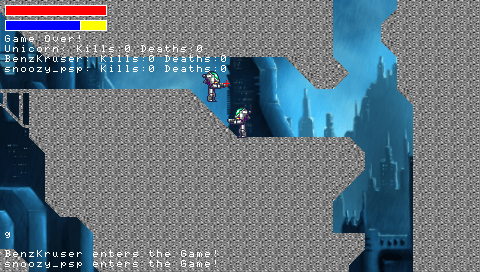
On your screen:
- Health - Shouldn't be zero.
- Jetpack - You can only fly if you have enough power.
- Reload - Changes the color for the three weapon modes.
- Time - If it's smaller then zero, the game is over, a screenshot will be taken (soldier\scores) and the next map will be loaded.
- Playerlist - Shows the score.
- You - This sprite is taken from Metroid.
- Event - Events like "Seddy kills someone" and chatmessages will be shown here.
- OSK - Write chatmessages.
The three Weapon modes are:
- Yellow - Fast but not much power.
- Orange - The golden middle.
- Red - Slow but with much power.
Controls
L/R - Move left/right
Cross - Jump
Circle - Use your Jetpack
Triangle - Switch between weapon modes
Analog - Aim and shoot
Start - Show the Menu
Select - Show the Playerlist
D-Pad+Square - OSK
Screenshots
External links
- Author's website - http://www.palib.info/Seddy/pspsoldier/play.html (archvied)
- DCEmu - https://www.dcemu.co.uk/vbulletin/threads/23619-PSP-PsP-Soldier-Open-Beta?s=