
Saviine Wii U
From GameBrew
More actions
| Saviine | |
|---|---|
 | |
| General | |
| Author | Maschell |
| Type | todo/Utilities |
| Version | 1.1b |
| License | GPL-3.0 |
| Last Updated | 2016/05/12 |
| Links | |
| Download | |
| Website | |
| Source | |
This application dumps and injects savegames of any title that is entered over network to a PC application.
Installation
Copy the wiiu folder to the root of the SD card.
Notes:
- The latest version exclusively runs with the Homebrew Launcher.
- Make sure you already have a save of the game on you console before trying to dump/inject them
- Always backup your savedata before initiating any dumping to prevent data loss. The developer is not responsible for lost data.
- Confirm that your game version matches the version used for injecting saves. e.g. injecting PAL saves into NTSC one is untested.
Super Smash Bros for Wii U specific note:
- The common data is too large to inject at once, and data may be flushed, making automatic restoration impossible. Ensure to make a backup. This caution may apply to other games as well.
Wii U save folders:
- The Wii U has multiple save folders: one for shared account information (common) and one for each account (e.g. 8000000a).
- Currently, only dumping the common folder and your own folder is possible, as not all games use the common folder.
Folder structure:
logs/<- logssaviine_root/dump<- dumped save files (subfolders created for each game)saviine_root/inject<- place saves here for injection
User guide
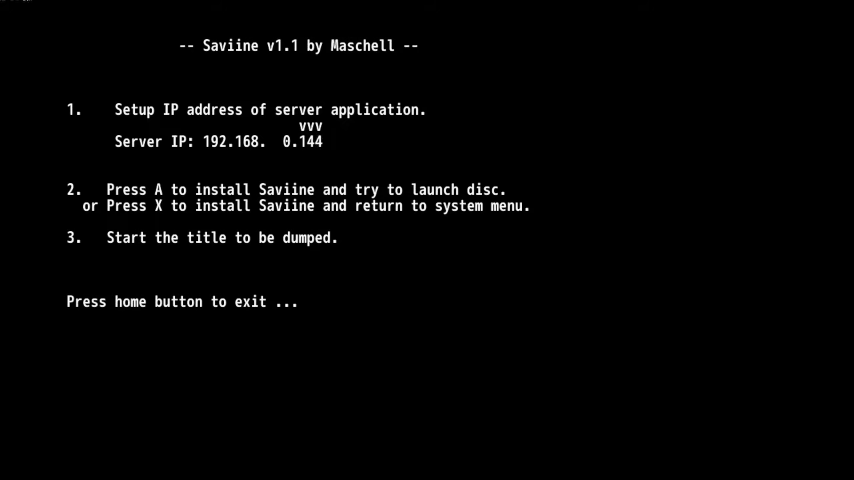
Launch Saviine from the Homebrew Launcher.
Set the Saviine server IP using directional buttons, press A to install Saviine.
If the screen displays anomalies, use up/down to correct it.
Dumping:
- Note: Make sure that the saviine server in a folder with a short path e.g.
D:/saviine/ - Open dump.bat or start saviine_server.exe on the PC with the argument "dump."
- Launch a game; a dialog will appear to select user and/or common data for dumping.
- Data will be dumped to
saviine_root/dump/[game_title_id]/80000000x (user data)and/orsaviine_root/dump/[game_title_id]/common(common). - Close the game and repeat the process for other games.
Injecting (experimental):
- Note: Exist data will be gone after the injection. Please make sure to backup your saves before trying to inject something.
- Open inject.bat or start saviine_server.exe on the PC with the argument "inject."
- Place save data in
saviine_root/injectfolder, organized by game title id (e.g.,saviine_root\inject\00050000-1010ED00). - Launch a game; a dialog will appear to select the profile to inject and whether to inject common files.
- Two options for the common folder:
- Inject: Adds data into the existing common folder, overwriting existing files.
- Clean and Inject: Deletes existing files in the common folder before injecting new ones.
- In case of errors during injection, the Wii tries to restore old data, but backups are advised.
Screenshots
Compatibility
Works on:
Mocha/Haxchi/CBHC
Tiramisu Environment
Compatible firmwares (+ kernel exploit):
5.0.0
5.1,0
5.3.2
5.4.0
5.5.x
Changelog
v1.1b 2016/05/12
- Fixed bug while dumping games that has only shared savedata (thx @n0rbyt3).
v1.1 2016/04/03
- Now only compatible with the homebrew launcher (https://github.com/dimok789/homebrew_launcher).
- Should support more firmwares than only 5.3.2.
v1.0 2016/10/26
- Read the README.
v0.3 2015/10/19
- Now excecuted on FSAddClientEX.
- getting the persistentID from the system instead of guessing.
- cleaner log files.
- improved the installer (thanks to dimok for the code in the loadiine installer).
- loading saviine as elf (^-).
- should support more games.
v0.2 2015/10/17
- Fixed a lot of games.
- New entry point.
- Added fast/normal mode.
v0.1 2016/10/16
- Fixed the folder structure.
Credits
Thanks to:
- dimok - for the homebrew launcher, loadiine gx 2, and ddd with was the base environment for the current version.
- chadderz - for cafiine. Still using some of this old funcions.
External links
- GitHub - https://github.com/Maschell/saviine
- GBAtemp - https://gbatemp.net/threads/release-saviine-wiiu-savedata-tool.399833/
- ForTheUsers - https://hb-app.store/wiiu/saviine