
Atmosphere-Updater Switch
From GameBrew
More actions
| Atmosphere-Updater | |
|---|---|
 | |
| General | |
| Author | ITotalJustice |
| Type | Other Apps |
| Version | 0.5.1 |
| License | GPL-2.0 |
| Last Updated | 2019/12/08 |
| Links | |
| Download | |
| Website | |
| Source | |
| This application has been obsoleted by one or more applications that serve the same purpose, but are more stable or maintained. |

WIP Atmosphere (Switch CFW) updater.
Note: This (and all other updaters) will no longer work on ams ver 0.15.0 or higher.
Installation
Move the .nro onto you Nintendo Switch SD card inside the folder /switch/atmosphere-updater.
User guide
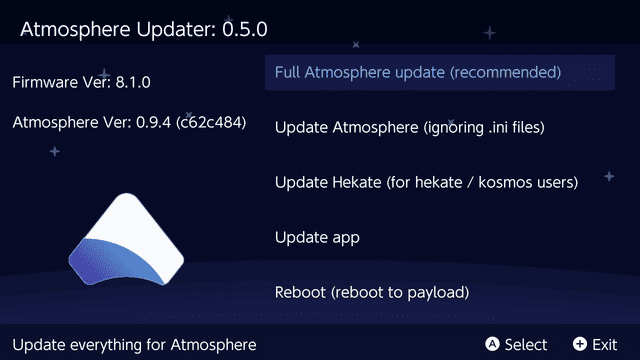
The application has 5 main options.
Full Atmosphere Update:
- Downloads the latest Atmosphere release and installs everything from that release.
Update Atmosphere, not overwriting .ini files:
- Downloads the latest Atmosphere release and installs everything from that release ignoring .ini files.
- This option will still install any missing .ini files, ensuring that the update will function correctly.
Update Hekate:
- Installs the latest release of Hekate.
- Option to install latest Atmosphere as well, when selecting update Hekate.
- If option to update Hekate + Atmosphere is selected, the new fusee-primary.bin is copied to /bootloader/payloads/fusee-primary.bin.
- Replaces /atmosphere/reboot_payload.bin with the new Hekate payload.
- Copies new Hekate payload to /bootloader/update.bin.
Update App:
- Downloads the latest version of this app straight from GitHub.
- Deletes the previous old version.
Reboot (reboot to payload):
- Reboots the switch, loading the payload from /atmosphere/reboot_payload.bin.
- This is recommended after install Atmosphere.
- Updating Atmosphere / Hekate automatically includes the needed reboot_payload.bin.
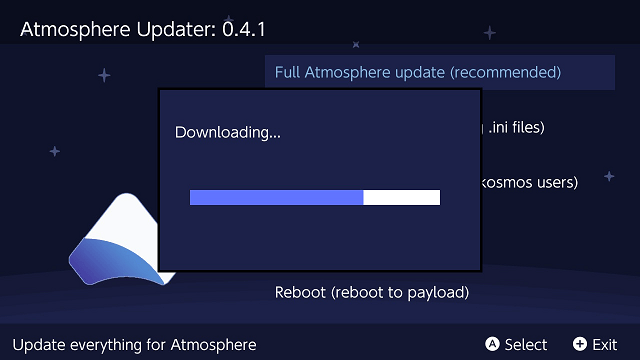
Screenshots
Changelog
v0.5.1
- Hot fix for latest atmosphere release (as it was marked as pre release).
v0.5.0
- Added full touchscreen support.
- Added a confirm pop-up box when selecting an option (to avoid pressing / touching the wrong option).
- Now displays the sys / ams version (with git commit). Thanks to @KranKRival for the pr.
- Fixed bug that would overwrite the app when selecting update app with no internet connection. Thanks to @suppai for reporting.
- Cleaned up code.
v0.4.1
- Option to overwite atmosphere ini files when updating hekate.
- Make the Hekate update option more clear that it is for Hekate / kosmos users.
- Copy hekate payload as update.bin to "/bootloader" so that the latest version of hekate will always be loaded with modchips / rcm injectors.
- Copy fusee-primary.bin to "/bootloader/payloads" after selecting update Hekate + Atmosphere.
- Load switch font buttons from memory.
- Cleaned up code a lot, added a few comments.
- Cleaned up the look of error messages (should you ever see them).
v0.4.0
- Hekate support finally added.
- Option to install atmosphere with hekate (when selecting update hekate).
- Improved the look of the UI.
- Added error messages, should anything go wrong (hopefully you don't see them).
- Cleaned up the code a lot.
v0.3.0
- Complete gui rewrite (looks pretty now).
- Added reboot to payload option.
- Correctly update the app.
- Update the app with latest libnx, ready for fw 9.0.0.
- Cleaned up code.
v0.2.1
- New app icon thanks to @sudot0ph.
- Display exit button (+).
- After updating the app, it'll check for an old version in /switch/. Deletes it if found. (by default the app is installed to /switch/atmosphere-updater/).
- Cleaned up code slightly.
v0.2
- Much faster downloads.
- Unziping is now instant.
- Option to not overwrite .ini files (used for config).
v0.1
- Download latest atmosphere release (zip) from github.
- Unpack the contents to the root of the sd card (overwriting files).
- Update the atmosphere-updater from within the app itself.
Credits
Special Thanks:
- toph for the design of the app icon, as well as the most icons used within the app.
- Black Rabbit for the design of the plus and error icon (and the idea for this app).
- bandithedoge for the background.
- KrankRival for the initial sys / ams version pr (and for motivating me to work on touch controls).