
NX Mod Manager Switch
More actions
| NX Mod Manager | |
|---|---|
 | |
| General | |
| Author | TOM-BadEN |
| Type | Utilities |
| Version | 2.26 |
| License | MIT License |
| Last Updated | 2025/09/25 |
| Links | |
| Download | |
| Website | |
| Source | |
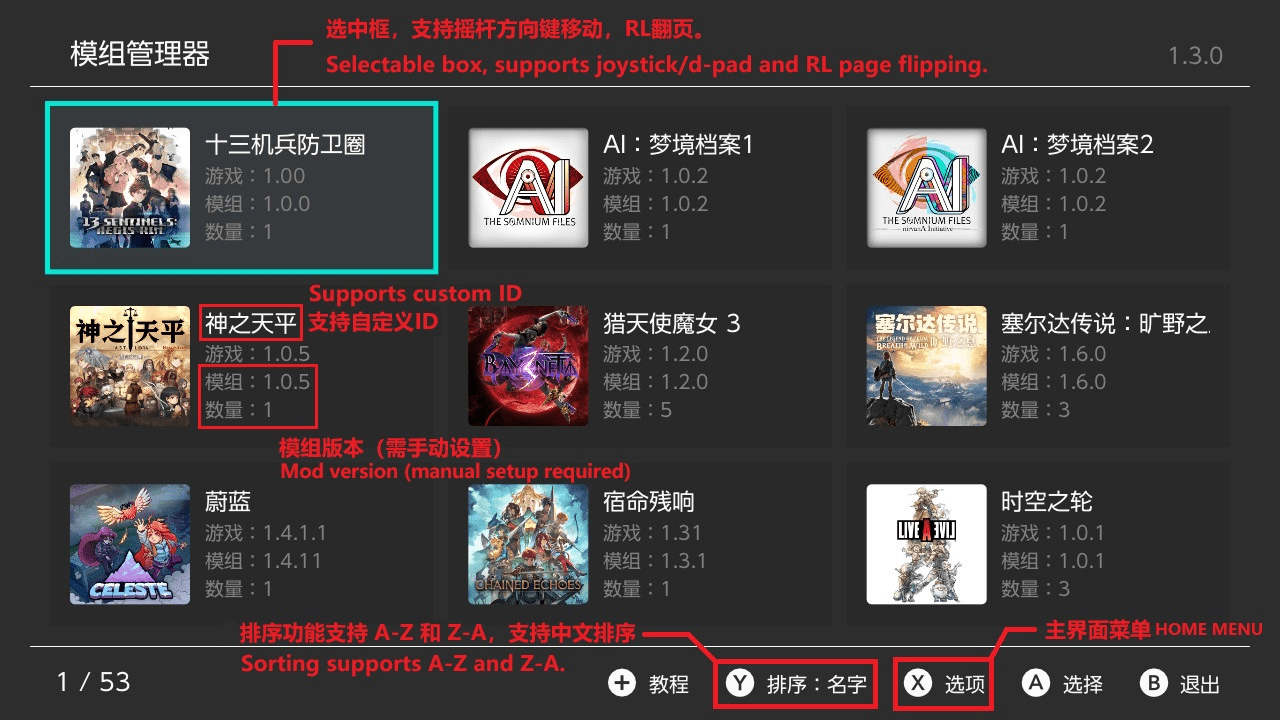
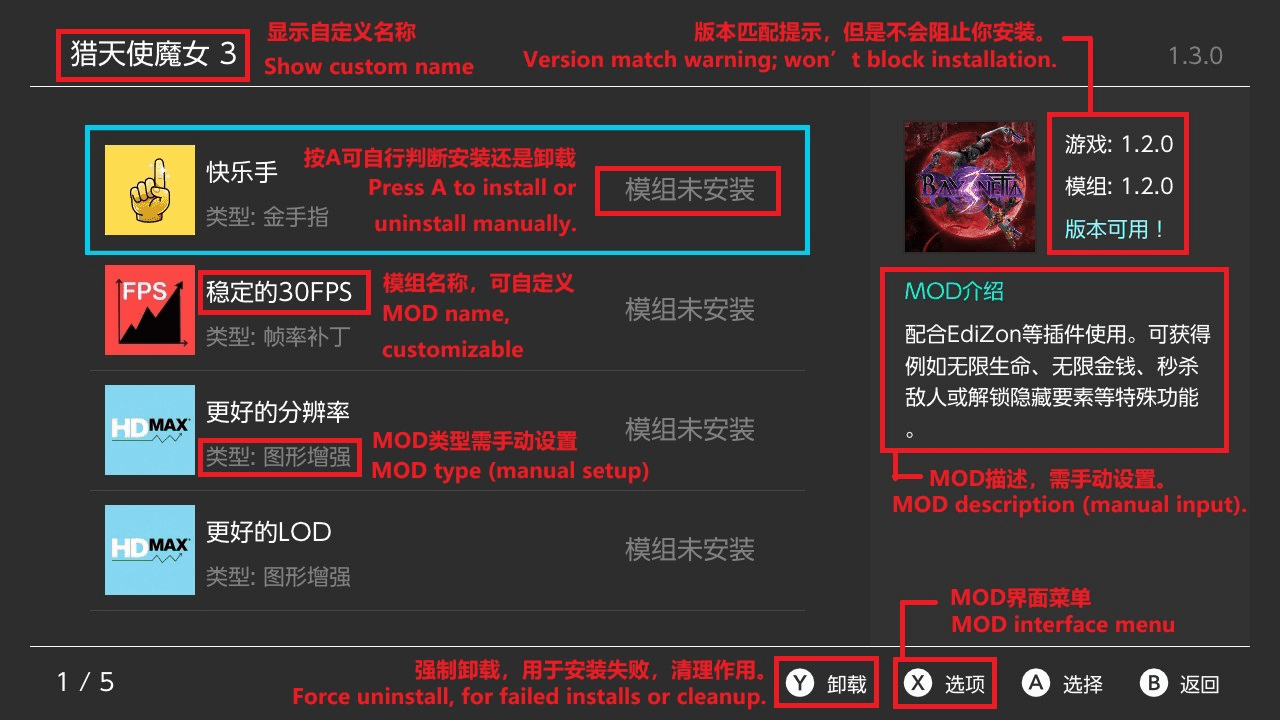
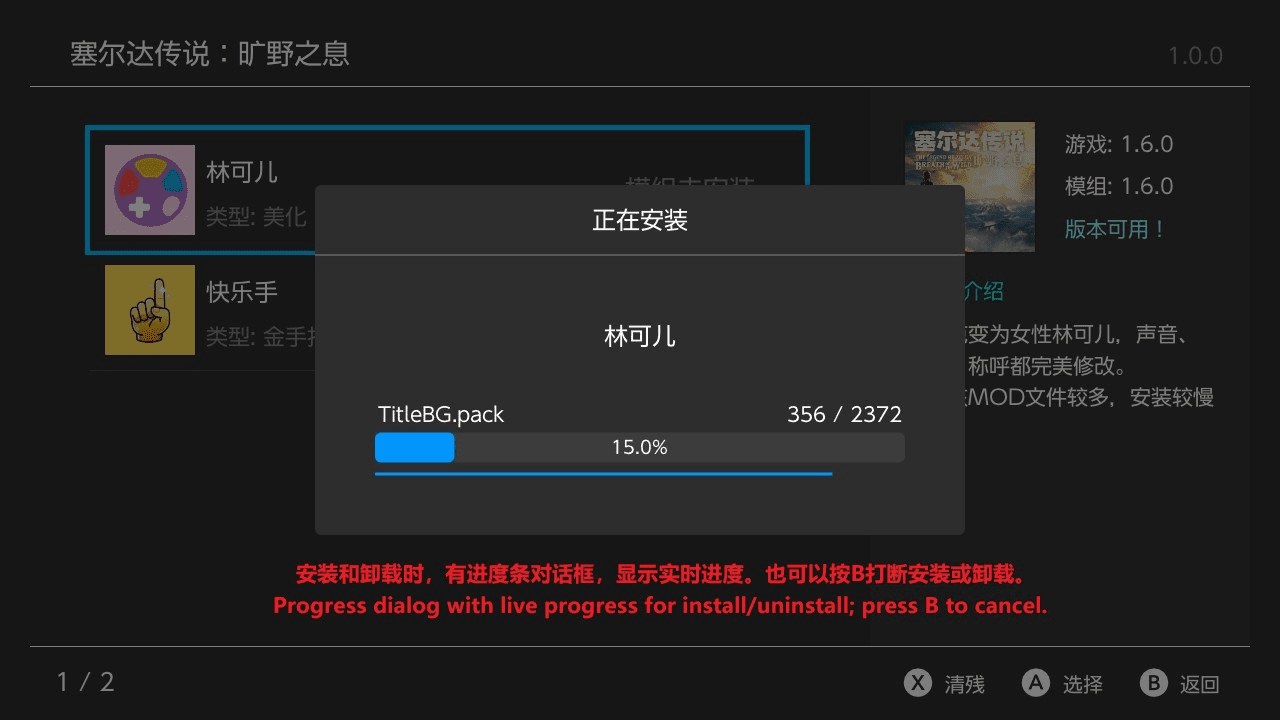
NX Mod Manager is a comprehensive mod management tool designed specifically for the Nintendo Switch. It supports multi-language interfaces, audio feedback, and name mapping, providing an intuitive system to add, install, uninstall, and manage mods. Mods are installed by copying files, which simplifies backup and removal but may result in slower installation times for large mods.
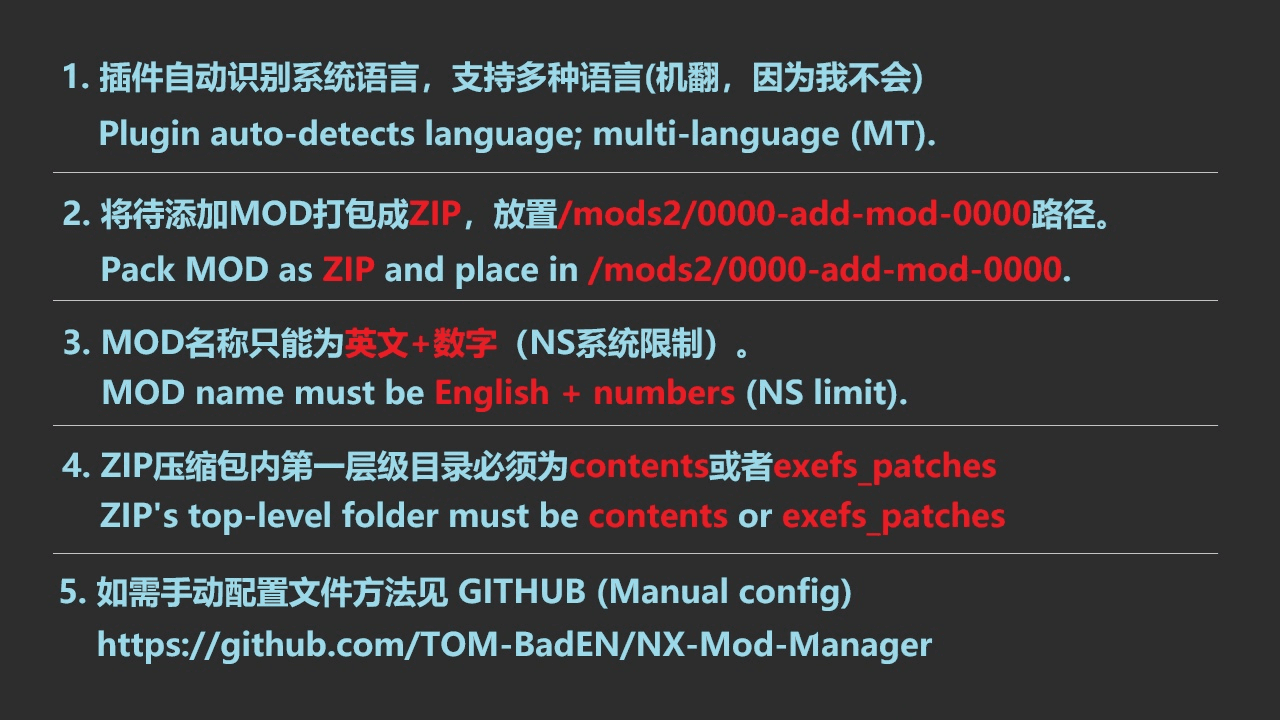
The manager supports ZIP-format mods from version 2.0 onward, requiring the ZIP's root folder structure to contain both contents and exefs_patches directories for proper recognition.
Features
- Intuitive mod management with installation, uninstallation, and backup support.
- Multi-language interface with audio feedback for user actions.
- Supports large mod installations (by copying, not symlinking).
- ZIP mod support with strict folder structure requirements (
contentsandexefs_patches). - Game and mod name mapping via JSON for user-friendly display.
- Fast loading after initial scanning due to local caching of mod data.
Installation & Usage
- Download and run the plugin, which creates a
mods2folder on the SD card to store mods. - Place ZIP mod files in the
/mods2/0000-add-mod-0000/folder for installation. - Launch the app and follow on-screen instructions to install or manage mods.
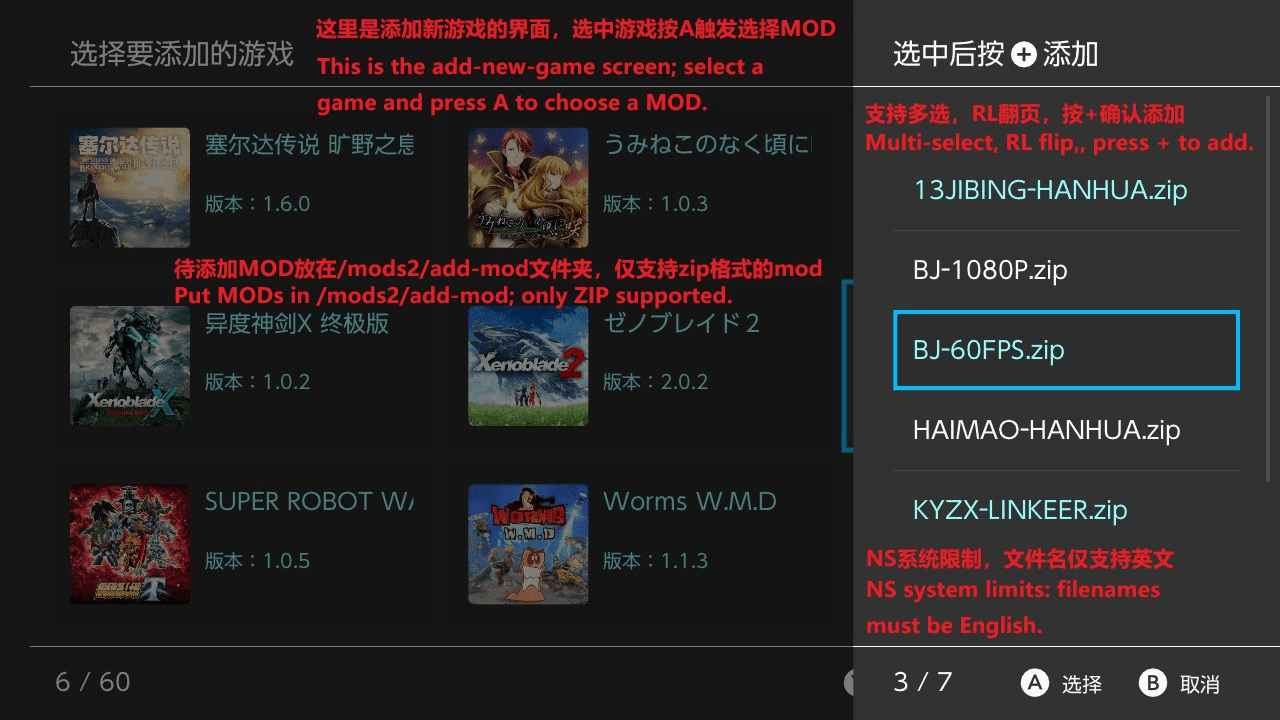
- Naming conventions require ZIP filenames to use only English letters and numbers.
- The ZIP’s root folder must contain
contentsandexefs_patchesfolders for the mod to be recognized properly.
Directory Structure Example
SD卡/
└── mods2/
   ├── game_name.json           # Game name mappings
   ├── GameName[version]/       # Game folder and version tag
   │   └── GameID/             # Game ID folder
   │       ├── mod_name.json   # Mod name mappings
   │       ├── ModName[Type]/  # Mod folder with type tag
   │       │   ├── contents/   # Mod content files
   │       │   └── exefs_patches/ # Mod patch files
   │       └── MOD.ZIP         # ZIP mod package (with required structure)
Mod Type Tags
| Tag | Meaning |
|---|---|
| [F] | Frame rate patch |
| [G] | Graphics enhancement |
| [B] | Game beautification |
| [P] | Gameplay changes |
| [C] | Cheat codes |
Game and Mod Name Mapping
- Game names and mod names can be mapped to user-friendly names using JSON files placed in the mods folder.
- Allows for localized display of names and descriptions in the manager UI.
Performance
- Initial scan of more than 20 modded systems may be slow; subsequent accesses are significantly faster due to caching.
- Installation times vary depending on mod size, e.g., around 1 to 7 minutes, with uninstallation generally faster.
Screenshots
|
|

Changelog
v2.2.6
- Optimized conflict detection logic, now allowing multiple mods to share common files.
- Removed the feature to cancel mod uninstallation by pressing B.
- Fixed a critical bug in file-type mod installation.
v2.2.5
- Added Bilibili video tutorial and GitHub QR code images to the guide.
- Adjusted some details.
v2.2.4
- Fixed an issue where MTP transfers of large files could occasionally freeze (thanks to TotalJustice’s libhaze fix).
- Added conflict detection when installing MODs: if the target path contains the same file, the system will compare and identify conflicting MODs.
- Added automatic cleanup of installed files when installation is interrupted by pressing B.
- Added automatic cleanup of installed files if installation fails due to an error.
- Adjusted the text position in confirmation dialogs: previously centered, now centered horizontally but left-aligned.
- Changed the Y button label from “Uninstall” to “Force Clean”.
- Added confirmation dialog text for Force Clean.
- Added dynamic timer display in the console during MTP transfers.
- Fixed an error in MOD list sorting.
v2.1.4
- Added transfer speed information to the MTP transfer interface
- Slightly improved MTP stability for LITE models
- Completed the missing text in languages other than Simplified Chinese
v2.1.3
- Home Screen
- Added favorite marking feature
- Added search function, supporting touch, pinyin, fuzzy, initials, and full spelling search
- Added MTP transfer option in the menu (experimental; known issue: on LITE, uploading files larger than 1.5 GB will freeze)
- Added Remove Game option in the menu; removed mods will be moved to the addmod folder
- Added View Location option in the menu
- Added pre-sorting: games are displayed in A–Z order when opening the plugin
- Add Game Screen
- Added search function
- Added a reminder when installing mods if the version does not match
- Mod Screen
- Added Remove Mod option in the menu
- Added View Location option in the menu
- Others
- Simplified version comparison rules: now only compares the numeric part
- Added repeat input for Up/Down keys when held
- Adjusted the add function: it can only be used after the home scan finishes, to avoid blocking
- Removed the mod count display at the bottom left of the add-mod list, since long text in other languages caused overlap
- Adjusted some details to improve user experience (forgot the exact changes)
- Bug Fixes
- Fixed an exception where modifying the version number did not update the corresponding JSON file
- Fixed an issue where some game icons failed to load
- Fixed an issue where folders containing a dot were misidentified as files
- Fixed an exception with down-key navigation in the 3×3 grid under special conditions
- Fixed some minor bugs that didn’t affect usage (details forgotten)
v2.0.3
- Fixed an issue where the scanned game version on the Switch remained outdated after the game version changed.
v2.0.2
- Fixed a bug that caused the program to crash when adding mods.
v2.0.1
- Fix the issue where the text on the virtual keyboard is invisible when the Switch theme is set to the light theme.
- Newly added games will now appear at the top of the page, eliminating the need to search for them.
v2.0.0
- Main Interface
- The vertical list interface has been rebuilt into a grid interface, allowing more content to be displayed at once.
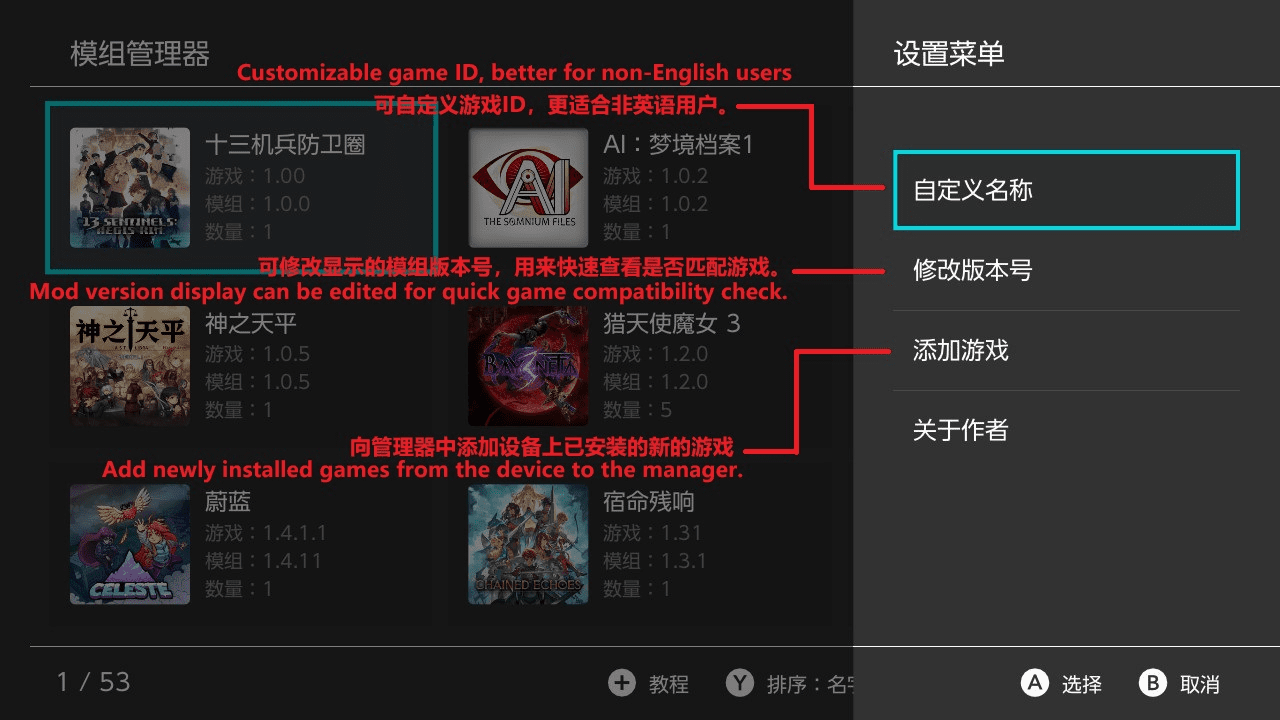
- Added menu functionality for the X button.
- Supports custom game names and mod version editing (display purposes only).
- Added the ability to add games directly from installed games into the mod manager, avoiding the need for complex manual configuration.
- Installed Games Interface
- A new interface has been added to support the “Add Game” function from the main interface.
- MOD Interface
- Added menu functionality for the X button.
- Supports custom mod names, mod type modification, and adding mod descriptions.
- Supports appending mods freely, with mod files placed in /mods2/0000-add-mod-0000.
- Tutorial Interface
- The tutorial interface has been rebuilt. Previously, it was all text-heavy and hard to follow; now it is image-based.
- Others
- Added pinyin sorting, allowing Chinese game names to be sorted alphabetically.
- Fixed a bug that could cause installed mods to fail.
- Fixed several minor bugs that did not affect functionality.
v1.3.0
- Significantly improved ZIP MOD uninstallation speed
- Linkoer can now be uninstalled within 20 seconds.
- Princess Flower uninstallation improved from 3 minutes 30 seconds to 1 minute 30 seconds.
- Significantly improved installation speed for file-based MODs
- Linkoer installation improved from 1 minute 40–50 seconds to 1 minute–1 minute 20 seconds.
- Princess Flower installation previously unmeasured, now takes 7 minutes 10 seconds; using ZIP-based MOD installation is recommended.
- Significantly improved installation speed for ZIP-based MODs
- Linkoer installation improved from 1 minute 5–20 seconds to a more stable time, close to 1 minute 5 seconds.
- Princess Flower installation improved from 6 minutes 13 seconds to 4 minutes 50 seconds–5 minutes 10 seconds.
- Adjusted the file count background layer in the progress dialog to ensure it is not obscured by file names.
- Fixed a minor bug that does not affect usage.
v1.2.0
- Added support for installing MODs in ZIP format, primarily targeting large MODs, significantly improving installation speed.
- Refactored the installation and uninstallation code.
- For example, the Lin Ke’er MOD consists of 2,732 files totaling 500 MB.
- Slightly improved file-based installation speed, reducing the time from 1:50–2:00 to 1:40–1:55.
- Slightly improved uninstallation speed, now completing in most cases within 20 seconds (previously around 20 seconds).
- Greatly improved installation speed for ZIP-based MODs. When the Lin Ke’er MOD was packaged as a ZIP, installation time decreased from 1:40–1:55 to 1:05–1:20.
- The larger the MOD, the greater the relative performance improvement. For details on configuring ZIP installation, see the provided template or README.
v1.1.0
- Modified the bottom-left text in the game and mod interface from "Total" to "Current Index / Total".
- Fixed two minor bugs that did not affect usability.
- Added a per-file copy progress bar in the installation dialog, which only appears for large files.
- Significantly improved mod uninstallation speed. For example, uninstalling the "Lin Ke'er MOD" is reduced from over 1 minute 30 seconds to about 20 seconds.
- Slightly improved mod installation speed. For example, installing the "Lin Ke'er MOD" is reduced from 2:00–2:10 to 1:50–2:00.
- The "Lin Ke'er MOD" contains a total of 2732 files.
- Added timing display for installation and uninstallation completion. If under 1 second, it will display as 0.1s.
v1.0
- First Release.
Credits & Libraries
Acknowledges multiple open-source projects and libraries including devkitPro, libnx, Atmosphere-NX, NanoVG, switch-libpulsar, and others for foundational support in UI, audio, rendering, and file management.