
Wii Plugin Manager
From GameBrew
More actions
| Wii Plugin Manager | |
|---|---|
 | |
| General | |
| Author | wei134102 |
| Type | PC Utilities |
| Version | 2.2 |
| License | N/A |
| Last Updated | 2025/05/10 |
| Links | |
| Download | |
| Website | |
| Source | |
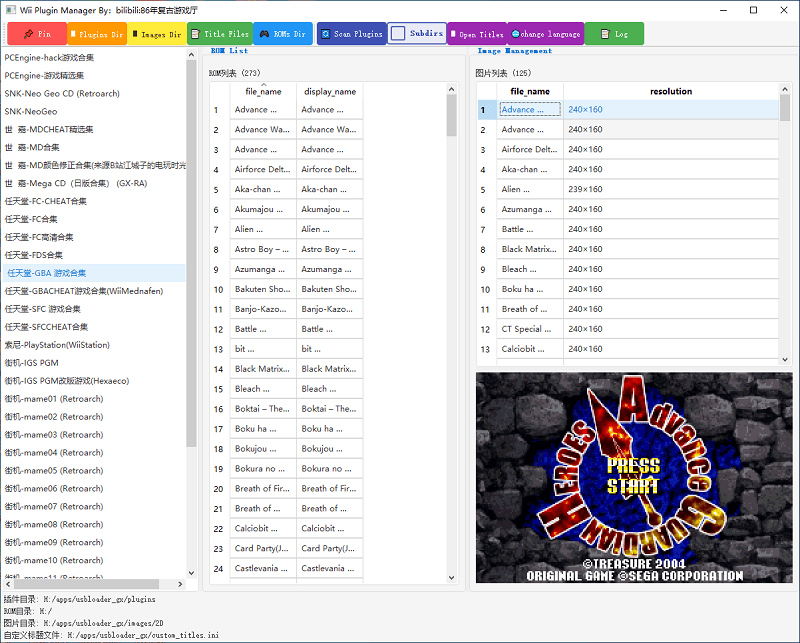
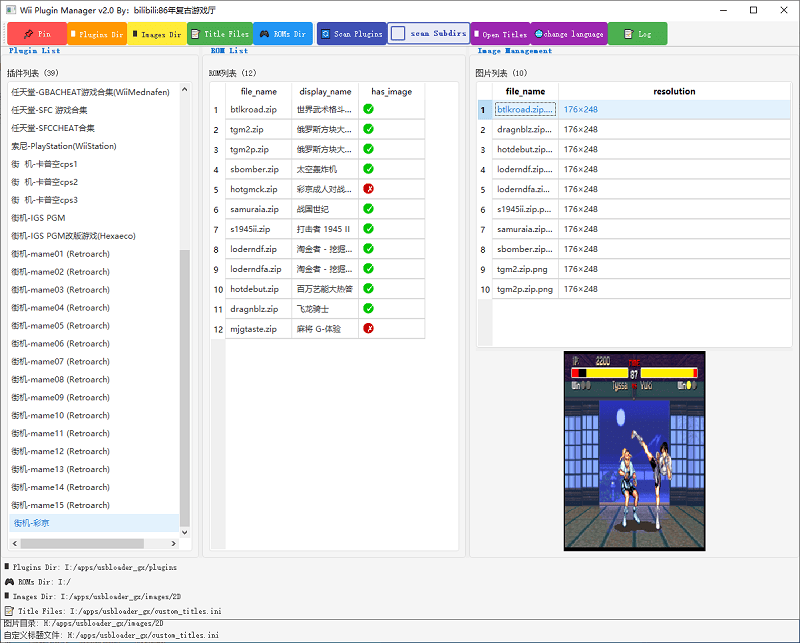
Wii Plugin Manager is a desktop application designed to manage plugins for the Nintendo Wii. It is particularly useful for users of homebrew loaders like WiiFlow and USBLoaderGX, offering a graphical interface to handle plugin configurations, game ROMs, and associated cover images.
Main Features
Key Features
- Visual interface for plugin management
- Automatic association between ROMs and images
- Bilingual UI support (Chinese/English)
- One-click scan and load plugin directory
- Real-time preview of configuration changes
- Double-click to copy ROM filename feature
Plugin Management
- Scan and load plugin configuration files (.ini)
- Edit plugin configurations (right-click menu)
- Delete plugins (move to bak directory)
- Support for subdirectory scanning
ROM Management
- Display ROM list with custom display names
- Rename ROM files (with option to rename corresponding images)
- Delete ROM files
- Copy ROM filename to clipboard with double-click
- Open ROM folder from right-click menu
Image Management
- Display images corresponding to ROMs
- Resize images (with or without maintaining aspect ratio)
- Rename image files
- Open image folder
- Automatically display corresponding image when ROM is selected
- Image status indication (has/no image)
Custom Titles
- Load and save custom title configurations
- Edit ROM display names
- Open custom title file for direct editing
- Auto-save modified titles
Interface Features
- Bilingual UI support (Chinese/English, toggle with "change language" button)
- Window always-on-top function (click " Pin" button)
- Logging functionality (can be enabled/disabled)
- Status bar notifications
- Movable toolbar
Installation & Usage (English)
System Requirements
- Python 3.8+
- PyQt5
- Pillow (Image processing library)
Installation Steps
1 - Create virtual environment:
python -m venv venv
2 - Activate virtual environment:
- Windows:
venv\Scripts\activate - Mac/Linux:
source venv/bin/activate
3 - Install dependencies
pip install PyQt5 pillow
4 - Run the program:
python main.py
Supported Plugin Types
- wii flow plugins
- usbloader_gx plugins
Usage Instructions
Basic Setup
- Click "Plugins Dir" button to select plugin configuration directory
- Click "ROMs Dir" button to select ROM files directory
- Click "Images Dir" button to select game images directory
- Click "Title Files" button to select custom title configuration file (optional)
- Click "Scan Plugins" button to load plugin configurations
ROM Operations
- Select a plugin from the left list, the middle area will display corresponding ROMs
- Right-click on an item in the ROM list to:
- Open ROM folder
- Rename ROM file (with option to rename corresponding image)
- Delete ROM file
- Double-click on ROM filename to copy it to clipboard
- Click on an item in the ROM list, if there's a corresponding image, it will be displayed in the preview area
Image Operations
- Right-click on an item in the image list to:
- Open image folder
- Resize image
- Rename image file
Custom Titles
- Edit the "Display Name" column directly in the ROM list
- Click "Open Titles" button to edit the title configuration file directly
Other Features
- Click " Pin" button to toggle window always-on-top state
- Click "change language" button to switch between Chinese and English interface
- Click "Log" button to enable/disable logging functionality
Screenshots
Changelog
v2.2
- Fix bugs and add features!
v1.0
- Fixed the bug that blank columns appeared after sorting!