
Saturn-FPKG PS4
From GameBrew
More actions
| SATURN-FPKG | |
|---|---|
| File:Saturn2ps4j.png | |
| General | |
| Author | Jabu |
| Type | PC Utilities |
| Version | 1.2 |
| License | Mixed |
| Last Updated | 2023/10/22 |
| Links | |
| Download | |
| Website | |

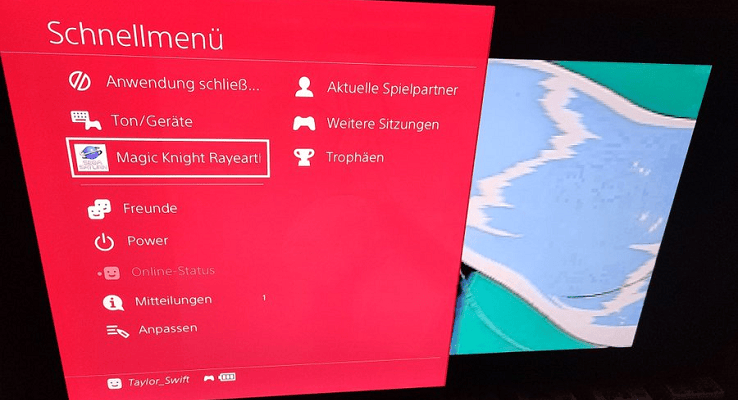
SATURN-FPKG is a ROM injection utility that can convert Sega Saturn ROMs (.bin/.cue) to PS4 fpkgs.
User guide
How to use
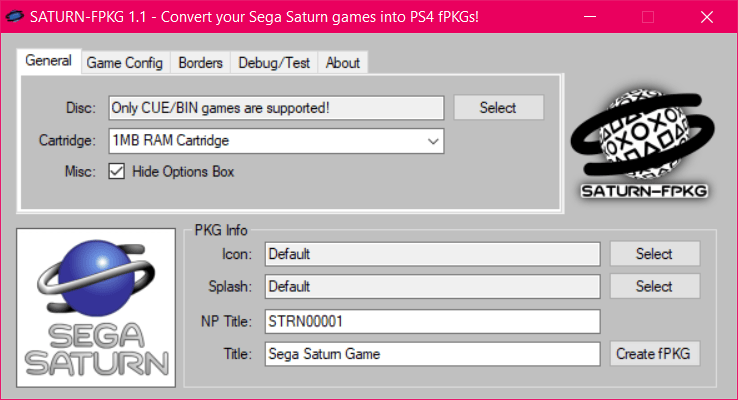
- Run SATURN-FPKG.exe.
- Click "Disc" and select your Saturn game's .cue file.
- Customize the settings (game title, icon, ram cartridge, screen settings, borders, etc).
- Make sure the auto-generated npTitle is unique (to prevents PKG conflicts).
- On Firmwares that are lower than 9.00, check the "FW 5.05 Backport" checkbox.
- Click "Create fPKG" and select an output folder.
Notes
- The emulator now works on Firmware 5.05 and up, make sure you use the latest GoldHen payload on Firmwares lower than 9.00 for it to work.
- ISOs are probably not supported by the emulator and won't work (use proper CUE/BIN game images),
- A unique npTitle based on the game product id will be now automatically selected.
- You can right-click on a text box to reset it's value.
- You can select which RAM cartridge should be used for a game(eg Street Fighter Zero 3 uses the 4MB cart for better animations) but most games should run fine on the default setting.
- You can hide the in-game "Press Options for Options" box by checking the "Hide Options Box" checkbox.
- When playing a game press the touchpad or hold the Options button for a settings menu, you can change some display options and button configs there, you can also quick save/load/rewind the game there.
Screenshots
Media
How to Play Sega Saturn Games on a Jailbroken PS4 with SATURN-FPKG (MrMario2011)
SATURN-FPKG v1.1 - Quick Preview (JabuPL)
SATURN-FPKG v1.0 - PKG Creation Test (JabuPL)
Compatibility
Firmware 5.05 +
Known Issues
- Savestates won't work when a 4MB RAM cartridge is used.
- Custom Borders can sometimes get corrupted, idk why yet(but it doesn't happen as much as it did before)
Changelog
v1.2
- The emulator now works from FW 5.05 and up, thanks to Cyber1000's backport.
- Make sure you check the "FW 5.05 Backport" option, works best with GoldHen on firmwares lower than 9.00.
- Added a Polish translation which can be selected from the "About" tab, it's also possible to add more languages by creating .lng files in the stuff/lng/ folder(see polish.lng for more info)
- It's now possible to import custom game guides(well 3 pages for now)
- Improved TEX conversion, custom borders/guides bigger than ~1,19MB work fine now
- PKG Creation was moved to a thread so the app doesn't look like it froze anymore
v1.1
- The UI was redesigned(it's not so ugly anymore).
- Some under-the-hood code cleanups/changes.
- Improved CUE parsing, no more problems with absolute paths and the app will now check if all .bin files exist.
- The app will now check if a valid Track1 .bin file is used in the CUE file.
- Added an error message when selectiong a game in ISO format, ISOs are not supported by the emulator and won't work(use proper CUE/BIN game images!)
- Added automatic npTitle selection using a crc16 hash based on the games product id(no need to use the Randomize npTitle button anymore).
- Added a True Transparency option(no more meshes!)
- Added a Widescreen option(it just stretches the game into 16:9).
- It's now possible to select a config file from the users pc(it overrides all config related options, like the widescreen and the transparency option!)
- It's now possible to import custom game borders, .tex and .png files are supported(png images will be converted and rescaled automatically).
- The Readme has been updated.
v1.0
- First Release.
Credits
Stuff used:
- 7-Zip - https://7-zip.org/
- LibOrbisPkg - https://github.com/maxton/LibOrbisPkg
- gengp4 - https://github.com/xvortex/ps4-dumper-vtx/
- Thanks to k6stor for support.
- And thanks to Cyber1000 for his backport.