
JMANIA PSP
More actions
| JMANIA | |
|---|---|
 | |
| General | |
| Author | Joreofiorio35 |
| Type | Music Games |
| Version | 2.0 |
| License | Mixed |
| Last Updated | 2005/11/04 |
| Links | |
| Download | |
| Website | |
| Source | |
Stepmania Port for PSP made in Lua.
Features
- Dwi files.
- Backgrounds.
- Banners.
- 4th-192nd notes.
- Mods.
- Assist tricks.
- Combos.
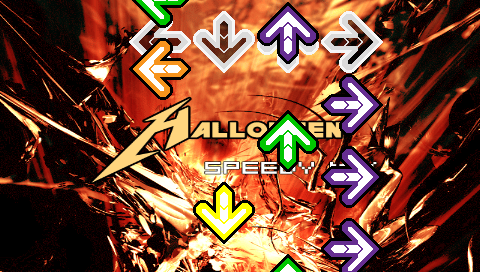
- Colored arrows.
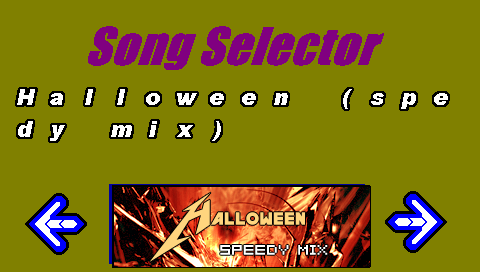
- Song selector.
Installation
Copy the JMANIA folder to /PSP/GAME/.
If you have played STEPMANIA before, you would probably know how to add songs to the game. For this program, for one song, you can have:
- DWI file (contains steps)
- Banner file (song banner)
- Background (song background)
Notes:
- The files must be in the same directory as the script (index.lua).
- The banner must have the same name as the DWI file with a .PNG extension (256 x 80).
- The background must have the same name as the Song with "-BG" on the end with a .PNG extension (480 x 272).
- Neither the banner nor the background are required, it just makes things look neater.
User guide
First off, when loading, it must load FONTS, FUNCTIONS, and SONGS, and it will notify you of it's progress.
Then once everything is loaded, you can select your song. To select, use the Left/Right buttons.
If you would like to proceed with the song you have selected, press Start, and you can play the Song.
If you would like to modify how the song plays, press the Square button.
If you press Square, you come to a black screen you can navigate through the MODS with the Up/Down buttons, and change the VALUES with the left/right buttons.
Turn on ASSIST TRICK if you would like the program to CLAP each time an arrow is supposed to be pressed. You can also change BPM, how fast the song moves, and CMOD Speed, which tells how far apart the arrows are separated.
To go back to the selector screen, press the Start button. Once the song is selected, the game will notify you of its progress in creating the arrows and you will be ready to play.
After the song is over, it will proceed to the evaluation Screen, and once you press Start to the Selector screen, where you can select another song.
Controls
Cross/Down - Down arrow
Square/Left - Left arrow
Triangle/Up - Up arrow
Circle/Right - Right arrow
Start - Exit game
R/L - Increase/Decrease song bpm
Screenshots
Known issues
There are many bugs.
The dwi files must contain the one difficulty you want to play. If there is more than one difficulty in the dwi file, the song will not load.
Anything else you would expect to screw up lua, would most likely screw up this game.