
FEGecko Wii U
From GameBrew
More actions
| SFEGecko | |
|---|---|
 | |
| General | |
| Author | MiMiCAX |
| Type | Game Trainers |
| Version | sfe0.2 |
| License | Mixed |
| Last Updated | 2016/07/16 |
| Links | |
| Download | |
| Website | |
| Source | |
Trainer GUI for Tokyo Mirage Sessions #FE, similar to XCXGecko.
Note: Use at your own risk. Keep a backup of your save data before using the tool just in case.
User guide
How to setup:
- On the Wiiu, launch TCP Gecko, then run Tokyo Mirage Sessions ♯FE.
- From the PC, open FEGecko trainer, enter the Wii U's IP address and click the connect icon.
Notes:
- Successfully tested with Loadiine v3 and GX2 v0.3 on 5.3.2. Different offset (0x1140) required for GX2 version on 5.3.2. Should work with disc (refer to the next point).
- Choose an appropriate offset for code addresses that suits your Wii U OS + Loadiine version + game region. Use the 'Offset:' dropdown combobox in the top toolbar to select different offsets.
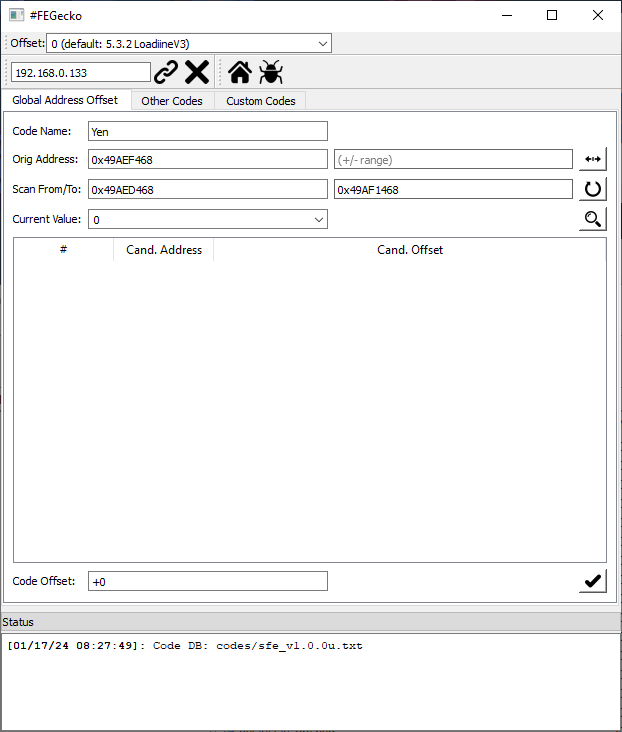
- If none of those offsets work, use the "Global Address Offset" tab or another tool like Gecko.NET to find the suitable offset for your setup. Refer to the instructions here.
- If you've added an item/performa item/clothing, but it's not working with Tiki/showing a blank icon: Try obtaining at least 1 of said item legally in-game first.
Screenshots
Changelog
sfe0.2 2016/07/16
- Fixed POKE codes from adding 2x offset.
sfe0.1 2016/07/11
- #FEGecko teaser release.