
Checkpoint Switch
More actions
| Checkpoint | |
|---|---|
 | |
| General | |
| Author | FlagBrew |
| Type | Save Managers and Editors |
| Version | 4.0.0 |
| License | GPL-3.0 |
| Last Updated | 2026/07/11 |
| Links | |
| Download | |
| Website | |
| Source | |
| Support Author | |
A fast and simple homebrew save manager for 3DS and Switch written in C++.
Checkpoint is created following ideas of simplicity and efficiency. The UI has been designed to condense as many options as possible, while keeping it simple to work with.
Moreover, Checkpoint is extremely lightweight - while being packaged with a nice graphic user interface - and is built using the most recent libraries available.
Checkpoint for Switch natively supports NAND saves for the titles you have played. Title information are loaded automatically.
Features
- Saves for the titles you have played, with title information loaded automatically.
- A completely redesigned user interface, with light and dark mode theming.
- A Settings section to configure everything directly from the console: favorites, filters, additional save folders and more, with no manual file editing required.
- Internationalization support: English, Italian, French, German, Portuguese, Spanish, Dutch, Japanese and Chinese.
- Fast, responsive file operations: backups and restores run on a worker thread, and backups can be cancelled while in progress.
- Additional save folders, configurable per title through a built-in folder browser.
- A background FTP server, to access your save backups directly from your PC.
- Wireless save transfer between consoles.
- An HTTP log server, to view Checkpoint's logs in real time from any browser on your network.
- A rendering backend built on deko3d, which makes the application ~70% smaller than before.
- 1080p docked mode support, alongside 720p in handheld.
- File-by-file verification after restore, and safer handling of large save restores.
chlink
Checkpoint comes with chlink, a companion command line app for your PC that talks to Checkpoint's wireless save transfer feature. With chlink you can send save backups from your PC to the console and receive backups from the console to your PC, over your local network - no cables and no SD card swapping required.
Transfers are protected by a 4-digit PIN displayed on the console, and chlink automatically recognizes backups coming from a Checkpoint SD card layout, so title and backup information are filled in for you.
chlink is a single, dependency-free executable available for Windows, macOS and Linux. You can download it from the releases page, or build it yourself from the tools/chlink folder.
Installation
Place the .nro to the /switch/ folder on the SD card.
Checkpoint for Switch runs on homebrew launcher. Make sure you're running up-to-date payloads.
User guide
Working path
Checkpoint relies on the following folders to store the files it generates. Note that all the working directories are automatically generated on first launch (or when Checkpoint finds a new title that doesn't have a working directory yet).
sdmc:/switch/Checkpoint: root pathsdmc:/switch/Checkpoint/logs: log filessdmc:/switch/Checkpoint/config.json: custom configuration filesdmc:/switch/Checkpoint/saves/<title id> <game title>: root path for all the save backups for a generic game
Configuration
You can configure Checkpoint directly from the console through the Settings section. All the options that used to require manual edits to the configuration file can now be managed from there. The config.json file is still stored in Checkpoint's working directory, but you're not required to touch it anymore.
FTP server
Checkpoint offers built-in server that allows for easy and fast save retrieval.
You can access connecting to SWITCH_IP_ADDRESS:50000 with empty username and password.
Troubleshooting
Checkpoint displays error codes when something weird happens or operations fail. If you have any issues, please ensure they haven't already been addressed, and report the error code and a summary of your operations to reproduce it.
Additionally, you can receive real-time support by joining FlagBrew's Discord server.
Controls
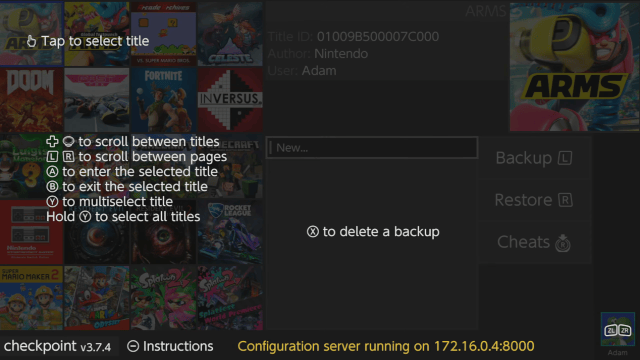
Minus - Instructions
Title selection:
D-Pad/Joystick - Scroll between titles
L/R - Scroll between pages
A - Enter selected title
B - Exit the selected title
Y - Multiselect title
Hold Y - Selection all titles
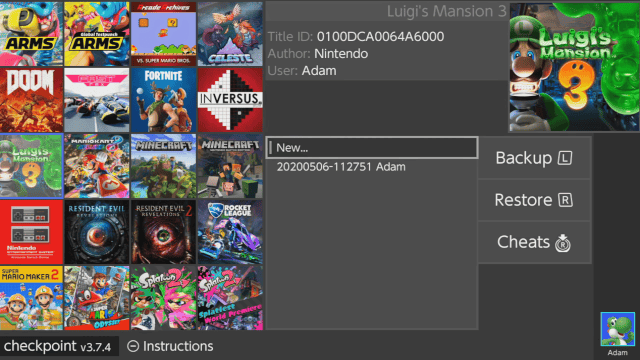
Menu options:
L - Backup save
R - Restore save
X - Delete a backup
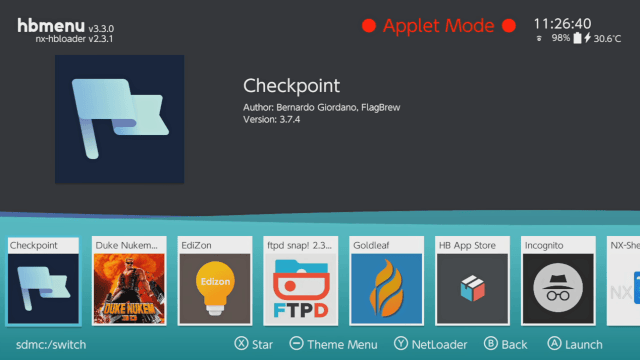
Screenshots
Media
[Switch] How To Backup & Restore Saves Using Checkpoint (DarkFlare)
Known issues
Changelog
4.0.0 2026/07/11
- Added: complete UI/UX redesign
- Added: internazionalization support.
- Translations have been done through the use of LLMs. If you're a native speaker and think that text wording and appearance in the UI can be improved, please submit a pull request or open an issue on this repository.
- Current language support includes English, Italian, French, German, Portuguese, Spanish, Dutch, Japanese and Chinese
- Added: a brand new Settings section: it is now possible to edit Checkpoint's config.json file directly from the console with a nice settings interface.
- Added: light and dark mode theming
- Added: a folder browser to navigate the SD card and choose additional save folders on device
- Added: quick backup toggle to use the default backup name without any prompt
- Added: confirm restore toggle to avoid being asked for confirmation for save restore operations
- Added: file-by-file verification after restore
- Added: complete graphics backend migration from SDL2 to deko3d
- Among all the benefits that the rewrite brought to the software, the application size is now ~70% smaller
- Added: HTTP log server on port 8000 — view logs in real-time from any browser on your network.
- Logs can now be accessed from the application directly via Settings > Connectivity > Logs.
- Added: 1080p docked mode support (alongside 720p handheld).
- Fixed: async IO makes file operations faster and more efficient by running them in a worker thread, separated from the main UI thread
- Fixed: backup list navigation is now massively more intuitive
- Added: large save restore with journal pre-extend and mid-file commits, preventing out-of-space failures (fixes #541).
- Fixed: avoid restoring files after a corruption error occurred during copy.
- Fixed: the project's code architecture has been greatly improved.
- The codebase is now 9 years old and has never seen an architecture overhaul like this before.
- Dozens of performance, security and safety bugfixes have been pushed to the project, making the app more secure and efficient.
- Removed: pksmbridge save transfer feature
- Removed: cheats feature.
- The cheat database required constant updates to stay in sync with game updates, and its maintenance wasn't sustainable.
- Removed: the HTML settings page accessible through local network, and all its dependencies
- Removed: unneeded dependencies like the SDL2 suite and libpng.
- Added: chlink, a companion command line app for your PC that works together with Checkpoint's wireless save transfer feature.
- Send save backups from your PC to the console, or receive them from the console to your PC, over your local network.
- Transfers are protected by a 4-digit PIN displayed on the console.
- chlink automatically recognizes backups stored in a Checkpoint SD card layout, so title and backup information are inferred for you.
- It ships as a single, dependency-free executable for Windows, macOS and Linux, attached to this release.
- General system stability improvements to enhance the user's experience.
V3.13.0 2026/06/21
- Added: support for 8MB DS cartridges.
- Added: wireless save transfer between 3DS consoles (thanks! @edu1010)
- The feature needs to be enabled via a flag in Checkpoint's configuration file.
- Added: show progress bars for DS cartridge backup and restore operations.
- The previous behaviour made Checkpoint look like it froze. The UX is more interactive now.
- Added: show an additional progress bar for multi-backup operations.
- Added: cheat database updated to latest Sharkive release.
- Fixed: support for latest toolchains and libraries versions.
- General system stability improvements to enhance the user's experience.
V3.12.0 2026/05/13
- Added: support BCAT saves on the Switch version of the app.
- Added: support device saves on the Switch version of the app.
- Added: support system saves on the Switch version of the app.
- The UI of the app has been slightly upgraded to account for these new save types.
- Added: per-file progress bar.
- The UI will now display two progress bars, one for the overall save progress and one for each file in the save archive.
- Fixed: occasional crash when loading NAND saves on the 3DS version of the app.
- Fixed: Checkpoint should not freeze anymore when performing backup or restore operations.
- Fixed: support asian system fonts in the Switch version of the app.
- This solves an issue where special characters were not rendered in the UI.
- Fixed: add not-empty validation for backup names.
- Fixed: file paths could contain multiple
/characters one after the other, causing folder deletion issues. - Fixed: undefined behaviour when trying to close directories that were not opened.
- Fixed: undefined behaviour could occur when reading a file's size.
- Fixed: log directory read errors.
- General system stability improvements to enhance the user's experience.
V3.11.0 2026/02/25
- Added: backup and restore modal UI has been greatly improved with a proper progress bar.
- Fixed: an issue with title cache persistence preventing new title installations from being recognized from Checkpoint.
- Fixed: occasional crashes when moving the buttons too fast on the 3DS version of the app.
- Fixed: an issue with the app freezing when holding B to refresh the title cache.
- Fixed: crash when no titles available on the Switch version of the app.
- Fixed: occasional crash when quitting the Switch version of the app.
- Fixed: name and icon of the selected account not updating on certain conditions.
- Fixed: various memory leaks here and there when disposing the application on quit.
- Fixed: properly print strings with percent characters in the logfile.
- Fixed: compiled with latest version of the needed dependencies.
- Added: cheat database updated to latest Sharkive release.
- General system stability improvements to enhance the user's experience.
V3.10.2 2025/11/22
- Fixed: breaking compatibility issue with latest Switch OS version.
- Fixed: compiled with latest version of the needed dependencies.
- Added: cheat database updated to latest Sharkive release.
- General system stability improvements to enhance the user's experience.
v3.10.1 2025/06/22
- Fixed: add support for archived, hidden and readonly 3ds save backup folders.
- This bug has been in the codebase from the very beginning. Eventually, we fixed it.
- Fixed: a bug where some text could not be rendered on screen properly.
- Added: cheat database updated to latest Sharkive release.
- General system stability improvements to enhance the user's experience.
v3.10.0 2025/04/19
- Fixed: startup time has been drastically improved: ~50% speedup on uncached boot, ~90% speedup on cached boot.
- This has been achieved by profiling the application boot process, and realizing that title cache persistence on the SD card took majority of the loading time. Now this operation is lazily done in a separate thread. It's funny to realize that a badly implemented optimization can become a bottleneck of its own, so take my mistake as a lesson.
- Here's the improvements I had on my console (improvements may vary since they depend on how many games you have on your console):
- Uncached startup went down from 9.8s to 5.7s
- Cached startup went down from 5.7s to 0.6s
- Added: due to requests from multiple users, Checkpoint can now be updated from Universal Updater.
- Fixed: cartridge loading now runs immediately rather than waiting for the title cache to be persisted on the SD card.
- Fixed: properly quit the application gracefully when an handled exception occurs.
- Fixed: initial code refactoring.
- Removed: some redundant logs in the title loader.
- General system stability improvements to enhance the user's experience.
v3.9.0 2025/04/14
- Fixed: the startup crash issue affecting all version since 3.8.0 has been identified and patched.
- Huge shoutout to achinech on Discord who volunteered to debug the issue on their console.
- If you still encounter startup crash issues, please notify the team immediately on Discord and on GitHub issues.
- Fixed: cartridge scanning has been refactored to be way more efficient.
- Previously, the software used to poll the cartridge synchronously for every frame of the UI thread. Cartridge scanning is now happening on a separate thread which only runs twice per second.
- Added: a more advanced threading framework ported from PKSM.
- Added: networking support and an integrated HTTP server. This is currently used to provide real-time online access to the application logs, but this code will be useful for future features like self-updating.
- Added: more robust logging ported from PKSM. Logs are stored in the
/3ds/Checkpoint/logsfolder and are split by date.- Logs are also accessible at runtime through the integrated HTTP server at the following addresses:
http://3ds-ip-address:8000/logs/memoryfor the logs of Checkpoint's current runhttp://3ds-ip-address:8000/logs/filefor all the logs for the current date
- Logs are also accessible at runtime through the integrated HTTP server at the following addresses:
- Added: compiler optimizations are back. This includes link-time optimization and an upgrade from
O2toO3compared to v.3.7.4. - Fixed: better configuration file handling ported from PKSM.
- Fixed: better thread synchronization between UI thread and title loading thread.
- Fixed: wrap the entire program into try-catch blocks to prevent crashes caused by other unhandled exceptions in the future.
- Fixed: few graphics improvements.
- Fixed: readme has been updated with latest screenshots.
- General system stability improvements to enhance the user's experience.
v3.8.2 2025/04/02
- Added: Initial upgrade from C++17 to C++20
- Added: Built with latest Sharkive's cheats repository
- Fixed: UI has been improved and rendering has been simplified in order to make the screen render faster
- Fixed: the color scheme has been improved (to my liking)
- Fixed: a crash when playing certain games and then going directly into checkpoint afterwards
- Fixed: logs on the Switch version are now split by day. This avoids keeping a huge
checkpoint.logfile after years of use.- You can safely remove
/switch/Checkpoint/checkpoint.log. - You can find the new logs under
/switch/Checkpoint/logsfolder. - Logs for the 3DS version will be added in the next releases.
- You can safely remove
- Fixed: dependencies have been updated to their latest version
- Fixed: displayed play time is now rendered correctly
- Fixed: L/R buttons double binding (thanks @Noxor11)
- Fixed: source compilation (thanks @mrhappyasthma and @l-austenfeld)
- Removed: link time optimizations have been disabled.
- These were originally introduced to strip down some weight off the compiled executable, but the difference is too small to consider this feature useful. LTO has caused some trouble in v3.8.0 on the 3DS version.
v3.8.1 2025/03/23
- Updated dependencies to their latest version
- Disabled link time optimizations
- Initial upgrade from C++17 to C++20
- Built with latest Sharkive's cheats repository
- Fixed displayed play time
- Fixed L/R buttons double binding (thanks @Noxor11)
- Fixed source compilation (thanks @mrhappyasthma and @l-austenfeld)
v3.8.0 2021/11/13
- Fixed: Checkpoint is now compatible again with latest firmware. Compatibility with latest Atmosphère has also been fixed.
- It took some time to this release to be fully working, but it is finally out.
- Added: title sorting by Alphabetical, Last Played and Played Time. (thanks @diwo)
- You can now sort your title list by pressing X. More details are available holding minus.
- Added: Sword & Shield PKSM Bridge support.
- This is a bonus feature for PKSM users. You can enable the PKSM Bridge functionality from the web configuration panel.
- Added: embedded Sharkive's cheat database has been updated.
- This counts ~2 years of cheat updates.
- Fixed: support for games containing character ū in their title.
- Fixed: documentation.
- Fixed: compilation with latest libraries (such as libnx 4.2.0).
- Stability improvements and tons of minor code improvements.
v3.7.4 2019/12/09
- Added compatibility for Atmosphere 0.10.0+. This changes the cheats path from
/atmosphere/titlesto/atmosphere/contents, so that means this version won't be able to put cheats in place for older Atmosphere versions. - Fixed: the
Aborted by userissue occurring when trying to perform a backup in Applet mode.- This means that if you're running Checkpoint in Applet mode, you won't be prompted to decide a name for your backup and the default name will be used instead.
- This also solves incompatibilities for CFWs that don't properly support title takeover.
- Fixed: the Account Selection applet won't cause Checkpoint to hang anymore if using Applet mode, if you're running Atmosphere 0.10.0+.
v3.7.3 2019/10/26
- Fixed: built in FTP server is now able to open the Checkpoint folder, finally letting this feature to be useful for easy and fast save retrieval.
- Fixed: removed red watermark if Checkpoint was launched in applet mode.
- Pro Tip: you shouldn't launch Checkpoint or homebrew in general in applet mode anyways. Please don't.
- Fixed: latest cheats submissions are built in this release through Sharkive.
- If you have cheat codes that are not already available in this release, please submit them to Sharkive's databases here.
- Fixed: unused folders in the SD card are not created anymore.
v3.7.2 2019/09/15
- Fixed: build compiled with support for system version 9.0.0. Please update to Checkpoint 3.7.2+ in order to be able to run this software on system versions 9.0.0 or superior.
- Fixed: graphics fixes and routine dependancies updates.
v3.7.1 2019/09/12
- Added: Checkpoint can now run again under applet mode, but:
- It will be very annoying.
- Functionalities may not work properly and memory corruption may happen. Occasionally, the application could hang when trying to access one of the system applets.Watch this video for an example.
- Please do not run Checkpoint in applet mode.
- Fixed: changed port of built in FTP server to 50000.
v3.7.0 2019/09/09
- Added: Sharkive feature for the Switch as well. A brand new Cheat menu has been implemented inside Checkpoint to be able to manage cheats for Atmosphere.
- The entire cheat database is offline and bundled inside of Checkpoint.
- You're able to select and enable just the cheats you really want to have. This is an alternative approach to cheat toggles.
- Cheat updates will happen when:
- Checkpoint updates.
- You build Checkpoint from source.
- You build the cheat database and place it into the sd card in the expected location, so that it'll be loaded instead of the bundled one.
- Added: Online configurations. You can now configure Checkpoint from your internet browser. Checkpoint will behave as an HTTP server while running.
- Connect to
SWITCH_IP_ADDRESS:8000from any device connected to the same network as your Switch to be able to access configurations.
- Connect to
- Added: FTP server. You probably want to be able to get your saves out of the switch once they have been backed up. While I come up with handier solutions, enjoy this non blocking FTP server. You can access connecting to
SWITCH_IP_ADDRESS:5000(As of v3.7.1,SWITCH_IP_ADDRESS:50000) with empty username and password. - Added: redesigned UI. Enjoy it while it's fresh.
- Added: system keyboard support. The custom keyboard originally setup has been removed from Checkpoint to fully take advantage of the system keyboard applet.
- Added: switch pages with L/R.
- Added: logging. Logs will be written to
/switch/Checkpoint/checkpoint.log. - Fixed: favorite sorting now works properly again.
- Fixed: cut down size of the executable. It now stores an entire cheat database inside and still manages to be ~1MB lighter than the previous stable release.
- Fixed: Checkpoint doesn't run anymore if nx-hbmenu is launched over a system applet (like Album).
- Refactoring, refactoring, refactoring...
v3.6.0 2019/01/01
- Added: a bridge functionality between Checkpoint for Switch and PKSM (for 3DS, v6.0.0 and above) has been implemented.
- It allows to send (and then receive back) a save file over the network, to allow manipulations without having to browse your save backups manually on your PC.
- It also needs to be manually enabled by editing your configuration file. Once it's enabled, you can access the bridge by pressing
L+Ron a valid game. - This feature currently works only with LGPE.
- Fixed: buttons are now responsive as before while navigating the UI.
- Fixed: titles with black background are now displayed properly.
- Fixed: checkmark color doesn't confuse with title icons anymore.
- Fixed: text doesn't bleed textboxes like before anymore.
v3.5.0 2019/10/28
- Added support for Hardware Acceleration. Checkpoint now relies on the GPU to render graphics and text, removing load from the CPU.
- The interface now relies on SDL2 to render images and text.
- Text rendering is optimized by using a customized version of SDL_FontCache which caches glyphs in memory rather than creating textures every frame. This also allows to use the system font already available in the console.
- Checkpoint caches from PlSharedFontType_Standard and PlSharedFontType_NintendoExt fonts, so both regular characters and symbols are now supported to be rendered on screen.
- Added option to set a title as Favorite. You can now edit your configuration file to set a title id to be a favorite title, so this will always appear at the top of the title list.
- Fixed crashes caused by too many file descriptors opened.
- Key behaviour changed. ( thanks @IBNobody )
- You can now select rows in the backup list, creating backups and restoring a backup just with the button A.
- Pressing Y will select the current title but deactivate/reset the backup list. It will also enable the backup touch button only. Creating a backup will then disable the backup touch button. This makes it more clear to the user what buttons / UI elements are relevant to multi-backup.
- Fixed occasional crashes while changing account.
- Checkpoint now uses latest libnx 1.5.0, which supports timezone and fixes wrong default backup names if your console never connected to internet.
- Checkpoint is now compiled using C++17.
v3.4.2 2019/09/04
- Fix compatibility with certain games and CFWs. Now Checkpoint is fully compatible with custom firmwares using
fs_mitm,layeredfsand other modules massively relying on file operations.- Confirmed working on both hekate, Atmosphere and ReiNX using said modules.
- Other CFWs may be compatible as well, even if not directly tested.
- The issue was caused by a poorly optimized function to recursively delete folders, which has been now replaced by the one available on JKSV, too.
- Fixed configuration override after updating Checkpoint version.
- Avoid using a separate thread to populate titles.
- Default selected button for the homebrew keyboard is now
OK(thanks @fennectech).
v3.4.1 2018/08/17
- Fixed corrupted save backup folders if your Account name contains non-ascii characters.
- You can now properly cancel a backup if you press B from the keyboard screen.
- Fixed parallel building.
- Code cleanup and multiple minor fixes.
Building
devkitA64 is required to compile Checkpoint for Switch. Learn more at devkitpro.org. Install or update dependencies with dkp-pacman -S libnx switch-pkg-config deko3d switch-freetype switch-libjpeg-turbo.
Build from the repository root with make switch.
License
This project is licensed under the GNU GPLv3. Additional Terms 7.b and 7.c of GPLv3 apply to this. See LICENSE.md for details.
Credits
- Bernardo for creating Checkpoint.
- J-D-K for the original JKSM version.
- TuxSH for TWLSaveTool, from which SPI code has been taken.
- WinterMute, fincs and devkitPro contributors for devkitARM, devkitA64 and dkp-pacman.
- Yellows8 and all the mantainers for switch-examples.
- rakujira for the awesome Checkpoint logo.
- Fellow testers and troubleshooters for their help.
- The huge amount of supporters that this project has gained over the years.
External links
- Official website - https://flagbrew.org/
- GitHub - https://github.com/FlagBrew/Checkpoint
- GBAtemp - https://gbatemp.net/threads/release-checkpoint-a-fast-and-simple-save-manager-for-3ds-and-switch.503899/
- Homebrew App Store - https://apps.fortheusers.org/switch/Checkpoint