
Fallout CE Switch
More actions
| Fallout CE Switch | |
|---|---|
 | |
| General | |
| Author | ryandeering |
| Type | Role Playing |
| Version | 1.0.0 |
| License | Mixed |
| Last Updated | 2024/12/12 |
| Links | |
| Download | |
| Website | |
| Source | |
Fallout Community Edition (Switch) is a homebrew port of the original Fallout for the Nintendo Switch.
You must own the game to play and have a Switch capable of running unsigned code, so you need a Switch running on custom firmware to run the port. Needless to say, this is not an official effort from Interplay or Bethesda.
Installation
Purchase your copy on GOG or Steam. The files need to be from a Windows installation.
Download the latest release or build from the source. See YAML pipelines for reference.
Drag the installation files into a new folder called fallout1 in your switch folder on the root of your SD card.
Create a file named fallout1_nx.ini in your fallout1 folder
In the fallout1_nx.ini file, paste the following content:
[MAIN]
SCR_WIDTH=1708
SCR_HEIGHT=960
SCALE_2X=1
; Change resolution and determine scaling. SCALE_2X=1 will turn 2x scaling on. SCALE_2X=0 will turn it off.
Warning: Failure to create the fallout1_nx.ini and required content in it will cause the game to immediately crash upon launch.
Put the necessary executable in your switch folder on the root of your SD card, either .nro or .nso.
(Note: Don't expect your original Fallout 1 saves/non-CE saves to work. And keep multiple saves! Quick save/quick loading currently save/load twice.)
Configuration
- Cursor Sensitivity: Adjustable in options via mouse sensitivity. Note this will affect cursor speedup as well.
- Resolution: You can configure resolution and scaling through a config file. Create a file in your
fallout1folder calledfallout1_nx.ini- It needs to follow the following structure:
Controls
|
|
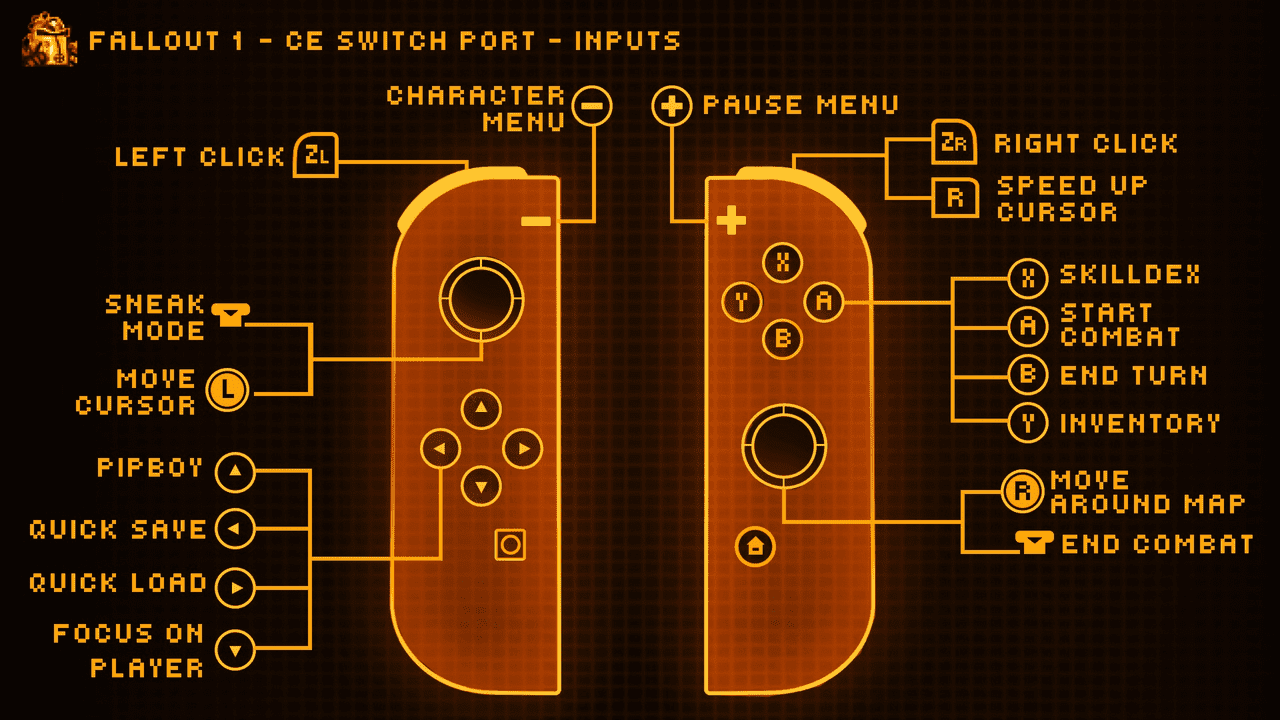
Basic touchscreen support is implemented.
On-screen keyboard support implemented for names and saves.
Media
New Native Switch Ports | Fallout 1+2 ( No Emulation ) How to Install, Tips + Tricks (Son of a Zet)
Changelog
v1.0
- First Release.
Credits
- Interplay: For developing and publishing the original game.
- alexbatalov and fallout-ce Contributors: For their excellent work in keeping this game modern.
- Romane: For the graphics.