
DirectPackageInstaller PS4
More actions
| DirectPackageInstaller | |
|---|---|
 | |
| General | |
| Author | marcussacana |
| Type | PC Utilities |
| Version | 8.3.1 |
| License | GPL-3.0 |
| Last Updated | 2025/05/25 |
| Links | |
| Download | |
| Website | |
| Source | |
A PC tool that lets you preview and send PKG files to your PS4 from direct links. It uses the API of the Remote Package Installer to add packages from URLs to your PS4 download queue. The tool also includes an automatic proxy server to improve the PS4's typically slow WAN download speeds.
The DirectPackageInstaller can function without the Remote Package Installer. In this case, you just need to enable your binloader, and the tool will instruct how the package should be installed. If both are running, the tool will prioritize the Remote Package Installer.
One of the tool's features is the ability to install PKGs from compressed files (rar,7z). As the file is downloaded, it is decompressed to your disk temporarily and sent to your PS4.
The tool also offers a Segmented Download mode, which starts a background multithreaded download of the PKG to your computer and sends it to your PS4 at the same time. It's the fastest method but the PS4 won't be able to show the real download progress and its remaining time.
Author's note: This program was made for legitimate purposes, you can use it only for download the your backups that you saved in cloud, and for that reason I condemn and do not support any kind of piracy. I'm not responsible for what you do with this tool, like, you know very well what you're doing.
Features
- Preview PKGs Files.
- Standalone PS4 package downloads.
- Auto Proxy PS4 Downloads to Speed up.
- Support for RAR/7z files as well.
- Resumable Downloads (Only from uncompressed files).
- Segmented Downloads.
- Support for few file hosting links.
- Support for PSN update manifest (Splited PKGs).
- Works with or without RemotePackageInstaller.
- Command Line Interface.
- JDown Click'n Load Support.
Installation
User guide
Supported file hostings
- Any direct link (Without Authentication)
- AllDebrid (API Key Required)
- Google Drive (With or Without Authentication)
- Mediafire (Without Authentication)
- PixelDrain
- 1Fichier (Must wait 60 minutes after downloaded)
Some hosting sites (e.g., Zippyshare) are slower than others. For better performance try testing with Google Drive.
How to use
Direct download mode
- Open the Remote Package Installer or enable Goldhen Payload Server.
- Open the DirectPackageInstaller.
- Put the direct PKG URL in the "PKG URL" field.
- Click at "Load" and wait.
- Click at "Install" and wait for the installation to finish.
- When it's done, you can close the DirectPackageInstaller or turn off your computer.
Proxied download mode
(For PS4 that has no Internet access.)
- Open the Remote Package Installer or enable Goldhen Payload Server.
- Open the DirectPackageInstaller.
- Go to "Options" > "Proxy Downloads" and check the option.
- Put the direct PKG URL in the "PKG URL" field.
- Click at "Load" and wait.
- Click at "Install" and wait for the installation to finish.
Segmented download mode
(Fastest, but the PS4 cannot track download progress accurately.)
- Make sure you have enough free disk space.
- Open the Remote Package Installer or enable Goldhen Payload Server.
- Open the DirectPackageInstaller.
- Go to "Options" > "Segmented Downloads" and check the option.
- Put the direct PKG URL in the "PKG URL" field.
- Click at "Load" and "Install".
- The PKG will be downloaded and preloaded before installation.
Download from compressed files
(Always Proxied.)
- Make sure you have enough free disk space.
- Open the Remote Package Installer or enable Goldhen Payload Server.
- Open the DirectPackageInstaller.
- Put the direct PKG URL to your compressed file.
- Click at "Load" and wait.
- (Optional) Select the correct PKG in the file list.
- Click at "Install" and wait for the installation to finish.
macOS CLI usage
Use the terminal to run the app:
./DirectPackageInstaller.Desktop
In some cases, you may need to run:
dotnet DirectPackageInstaller.Desktop.dll
Command line interface
The DirectPackageInstaller has an experimental CLI (RAR/7z and segmented downloads are not supported in this mode yet).
For more details run:
- Windows -
DirectPackageInstaller.Desktop -help - Other OS -
DirectPackageInstaller.Desktop.exe -help
Screenshots
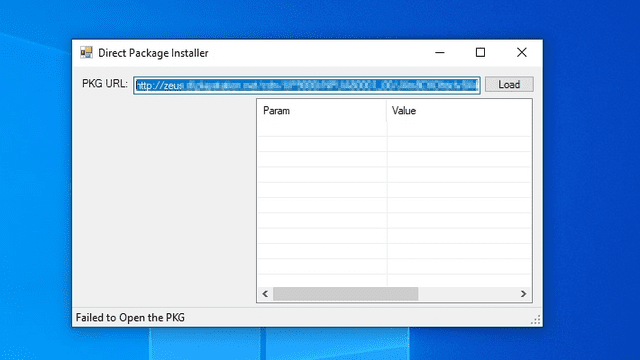
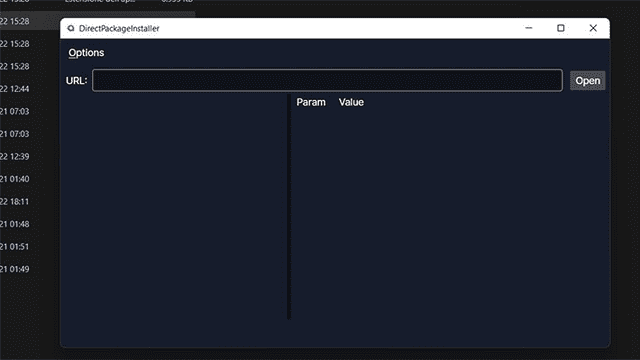
Media
Install PS4 Games Without Remote PKG Installer | Tutorial (BrutalSam)
Known issues
- The DirectPackageInstaller don't handle well parallel decompressions, If you're downloading from a compressed file, try download one per time.
- Compressed file downloads generate a temporary PKG 'cache' on your hard drive, which will require free space according to the size of the PKG on your hard drive.
Changelog
v8.3.1
- Add Support to NFS (#86).
v8.3.0
- Add support to etaHEN DPIv2.
- Add support to auto-detect the PS5 IP.
v8.2.1
- Fix bug in exotic linux distro (#85).
- Allow disable PKG Splitter in Settings.ini.
v8.2.0
- Fix bug that made CLI does not works.
- Disable (Temporally?) DataNode Support.
- Add CLI argument to change the DPI PKG Info TCP Port.
v8.1.0
- Fix Payload Installer on Android (#74).
- Fix RemotePackageInstaller on Android (#74).
- Implement PS4 IP Finder support for Android.
- Fix bug on Auto Updater (#76).
- Allows set a custom payload port in the Settings.ini (#66).
- Fix background persistence on Android 13 or newer.
v8.0.1
- Fix problem when dowloading from 1fichier links.
v8.0.0
- From now on, Direct Package Installer requires .NET 8 to work, as .NET 6 is unfortunately becoming unsupported.
- New Feature:
- DHCP Server (Windows Only): With this feature the DPI will automatically setup your PC x PS4 ethernet cable connection.
- To use this feature all you need is connect you PS4 and PC directly with an ethernet cable,
- 1 - Change your PS4 connection to cable
- 2 - At "IP Address" Setting, select "Automatic
- 3 - Setup your DNS and it's done.
- You can use the PS4 "Easy" setting mode too, but once you connect your ps4 on a router it will use an online DNS and update it, so be careful.
- Don't use this feature if: Your Home Internet has no router, and it depends of custom network settings to works (Like PPoE or Dial-Up).
- Be aware: This feature will reset your network adapter settings, the warning above is for the user be aware that might lose internet access if your internet require special settings with your network adapter.
- To use this feature all you need is connect you PS4 and PC directly with an ethernet cable,
- DHCP Server (Windows Only): With this feature the DPI will automatically setup your PC x PS4 ethernet cable connection.
v6.2.13
- Update DPI user agent and include it own signature in the user agent for automation solutions (#59).
v6.2.12
- Fix Bug with DataNode Links.
- Fix Bug in the URL Validator.
v6.2.11
- Implement DataNodes Support #55.
- Prepare Auto Updater for the upcomming .NET 8 upgrade.
v6.2.10
- Fix Alldebrid.
v6.2.9
- RealDebrid Support Added (An cortesy of @ananias47).
- Fix AllDebrid bug.
v6.2.8
- Change MacOS builds storage location (Fix #46).
- Fix Android Setting Loader (Fix #48).
- Fix Standalone Installation with Direct Links (Fix #49 and #47) (Needs test).
- Avalonia Upgraded.
- SharpZipLib Upgraded.
- HtmlAgilityPack Upgraded.
v6.2.7
- Fix bug when the user tries to restart the Http server (#45).
- Update the goldhen payload with the lastest changes in the repo.
v6.2.6
- Fix Google Drive.
- Remove Zippyshare.
- Fix URL validator bug.
- Fix a certain message.
- Fix Multi Package Menu Item List.
- Fix Decompressor Issues.
- Fix Android Bugs.
- Fix Android 14 Compatibility.
- Show Single Welcome message in Android.
- Upgrade HtmlAgilityPack.
- Upgrade SimpleHttpServer.
- Upgrade Javascript Engine.
- Upgrade Decompressor.
- Upgrade Avalonia.
v6.2.5
- Fix the Zippyshare for the 4th time...
v6.2.4
- Try prevent error 0x80990085 by splitting fpkgs.
- HTTP Server stability/performance Improved (may use more CPU).
- Fix bug when installing patches that don't shows the correct progress in the PS4.
- Force show console in CLI mode.
v6.2.3
- Fix a bug that the DPI didn't detected that the payload has lost the connection socket.
- Display more friendly error message when PS4 disk is full.
Credits
- LibOrbisPkg by maxton.
- HttpServerLite by jchristn.
- Payload template by sleirsgoevy.
- Help with PS4 OS internals by LM.
- PS4 exports definitions by OpenOrbis SDK.
- DirectPackageInstaller by marcussacana.