
VideoSetupNX Switch
From GameBrew
More actions
| VideoSetupNX | |
|---|---|
 | |
| General | |
| Author | Aida-Enna |
| Type | Media players |
| Version | 1.4 |
| License | GPL-3.0 |
| Last Updated | 2018/10/17 |
| Links | |
| Download | |
| Website | |
| Source | |
| This application has been obsoleted by one or more applications that serve the same purpose, but are more stable or maintained. |

An application app for creating HTML files (using HTML-Video-Template NX) and converting files to switch compatible formats.
Features
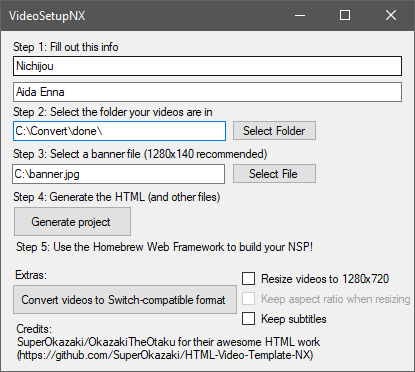
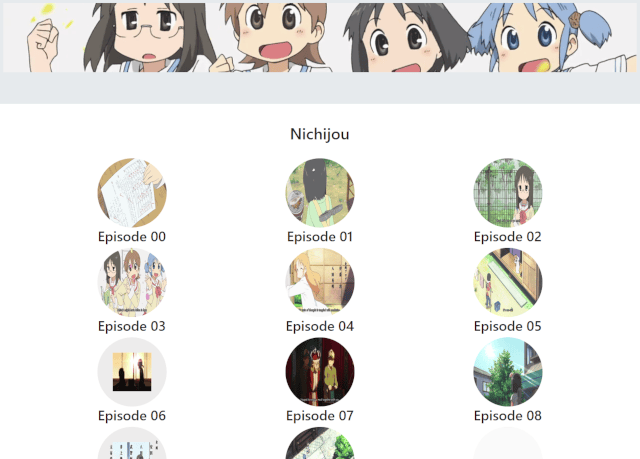
- Generates customized HTML from a folder of switch-compatible video files.
- Converts video files to Switch-compatible format with optional resizing/subtitles/passthrough and more. (requires ffmpeg installed).
- Burns in subtitles so you can watch your favorite anime anywhere.
- Autocreates episode preview snapshots.
- Automatically sets up directories, HTML/CSS/JS files. Just drop your videos into the vids folder.
- A "Check video for Switch compatibility" button. This will check for audio/video codecs, resolution, and other compatiblity factors.
User guide
Requirements
- FFMPEG. Alternatively you can just put the files in the bin folder in the same place as the VideoSetupNX.exe.
- Homebrew Web Framework (not provided as it contains copyrighted content).
Important notes
- Videos with spaces will not work. This seems to be a limitation of the switch's browser rather than this program or the web framework.
- Videos should be encoded with H264/AAC (other codecs/formats may work, but they are not tested).
- Videos must have a resolution less than or equal to 720p. Otherwise, the switch will crash.
- Please remember to checkmark "Ask for a user at launching" in the Homebrew Web Framework. The generated NSP will crash otherwise.
How to use
- Follow each step, then hit "Generate project". It'll open the output directory when it's complete.
- Copy the videos you selected in Step 2 into the "vids" folder, then build the entire output folder (the stuff in the folder, not the folder itself!) with the Homebrew Web Framework.
Screenshots
Changelog
v1.4 2018/10/17
- Added a "Check video for Switch compatibility" button. This will check for audio/video codecs, resolution, and other compatiblity factors.
- Option to only convert audio if your video is already H264 720P (Check with the above button).
- Removes extension from filename for individual titles.
- Fixed a bug with replacing the title.
v1.3 2018/10/17
- Added support for burning subs into the converted video (So now you can convert animu).
- Changed the thumbnail generation to 1 minute in instead of 2.
- Misc bugfixes.
v1.2 2018/10/16
- Merge branch 'master' of https://github.com/Aida-Enna/VideoSetupNX
v1.1 2018/10/16
- Added GPL3 license and credits to GUI/repo.
- Added resizing options to conversion.
- Some bugfixes and checks.
v1.0 2018/10/16
- The first release.
- Autocreates episode preview snapshots.
- Added banner code.
- Automatically sets up directories, HTML/CSS/JS files.
- GUI rework.
Credits
SuperOkazaki/OkazakiTheOtaku for their awesome HTML work.