PSPXTI: Difference between revisions
From GameBrew
More actions
| Line 23: | Line 23: | ||
==User guide== | ==User guide== | ||
===Key mappings=== | |||
* Multiple mappings in the emulator window (Standard, L-Trigger and R-Trigger). | * Multiple mappings in the emulator window (Standard, L-Trigger and R-Trigger). | ||
* Danzeff On-Screen Keyboard (by Danzel and Jeff Chen). | * Danzeff On-Screen Keyboard (by Danzel and Jeff Chen). | ||
* Customizable IR Keyboard (from the file pspirkeyb.ini). | * Customizable IR Keyboard (from the file pspirkeyb.ini). | ||
===IR Keyboard=== | |||
You can use an IR-keyboard with PSP XTI. You can edit the file pspirkeyb.ini and modify it according to your IR keyboard model. | You can use an IR-keyboard with PSP XTI. You can edit the file pspirkeyb.ini and modify it according to your IR keyboard model. | ||
* 1 - Compaq/HP foldable keyboard. | * 1 - Compaq/HP foldable keyboard. | ||
| Line 55: | Line 54: | ||
* The key Ctrl-L -> Home. | * The key Ctrl-L -> Home. | ||
===Load TI-92 Application files (92)=== | |||
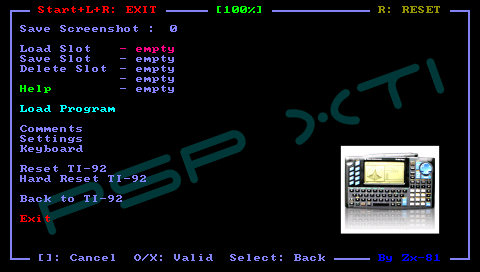
You can save any TI 92 files (with .92* file extension) on your PSP Memory Stick. Then press Select+L-Trigger+R-Trigger in the main menu and use the file selector to choose one application to load. | You can save any TI 92 files (with .92* file extension) on your PSP Memory Stick. Then press Select+L-Trigger+R-Trigger in the main menu and use the file selector to choose one application to load. | ||
| Line 63: | Line 61: | ||
To manage applications already loaded in your TI-92, you can use the VLINK menu (activate button 2ND and press the "-" key). | To manage applications already loaded in your TI-92, you can use the VLINK menu (activate button 2ND and press the "-" key). | ||
You can find applications | You can find applications from [http://www.ticalc.org ticalc.org] and [ftp://ftp.ti.com/pub/graph-ti/calc-apps/92 Official TI FTP site]. | ||
If you don't have enough memory to load all the program files you can use the Save slot option to save differents states of the emulator (save slot). You will then be able to load them, one at a time for different usages. | If you don't have enough memory to load all the program files you can use the Save slot option to save differents states of the emulator (save slot). You will then be able to load them, one at a time for different usages. | ||
===Load Key Mapping files (KBD)=== | |||
For given games, the default keyboard mapping between PSP Keys and TI-92 keys, is not suitable, you can write your own mapping file to overcome the issue. | For given games, the default keyboard mapping between PSP Keys and TI-92 keys, is not suitable, you can write your own mapping file to overcome the issue. | ||