PSPTHOM: Difference between revisions
From GameBrew
More actions
No edit summary |
No edit summary |
||
| Line 19: | Line 19: | ||
==User guide== | ==User guide== | ||
===Key mappings=== | |||
* Multiple mappings in the emulator window (Standard, L-Trigger and R-Trigger). | * Multiple mappings in the emulator window (Standard, L-Trigger and R-Trigger). | ||
* Danzeff On-Screen Keyboard (by Danzel and Jeff Chen). | * Danzeff On-Screen Keyboard (by Danzel and Jeff Chen). | ||
* Customizable IR Keyboard (from the file pspirkeyb.ini). | * Customizable IR Keyboard (from the file pspirkeyb.ini). | ||
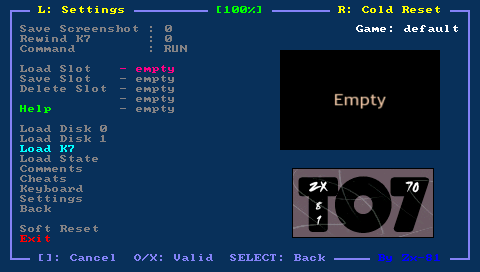
===Load Tape files (K7)=== | |||
Put your tape file (with .zip or .k7 file extension) on your PSP Memory Stick in the k7 directory. Use the Load K7 option in the emulator main menu and choose the tape file. | Put your tape file (with .zip or .k7 file extension) on your PSP Memory Stick in the k7 directory. Use the Load K7 option in the emulator main menu and choose the tape file. | ||
| Line 48: | Line 47: | ||
RUN"CASS:" | RUN"CASS:" | ||
===Load Disk files (SAP)=== | |||
Put your disk file (with .sap file extension) on your PSP Memory Stick in the disc directory. Choose Load Disc 0 (or Disc 1) option from the emulator main menu, and use the file selector to select you disk file. | Put your disk file (with .sap file extension) on your PSP Memory Stick in the disc directory. Choose Load Disc 0 (or Disc 1) option from the emulator main menu, and use the file selector to select you disk file. | ||
| Line 63: | Line 61: | ||
diskname=RUN"RunName" | diskname=RUN"RunName" | ||
===Load Snapshot files (STZ)=== | |||
Save state feature is added in PSPTHOM. The save state format is specific to PSPTHOM, but it might be useful to run previously loaded games (using K7 and disk menu). | Save state feature is added in PSPTHOM. The save state format is specific to PSPTHOM, but it might be useful to run previously loaded games (using K7 and disk menu). | ||
===Cheat Code (CHT)=== | |||
Using the Cheat menu you can search for modified bytes in RAM between current time and the last time you saved the RAM (monitor/modify for example life numbers). | Using the Cheat menu you can search for modified bytes in RAM between current time and the last time you saved the RAM (monitor/modify for example life numbers). | ||
All cheat codes you have specified for a game can be save in a CHT file in the cht folder. Those cheat codes would then be automatically loaded when you start the game. CHT file format can be found in cheat.txt. | All cheat codes you have specified for a game can be save in a CHT file in the cht folder. Those cheat codes would then be automatically loaded when you start the game. CHT file format can be found in cheat.txt. | ||
===Load Key Mapping files (KBD)=== | |||
For given games, the default keyboard mapping between PSP Keys and THOM keys, is not suitable, you can write your own mapping file to overcome the issue. | For given games, the default keyboard mapping between PSP Keys and THOM keys, is not suitable, you can write your own mapping file to overcome the issue. | ||
| Line 81: | Line 76: | ||
Use the Keyboard menu to configurate, load and save your keyboard mapping files inside the emulator. The Save option save the KBD file in the kbd directory using the Game Name as filename. The game name is displayed on the right corner in the emulator menu. | Use the Keyboard menu to configurate, load and save your keyboard mapping files inside the emulator. The Save option save the KBD file in the kbd directory using the Game Name as filename. The game name is displayed on the right corner in the emulator menu. | ||
===Settings=== | |||
* Sound enable. | * Sound enable. | ||
* Active Joystick. | * Active Joystick. | ||