PSPMSX: Difference between revisions
From GameBrew
More actions
| Line 21: | Line 21: | ||
==User guide== | ==User guide== | ||
===Load MSX Rom files (ZIP, ROM, MX1, MX2)=== | |||
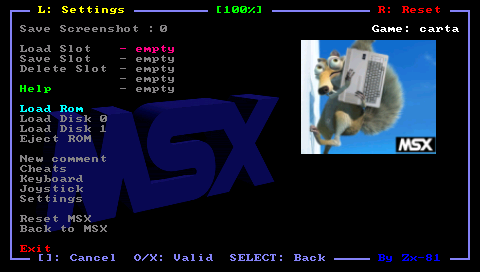
Put your rom file (with .zip, .rom, .mx1 or .mx2 file extension) on your PSP Memory Stick in the roms directory. Use the file selector in the emulator main menu and choose one rom file to load in your emulator. | Put your rom file (with .zip, .rom, .mx1 or .mx2 file extension) on your PSP Memory Stick in the roms directory. Use the file selector in the emulator main menu and choose one rom file to load in your emulator. | ||
To eject a ROM choose Eject Rom inside the emulator menu. | To eject a ROM choose Eject Rom inside the emulator menu. | ||
===Load Disk files (DSK, DSZ via gzip)=== | |||
If you want to load disk image in the virtual drive A or B of your emulator, put the disk file (with .dsk file extension, or gzipped disk file with .dsz file extension) on your PSP Memory Stick in the disk directory. | If you want to load disk image in the virtual drive A or B of your emulator, put the disk file (with .dsk file extension, or gzipped disk file with .dsz file extension) on your PSP Memory Stick in the disk directory. | ||
Gzipped disk files are not writable. Also you must eject any present rom before starting a disk, or only the ROM will start instead of your disk image. | Gzipped disk files are not writable. Also you must eject any present rom before starting a disk, or only the ROM will start instead of your disk image. | ||
===Cheat Code (CHT)=== | |||
Using the Cheat menu you can search for modified bytes in RAM between current time and the last time you saved the RAM (monitor/modify for example life numbers). | Using the Cheat menu you can search for modified bytes in RAM between current time and the last time you saved the RAM (monitor/modify for example life numbers). | ||
All cheat codes you have specified for a game can be save in a CHT file in the cht folder. Those cheat codes would then be automatically loaded when you start the game. CHT file format can be found in cheat.txt. | All cheat codes you have specified for a game can be save in a CHT file in the cht folder. Those cheat codes would then be automatically loaded when you start the game. CHT file format can be found in cheat.txt. | ||
===Load Key Mapping files=== | |||
The default keyboard mapping between PSP Keys and MSX keys, is not suitable for some games and you can write your own mapping file to overcome the issue. Edit a file with the .kbd extension (using any text editors) and put it in the kbd directory. Samples and syntax can be found in default.kbd (in the kbd directory). | The default keyboard mapping between PSP Keys and MSX keys, is not suitable for some games and you can write your own mapping file to overcome the issue. Edit a file with the .kbd extension (using any text editors) and put it in the kbd directory. Samples and syntax can be found in default.kbd (in the kbd directory). | ||
| Line 47: | Line 44: | ||
Use the Keyboard menu to further configure, load and save your keyboard mapping files inside the emulator. The Save option saves the KBD file in the kbd directory using the Game Name as filename. The game name is displayed on the right corner in the emulator menu. | Use the Keyboard menu to further configure, load and save your keyboard mapping files inside the emulator. The Save option saves the KBD file in the kbd directory using the Game Name as filename. The game name is displayed on the right corner in the emulator menu. | ||
===Key mappings=== | |||
* Multiple mappings in the emulator window (Standard, L-Trigger and R-Trigger). | * Multiple mappings in the emulator window (Standard, L-Trigger and R-Trigger). | ||
* Danzeff On-Screen Keyboard (by Danzel and Jeff Chen). | * Danzeff On-Screen Keyboard (by Danzel and Jeff Chen). | ||
| Line 54: | Line 51: | ||
You can use the virtual keyboard in the file requester menu to choose the first letter of the game you search. Use the Trigger key to swap between the two virtual keyboard panels (numbers and letters). | You can use the virtual keyboard in the file requester menu to choose the first letter of the game you search. Use the Trigger key to swap between the two virtual keyboard panels (numbers and letters). | ||
''' | ===Settings=== | ||
'''General:''' | |||
* Sound enable. | * Sound enable. | ||
* Music FM-PAC. | * Music FM-PAC. | ||
| Line 71: | Line 69: | ||
* Clock frequency. | * Clock frequency. | ||
'''Joystick | '''Joystick:''' | ||
* Swap Analog/Cursor - Awap key mapping between PSP Analog and D-Pad. | * Swap Analog/Cursor - Awap key mapping between PSP Analog and D-Pad. | ||
* Auto fire period - Auto fire period. | * Auto fire period - Auto fire period. | ||
* Auto fire mode - Activate/deactivate auto fire mode. | * Auto fire mode - Activate/deactivate auto fire mode. | ||
'''IRDA Joy | '''IRDA Joy:''' | ||
* IRDA mode - Type of DB9 device connected to the Irda Joystick box (None, Joystick, Single or double paddle). | * IRDA mode - Type of DB9 device connected to the Irda Joystick box (None, Joystick, Single or double paddle). | ||
* IRDA debug - Enable or disable debug mode to display data sent by the Irda Joystick box. | * IRDA debug - Enable or disable debug mode to display data sent by the Irda Joystick box. | ||