Frotz-PSP: Difference between revisions
From GameBrew
More actions
Created page with "{{Infobox PSP homebrew | title = Frotz-PSP | image = https://dlhb.gamebrew.org/psphomebrew/frotzpsp.png|250px | type = Other Emulators | version = 1.0 (6 Dec 2009) | licence =..." |
No edit summary |
||
| Line 32: | Line 32: | ||
'''Gameplay:''' | '''Gameplay:''' | ||
With Interactive Fiction, you type your commands in plain English each time you see the prompt which looks like this | |||
With Interactive Fiction, you type your commands in plain English each time you see the prompt which looks like this | |||
> | > | ||
| Line 54: | Line 55: | ||
'''Basic Commands:''' | '''Basic Commands:''' | ||
BRIEF | >BRIEF | ||
This command causes the game to fully describe a location only the first time you enter it. | |||
On subsequent visits, only the name of the location and any objects present will be described. | |||
INVENTORY | Most adventures will begin in BRIEF mode and remain in BRIEF mode unless you use the VERBOSE or SUPERBRIEF commands. | ||
>DIAGNOSE | |||
This will give you a report of your physical condition. Not all games support this command. | |||
>INVENTORY | |||
This will give you a list of what you are carrying and wearing. Usually you can abbreviate INVENTORY to I. | |||
>LOOK | |||
This will give you a full description of your location. You can abbreviate LOOK to L. | |||
>QUIT | |||
This lets you stop Frotz gracefully. | |||
If you want to save your position before quitting, you must use the SAVE command. | |||
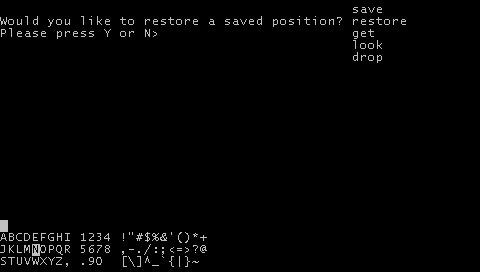
>RESTORE | |||
This restores a previously saved position. | |||
>RESTART | |||
This stops the game and restarts it from the beginning. | |||
>SAVE | |||
This saves a snapshot of your current position. You can return to a saved position in the future by using the RESTORE command. | |||
>SCRIPT | |||
This command tells Frotz to make a transcript of the story and save it to a file. | |||
Transcripts can be used to aid your memory, prepare maps, prepare walkthroughs, make something to brag about, and so on. | |||
>SCORE | |||
This command will show your current score and often a ranking based on that score. | |||
>SUPERBRIEF | |||
This one causes the game to display only the name of a place you enter, even if you've never been there before. | |||
In this mode, not even objects present are described. | |||
Of course, you can get a full description of your location and the object present by typing LOOK. | |||
In SUPERBRIEF mode, the blank line between turns is eliminated. This mode is meant for players who are already familiar with the geography. | |||
>TIME | |||
This gives your the current time in the story. Some games don't have a concept of time and therefore don't have this command. | |||
>UNSCRIPT | |||
Stops Frotz from making a transcript. | |||
>VERBOSE | |||
This causes the game to give a complete description of each location and the objects in it every time you enter a location, even if you've been there before. | |||
>VERSION | |||
Shows you the release number and serial number of the story file. | |||
>WAIT | |||
Causes time in the story to pass. | |||
Since nothing happens until you type a sentence and press RETURN, you could leave your machine, take a nap, then return to the story to find that nothing has changed. | |||
So, to make time pass in the story, you type WAIT. For example, if you meet a wizard, you might WAIT to see if he will say anything. | |||
If you're aboard a flying carpet, you might WAIT to see where it goes. | |||
There are few exceptions, most notable Infocom's Border Zone, in which the game is played in real-time (take too long deciding what to do and Bad Things happen). | |||
This command can often be abbreviated to Z. | |||
'''Where to find Interactive Fiction games:''' | '''Where to find Interactive Fiction games:''' | ||