PSPMO5: Difference between revisions
From GameBrew
More actions
No edit summary |
|||
| Line 36: | Line 36: | ||
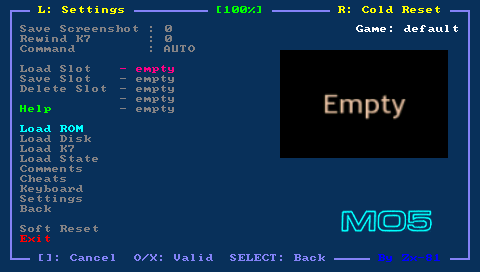
Put your tape file (with .k7 file extension) on your PSP Memory Stick in the k7 directory. Then select your tape file using the Load K7 option in the emulator. | Put your tape file (with .k7 file extension) on your PSP Memory Stick in the k7 directory. Then select your tape file using the Load K7 option in the emulator. | ||
To run game of your tape file, use the virtual keyboard (Start button) and type the following MO5 command, followed by Enter (Triangle button); you can also use the shortcut in the emulator menu (Command LOADM option) | To run game of your tape file, use the virtual keyboard (Start button) and type the following MO5 command, followed by Enter (Triangle button); you can also use the shortcut in the emulator menu (Command LOADM option) | ||
LOADM"",,R | LOADM"",,R | ||
To run basic program, type the following MO5 command followed by Enter (Triangle button); you can also use the shortcut in the emulator menu (Command RUN option) | To run basic program, type the following MO5 command followed by Enter (Triangle button); you can also use the shortcut in the emulator menu (Command RUN option) | ||
RUN"" | RUN"" | ||
To rewind the tape, you can use the Rewind K7 menu. Also note that sometimes the command LOADM does not work and you can use the following command (without M) | To rewind the tape, you can use the Rewind K7 menu. Also note that sometimes the command LOADM does not work and you can use the following command (without M) | ||
LOAD"" | LOAD"" | ||
If you use the MS Disk Basic (disk mode enabled), you will have to put the string CASS: in your LOADM, LOAD or RUN command as follows | If you use the MS Disk Basic (disk mode enabled), you will have to put the string CASS: in your LOADM, LOAD or RUN command as follows | ||
LOADM"CASS:",,R | LOADM"CASS:",,R | ||