Move it PSP: Difference between revisions
From GameBrew
More actions
Created page with "{{Infobox PSP homebrew | title = Move it | image = https://dlhb.gamebrew.org/psphomebrew/Moveit.jpg|250px | type = Puzzle | version = v0.9 | licence = Mixed | author = 2flower..." |
No edit summary |
||
| Line 1: | Line 1: | ||
{{Infobox PSP homebrew | {{Infobox PSP homebrew | ||
| title = Move it | | title = Move it | ||
| image = https://dlhb.gamebrew.org/psphomebrew/ | | image = https://dlhb.gamebrew.org/psphomebrew/moveit.jpg|250px | ||
| type = Puzzle | | type = Puzzle | ||
| version = | | version = 0.9 (14 Aug 2006) | ||
| licence = Mixed | | licence = Mixed | ||
| author = 2flower | | author = 2flower | ||
| website = https:// | | website = https://www.neoflash.com/forum/index.php?topic=2960.0 | ||
| download = https://dlhb.gamebrew.org/psphomebrew/ | | download = https://dlhb.gamebrew.org/psphomebrew/moveit.7z | ||
| source = | | source = | ||
}} | }} | ||
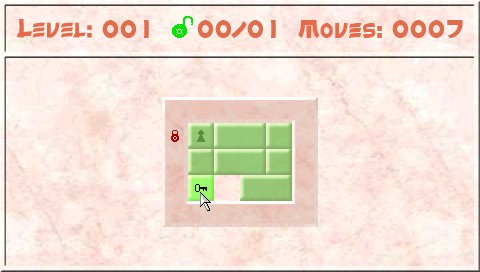
Move it is a sliding block puzzle game created by 2flower. It is inspired by a game called wocblocks, a small bonus game in the CD burning application WinOnCD 5 by CeQuadrat. | Move it is a sliding block puzzle game created by 2flower. It is inspired by a game called wocblocks, a small bonus game in the CD burning application WinOnCD 5 by CeQuadrat. | ||
| Line 16: | Line 15: | ||
This is an entry from the Neo Summer Coding Compo 2006 (PSP Games). | This is an entry from the Neo Summer Coding Compo 2006 (PSP Games). | ||
Installation | ==Installation== | ||
Copy the moveit folders into the /PSP/GAME/ folder of your Memory Stick. | Copy the moveit folders into the /PSP/GAME/ folder of your Memory Stick. | ||
User guide | ==User guide== | ||
The aim of the game is to move the blocks with keys over the keyholes an open all locks to reach the next level. The block can only be moved if it's possible. | The aim of the game is to move the blocks with keys over the keyholes an open all locks to reach the next level. The block can only be moved if it's possible. | ||
| Line 26: | Line 25: | ||
At the moment the game has 80 level. | At the moment the game has 80 level. | ||
Controls | ==Controls== | ||
Main Menu: | '''Main Menu:''' | ||
Up/Down - Move selection | Up/Down - Move selection | ||
Circle - Select menuentry | Circle - Select menuentry | ||
In-game: | '''In-game:''' | ||
D-Pad - Move mouse cursor | D-Pad - Move mouse cursor | ||
Analog - move mouse cursor | Analog - move mouse cursor | ||
Circle - "Hold" block and move with D-Pad/Analog | Circle - "Hold" block and move with D-Pad/Analog | ||
Triangle - Undo moves | Triangle - Undo moves | ||
Start - Pause menu | Start - Pause menu | ||
Pause Menu: | '''Pause Menu:''' | ||
Up/Down - Move selection | Up/Down - Move selection | ||
Left/Right - Select "goto" level | Left/Right - Select "goto" level | ||
Circle - Select menuentry | Circle - Select menuentry | ||
Compatibility | ==Compatibility== | ||
Author note the game was only tested on a 1.5 PSP. | Author note the game was only tested on a 1.5 PSP. | ||
Credits | ==Credits== | ||
Brunni for his great Oldschool Lib. | Brunni for his great Oldschool Lib. | ||
==External links== | |||
NeoFlash | * NeoFlash - https://www.neoflash.com/forum/index.php?topic=2960.0 | ||
[[Category:PSP homebrew games]] | |||
[[Category:Homebrew puzzle games on PSP]] | |||