PopBlocks PSP: Difference between revisions
From GameBrew
More actions
Created page with "{{Infobox PSP homebrew | title = PopBlocks | image = https://dlhb.gamebrew.org/psphomebrew/PopBlocks.jpg|250px | type = Puzzle | version = v1.0.1 | licence = Mixed | author =..." |
No edit summary |
||
| Line 1: | Line 1: | ||
{{Infobox PSP homebrew | {{Infobox PSP homebrew | ||
| title = PopBlocks | | title = PopBlocks | ||
| image = https://dlhb.gamebrew.org/psphomebrew/ | | image = https://dlhb.gamebrew.org/psphomebrew/popblocks.jpg|250px | ||
| type = Puzzle | | type = Puzzle | ||
| version = | | version = 1.0.1 (16 Mar 2009) | ||
| licence = Mixed | | licence = Mixed | ||
| author = Gefa | | author = Gefa | ||
| website = https:// | | website = https://www.neoflash.com/forum/index.php?topic=5515.0 | ||
| download = https://dlhb.gamebrew.org/psphomebrew/ | | download = https://dlhb.gamebrew.org/psphomebrew/popblocks.7z | ||
| source = | | source = | ||
}} | }} | ||
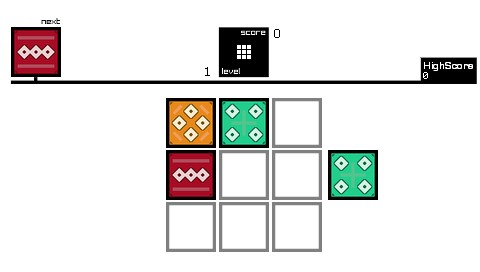
PopBlocks is a clone of the flash puzzle game Pushori. | PopBlocks is a clone of the flash puzzle game Pushori. | ||
| Line 16: | Line 15: | ||
This is an entry from the Neo Spring Coding Compo 2009 (PSP Games). | This is an entry from the Neo Spring Coding Compo 2009 (PSP Games). | ||
Installation | ==Installation== | ||
Copy python directory in the root of your Memory Stick, and the directory PopBlocks in the path ms0:/PSP/GAME/. | Copy python directory in the root of your Memory Stick, and the directory PopBlocks in the path ms0:/PSP/GAME/. | ||
User guide | ==User guide== | ||
Push pieces to the board from left or right. Align a similar pieces vertically and they will disappear from the board, the difficulty increases as you progress. | Push pieces to the board from left or right. Align a similar pieces vertically and they will disappear from the board, the difficulty increases as you progress. | ||
Game ends when the board is full and at least 2 pieces on board are same kind (no matches). | Game ends when the board is full and at least 2 pieces on board are same kind (no matches). | ||
Controls | ==Controls== | ||
Up/Down - Select row | Up/Down - Select row | ||
Left/Right - Push the pieces | Left/Right - Push the pieces | ||
Start - Begin game | Start - Begin game | ||
Compatibility | ==Screenshots== | ||
https://dlhb.gamebrew.org/psphomebrew/popblocks2.png | |||
https://dlhb.gamebrew.org/psphomebrew/popblocks3.png | |||
==Compatibility== | |||
Tested and works on a PSP with Custom Firmware by D_A. | |||
==Changelog== | |||
'''v1.0.1''' | |||
* Added the neo flash spring compo 2009 splash screen. | |||
* Solved a critical bug. | |||
'''v1.0.0''' | |||
* First public release. | |||
==External links== | |||
- | * Author's website - http://www.gefa.altervista.org | ||
* NeoFlash - https://www.neoflash.com/forum/index.php?topic=5515.0 | |||
[[Category:PSP homebrew games]] | |||
[[Category:Homebrew puzzle games on PSP]] | |||