Stakker PSP: Difference between revisions
From GameBrew
More actions
Created page with "{{Infobox PSP homebrew | title = Stakker | image = https://dlhb.gamebrew.org/psphomebrew/StakkerPSP.jpg|250px | type = Puzzle | version = Final Update 2 | licence = Mixed | au..." |
No edit summary |
||
| Line 1: | Line 1: | ||
{{Infobox PSP homebrew | {{Infobox PSP homebrew | ||
| title = Stakker | | title = Stakker PSP | ||
| image = https://dlhb.gamebrew.org/psphomebrew/ | | image = https://dlhb.gamebrew.org/psphomebrew/stakkerpsp.png|250px | ||
| type = Puzzle | | type = Puzzle | ||
| version = | | version = Idol Edition (2008) | ||
| licence = Mixed | | licence = Mixed | ||
| author = MK2k | | author = MK2k | ||
| website = https://psp.brewology.com/downloads/download.php?id=8313&mcid=1 | | website = https://psp.brewology.com/downloads/download.php?id=8313&mcid=1 | ||
| download = https://dlhb.gamebrew.org/psphomebrew/ | | download = https://dlhb.gamebrew.org/psphomebrew/stakkerpsp.7z | ||
| source = | | source = | ||
}} | }} | ||
==Media== | |||
'''Stakker PSP''' ([https://www.youtube.com/watch?v=Jn27Hi59bw0 arrdcore]) <br> | |||
<youtube>Jn27Hi59bw0</youtube> | <youtube>Jn27Hi59bw0</youtube> | ||
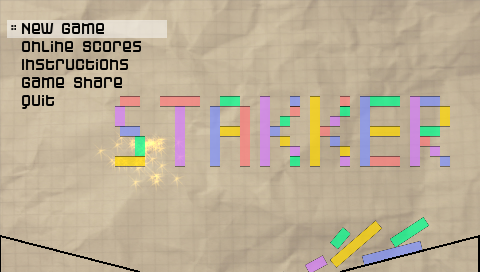
Stakker PSP is homebrew building block puzzle game for PSP. It showcases | Stakker PSP is homebrew building block puzzle game for PSP. It showcases Slembcke's chipmunk physics library and is developed in C++ by MK2k. | ||
It is featured at the PSP-Hacks Homebrew Idol in 2008 (Winner). | It is featured at the PSP-Hacks Homebrew Idol in 2008 (Winner). | ||
| Line 38: | Line 41: | ||
Place file called theme.jpg in Stakker's directory and it gets loaded as the new background (standard size should be 480x272). | Place file called theme.jpg in Stakker's directory and it gets loaded as the new background (standard size should be 480x272). | ||
Controls | ==Controls== | ||
D-Pad Left/Right - Move the drop of the blocks | D-Pad Left/Right - Move the drop of the blocks | ||
D-Pad Down - Let blocks fall x3 faster | D-Pad Down - Let blocks fall x3 faster | ||
Cross - Fire the projectile | Cross - Fire the projectile | ||
Analog - MP3 playback (play, pause, next and previous song) | Analog - MP3 playback (play, pause, next and previous song) | ||
Note | '''Note:''' You will find an alternative version in the package (with controls slightly modified), where you can use Select+D-Pad for MP3 playback, instead of Analog (original release). | ||
==Screenshots== | |||
https://dlhb.gamebrew.org/psphomebrew/stakker2.png | |||
https://dlhb.gamebrew.org/psphomebrew/stakker3.png | |||
Update #1 | ==Changelog== | ||
'''Update #2 SE''' | |||
* If your PSP analog stick is messed up for whatever reason, grab Update #2 SE. It doesn't utilize the analog; instead, hold SELECT and press D-Pad Left/Right for song change, Down for Stop, and Up for Play. Looking at you Scuba Steve. | |||
'''Update #2''' | |||
* New feature: put a JPEG image called theme.jpg in Stakker's directory and the image gets loaded as your new background (standard size is 480'72). | |||
'''Update #1''' | |||
* Swap Controls implemented (you can choose between D-Pad and Analogue handling). | |||
* Reward system made easier (you get points in the following manner: +1 +2 +3 +4 +5 +5 +5). | |||
* Pressing Down lets the blocks fall 3x faster. | |||
* IMPORTANT: Letting a block fall faster directly on the platform could result in the situation where the block goes 'through' the platform, and you get -10 points, that's because of the simulation being fast forwarded by the factor 3. | |||
==Credits== | |||
[https://www.psp-hacks.com Greg]. | |||
[https://www.firewallrecords.com DJ Runningman]. | |||
InsertWittyName, Abhoth and everyone else in #psp-programming on freenode. | InsertWittyName, Abhoth and everyone else in #psp-programming on freenode. | ||
==External links== | |||
Author's | * Author's website - https://www.mk2k.net/serendipity/index.php?/archives/16-Stakker-PSP-Idol-Edition.html | ||
PSP-Hacks | * PSP-Hacks - http://www.psp-hacks.com/2008/05/30/stakker-psp-final-beta-released | ||
[[Category:PSP homebrew games]] | |||
[[Category:Homebrew puzzle games on PSP]] | |||