PRXShot PNG Mod PSP: Difference between revisions
From GameBrew
More actions
Created page with "{{Infobox PSP homebrew | title = PRXShot PNG Mod | image = https://dlhb.gamebrew.org/psphomebrew/PRXShotPNGMod.jpg|250px | type = Plugins | version = v0.2 fixed | licence = Mi..." |
No edit summary |
||
| Line 1: | Line 1: | ||
{{Infobox PSP homebrew | {{Infobox PSP homebrew | ||
| title = PRXShot PNG Mod | | title = PRXShot PNG Mod | ||
| image = https://dlhb.gamebrew.org/psphomebrew/ | | image = https://dlhb.gamebrew.org/psphomebrew/prxshotpngmod.png|250px | ||
| type = Plugins | | type = Plugins | ||
| version = v0.2 fixed | | version = v0.2 fixed (28 Aug 2012) | ||
| licence = Mixed | | licence = Mixed | ||
| author = LMAN (leecherman) | | author = LMAN (leecherman) | ||
| website = https://sites.google.com/site/theleecherman | | website = https://sites.google.com/site/theleecherman | ||
| download = https://dlhb.gamebrew.org/psphomebrew/ | | download = https://dlhb.gamebrew.org/psphomebrew/prxshotpngmod.7z | ||
| source = https://sites.google.com/site/theleecherman | | source = https://sites.google.com/site/theleecherman | ||
}} | }} | ||
This is a plugin created by LMAN (aka leecherman), a mod version of PRXShot-png by yuh0q223. It allows you to use different keys to capture with screenshots in XMB, GAME and POPS. | This is a plugin created by LMAN (aka leecherman), a mod version of [[PRXShot-png PSP|PRXShot-png]] by yuh0q223. It allows you to use different keys to capture with screenshots in XMB, GAME and POPS. | ||
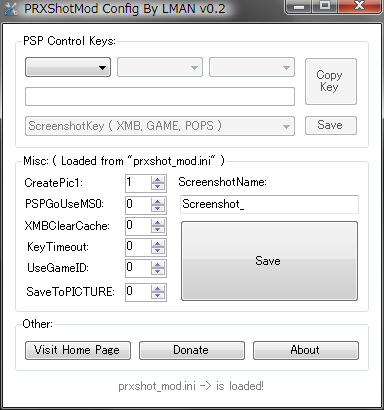
Installation | '''Note:''' There is an alternative version [https://sites.google.com/site/theleecherman/prxshot_mod PRXShot Mod], which has the same functionality but saves screenshots in BMP instead of PNG. It also comes with a PC program to support easier configuration (you can find it in the bundle package for prxshot mod config v0.2 and prxshot mod v0.2 from the author's website). | ||
==Installation== | |||
Copy the prxshot_png_mod directory to the seplugins directory. | Copy the prxshot_png_mod directory to the seplugins directory. | ||
| Line 20: | Line 21: | ||
Add the following line to the text files | Add the following line to the text files | ||
ms0:/seplugins/prxshot_png_mod/prxshot_png_mod.prx 1 | ms0:/seplugins/prxshot_png_mod/prxshot_png_mod.prx 1 | ||
User guide | '''Note:''' Please use at your own risk. | ||
==User guide== | |||
Please note XMBClearCache will refresh your captured picture in XMB. Enable it (set it to true) if you want to use it. | Please note XMBClearCache will refresh your captured picture in XMB. Enable it (set it to true) if you want to use it. | ||
| Line 29: | Line 32: | ||
For more informations about using the PSP control keys see the config: prxshot_png_mod.ini. | For more informations about using the PSP control keys see the config: prxshot_png_mod.ini. | ||
Note | ==Controls== | ||
Note - Take screenshots (default) | |||
==Changelog== | |||
'''prxshot png mod v0.2 fix''' | |||
* [!] Fixed a possible problem in (KeyTimeOut) that exists in the original source code of (PRXShot-PNG v1.1). | |||
'''prxshot png mod v0.2''' | |||
prxshot png mod v0.2 | * [+] Added new option "SaveToPICTURE" to enable/disable saving the captured picture to xx0:/PICTURE without creating PSCM.DAT info file. So you can delete the folder from the PSP without any problem. | ||
* [+] Added new option "InvertedColor" to enable/disable displaying inverted color whilen taking a screenshot. | |||
prxshot png mod | '''prxshot png mod fix''' | ||
* [!] Fixed the duplicated name when capturing if "ScreenshotNameUseGameID" is enabled. | |||
prxshot png mod | '''prxshot png mod''' | ||
* [+] Added new ScreenshotKey option (Removed the old one) in the ini file that let you choose which keys that you want to capture with it in [XMB, GAME, POPS] (Combination key is also Available). Example: | |||
** ScreenshotKeyInXMB = HOME + START. | |||
** ScreenshotKeyInGAME = LTRIGGER + RTRIGGER + START. | |||
** ScreenshotKeyInPOPS = RTRIGGER + START. | |||
* [+]Added new option to enable/disable using GameID in the screenshot name. Example: | |||
** ScreenshotNameUseGameID = true. | |||
** Captured name will be: ULUS10336_2012-05-26_07;38;39.png. | |||
==External links== | |||
* Author's website - https://sites.google.com/site/theleecherman | |||
* Wololo - https://wololo.net/talk/viewtopic.php?t=11840 | |||
- | |||
- | |||
[[Category:PSP homebrew applications]] | |||
[[Category:PSP homebrew plugins]] | |||