MyCustomHidder PSP: Difference between revisions
From GameBrew
More actions
Created page with "{{Infobox PSP homebrew | title = MyCustomHidder | image = https://dlhb.gamebrew.org/psphomebrew/MyCustomHidder.jpg|250px | type = Plugins | version = initial release | licence..." |
No edit summary |
||
| Line 1: | Line 1: | ||
{{Infobox PSP homebrew | {{Infobox PSP homebrew | ||
| title = MyCustomHidder | | title = MyCustomHidder | ||
| image = https://dlhb.gamebrew.org/psphomebrew/ | | image = https://dlhb.gamebrew.org/psphomebrew/mycustomhidder.jpg|250px | ||
| type = Plugins | | type = Plugins | ||
| version = | | version = 9 May 2010 | ||
| licence = Mixed | | licence = Mixed | ||
| author = Zer01ne | | author = Zer01ne | ||
| website = | | website = http://www.blackdevsteam.net/zer01ne | ||
| download = https://dlhb.gamebrew.org/psphomebrew/ | | download = https://dlhb.gamebrew.org/psphomebrew/mycustomhidder.7z | ||
| source = | | source = | ||
}} | }} | ||
<youtube>PT13XWzZWjI</youtube> | <youtube>PT13XWzZWjI</youtube> | ||
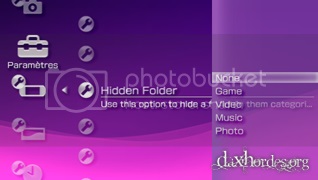
MyCustomHidder is a plugin that can hide folders in the XMB. It is capable of hiding default categories/folders in the Memory Stick including Game, Homebrew, ISO, Video, Music and Photo. | MyCustomHidder is a plugin that can hide folders in the XMB. It is capable of hiding default categories/folders in the Memory Stick including Game, Homebrew, ISO, Video, Music and Photo. | ||
Installation | ==Installation== | ||
Copy MyCustomHidder.prx to the seplugins folder in the root of your Memory Stick. | Copy MyCustomHidder.prx to the seplugins folder in the root of your Memory Stick. | ||
| Line 20: | Line 21: | ||
For PSP, append this line to the text file | For PSP, append this line to the text file | ||
ms0:/seplugins/MyCustomHidder.prx 1 | ms0:/seplugins/MyCustomHidder.prx 1 | ||
For PSP Go, add this line instead | For PSP Go, add this line instead | ||
ef0:/seplugins/MyCustomHidder.prx 1 | ef0:/seplugins/MyCustomHidder.prx 1 | ||
User guide | ==User guide== | ||
Go to Settings | Go to Settings> System Settings and choose Hidden Folder. Select one from the available category to hide. | ||
None | {| class="wikitable" | ||
Game | |- | ||
Video | ! scope="row"| None | ||
Music | | None of the category is hided. | ||
Photo | |- | ||
! scope="row"| Game | |||
| Hide the Game, Homebrew and ISO folders. | |||
|- | |||
! scope="row"| Video | |||
| Hide the Video folder. | |||
|- | |||
! scope="row"| Music | |||
| Hide the Music folder. | |||
|- | |||
! scope="row"| Photo | |||
| Hide the Photo folder. | |||
|- | |||
|} | |||
Compatibility | ==Compatibility== | ||
Tested on 5.00 M33 and 5.50 GEN. | Tested on 5.00 M33 and 5.50 GEN. | ||
This plugin does not work with Game Categories plugin. | This plugin does not work with [[Game Categories PSP|Game Categories]] plugin. | ||
Credits | ==Credits== | ||
Friends and everyone who have been supportive. | Friends and everyone who have been supportive. | ||
Saphire/Biscottealacrevete for the support and PC. | Saphire/Biscottealacrevete for the support and PC. | ||
All credits go to Bubbletune, for the source code of Game Categories v12. | All credits go to Bubbletune, for the source code of Game Categories v12. | ||
==External links== | |||
Author's | * Author's website - http://www.blackdevsteam.net/zer01ne | ||
[[Category:PSP homebrew applications]] | |||
[[Category:PSP homebrew plugins]] | |||