VSHPong PSP: Difference between revisions
From GameBrew
More actions
Created page with "{{Infobox PSP homebrew | title = VSHPong | image = https://dlhb.gamebrew.org/psphomebrew/VSHPong.jpg|250px | type = Plugins | version = Delta | licence = Mixed | author = A_no..." |
No edit summary |
||
| Line 1: | Line 1: | ||
{{Infobox PSP homebrew | {{Infobox PSP homebrew | ||
| title = VSHPong | | title = VSHPong | ||
| image = https://dlhb.gamebrew.org/psphomebrew/ | | image = https://dlhb.gamebrew.org/psphomebrew/vshpong.jpg|250px | ||
| type = Plugins | | type = Plugins | ||
| version = Delta | | version = Delta | ||
| licence = Mixed | | licence = Mixed | ||
| author = A_noob | | author = A_noob | ||
| website = | | website = http://forums.qj.net/psp-development-forum/98780-updated-release-vshpong-delta.html#post1425504 | ||
| download = https://dlhb.gamebrew.org/psphomebrew/ | | download = https://dlhb.gamebrew.org/psphomebrew/vshpong.rar | ||
| source = | | source = | ||
}} | }} | ||
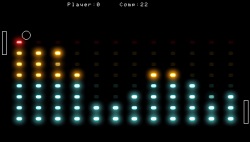
VSHPong is a plugin that will allow you to play Pong anywhere in your PSP menu. For instance, you can play Pong in the music menu, right in the middle of one of the visualizers. | VSHPong is a plugin that will allow you to play Pong anywhere in your PSP menu. For instance, you can play Pong in the music menu, right in the middle of one of the visualizers. | ||
Installation | ==Installation== | ||
Create seplugins folder on the root of your Memory Stick if one doesn't exist. Put the VSHPong.prx in that folder. | Create seplugins folder on the root of your Memory Stick if one doesn't exist. Put the VSHPong.prx in that folder. | ||
Modify vsh.txt in the same seplugins folder (create it if not already there) and append this line | Modify vsh.txt in the same seplugins folder (create it if not already there) and append this line | ||
ms0:/seplugins/VSHPong.prx | ms0:/seplugins/VSHPong.prx | ||
Enter Recovery Mode and enable the plugin. | Enter Recovery Mode and enable the plugin. | ||
User guide | ==User guide== | ||
You can choose to play against AI, or enable off/auto-play mode (AI vs AI). | You can choose to play against AI, or enable off/auto-play mode (AI vs AI). | ||
Controls | ==Controls== | ||
Analog Up/Down - Control paddle (player vs AI) | Analog Up/Down - Control paddle (player vs AI) | ||
Compatibility | Start+R - Enable/disable off mode (AI vs AI) | ||
==Media== | |||
'''PSP vshpong''' ([https://www.youtube.com/watch?v=2sNwEHgmoGo PSPofw]) <br> | |||
<youtube>2sNwEHgmoGo</youtube> | |||
==Compatibility== | |||
Supported Firmwares: | Supported Firmwares: | ||
Changelog | 5.00 to 6.60 <br> | ||
Delta | |||
==Changelog== | |||
'''Delta''' | |||
* Faster gameplay. | |||
* Can score on ai now. | |||
* Analog now used. | |||
* Top/bottom collision bug fixed. | |||
* AI vs AI (aka off mode). | |||
'''Gamma''' | |||
* On/Off feature. | |||
* Better ai vs ai. | |||
==External links== | |||
- | * QuickJump - http://forums.qj.net/psp-development-forum/98780-updated-release-vshpong-delta.html#post1425504 | ||
- | |||
[[Category:PSP homebrew applications]] | |||
[[Category:PSP homebrew plugins]] | |||