PluginManager PSP: Difference between revisions
From GameBrew
More actions
Created page with "{{Infobox PSP homebrew | title = PluginManager | image = https://dlhb.gamebrew.org/psphomebrew/PluginManager.jpg|250px | type = Plugins | version = v4 | licence = Mixed | auth..." |
No edit summary |
||
| Line 1: | Line 1: | ||
{{Infobox PSP homebrew | {{Infobox PSP homebrew | ||
| title = PluginManager | | title = PluginManager | ||
| image = https://dlhb.gamebrew.org/psphomebrew/ | | image = https://dlhb.gamebrew.org/psphomebrew/pluginmanager.jpg|250px | ||
| type = Plugins | | type = Plugins | ||
| version = | | version = 4 (15 Jun 2012) | ||
| licence = Mixed | | licence = Mixed | ||
| author = plum | | author = plum | ||
| website = | | website = https://twitter.com/plum_429/status/140679547631845376 | ||
| download = https://dlhb.gamebrew.org/psphomebrew/ | | download = https://dlhb.gamebrew.org/psphomebrew/pluginmanager.rar | ||
| source = | | source = https://dlhb.gamebrew.org/psphomebrew/pluginmanager.rar | ||
}} | }} | ||
Plugin Manager is a plugin that allows you to switch, enable and/or disable plugins at any time without rebooting the PSP. | Plugin Manager is a plugin that allows you to switch, enable and/or disable plugins at any time without rebooting the PSP. | ||
Installation | ==Installation== | ||
Copy plugin_mgr.prx, reboot_loader.prx and plugin_mgr.ini to the seplugins folder of the Memory Stick. | Copy plugin_mgr.prx, reboot_loader.prx and plugin_mgr.ini to the seplugins folder of the Memory Stick. | ||
Open (or create) vsh.txt and game.txt in the same seplugins directory, then insert the following path | Open (or create) vsh.txt and game.txt in the same seplugins directory, then insert the following path | ||
ms0:/seplugins/reboot_loader.prx 1 | ms0:/seplugins/reboot_loader.prx 1 | ||
For PSP Go, add this line to the text files instead | For PSP Go, add this line to the text files instead | ||
ef0:/seplugins/reboot_loader.prx 1 | ef0:/seplugins/reboot_loader.prx 1 | ||
Note if you also want to use the plugin during PS1 game, edit pops.txt in the seplugins directory and write the following line (replace ms0:/ with ef0:/ for PSP Go) | Note if you also want to use the plugin during PS1 game, edit pops.txt in the seplugins directory and write the following line (replace ms0:/ with ef0:/ for PSP Go) | ||
ms0:/seplugins/plugin_mgr.prx 1 | ms0:/seplugins/plugin_mgr.prx 1 | ||
==User guide== | |||
===StatusMenu=== | |||
Manage plugins that are currently in use (On to enable; Off to disable). | |||
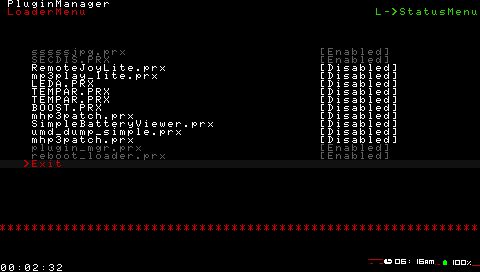
===LoaderMenu=== | |||
You can load plugins that that has been listed in the text files (vsh.txt, game.txt and pop.txt). | |||
Selected plugin will appear in the StatusMenu once you activated it from the LoaderMenu. | |||
===Additional notes=== | |||
Any changes will be effective immediately without the need to reboot, however in some cases you still need to restart the PSP in order to use the plugin. | Any changes will be effective immediately without the need to reboot, however in some cases you still need to restart the PSP in order to use the plugin. | ||
| Line 40: | Line 41: | ||
Also, there are some plugins that cannot be used with PluginManager. | Also, there are some plugins that cannot be used with PluginManager. | ||
Controls | ==Controls== | ||
Start+R | Start+R+L (default) - Open menu | ||
Cross - Enter, Plugin On/off | Cross - Enter, Plugin On/off | ||
Compatibility | R - Loader menu | ||
L - Status menu | |||
==Compatibility== | |||
Supported Firmwares: | Supported Firmwares: | ||
Changelog | 6.20 to 6.60 <br> | ||
v4 | |||
==Changelog== | |||
'''v4''' | |||
* Added scroll display support for LoaderMenu to handle more plugins. | |||
* Able to use reboot_loader in VSH. | |||
* Bug fix. | |||
==External links== | |||
* Author's website - https://twitter.com/plum_429/status/140679547631845376 | |||
[[Category:PSP homebrew applications]] | |||
[[Category:PSP homebrew plugins]] | |||