
PleNx Switch: Difference between revisions
More actions
0.1.12 |
0.1.14 |
||
| Line 4: | Line 4: | ||
|description=Plex client for Switch. | |description=Plex client for Switch. | ||
|author=thcolin | |author=thcolin | ||
|lastupdated=2026/07/ | |lastupdated=2026/07/05 | ||
|type=Media Players | |type=Media Players | ||
|version=0.1. | |version=0.1.14 | ||
|license=Apache-2.0 | |license=Apache-2.0 | ||
|download=https://dlhb.gamebrew.org/switchhomebrews/pleNxSwitch.7z | |download=https://dlhb.gamebrew.org/switchhomebrews/pleNxSwitch.7z | ||
| Line 77: | Line 77: | ||
== Changelog == | == Changelog == | ||
'''v0.1.14''' | |||
* '''PS Vita''' | |||
** '''The in-app updater now installs the new version directly instead of opening a broken browser page.''' When an update was available, the Vita opened the GitHub release page in the system browser — a page its ageing WebKit cannot render, so it hung and the download never showed up. The Vita now self-updates in place like the Switch does: it downloads the VPK, unpacks it and installs it through the system package installer, then drops you back to the LiveArea to relaunch the updated bubble. (The VitaDB "downgrade to 0.1.4" prompt reported alongside this is a stale VitaDB store entry, not a pleNx bug; see <code>RELEASING.md</code>.) | |||
'''v0.1.13''' | |||
* '''Interface''' | |||
** '''Series and movie logos no longer smear.''' The transparent title logos on detail pages are drawn in "fit" mode, so the image is smaller than its box and sits letterboxed inside it. The empty area around it was still being painted with the image, which sampled outside the texture and — because edge pixels are clamped — dragged vertical streaks down from every shape. The image now fills only its own fitted area, so logos render cleanly. Affects every platform (the fix is in the shared image renderer). | |||
'''v0.1.12''' | '''v0.1.12''' | ||
* '''Player''' | * '''Player''' | ||
Latest revision as of 03:30, 10 July 2026
| pleNx | |
|---|---|
 | |
| General | |
| Author | thcolin |
| Type | Media Players |
| Version | 0.1.14 |
| License | Apache-2.0 |
| Last Updated | 2026/07/05 |
| Links | |
| Download | |
| Website | |
| Source | |
pleNx (/plɛn.ɛks/, "Plex × NX") is a third-party, native, controller-first Plex client for the Nintendo Switch. It lets you browse and play the movies and shows from your Plex Media Server through a fully native interface designed for the gamepad.
pleNx is a fork of Switchfin (a Nintendo Switch Jellyfin client) fully migrated to the Plex API, with a redesigned interface. It is a third-party project, not affiliated with or endorsed by Plex.
Features
- Sign in with Plex - enter a 4-character code on plex.tv/link, then choose your server and your Plex Home profile (PIN-protected profiles supported).
- Home mirrors your server - Continue Watching followed by every hub configured on your Plex, in the order your server returns them.
- Libraries in the sidebar - one entry per library, each with Home, Suggestions, Collections and Genres views, and server-side sorting.
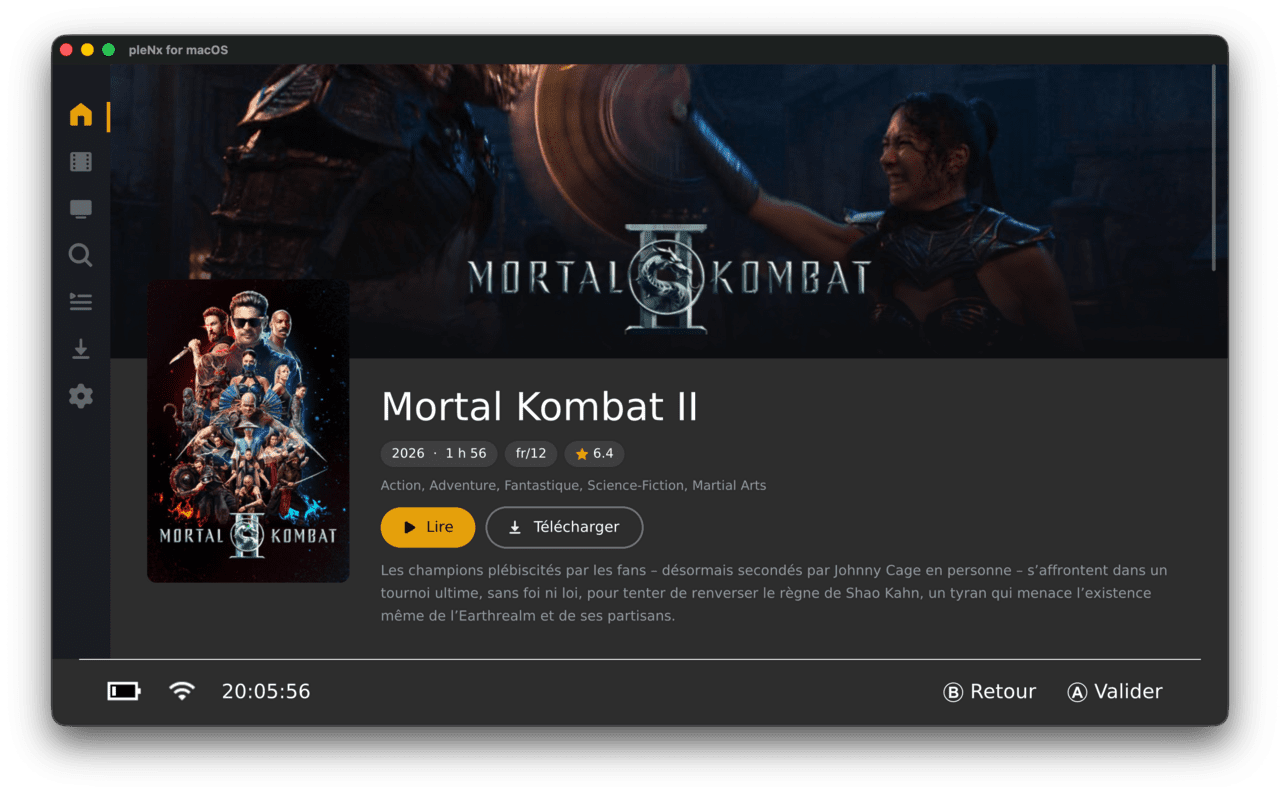
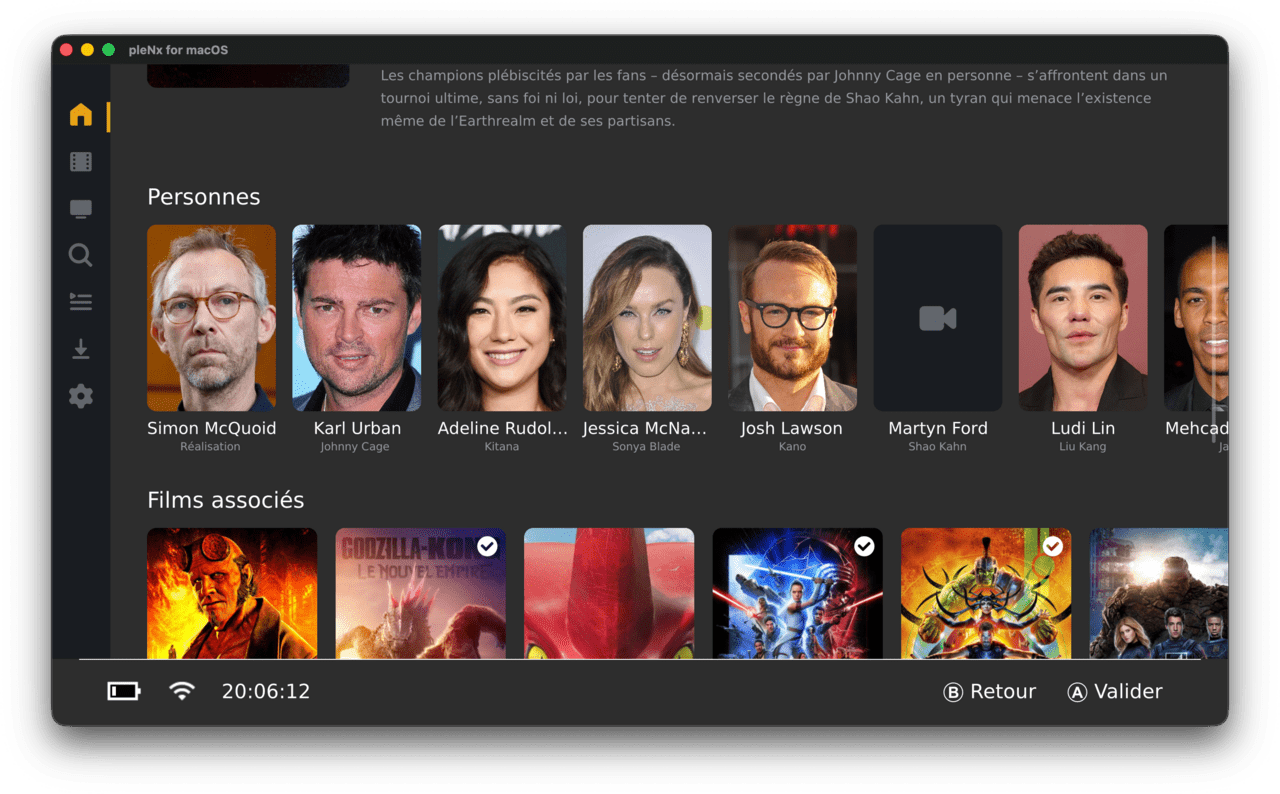
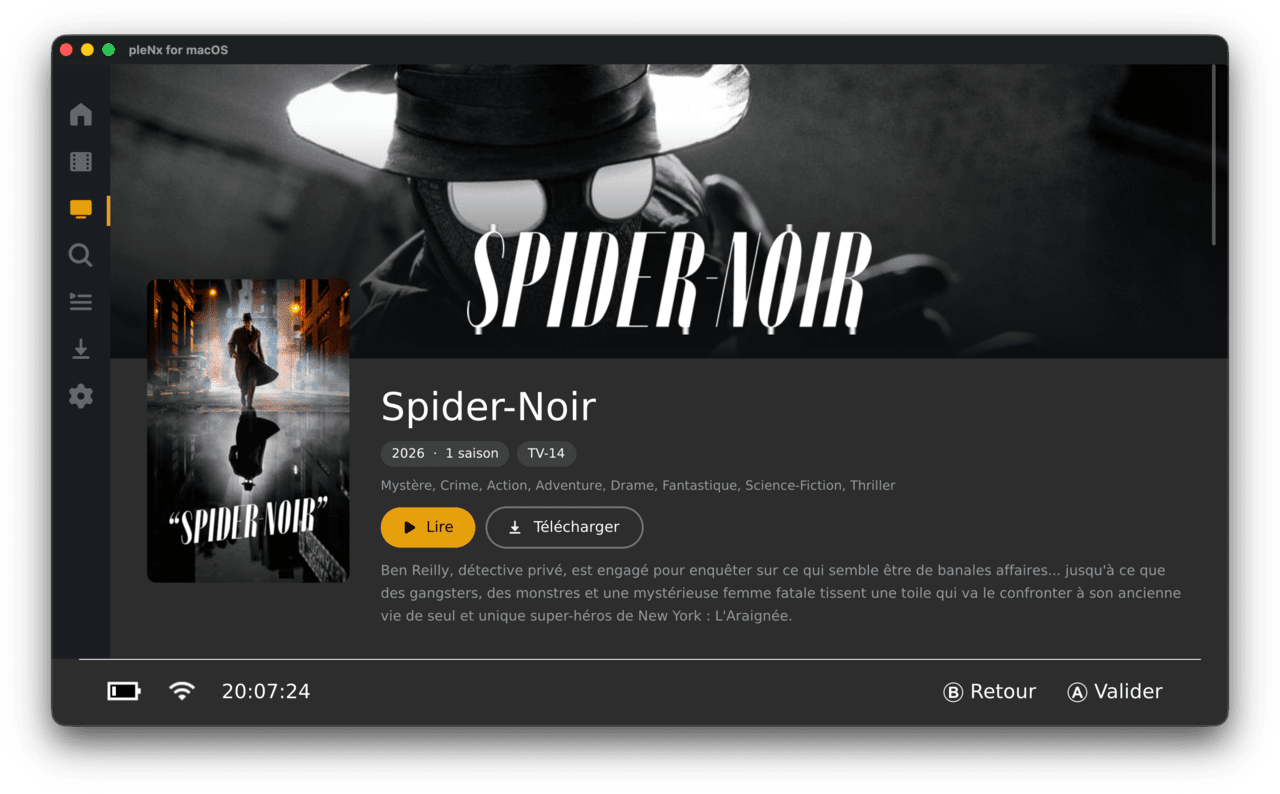
- Rich detail pages - full-bleed backdrop with the title logo, cast with full person pages (filmography), and related rows pulled from your server.
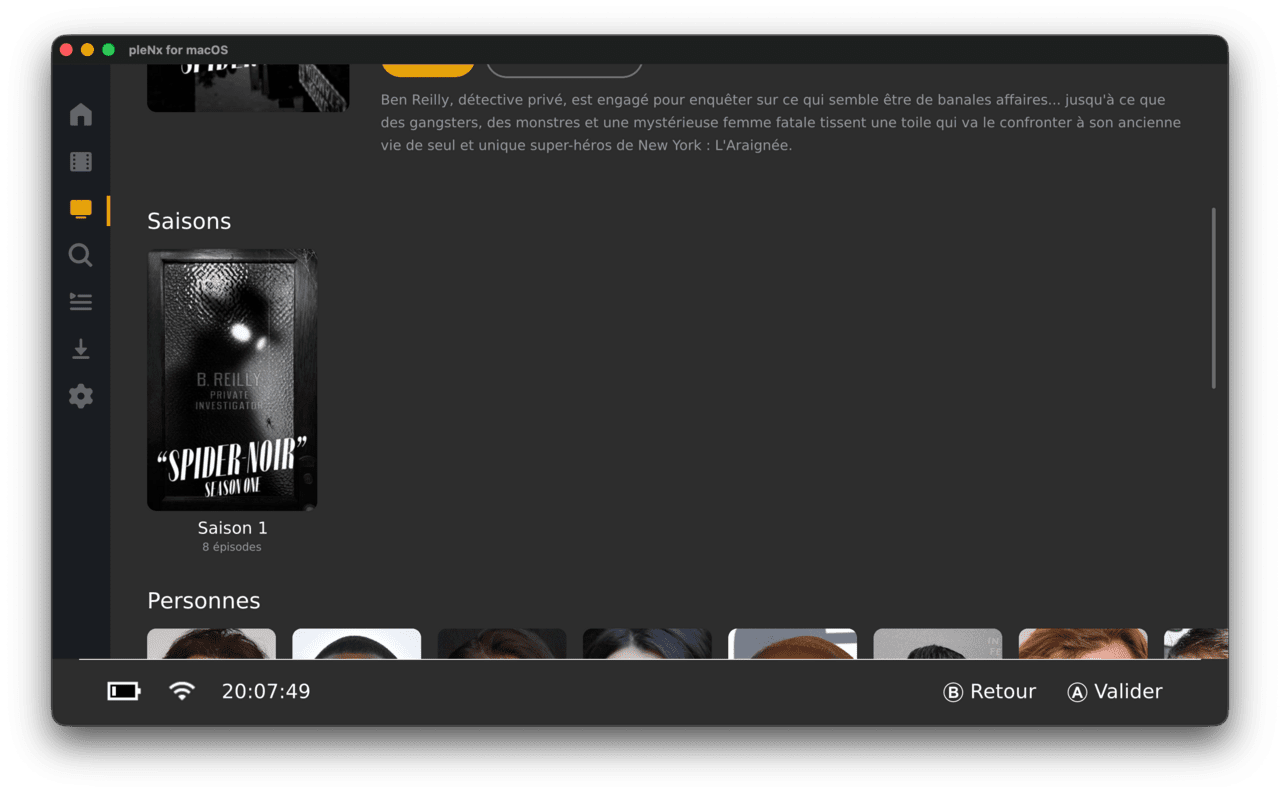
- Season pages - artwork, episode count and synopsis, with one-tap full-season download.
- Quick actions on any poster - go to show, go to season, mark watched, download.
- Plex Watchlist - browse your account watchlist in the sidebar, add or remove any movie or show from its detail page or the quick actions menu.
- Playback with MPV - direct play and universal transcode (HLS), resume, chapters, external and embedded subtitles, audio track selection.
- Offline downloads for playback without a connection (original quality).
- Remote file browser for WebDAV / Apache / Nginx / FTP / SFTP servers.
- Available in 14 languages.
- MPV decodes H.264, H.265, VP8, VP9 and AV1 video; Opus, FLAC, MP3, AAC, AC-3, E-AC-3, TrueHD and DTS audio; and SRT, VTT, SSA/ASS and DVDSUB subtitles.
Installation
Requires a Nintendo Switch running Atmosphère CFW (full-memory mode is required for playback).
Copy pleNx.nro to sdmc:/switch/ and launch it from the homebrew menu.
On first launch in applet mode, pleNx offers to install a HOME menu tile: press the button, confirm, and the app relaunches as a regular title with full memory (required for video playback). Alternatively, hold R while launching any game (title takeover).
Sign in with your Plex account at plex.tv/link.
Video playback needs full-memory mode. Applet mode is fine for browsing, but install the HOME tile (or use title takeover) before starting a movie.
Controls
During playback:
A - Play, Pause
B - Stop
Y - Toggle OSD
X - Menu
R/L - Seek forward/back
Plus - Video profile
Right Stick - Video quality
Left Stick - Playback speed
Screenshots
|
|
Changelog
v0.1.14
- PS Vita
- The in-app updater now installs the new version directly instead of opening a broken browser page. When an update was available, the Vita opened the GitHub release page in the system browser — a page its ageing WebKit cannot render, so it hung and the download never showed up. The Vita now self-updates in place like the Switch does: it downloads the VPK, unpacks it and installs it through the system package installer, then drops you back to the LiveArea to relaunch the updated bubble. (The VitaDB "downgrade to 0.1.4" prompt reported alongside this is a stale VitaDB store entry, not a pleNx bug; see
RELEASING.md.)
- The in-app updater now installs the new version directly instead of opening a broken browser page. When an update was available, the Vita opened the GitHub release page in the system browser — a page its ageing WebKit cannot render, so it hung and the download never showed up. The Vita now self-updates in place like the Switch does: it downloads the VPK, unpacks it and installs it through the system package installer, then drops you back to the LiveArea to relaunch the updated bubble. (The VitaDB "downgrade to 0.1.4" prompt reported alongside this is a stale VitaDB store entry, not a pleNx bug; see
v0.1.13
- Interface
- Series and movie logos no longer smear. The transparent title logos on detail pages are drawn in "fit" mode, so the image is smaller than its box and sits letterboxed inside it. The empty area around it was still being painted with the image, which sampled outside the texture and — because edge pixels are clamped — dragged vertical streaks down from every shape. The image now fills only its own fitted area, so logos render cleanly. Affects every platform (the fix is in the shared image renderer).
v0.1.12
- Player
- Changing the audio or subtitle track no longer stops playback with a "playback error" on PS Vita. In transcode mode a track change reloads the stream, but the reload happened in place and never released the hardware decoder, so it stalled and then failed. The reload now resets the player first (like episode navigation) and tears the previous transcode session down on the server instead of leaving it orphaned.
- Audio and subtitle tracks are now selectable during local playback from the file browser. The player showed the track buttons but had no handler wired, so they appeared to do nothing.
- A failed transcode now falls back to direct play once, instead of going straight to an error — a smoother recovery on constrained hardware.
- Playback errors now show the underlying mpv reason (e.g. "unrecognized file format") instead of a bare "playback error", making bug reports actionable.
- Fixes
- PS Vita: the transcoder height is capped at 1080p, the hardware decoder's limit, so a 4K source at a high bitrate no longer produces a stream the Vita cannot decode.
v0.1.11
- Fixes
- PS Vita: servers reached by a hostname no longer stall with an endless "timeout reached". libcurl was built with the synchronous name resolver, so a DNS lookup issued from a background thread could not be bounded by any timeout — the synchronous resolver can only abort a slow
getaddrinfo()viaSIGALRM, which libcurl arms on the main thread alone. A slow-to-resolve hostname (e.g. a duckdns address) therefore hung every request indefinitely, and raising the request-timeout setting had no effect; only a raw LAN IP, which skips name resolution, worked. curl is now built with the threaded resolver so lookups run in a worker thread the timeout can abandon, andCURLOPT_NOSIGNALkeeps libcurl off signals on its background threads.
- PS Vita: servers reached by a hostname no longer stall with an endless "timeout reached". libcurl was built with the synchronous name resolver, so a DNS lookup issued from a background thread could not be bounded by any timeout — the synchronous resolver can only abort a slow
v0.1.10
- Fixes
- PS Vita: movie logos no longer render sheared or with a torn vertical strip. GPU texture compression always extracted a full 4×4 pixel block, so for images whose width or height isn't a multiple of 4 the edge blocks pulled in the next row's pixels (the visible vertical corruption) or read past the decoded image. Edge blocks are now clamped to the valid pixels, with the border replicated into the padding for a clean edge.
v0.1.9
- Fixes
- Self-hosted servers on your LAN are reachable again when
plex.directDNS is blocked. Server discovery only probed theplex.directhostname, whose public DNS record points at a private IP — which routers and resolvers with DNS-rebinding protection (Fritz!Box, Pi-hole, AdGuard…) refuse to resolve. A server sitting on the same network then reported "unreachable" even though it answered directly, while the official clients connected fine. pleNx now also probes the raw IP address for private, CGNAT and VPN endpoints, bypassingplex.directentirely — and re-discovers a working address on reconnect when the server changes IP (e.g. a new DHCP lease)
- Self-hosted servers on your LAN are reachable again when
v0.1.8
- Downloads
- The download card now shows transfer speed and ETA. While a download is running, the progress line reads
123 MB / 456 MB · 5.2 MB/s · 12:30 left; the rate is a smoothed average (EMA) so the estimate stays steady instead of jumping on every tick
- The download card now shows transfer speed and ETA. While a download is running, the progress line reads
- Library
- Movie and show pages show critic and audience ratings with their official icons. Plex's rating sources are mapped to the Rotten Tomatoes tomato (fresh/rotten), the audience popcorn (upright/spilled), and the IMDb and TMDb marks, each sized to its own aspect; a plain star is kept as a fallback when the source is unknown
- Changelog
- The changelog is now readable in the app, from Settings ▸ Changelog — the full history, scrollable
- The update prompt shows the new version's release notes instead of just its number, so you can see what changed before updating
v0.1.7
- Sign-in
- Selecting a server no longer looks frozen. Picking a server (or profile) during Plex sign-in blocked all input while probing the server's connections — several seconds, with nothing on screen — so the dialog just vanished and the app seemed dead. A loading overlay now sits over the pairing screen for the whole wait, with a reassurance line that fades in if it runs long
- Account linking survives a transient network hiccup. A single timeout or TLS blip (common on Vita) no longer aborts the whole PIN flow; only an expired/consumed code is terminal, and the 2-minute deadline stays the real give-up
- Player
- Direct-access OSD. The speed control is replaced by icon buttons for audio track, subtitle track and quality. Subtitles get a live, translucent sub-delay overlay (LEFT/RIGHT) on top of the video; audio, subtitle and sub-sync leave the settings panel. Video quality is now remembered and defaults to a 4 Mbps transcode on Vita (its decoder chokes on heavy direct play), staying Auto everywhere else
- Marking watched is now a targeted card refresh instead of reloading the whole view (heavy on the home screen): the single card updates optimistically
- Fixes
- The synopsis no longer collapses to a single line when returning from a person page — a relayout had cut the text at an intermediate width. The action row also gains a little breathing room below the title/meta block
- The splash logo no longer shows a flat colored band along its edges — an edge-clamp artifact from letterboxing the non-square asset, fixed by re-exporting it square with a transparent margin
- Deleting the last card in a grid no longer leaves a ghost highlight, and emptying the downloads list hands focus back to the sidebar
v0.1.6
- Fixes
- PS Vita: transparent images no longer render as opaque black blocks. Images with real transparency now use DXT5 (8-bit alpha) instead of DXT1, which has no alpha channel; opaque images keep DXT1.
v0.1.5
- Fixes
- Controller navigation no longer breaks after closing the player; focus now returns to the first home row.
- Docking the Switch mid-playback now switches the video to fullscreen 1080p instead of leaving it small in a corner.
- Player
- Focused controls now show a translucent orange background instead of the border halo.
- The close button is a round, properly centered icon.
- Up/down wake the OSD and focus the play/pause button.
- The progress bar is focusable, with accelerating left/right seek (TV-style OSD is now the default, still toggleable).
- Removed the always-on bottom progress bar and its settings.
v0.1.4
- Fixes
- Every truncated row now ends with a "+" card opening the full list (the home rows and the Suggestions tabs of movie and show libraries previously lacked it). The card shows whenever the server reports more content than displayed.
v0.1.3
- Breaking
- New Switch title ID for the HOME menu tile (
0104201312000000). Migration: delete any old tile ("Switchlex" or a previous pleNx) from the HOME menu, replacepleNx.nroon the SD card, then reinstall the tile from the app. - The forwarder NPDM
program_idis now generated from the singlePROJECT_TITLEIDsource of truth.
- New Switch title ID for the HOME menu tile (
- Fixes
- Branding harmonized across every derived asset (app icons, forwarder wordmark, scalable icon wrapper, website favicons / social image). The Android launcher icons and the PS4 / PS Vita system images now ship pleNx branding (Vita assets kept 8-bit indexed as the firmware requires).
- Website
- The hero opens with the app icon presented as a homebrew-menu tile next to the wordmark, and the floating nav no longer flashes before first paint.
v0.1.2
- Fixes
- Translations completed and corrected across all 13 languages (cs, de, es, fr, ja, ko, pt, ru, tr, uk, vi, zh-Hans, zh-Hant), now at full key parity with English. Filled missing strings, translated Plex sign-in and HOME-tile hint screens left in English in several locales, fixed mistranslations and typos, and restored the French "current speed" overlay placeholder.
v0.1.1
- Features
- Working in-app self-update on Nintendo Switch: pleNx offers to update itself (checked at startup and from Settings ? "Check for updates"), downloads the NRO with a live progress dialog, verifies the file size against the GitHub release asset, then replaces itself and prompts to relaunch. On other platforms the dialog opens the release page in the browser.
- Fixes
- The app now replaces the NRO it was actually launched from (
argv[0]). Updating from 0.1.0 via the in-app dialog may appear to have no effect depending on NRO location; 0.1.0 users with the NRO atsdmc:/switch/pleNx.nroshould replace it manually once. - The release-asset download URL and expected size are now taken from the GitHub API response.
- The startup update check now honors its intended delay.
- All references to the repository now use its new name
thcolin/pleNx. - The Arch package version is now derived from
CMakeLists.txt.
- The app now replaces the NRO it was actually launched from (
v0.1.0
- First release of pleNx, a third-party native Plex client for Nintendo Switch, macOS, Windows, Linux, Android, PS4 and PS Vita; a fork of Switchfin (a Jellyfin client) fully migrated to the Plex API with a complete UI overhaul.
- Features
- Full migration from the Jellyfin API to the Plex API: plex.tv PIN sign-in (link code), server discovery and connection selection, libraries, home hub, movies, shows, collections, search, and playback (direct play and transcode) backed by mpv.
- Complete UI overhaul with the new pleNx branding: icon-only sidebar, full-bleed detail pages, scrollable season / playlist / collection views, redesigned search, quick-actions side panel on any poster, guaranteed 2:3 poster ratios, skeletons and empty states, pill-shaped toasts.
- Plex Watchlist with provider-backed sorting and filters, add/remove from detail pages and the quick-actions menu.
- Offline downloads with storage gauge, active/completed sections, one-tap season or whole-show download, local playback.
- Remote file servers (WebDAV, FTP, SFTP, HTTP(S)) managed from the UI with a mandatory connection test before saving.
- Genre cards illustrated with Kometa default posters, playlists, collection pages, person pages, "Play again" on fully-watched shows.
- Available in 14 languages.
- Nintendo Switch specifics: applet-mode warning screen with HOME tile (forwarder) installation flow, system Standard font by default, USB drives via libusbhsfs.
- Fixes
- Fixed an infinite relayout loop, ghost focus on recycled views, NaN yoga measurements on empty text, and scroll-edge focus traps; included borealis framework patches.
- Build
- Local Nintendo Switch build via Docker; continuous delivery via GitHub Actions building all platforms (Switch NRO, macOS DMG, Windows, Linux Flatpak/Arch, Android APK, PS4 PKG, PS Vita VPK) on each
v*tag.
- Local Nintendo Switch build via Docker; continuous delivery via GitHub Actions building all platforms (Switch NRO, macOS DMG, Windows, Linux Flatpak/Arch, Android APK, PS4 PKG, PS Vita VPK) on each
- Documentation
- Jellyfin ? Plex migration plan, UI redesign reference, refreshed README.
External links
- Official website - https://thcolin.github.io/pleNx/
- GitHub - https://github.com/thcolin/pleNx