
Doodle 3DS: Difference between revisions
More actions
Created page with " {{Infobox 3DS Homebrews |title=Doodle |image=Doodle3DS.png |description=A collaborative drawing application for 3DS consoles. |author=Thomas Armstrong |lastupdated=2024/12/30 |type=Other Apps |version=1.0.1 |license=MIT |download=https://dlhb.gamebrew.org/3dshomebrews/Doodle3DS.7z |website=https://github.com/ArmstrongThomas/Doodle |source=https://github.com/ArmstrongThomas/Doodle }} Doodle is a simple drawing application designed for the Nintendo 3DS platform. It allows..." |
1.2.0 |
||
| Line 1: | Line 1: | ||
{{Infobox 3DS Homebrews | {{Infobox 3DS Homebrews | ||
|title=Doodle | |title=Doodle | ||
| Line 5: | Line 4: | ||
|description=A collaborative drawing application for 3DS consoles. | |description=A collaborative drawing application for 3DS consoles. | ||
|author=Thomas Armstrong | |author=Thomas Armstrong | ||
|lastupdated= | |lastupdated=2026/06/25 | ||
|type=Other Apps | |type=Other Apps | ||
|version=1.0 | |version=1.2.0 | ||
|license=MIT | |license=MIT | ||
|download=https://dlhb.gamebrew.org/3dshomebrews/Doodle3DS.7z | |download=https://dlhb.gamebrew.org/3dshomebrews/Doodle3DS.7z | ||
| Line 16: | Line 15: | ||
Server Information: | Server Information: | ||
* Live canvas viewer: http://server1.rpgwo.org:3000/ | |||
* Gallery: http://server1.rpgwo.org:3000/gallery.html | |||
* Legacy gallery redirect: http://server1.rpgwo.org/ | |||
== Features == | |||
* Real-time collaborative drawing with the 3DS touchscreen. | |||
* Top-screen minimap with viewport marker. | |||
* Named channels: <code>main</code>, <code>sketch</code>, and <code>test</code>. | |||
* Channel switch UI on the 3DS. | |||
* Color picker, color sampling, brush size/shape controls, and hex color entry. | |||
* Compressed canvas snapshots using zlib. | |||
* Server update checks with manifest, size, and SHA-256 verification. | |||
* App metadata/icon via SMDH, including the visible app version. | |||
== Installation == | |||
Copy the .3dsx to the SD card, run it with the Homebrew Launcher. | |||
Or send it with 3dslink while the Homebrew Launcher netloader is waiting: | |||
3dslink -a <3ds-ip> -r 10 Doodle.3dsx | |||
== Controls == | == Controls == | ||
Touch bottom screen - Draw | |||
Hold D-Pad Left or A+Drag stylus - Pan viewport | |||
Hold D-Pad Right - Show zoom buttons on the right side of the bottom screen | |||
Hold Y - Show zoom buttons on the left side of the bottom screen | |||
Hold D-Pad Right or Y+Plus - Zoom in | |||
Hold D-Pad Right or Y+Minus - Zoom out | |||
Start - Refresh | Start - Refresh canvas from server | ||
Select - Exit | Select - Exit | ||
L - Open/close channel selector. | |||
D-Pad Up/Down while channel selector is open - Move channel selection | |||
A while channel selector is open - Switch to selected channel | |||
R - Open/close controls help on top screen | |||
D-Pad Down | B or D-Pad Down - Toggle color picker | ||
Hold D-Pad Up | Hold D-Pad Up+Tap canvas - Sample color | ||
X - | X - Enter hex color | ||
== Screenshots == | == Screenshots == | ||
| Line 43: | Line 70: | ||
== Changelog == | == Changelog == | ||
'''v1.2.0''' | |||
* New bottom-screen tool palette with Color and Mod tabs. | |||
* Color-square picker with hue strip. | |||
* Circle, box, and dither brush modes. | |||
* Cleaner mod/admin tools, including snapshot, clear canvas, and selection-style fill rectangle. | |||
* Persistent 3DS identity with display names, backup codes, and account recovery. | |||
* Connected-user list and improved top-screen status/menu flow. | |||
'''v1.1.1''' | |||
* Implemented zoom functionality! | |||
* Zoom levels: 0.5x, 1x, 2x, and 4x. | |||
'''v1.0.1''' | '''v1.0.1''' | ||
Network Updates: | Network Updates: | ||
* Updated backend connection code to support domains for server connection | |||
* Added some reconnect functionality | |||
'''v1.0.0''' | '''v1.0.0''' | ||
* Initial release. | * Initial release. | ||
Revision as of 03:27, 26 June 2026
| Doodle | |
|---|---|
 | |
| General | |
| Author | Thomas Armstrong |
| Type | Other Apps |
| Version | 1.2.0 |
| License | MIT License |
| Last Updated | 2026/06/25 |
| Links | |
| Download | |
| Website | |
| Source | |
Doodle is a simple drawing application designed for the Nintendo 3DS platform. It allows users to create and manipulate graphical content using various brush sizes and colors with other people on a shared canvas.
Server Information:
- Live canvas viewer: http://server1.rpgwo.org:3000/
- Gallery: http://server1.rpgwo.org:3000/gallery.html
- Legacy gallery redirect: http://server1.rpgwo.org/
Features
- Real-time collaborative drawing with the 3DS touchscreen.
- Top-screen minimap with viewport marker.
- Named channels:
main,sketch, andtest. - Channel switch UI on the 3DS.
- Color picker, color sampling, brush size/shape controls, and hex color entry.
- Compressed canvas snapshots using zlib.
- Server update checks with manifest, size, and SHA-256 verification.
- App metadata/icon via SMDH, including the visible app version.
Installation
Copy the .3dsx to the SD card, run it with the Homebrew Launcher.
Or send it with 3dslink while the Homebrew Launcher netloader is waiting:
3dslink -a <3ds-ip> -r 10 Doodle.3dsx
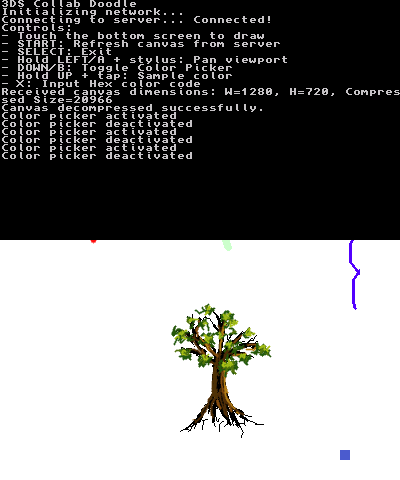
Controls
Touch bottom screen - Draw
Hold D-Pad Left or A+Drag stylus - Pan viewport
Hold D-Pad Right - Show zoom buttons on the right side of the bottom screen
Hold Y - Show zoom buttons on the left side of the bottom screen
Hold D-Pad Right or Y+Plus - Zoom in
Hold D-Pad Right or Y+Minus - Zoom out
Start - Refresh canvas from server
Select - Exit
L - Open/close channel selector.
D-Pad Up/Down while channel selector is open - Move channel selection
A while channel selector is open - Switch to selected channel
R - Open/close controls help on top screen
B or D-Pad Down - Toggle color picker
Hold D-Pad Up+Tap canvas - Sample color
X - Enter hex color
Screenshots
Changelog
v1.2.0
- New bottom-screen tool palette with Color and Mod tabs.
- Color-square picker with hue strip.
- Circle, box, and dither brush modes.
- Cleaner mod/admin tools, including snapshot, clear canvas, and selection-style fill rectangle.
- Persistent 3DS identity with display names, backup codes, and account recovery.
- Connected-user list and improved top-screen status/menu flow.
v1.1.1
- Implemented zoom functionality!
- Zoom levels: 0.5x, 1x, 2x, and 4x.
v1.0.1 Network Updates:
- Updated backend connection code to support domains for server connection
- Added some reconnect functionality
v1.0.0
- Initial release.