
Switch Deck: Difference between revisions
From GameBrew
More actions
No edit summary |
1.0 |
||
| Line 4: | Line 4: | ||
|description=A Streamdeck for Nintendo Switch. | |description=A Streamdeck for Nintendo Switch. | ||
|author=lunares83 | |author=lunares83 | ||
|lastupdated=2026/ | |lastupdated=2026/05/13 | ||
|type=Other Apps | |type=Other Apps | ||
|version=0 | |version=1.0 | ||
|license=MIT | |license=MIT | ||
|download=https://github.com/lunares83/Switch_Deck/releases | |download=https://github.com/lunares83/Switch_Deck/releases | ||
| Line 38: | Line 38: | ||
|https://dlhb.gamebrew.org/switchhomebrews/images/SwitchDeck2.png | |https://dlhb.gamebrew.org/switchhomebrews/images/SwitchDeck2.png | ||
|} | |} | ||
== Media == | |||
'''StreamDeck - A streamdeck homebrew for Switch''' ([https://www.youtube.com/watch?v=F54bT5_ek4Y poucarte]) <br> | |||
<youtube>F54bT5_ek4Y</youtube> | |||
== Changelog == | |||
'''v1.0''' | |||
* Added icons for homebrew and PC apps. | |||
* Created .exe versions of the PC apps. | |||
* Fixed and improved the implementation of directories located on the PC and the Switch. | |||
* After configuring your screen and IP address through the configurator, you must copy the files in the main "config.json" folder and the icosn folder created by the configurator to the Switch, in addition to the "streamdeck_proto.nro" file that is already in the Switch's SD card folder. | |||
* The Switch's SD card folder already contains a folder with a "config.json" file and an "icons" folder; these should be replaced after saving your settings with the configurator.exe app. | |||
* The only app that should be opened after all the files are on the Switch and the app is open is "receiver.exe". It will connect to the Switch, display a log of button presses, and execute the commands and shortcuts configured on your PC through the Switch. | |||
== External links == | == External links == | ||
GitHub - https://github.com/lunares83/Switch_Deck/ | GitHub - https://github.com/lunares83/Switch_Deck/ | ||
Latest revision as of 09:39, 15 May 2026
| Switch Deck | |
|---|---|
 | |
| General | |
| Author | lunares83 |
| Type | Other Apps |
| Version | 1.0 |
| License | MIT License |
| Last Updated | 2026/05/13 |
| Links | |
| Download | |
| Website | |
| Source | |
Switch Deck turns your Nintendo Switch into a wireless "Stream Deck" for your computer. Using the console's touchscreen, you can launch apps, execute hotkeys, or open URLs on your PC over your local Wi-Fi network.
The project consists of three main components:
- NRO (Switch): The visual frontend that sends commands via TCP.
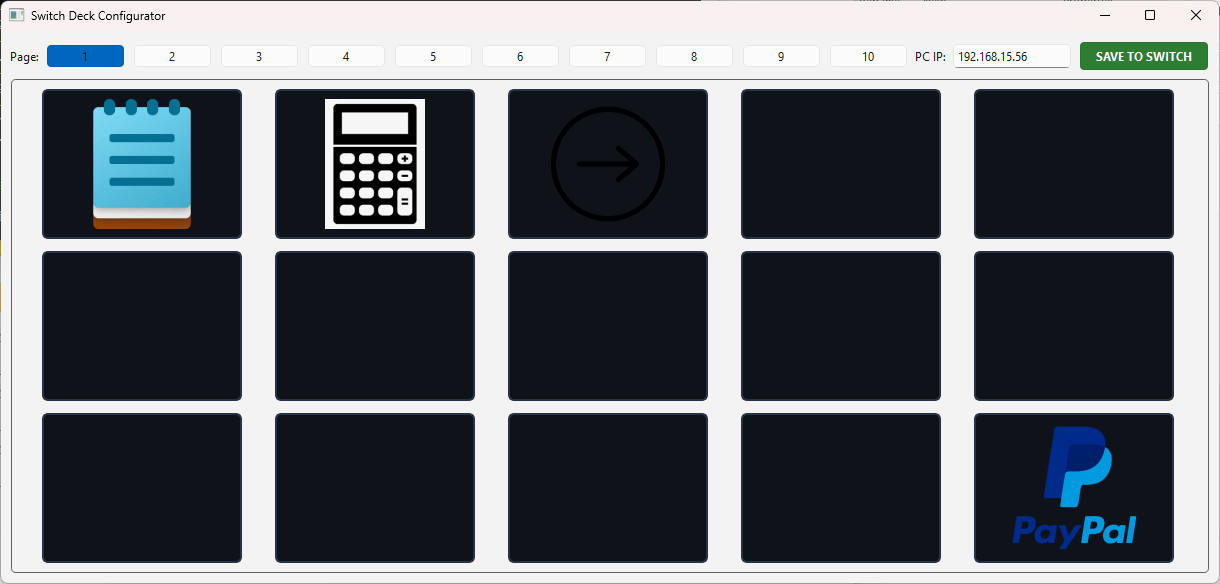
- Configurator (PC): A Python GUI tool to map buttons, icons, and pages.
- Receiver (PC): A lightweight background server that listens for Switch commands and executes actions on Windows.
User guide
On your Computer:
- Install requirements:
pip install PySide6 pyautogui - Run configurator.py to set up your PC IP, button actions, and icons.
- Click "SAVE TO SWITCH" and select your app's folder on the SD Card.
- Launch receiver.py to start listening for commands.
On your Switch:
- Ensure both Switch and PC are on the same Wi-Fi network.
- Open the app via the Homebrew Menu.
- If the background is green, you are connected! If it's red, double-check the IP in config.json.
Screenshots
Configurator
|
Media
StreamDeck - A streamdeck homebrew for Switch (poucarte)
Changelog
v1.0
- Added icons for homebrew and PC apps.
- Created .exe versions of the PC apps.
- Fixed and improved the implementation of directories located on the PC and the Switch.
- After configuring your screen and IP address through the configurator, you must copy the files in the main "config.json" folder and the icosn folder created by the configurator to the Switch, in addition to the "streamdeck_proto.nro" file that is already in the Switch's SD card folder.
- The Switch's SD card folder already contains a folder with a "config.json" file and an "icons" folder; these should be replaced after saving your settings with the configurator.exe app.
- The only app that should be opened after all the files are on the Switch and the app is open is "receiver.exe". It will connect to the Switch, display a log of button presses, and execute the commands and shortcuts configured on your PC through the Switch.